


3 Post Moderation Rule for New Boarders (25 Jan 2021)
New boarders will have their posts moderated - Don't worry if you cannot see your post immediately.
Make your custom music, effects appear and play within fcpx media browser !


23 Feb 2012 10:00 - 23 Feb 2012 10:04 #4758
by dgwvideo
Creating history....one edit at a time !
Here ia a way to install your custom sounds and purchased music so it appears in the fcpx media browser without having to import through iTunes. I posted this at the end of a long thread but thought it might be helpful to give it its' own topic so other people might more easily find it.
It works with symbolic links so you can store your other stock music, sound effects, etc. on any drive and create an alias to that folder so your music appears and plays within the fcpx media browser.
Here is the complete path.
Drop your music folders into:
Startup Drive/Library/Audio/Apple Loops/Apple/Apple Loops For Soundtrack Pro/
(likewise you could put your sound effects in:
Startup Drive/Library/Audio/Apple Loops/Apple/Final Cut Pro Sound Effects
or
Startup Drive/Library/Audio/Apple Loops/Apple/iLife Sound Effects
and I expect you could drill down from there if wanted specifics placed in things like Foley, ambience, etc.
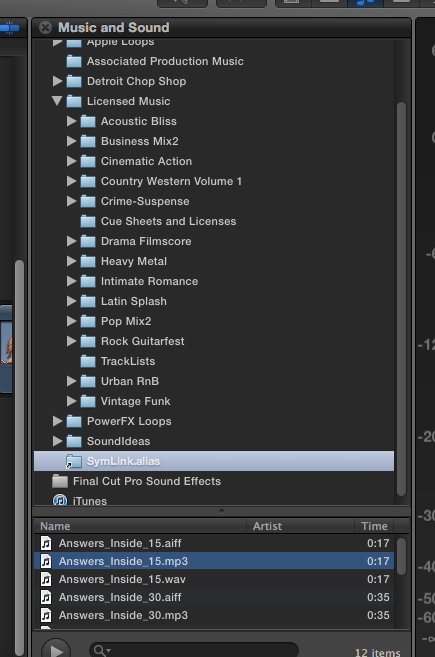
And good news...symbolic links also work. I made an alias to an offline drive for media with a test folder (symlink.alias) and it comes up in the media browser and the songs play. I have included some screen shots.
Picture 2 shows the symbolic link folder selected and its' enclosed tunes.
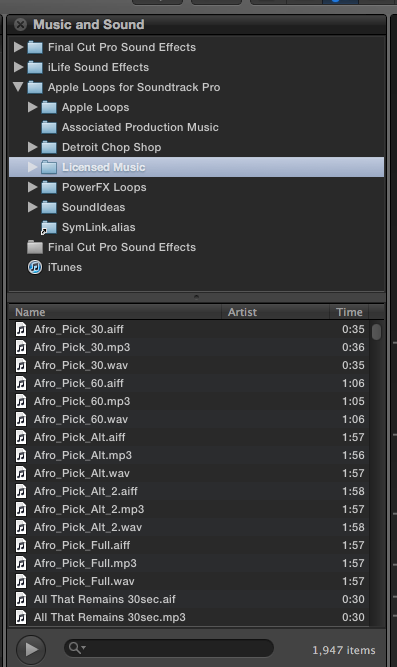
Picture 1 shows the "Licensed Music" folder (which I made) and one directory of songs.
Clicking the disclosure triangle reveals all the enclosed themes.
Also notice my Licensed music folder includes a directory for cue sheets. Obviously the media browser won't do anything when this folder is selected. I just forgot to remove the cue sheets folder that was contained within my custom licensed music folder.
It works with symbolic links so you can store your other stock music, sound effects, etc. on any drive and create an alias to that folder so your music appears and plays within the fcpx media browser.
Here is the complete path.
Drop your music folders into:
Startup Drive/Library/Audio/Apple Loops/Apple/Apple Loops For Soundtrack Pro/
(likewise you could put your sound effects in:
Startup Drive/Library/Audio/Apple Loops/Apple/Final Cut Pro Sound Effects
or
Startup Drive/Library/Audio/Apple Loops/Apple/iLife Sound Effects
and I expect you could drill down from there if wanted specifics placed in things like Foley, ambience, etc.
And good news...symbolic links also work. I made an alias to an offline drive for media with a test folder (symlink.alias) and it comes up in the media browser and the songs play. I have included some screen shots.
Picture 2 shows the symbolic link folder selected and its' enclosed tunes.
Picture 1 shows the "Licensed Music" folder (which I made) and one directory of songs.
Clicking the disclosure triangle reveals all the enclosed themes.
Also notice my Licensed music folder includes a directory for cue sheets. Obviously the media browser won't do anything when this folder is selected. I just forgot to remove the cue sheets folder that was contained within my custom licensed music folder.
Creating history....one edit at a time !
Last edit: 23 Feb 2012 10:04 by dgwvideo. Reason: typo
Please Log in to join the conversation.
- ronny courtens
-

- Offline
- Moderator
-

Less
More
- Posts: 4455
- Thank you received: 962
23 Feb 2012 15:01 #4761
by ronny courtens
Replied by ronny courtens on topic Re: Make your custom music, effects appear and play within fcpx media browser !
Good tip, there are different ways you can add audio to the FCPX audio tab without going via iTunes.
You can simply drag any given audio folder from the Finder onto the FCPX audio browser and it will appear as a folder with all its relevant sub-folders in the audio library. Open FCPX, press CMD+TAB to swith to Finder, and from the Finder drag any audio folder from any drive onto the FCPX audio tab. Done.
If the drive that holds the original audio files is disconnected its folders will appear greyed out in the FCPX audio library. As soon as you connect the drive again all files get reconnected in seconds.
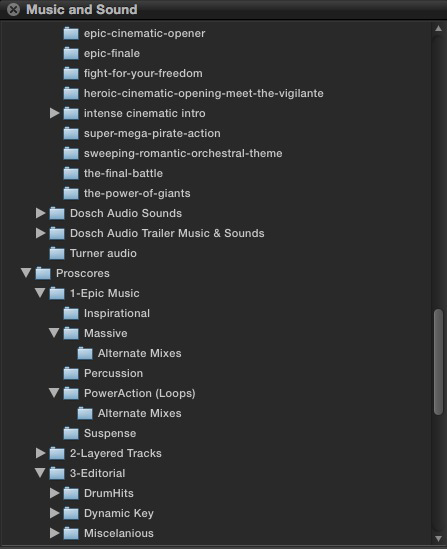
I have attached a picture of a cinematic library and Proscores such as they appear in the FCPX audio tab.
You can simply drag any given audio folder from the Finder onto the FCPX audio browser and it will appear as a folder with all its relevant sub-folders in the audio library. Open FCPX, press CMD+TAB to swith to Finder, and from the Finder drag any audio folder from any drive onto the FCPX audio tab. Done.
If the drive that holds the original audio files is disconnected its folders will appear greyed out in the FCPX audio library. As soon as you connect the drive again all files get reconnected in seconds.
I have attached a picture of a cinematic library and Proscores such as they appear in the FCPX audio tab.
Please Log in to join the conversation.


23 Feb 2012 19:58 - 23 Feb 2012 20:00 #4770
by BenB
Replied by BenB on topic Re: Make your custom music, effects appear and play within fcpx media browser !
I used to just put them in iTunes and create Playlists. But now I put them in folders on a drive and create an Event with keywords based on the folders, that way I don't create duplicate copies that eat up excess drive space every time I use one of them.
Last edit: 23 Feb 2012 20:00 by BenB.
Please Log in to join the conversation.
23 Feb 2012 21:15 #4781
by dgwvideo
I suspect using this method you cannot place content into any subfolders within the audio tab. Is this correct? i.e. if I want to add sound effects for transitions, I would like them to be in that specific folder within the audio tab. Does dragging to the media browser only allow placement at the top level?
Creating history....one edit at a time !
Replied by dgwvideo on topic Re: Make your custom music, effects appear and play within fcpx media browser !
ronny courtens wrote: You can simply drag any given audio folder from the Finder onto the FCPX audio browser and it will appear as a folder with all its relevant sub-folders in the audio library. Open FCPX, press CMD+TAB to swith to Finder, and from the Finder drag any audio folder from any drive onto the FCPX audio tab. Done.
I suspect using this method you cannot place content into any subfolders within the audio tab. Is this correct? i.e. if I want to add sound effects for transitions, I would like them to be in that specific folder within the audio tab. Does dragging to the media browser only allow placement at the top level?
Creating history....one edit at a time !
Please Log in to join the conversation.
- ronny courtens
-
- Offline
- Moderator
-
Less
More
- Posts: 4455
- Thank you received: 962
23 Feb 2012 23:26 #4788
by ronny courtens
Replied by ronny courtens on topic Re: Make your custom music, effects appear and play within fcpx media browser !
You are correct. Just like the effects browser, the title browser etc., the audio browser does not allow you to make any changes to the folders or assets inside them. If you want to organize the items you see in the browser windows you have to do this at the Finder level, where the original assets are located.
For detailed organizing of library media it is better to create Events for the libraries with keywords, keyword collections and folders. Another major advantage of this is that inside an Event you can also skim through the media to audition them.
For detailed organizing of library media it is better to create Events for the libraries with keywords, keyword collections and folders. Another major advantage of this is that inside an Event you can also skim through the media to audition them.
Please Log in to join the conversation.
