


- Posts: 4
- Thank you received: 0
3 Post Moderation Rule for New Boarders (25 Jan 2021)
New boarders will have their posts moderated - Don't worry if you cannot see your post immediately.
Shortcuts
- Tom Wolsky
-

- Offline
- Moderator
-

18 Feb 2012 02:18 #4514
by Tom Wolsky
Replied by Tom Wolsky on topic Re: Shortcuts
Cmd = to zoom in make sure the timeline is the active panel.
/ to play selection. What is selected in the active panel?
/ to play selection. What is selected in the active panel?
Please Log in to join the conversation.
18 Feb 2012 02:38 #4515
by Louis
Replied by Louis on topic Re: Shortcuts
Hi,
When I hit slash my Mac just says a sound. And nothing happens.
When I hit slash my Mac just says a sound. And nothing happens.
Please Log in to join the conversation.
18 Feb 2012 02:57 #4516
by Louis
Replied by Louis on topic Re: Shortcuts
This one says command + ?
But still / daoesnt work either.
But still / daoesnt work either.
Please Log in to join the conversation.

18 Feb 2012 02:57 #4517
by cgbier
Replied by cgbier on topic Re: Shortcuts
You selected a clip before hitting /, did you?
Please Log in to join the conversation.
- Tom Wolsky
-
- Offline
- Moderator
-
18 Feb 2012 03:37 #4520
by Tom Wolsky
Replied by Tom Wolsky on topic Re: Shortcuts
Are you using Command and the = key next to the delete? Is the timeline the active panel?
Are you using a standard US QWERTY keyboard?
Is the browser or the timeline the active panel? What do you have selected?
Are you using a standard US QWERTY keyboard?
Is the browser or the timeline the active panel? What do you have selected?
Please Log in to join the conversation.
18 Feb 2012 18:24 #4541
by Louis
Replied by Louis on topic Re: Shortcuts
I selected a clip. Then hit / but nothing happens.
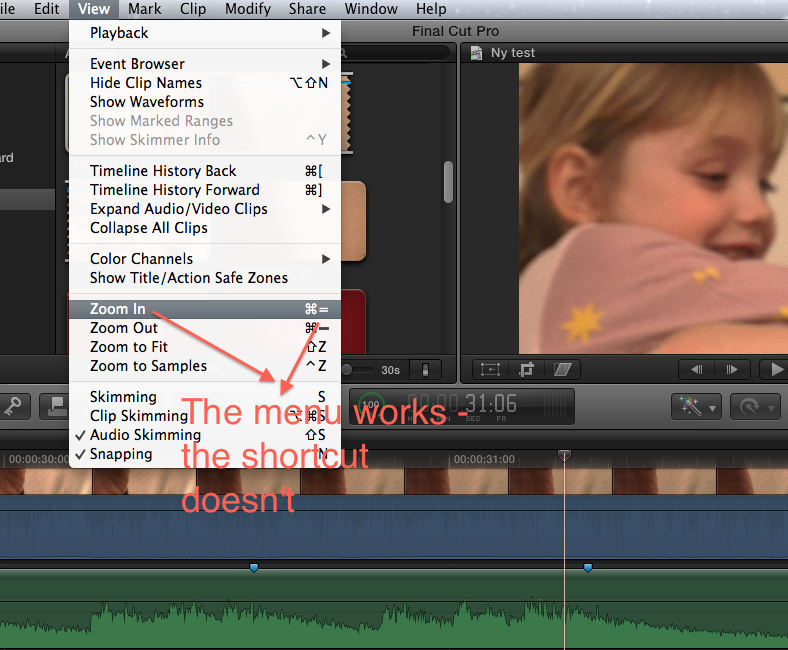
I tried cmd+= nothing happens. But if I go to the view menu then I can see that ths shortcut is indeed cmd =, and when I cklick on the menu I am able to zoom in. If I then try the shortcut nothing happens. It is as if the shortcuts are not active.
Where can I see what kind of keyboard it is. It is a MacBook Pro.
Best
Louis
I tried cmd+= nothing happens. But if I go to the view menu then I can see that ths shortcut is indeed cmd =, and when I cklick on the menu I am able to zoom in. If I then try the shortcut nothing happens. It is as if the shortcuts are not active.
Where can I see what kind of keyboard it is. It is a MacBook Pro.
Best
Louis
Please Log in to join the conversation.


18 Feb 2012 19:38 #4542
by grailz
Replied by grailz on topic Re: Shortcuts
Hold down the SHIFT key in order to engage the "+". Without SHIFT you're just hitting the "=" key.
Please Log in to join the conversation.
- Tom Wolsky
-
- Offline
- Moderator
-
18 Feb 2012 20:18 #4544
by Tom Wolsky
Replied by Tom Wolsky on topic Re: Shortcuts
No. This is wrong. The correct keyboard shortcut is Command =. It is NOT Cmd-Shift-=. That does not work.
Please Log in to join the conversation.

19 Feb 2012 01:39 #4551
by ianstubbs
Replied by ianstubbs on topic Re: Shortcuts
Have you got any 3rd party programs running that might be responding to the cmd= key press?
Have you got a keyboard shortcut configured for this combination?
I'd try logging in as a guest and seeing if it works - if it does then it's something to do with your user account.
Before you do that you could see if it works in Safari - the same key combo zooms web pages in and out! If it works in Safari then your user account is OK.
Ian.
Have you got a keyboard shortcut configured for this combination?
I'd try logging in as a guest and seeing if it works - if it does then it's something to do with your user account.
Before you do that you could see if it works in Safari - the same key combo zooms web pages in and out! If it works in Safari then your user account is OK.
Ian.
Please Log in to join the conversation.
20 Feb 2012 05:49 #4618
by grailz
Replied by grailz on topic Re: Shortcuts
Thanks for the correction Tom!
Please Log in to join the conversation.
20 Feb 2012 07:44 #4624
by Seanus
If you go to customise commands are those keys reserved by the OS? Have you perhaps got something in your Keyboard Preferences that is overriding those keys?
Sean Lander - Editing since 1982 - AVID 1991 - FCP 1999 - FCPX 2011
Replied by Seanus on topic Re: Shortcuts
Louis wrote: I selected a clip. Then hit / but nothing happens.
I tried cmd+= nothing happens. But if I go to the view menu then I can see that ths shortcut is indeed cmd =, and when I cklick on the menu I am able to zoom in. If I then try the shortcut nothing happens. It is as if the shortcuts are not active.
Where can I see what kind of keyboard it is. It is a MacBook Pro.
Best
Louis
If you go to customise commands are those keys reserved by the OS? Have you perhaps got something in your Keyboard Preferences that is overriding those keys?
Sean Lander - Editing since 1982 - AVID 1991 - FCP 1999 - FCPX 2011
Please Log in to join the conversation.
