


- Posts: 23
- Thank you received: 0
3 Post Moderation Rule for New Boarders (25 Jan 2021)
New boarders will have their posts moderated - Don't worry if you cannot see your post immediately.
HOW to temporarily use Broadcast monitoring work on snow leopard OS X v10.6.8 for FINAL CUT PRO X
- finalcolor
-
 Topic Author
- Offline
- Junior Member
-

Less
More
15 Feb 2012 11:23 #4393
by finalcolor
HOW to temporarily use Broadcast monitoring work on snow leopard OS X v10.6.8 for FINAL CUT PRO X was created by finalcolor
On our Forum, thx,macmacmac give me prompt.He had an interesting trick for getting the OS X Lion 'only' plugin to work on Snow Leopard
To install the plugin on Snow Leopard OS X 10.6.8 you have to temporarily change your system version number to Lion 10.7.2!
1. Go to HD:/System/Library/CoreServices/SystemVersion.plist
2. Copy the file to the Desktop
3. Open the original with a text editor and change the string value of 'ProductVersion' and 'ProductUserVisibleVersion' to '10.7.2'.
4. Save & Overwrite.
I suddenly thought Apple said that Broadcast monitoring work on Lion OS X v10.7.3.I change system version number at once! Changing 10.6.8 snow leopard system version number to Lion 10.7.2!
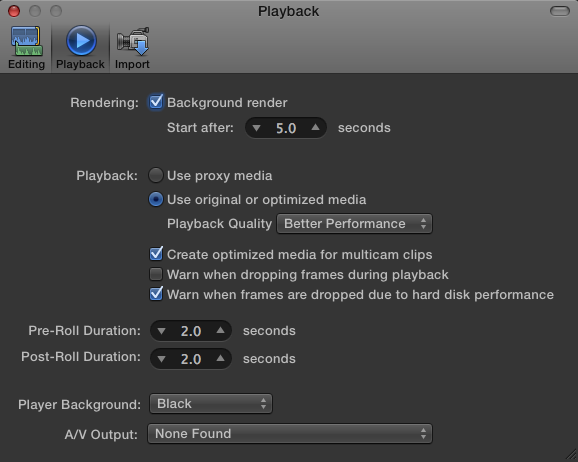
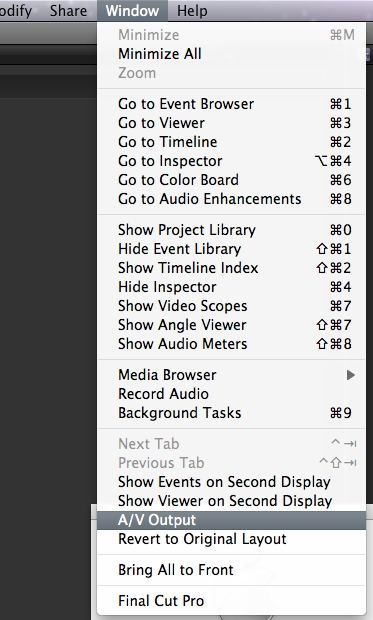
ok,no problem. Restart final cut pro x,A/V output has appeared in FINAL CUT PRO X preferences and Window Menu
Enjoy it.HAHA!
To install the plugin on Snow Leopard OS X 10.6.8 you have to temporarily change your system version number to Lion 10.7.2!
1. Go to HD:/System/Library/CoreServices/SystemVersion.plist
2. Copy the file to the Desktop
3. Open the original with a text editor and change the string value of 'ProductVersion' and 'ProductUserVisibleVersion' to '10.7.2'.
4. Save & Overwrite.
I suddenly thought Apple said that Broadcast monitoring work on Lion OS X v10.7.3.I change system version number at once! Changing 10.6.8 snow leopard system version number to Lion 10.7.2!
ok,no problem. Restart final cut pro x,A/V output has appeared in FINAL CUT PRO X preferences and Window Menu
Enjoy it.HAHA!
Please Log in to join the conversation.
- mliebergot
-
- Offline
- Premium Member
-

Less
More
- Posts: 84
- Thank you received: 3
15 Feb 2012 20:05 #4409
by mliebergot
Replied by mliebergot on topic Re: HOW to temporarily use Broadcast monitoring work on snow leopard OS X v10.6.8 for FINAL CUT PRO X
Thanks for the tip.
So by doing this, it tricks FCPX into letting you use AV output?
Also, after this is originally done, are we able to switch back the .plist entry to 10.6.8.
I only ask because I wonder by switching the .plist entry to 10.7.2, that it might effect future updates to your Snow Leopard via Apple Updates.
So by doing this, it tricks FCPX into letting you use AV output?
Also, after this is originally done, are we able to switch back the .plist entry to 10.6.8.
I only ask because I wonder by switching the .plist entry to 10.7.2, that it might effect future updates to your Snow Leopard via Apple Updates.
Please Log in to join the conversation.
- finalcolor
-
Topic Author
- Offline
- Junior Member
-
Less
More
- Posts: 23
- Thank you received: 0
15 Feb 2012 20:40 #4411
by finalcolor
Replied by finalcolor on topic Re: HOW to temporarily use Broadcast monitoring work on snow leopard OS X v10.6.8 for FINAL CUT PRO X
Apple Updates only update the others content!It should not effect such as airpot,security update,EFI Firmware Update 2.6,etc
Please Log in to join the conversation.
- mliebergot
-
- Offline
- Premium Member
-
Less
More
- Posts: 84
- Thank you received: 3
15 Feb 2012 21:47 - 15 Feb 2012 21:48 #4416
by mliebergot
Replied by mliebergot on topic Re: HOW to temporarily use Broadcast monitoring work on snow leopard OS X v10.6.8 for FINAL CUT PRO X
Thanks for the info.
I think I'll give this trick a try later on tonight.
Curious to see if my Intensity Pro card will work on Snow Leopard now as well.
It works on Lion, but obviously not on Snow Leopard right now, as I don't even have AV out as an option in FCPX on Snow Leopard.
BTW, do I have to reinstall FCPX after I change the .plist. Or, when I startup FCPX after the .plist change, I'll have the option for AV out?
I think I'll give this trick a try later on tonight.
Curious to see if my Intensity Pro card will work on Snow Leopard now as well.
It works on Lion, but obviously not on Snow Leopard right now, as I don't even have AV out as an option in FCPX on Snow Leopard.
BTW, do I have to reinstall FCPX after I change the .plist. Or, when I startup FCPX after the .plist change, I'll have the option for AV out?
Last edit: 15 Feb 2012 21:48 by mliebergot.
Please Log in to join the conversation.

16 Feb 2012 02:23 - 16 Feb 2012 02:24 #4426
by ianim8
Replied by ianim8 on topic Re: HOW to temporarily use Broadcast monitoring work on snow leopard OS X v10.6.8 for FINAL CUT PRO X
I cant seem to find CoreServices under Library anywhere?
Oops my bad found it
Oops my bad found it
Last edit: 16 Feb 2012 02:24 by ianim8.
Please Log in to join the conversation.
- mliebergot
-
- Offline
- Premium Member
-
Less
More
- Posts: 84
- Thank you received: 3
16 Feb 2012 02:26 #4427
by mliebergot
Replied by mliebergot on topic Re: HOW to temporarily use Broadcast monitoring work on snow leopard OS X v10.6.8 for FINAL CUT PRO X
It's there. Here's his instructions again.
Follow the path...Make sure you're not looking under user, as it's under the drive "ROOT" directory
1. Go to HD (root directory):/System /Library /CoreServices /SystemVersion.plist
2. Copy the file to the Desktop
3. Open the original with a text editor and change the string value of 'ProductVersion' and 'ProductUserVisibleVersion' to '10.7.2'.
4. Save & Overwrite.
Follow the path...Make sure you're not looking under user, as it's under the drive "ROOT" directory
1. Go to HD (root directory):/System /Library /CoreServices /SystemVersion.plist
2. Copy the file to the Desktop
3. Open the original with a text editor and change the string value of 'ProductVersion' and 'ProductUserVisibleVersion' to '10.7.2'.
4. Save & Overwrite.
Please Log in to join the conversation.
16 Feb 2012 02:29 - 16 Feb 2012 02:33 #4428
by ianim8
Replied by ianim8 on topic Re: HOW to temporarily use Broadcast monitoring work on snow leopard OS X v10.6.8 for FINAL CUT PRO X
Thanks found it but its locked away.
Fixed by doing it from Lion side.
Crossing fingers
Fixed by doing it from Lion side.
Crossing fingers
Last edit: 16 Feb 2012 02:33 by ianim8.
Please Log in to join the conversation.
16 Feb 2012 02:41 #4430
by ianim8
Replied by ianim8 on topic Re: HOW to temporarily use Broadcast monitoring work on snow leopard OS X v10.6.8 for FINAL CUT PRO X
With the changes made Im now in an endless loop at start-up where you see the spinning icon (not sure what that is ).
I hope I can reboot to Lion with option key
I hope I can reboot to Lion with option key
Please Log in to join the conversation.
16 Feb 2012 02:52 - 16 Feb 2012 03:08 #4431
by ianim8
Replied by ianim8 on topic Re: HOW to temporarily use Broadcast monitoring work on snow leopard OS X v10.6.8 for FINAL CUT PRO X
Well I cant boot into my Snow Leopard drive since the edit.
Even after I changed things back to 10.6.8.
What a waste of time that was.
Update:
I have a slew of Mac Pro's here. Just grabbed a plist from another box and now it works.
I guess sticking to Lion with Intensity Pro.
Even after I changed things back to 10.6.8.
What a waste of time that was.
Update:
I have a slew of Mac Pro's here. Just grabbed a plist from another box and now it works.
I guess sticking to Lion with Intensity Pro.
Last edit: 16 Feb 2012 03:08 by ianim8.
Please Log in to join the conversation.
- mliebergot
-
- Offline
- Premium Member
-
Less
More
- Posts: 84
- Thank you received: 3
16 Feb 2012 03:36 - 16 Feb 2012 03:38 #4433
by mliebergot
Replied by mliebergot on topic Re: HOW to temporarily use Broadcast monitoring work on snow leopard OS X v10.6.8 for FINAL CUT PRO X
Well I haven't tried it yet, as I said I was going to try it tonight.
Although on the forum I watched the video of how to preform this, and it was simple t do and worked instantly on his system.
BabelFish Translation
Also, I have no idea why the file would be locked, unless you weren't working on the Snow Leopard drive to start with. Also all files can be unocked, by simply pulling up the info for the file, and changing the preferences to Allow Read & Write.
I wonder f the problem was that you made changes from the Lion side of things and not the Snow Leopard.
Instead of doing the changes in Snow Leopard.
Also, in case of any issues, I'm going to make sure that I make 2 copies of the SystemVersion.plist file. The altered one will be used to overwrite the file in the CoreServices folder. And unaltered file will be for backup, in case of issues.
But I won't be using the Lion drive for any purpose.
Although on the forum I watched the video of how to preform this, and it was simple t do and worked instantly on his system.
BabelFish Translation
Also, I have no idea why the file would be locked, unless you weren't working on the Snow Leopard drive to start with. Also all files can be unocked, by simply pulling up the info for the file, and changing the preferences to Allow Read & Write.
I wonder f the problem was that you made changes from the Lion side of things and not the Snow Leopard.
Instead of doing the changes in Snow Leopard.
Also, in case of any issues, I'm going to make sure that I make 2 copies of the SystemVersion.plist file. The altered one will be used to overwrite the file in the CoreServices folder. And unaltered file will be for backup, in case of issues.
But I won't be using the Lion drive for any purpose.
Last edit: 16 Feb 2012 03:38 by mliebergot.
Please Log in to join the conversation.
16 Feb 2012 03:37 #4435
by ianim8
Replied by ianim8 on topic Re: HOW to temporarily use Broadcast monitoring work on snow leopard OS X v10.6.8 for FINAL CUT PRO X
Okay after trying one more time (original problem was perm issues) I got it to work.
However, FCPX is not recognizing my card.
I can see it in the BM Control Panel and System Prefs but not as an option in FCPX.
Thanks for the tip, maybe itll work on my home computer.
However, FCPX is not recognizing my card.
I can see it in the BM Control Panel and System Prefs but not as an option in FCPX.
Thanks for the tip, maybe itll work on my home computer.
Please Log in to join the conversation.
16 Feb 2012 08:12 - 16 Feb 2012 18:28 #4439
by ianim8
Replied by ianim8 on topic Re: HOW to temporarily use Broadcast monitoring work on snow leopard OS X v10.6.8 for FINAL CUT PRO X
Tested this again at home with 10.6.8.
Not recognizing the card in FCPX.
However, Avid, PremierePro and After Effects does.
I think Intensity Pro on Snow Leopard is a bust
Update: Checking the posted video and that too shows "none found" in the FCPX Pref panel for AV playback.
Not recognizing the card in FCPX.
However, Avid, PremierePro and After Effects does.
I think Intensity Pro on Snow Leopard is a bust
Update: Checking the posted video and that too shows "none found" in the FCPX Pref panel for AV playback.
Last edit: 16 Feb 2012 18:28 by ianim8.
Please Log in to join the conversation.
