


- Posts: 479
- Thank you received: 5
3 Post Moderation Rule for New Boarders (25 Jan 2021)
New boarders will have their posts moderated - Don't worry if you cannot see your post immediately.
missing file
08 Feb 2012 22:42 #4109
by parkerhqj
missing file was created by parkerhqj
I imported a bunch of clips and also created proxy files. For some reason, two of the clips have a proxy file but not a corresponding original file. This makes no sense to me. I never went in there and moved files around. It simply isn't there. That's why when I work on the proxy mode, everything's fine, but in original media, these two files are listed as missing. I tried to reimport the clip but fcpx won't do it because it thinks it's already there - but it isn't. How can I work around this? Has anyone else had a file exist as a proxy file and not an original file?
Please Log in to join the conversation.

09 Feb 2012 00:14 #4110
by BenB
Replied by BenB on topic Re: missing file
Be sure you're running 10.0.3, use the Relink function to re-establish for FCP X where the original is after you put it back into the Event folder.
Please Log in to join the conversation.
09 Feb 2012 01:08 #4115
by parkerhqj
Replied by parkerhqj on topic Re: missing file
I am running 10.3.
I reimported the clip into a separate event and that seems to do the trick. Not sure how that happened in the first place.
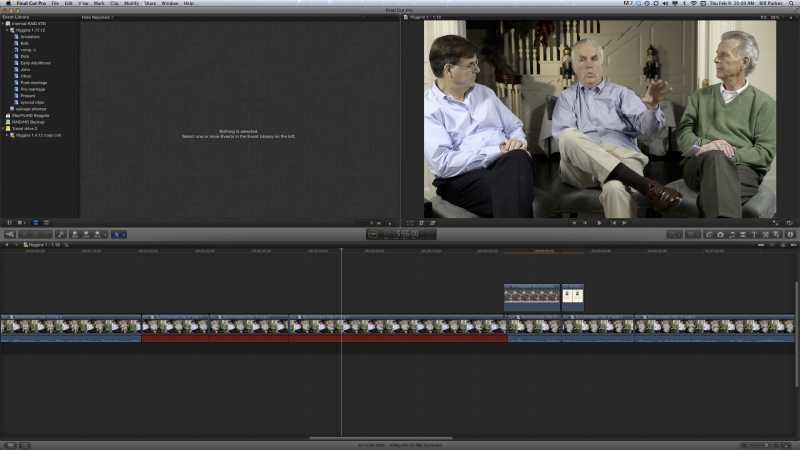
I also noticed on projects with the missing clips that there are stretches of audio that are red in the audio track as well, but the audio is unaffected. Is this something to worry about?
I reimported the clip into a separate event and that seems to do the trick. Not sure how that happened in the first place.
I also noticed on projects with the missing clips that there are stretches of audio that are red in the audio track as well, but the audio is unaffected. Is this something to worry about?
Please Log in to join the conversation.

09 Feb 2012 02:35 #4126
by dgwvideo
Creating history....one edit at a time !
Replied by dgwvideo on topic Re: missing file
Sounds like you somehow deleted the clip first time around.
As far as the audio issue, are you talking about peaked levels in the waveform with the red?
As far as the audio issue, are you talking about peaked levels in the waveform with the red?
Creating history....one edit at a time !
Please Log in to join the conversation.
09 Feb 2012 03:41 #4133
by parkerhqj
Replied by parkerhqj on topic Re: missing file
No - it's just a few of the clips on the time line. The lower half of the clip doesn't show the wave form at all. It's just red. The audio level is fine. When I double click on the clip and it opens in its own timeline, it's fine. It's just when it's in the primary story line that the compound clip shows red in the audio portion of the clip. When I look at the project in the project library, there's no red showing. It does have one of those exclamation points next to the audio icon though and a big one under it which I guess relates to video - but they're greyed out. Not sure what to make of this. It makes me nervous, but it doesn't look like it's going to cause problems (famous last words!).
Please Log in to join the conversation.
09 Feb 2012 21:09 #4176
by BenB
Replied by BenB on topic Re: missing file
Open up the Project's properties in the Inspector. There's a button to click to confirm Event connections. Do that, it may clear things up.
help.apple.com/finalcutpro/mac/10.0.3/#ver4353c0d3
help.apple.com/finalcutpro/mac/10.0.3/#ver4353c0d3
Please Log in to join the conversation.
09 Feb 2012 21:42 #4191
by dgwvideo
Creating history....one edit at a time !
Replied by dgwvideo on topic Re: missing file
Here's a link that addresses that on Creative Cow. According to the posts it appears to be media that needs to be re-linked. Hope it helps.
forums.creativecow.net/thread/344/6657
forums.creativecow.net/thread/344/6657
Creating history....one edit at a time !
Please Log in to join the conversation.
09 Feb 2012 22:12 #4196
by parkerhqj
Replied by parkerhqj on topic Re: missing file
They suggest reimporting the clip, but when I try to it won't because it sees it as already there. To fix my earlier problem, I imported to a new project which I labelled "salvage" and then copied it over to the original project and then replaced the offending clips. Not a very elegant solution, but I couldn't figure out a different way to do it.
Please Log in to join the conversation.
