


3 Post Moderation Rule for New Boarders (25 Jan 2021)
New boarders will have their posts moderated - Don't worry if you cannot see your post immediately.
Dual Monitor re configuration

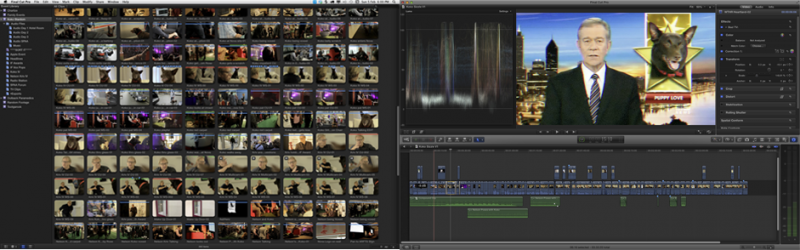
FCP X when calling up it's only two options for dual screen will either fill the monitor on the right with full screen video or a massive event browser.
UNLESS!!!! Put FPC X into single screen mode and drag the whole window to the right monitor.
Then invoke "Show Events on second display" and BINGO you get Events on the left under the menubar leaving your viewer and timeline on the right!
HAPPY DAYS!!! :lol:
(Of course would still be a lot happier if I could do other things like put the effects browser, info and waveforms on the left as well. But at lest it's a start)
Sean Lander - Editing since 1982 - AVID 1991 - FCP 1999 - FCPX 2011
Please Log in to join the conversation.
Please Log in to join the conversation.

Please Log in to join the conversation.
- mliebergot
-

- Offline
- Premium Member
-

- Posts: 84
- Thank you received: 3
If I select "Show Events in 2nd Display" i get the events and clips on top and the video and storyline on the larger lower screen.
I don't mind this setup if I'm editing in the storyline. But it's a little annoying for me to be looking up to see the Events and Clips. Plus I'm using my second (Samsung LED TV) display to do some approximate color work as it's calibrated for video.
But when I'm working in the storyline it's a nice view, as I don;t have to access the media in the library anyway.
Please Log in to join the conversation.

I like to see as much as my timeline as possible so to be able to throw the inspector, timeline list, effects etc over to the second monitor would be great.
Oh and I'm getting more and more annoyed about not being able to see the source and timeline pics at the same time. It didn't bother me at first but its starting to bother me occasionally.
Please Log in to join the conversation.
Sean Lander - Editing since 1982 - AVID 1991 - FCP 1999 - FCPX 2011
Please Log in to join the conversation.
Please Log in to join the conversation.
This is why the two screen layout has been the paradigm for so long. It works.
But I don't think Apple has any intention of changing it. This interface is clearly designed to be efficient on one screen. There's no doubt we'll be seeing an iPad version of FCP X very soon.
Sean Lander - Editing since 1982 - AVID 1991 - FCP 1999 - FCPX 2011
Please Log in to join the conversation.
I'm on the road a lot, and so I can't say I miss the Viewer window. Took up a lot of space on a 15" MBP.
Please Log in to join the conversation.
We already have iMovie for the iPad, and I doubt you'll see anything as powerful as FCP X on an iPad for quite some time.
Please Log in to join the conversation.
BenB wrote: If you're properly familiar with your footage, and the script, there's not a lot of experimentation during editing.
We already have iMovie for the iPad, and I doubt you'll see anything as powerful as FCP X on an iPad for quite some time.
And what would be the problem if we did? What if say a director was able to do a quick preliminary cut down or at least view the footage and make some simple cuts.
Or imagine being able to take low res proxy media on an iPad into a clients office, hook up to a projector and just cutting the story line with them. Then go home, hit the sync to FCP X button and the timeline, linked to the high res media is there for you to refine.
Beats lugging a laptop and hard drives, speakers and monitor to a clients office. Would justify buying an iPad in a heartbeat.
Please Log in to join the conversation.
Please Log in to join the conversation.
BenB wrote: iMovie already can do that. In fact, I've done preliminary cuts with iMovie on my iPad, and because it sync's to iMovie on my desktop Mac, I can take it into FCP X in tact. That has been possible since the first day FCP X was released.
How do you get the footage from say an XDcamHD camera in to iMovie?
Please Log in to join the conversation.
Please Log in to join the conversation.
BenB wrote: Convert it to an iPad compatible format, sync it to your iPad, just like any other NLE that does/will exist on your iPad.
And then how do you relink to the original footage?
Please Log in to join the conversation.
Please Log in to join the conversation.
I've no doubt at all that if we see an iPad 3 that is 2048x1536 and has Thunderbolt we will see Final Cut Pro X or a iMoviePro App and an Aperture or the like app out for this device.
Anyway not long to wait now if all the rumour sites are true.

Sean Lander - Editing since 1982 - AVID 1991 - FCP 1999 - FCPX 2011
Please Log in to join the conversation.
Please Log in to join the conversation.
