




- Posts: 7
- Thank you received: 0
3 Post Moderation Rule for New Boarders (25 Jan 2021)
New boarders will have their posts moderated - Don't worry if you cannot see your post immediately.
Ken Burns on a rotated Compound-Multicam clip adds black corners?
12 Oct 2023 04:16 #127445
by high5ths
Hi, I'm sure I'm just doing something dumb, but I can't seem to find a solution. I'm editing a video of a classical concert — I've working with a Multicam clip with 5 angles of 4K video, editing into a 1080p project.
1) In the Multicam Clip: One of the angles is slightly crooked, so I've made that clip a compound clip, and within the compound clip I've rotated and scaled it so I don't have any black corners.
2) In the project, I am trying to use that angle, but when I apply my Ken Burns effect to it in the project, it ends up with the dreaded black corners. I thought this would work if I had my rotated clip within a compound clip... what am I missing?
Apologies if this is unclear. Just to reiterate, I've got a Compound Clip as an angle in my Multicam Clip, and within the Compound Clip I've rotated & scaled my video. But in my project, when I apply Ken Burns to that angle, Ken Burns adds black corners. Two screenshots attached, the first showing me applying Ken Burns effect (no black corners!) and then after I click "Done," what Ken Burns does to the video. Really annoying... Thanks so much for your time!
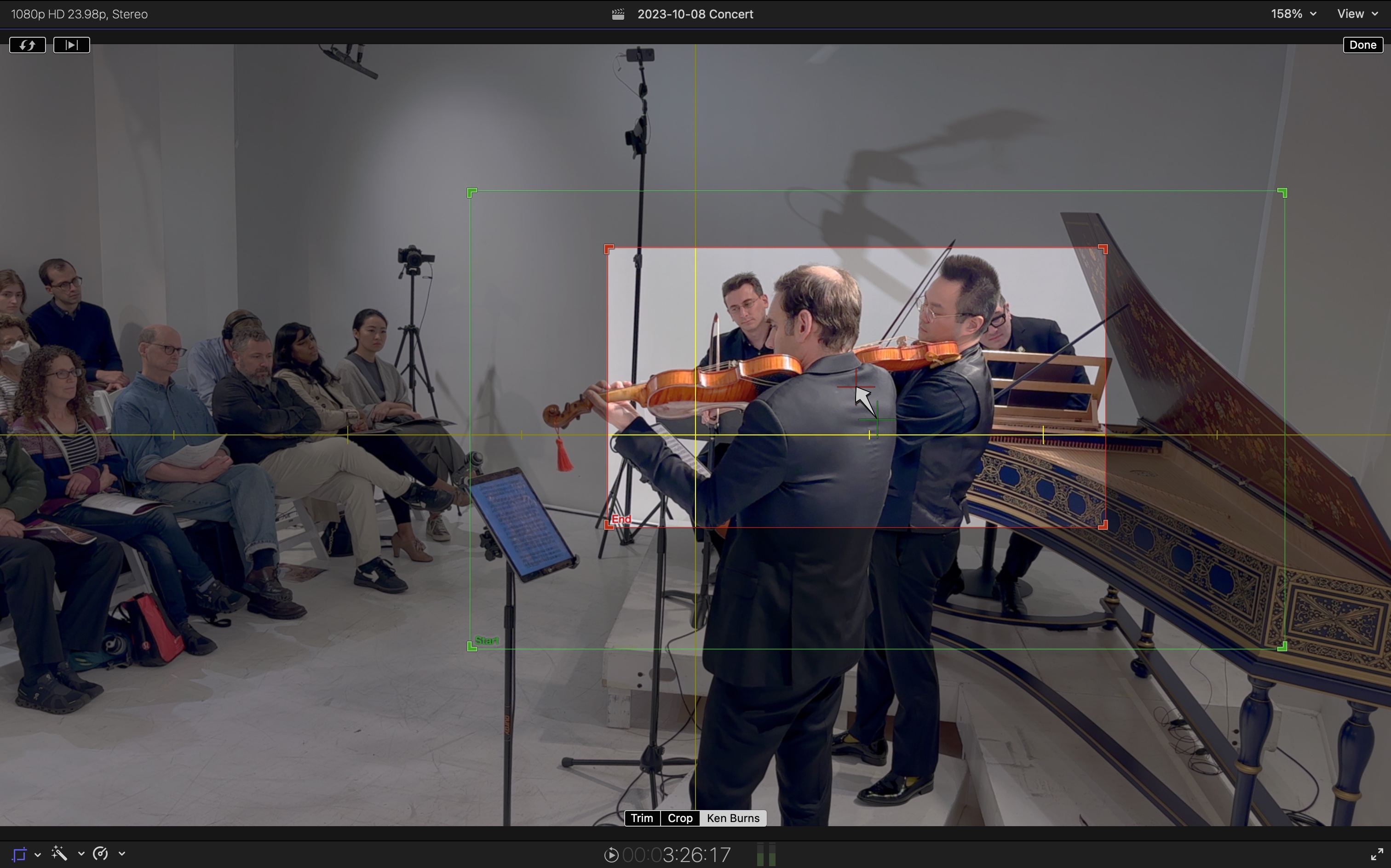
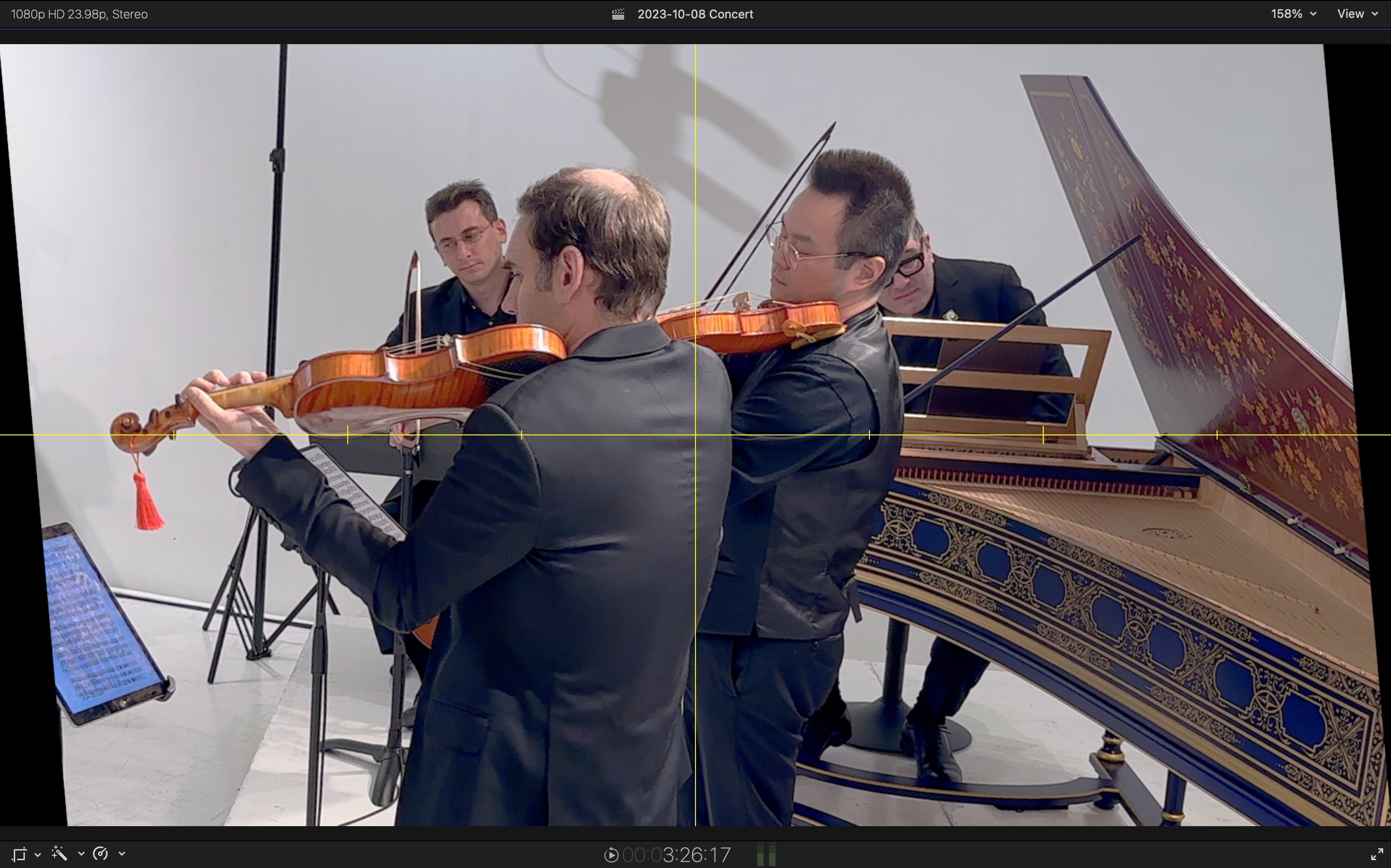
1) In the Multicam Clip: One of the angles is slightly crooked, so I've made that clip a compound clip, and within the compound clip I've rotated and scaled it so I don't have any black corners.
2) In the project, I am trying to use that angle, but when I apply my Ken Burns effect to it in the project, it ends up with the dreaded black corners. I thought this would work if I had my rotated clip within a compound clip... what am I missing?
Apologies if this is unclear. Just to reiterate, I've got a Compound Clip as an angle in my Multicam Clip, and within the Compound Clip I've rotated & scaled my video. But in my project, when I apply Ken Burns to that angle, Ken Burns adds black corners. Two screenshots attached, the first showing me applying Ken Burns effect (no black corners!) and then after I click "Done," what Ken Burns does to the video. Really annoying... Thanks so much for your time!
Please Log in to join the conversation.


12 Oct 2023 17:23 #127451
by dmetz
Replied by dmetz on topic Ken Burns on a rotated Compound-Multicam clip adds black corners?
That's no good! The Ken Burns effect, as implemented in FCP, is a variation of crop/trim. Looks like it is applying the crop before recognizing the rotation.
You could work around this by using an adjustment layer, and do your scale/push with keyframes or similar effect (just not the built-in KBE). Alternatively, you could export the entire corrected angle by itself, and then bring that back in to replace in the multicam.
You could work around this by using an adjustment layer, and do your scale/push with keyframes or similar effect (just not the built-in KBE). Alternatively, you could export the entire corrected angle by itself, and then bring that back in to replace in the multicam.
Please Log in to join the conversation.

16 Oct 2023 09:10 #127480
by Redifer
Replied by Redifer on topic Ken Burns on a rotated Compound-Multicam clip adds black corners?
Sadly this is just what Ken Burns tends to do and it's always done stuff like this. You gotta work around it and sometimes it's not easy! You could export the clip and import the resulting video file and apply the Ken Burns to that. I think someone needs to give Ken a good talkin' to.
Please Log in to join the conversation.
