


- Posts: 187
- Thank you received: 10
3 Post Moderation Rule for New Boarders (25 Jan 2021)
New boarders will have their posts moderated - Don't worry if you cannot see your post immediately.
NVME Problem ?
07 Oct 2023 10:03 #127409
by Stu Wart
NVME Problem ? was created by Stu Wart
Is there a problem between Fcp and NVME ?
I use my RAID volume for editing storage (4 mechanical disks) but I wanted to try an empty NVME partition for "Fcp Cache", "Fcp generated files", even Library
Despite of a whooping 1450 MB/s it's Little beach ball of death all the time.
RAID (550 MB/s) works way better smoothly
(this concerns a 2012 cheesegrater Mac station on stéroïdes ) Monterey
I use my RAID volume for editing storage (4 mechanical disks) but I wanted to try an empty NVME partition for "Fcp Cache", "Fcp generated files", even Library
Despite of a whooping 1450 MB/s it's Little beach ball of death all the time.
RAID (550 MB/s) works way better smoothly
(this concerns a 2012 cheesegrater Mac station on stéroïdes ) Monterey
Please Log in to join the conversation.


07 Oct 2023 15:41 #127410
by joema
Replied by joema on topic NVME Problem ?
There is no code in FCP that is specific to a certain type of hard drive. I'd suggest you format that NVME external SSD as APFS, then test it with Blackmagic Disk Test and ATTO Disk Test:
apps.apple.com/us/app/atto-disk-benchmark/id1479103658?mt=12
Just looking at the peak I/O rate on large sequential reads or writes is not very revealing. This is especially because the FCP I/O pattern to cache and library is often dominated by small random I/Os, not large sequential I/Os as tested by Blackmagic.
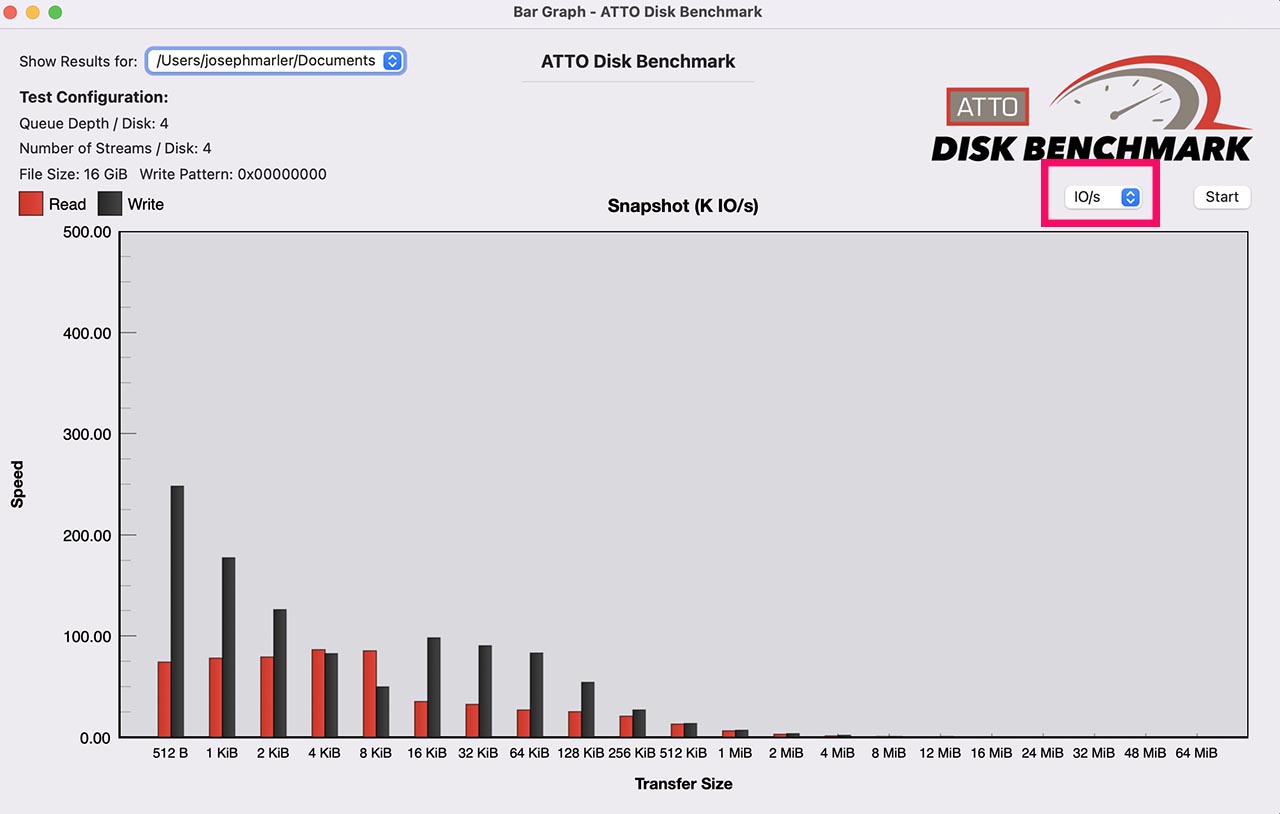
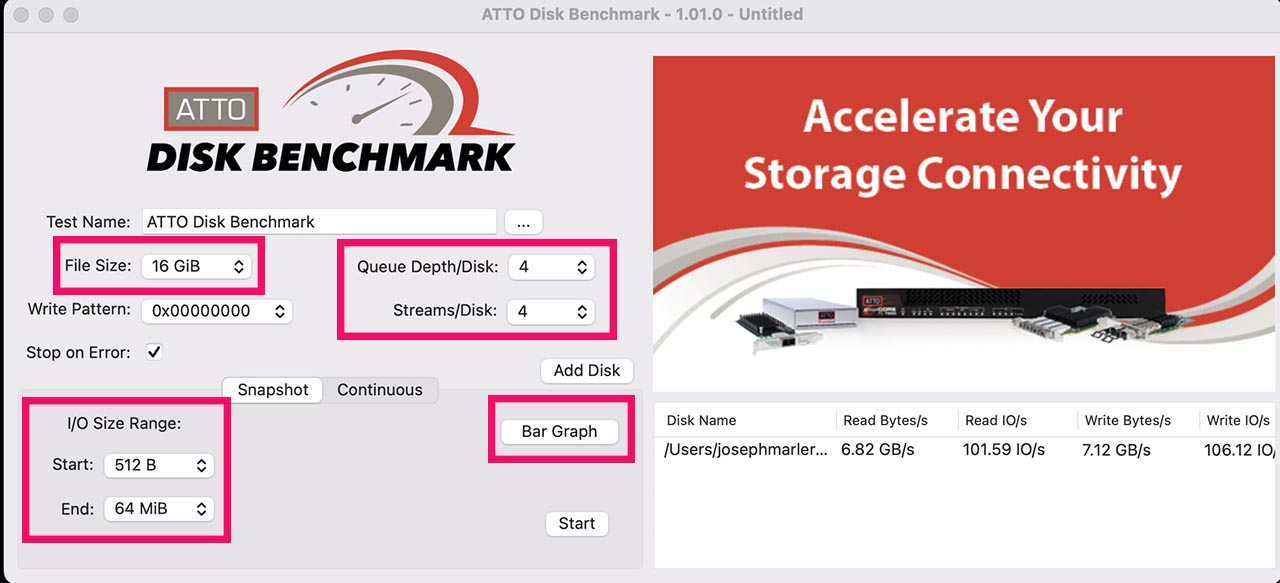
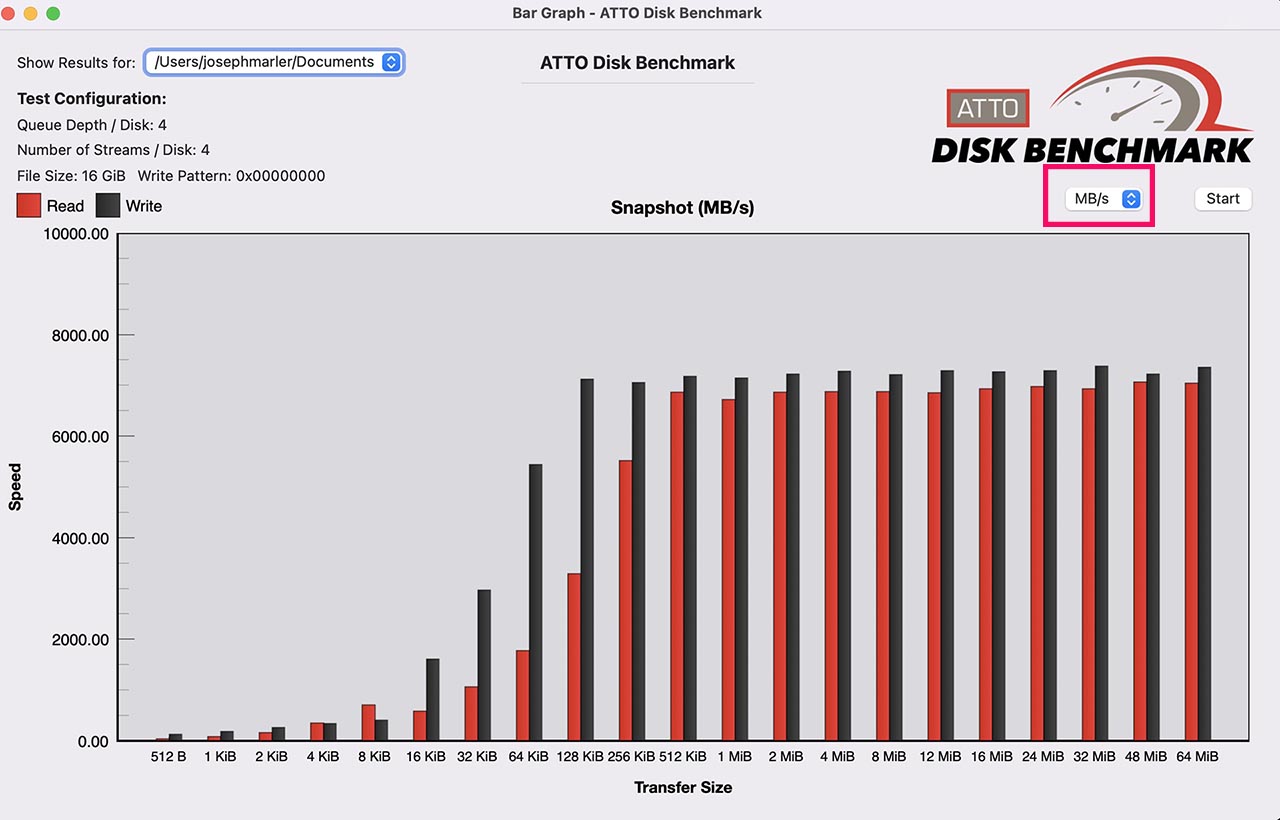
ATTO Disk Test will do various I/O sizes and draw a bar graph of both transfer rate and I/O per sec. See the attached done on my M1 Ultra internal SSD.
You can compare that to your mechanical RAID and see if the values are as expected.
If that works as expected, I'd suggest just importing a single ProRes file to FCP, add no effects or edits and try to export that at as ProRes 422 at the native resolution and frame rate to the NVME drive. That will at least verify the I/O rate from FCP is within reason if not encumbered by any Fx or timeline overhead.
Just looking at the peak I/O rate on large sequential reads or writes is not very revealing. This is especially because the FCP I/O pattern to cache and library is often dominated by small random I/Os, not large sequential I/Os as tested by Blackmagic.
ATTO Disk Test will do various I/O sizes and draw a bar graph of both transfer rate and I/O per sec. See the attached done on my M1 Ultra internal SSD.
You can compare that to your mechanical RAID and see if the values are as expected.
If that works as expected, I'd suggest just importing a single ProRes file to FCP, add no effects or edits and try to export that at as ProRes 422 at the native resolution and frame rate to the NVME drive. That will at least verify the I/O rate from FCP is within reason if not encumbered by any Fx or timeline overhead.
Please Log in to join the conversation.
12 Oct 2023 14:23 #127449
by Stu Wart
Replied by Stu Wart on topic NVME Problem ?
thank you for your answer but... what can I do with it ?
- That empty NVME Partition is already formated APFS. (Since the other partition is the Monterey boot drive)
- I don't need to test anything because I already dit it. The speed is there.
-Speed as itself is not the problem. That volume is FAST 1450 MB/s !
But despite of the speed I get jittering reading and Little coloured beach ball quite often if anything resides on it.
other persons have mentioned that there seems to be a problem between Fcp and NVME
- That empty NVME Partition is already formated APFS. (Since the other partition is the Monterey boot drive)
- I don't need to test anything because I already dit it. The speed is there.
-Speed as itself is not the problem. That volume is FAST 1450 MB/s !
But despite of the speed I get jittering reading and Little coloured beach ball quite often if anything resides on it.
other persons have mentioned that there seems to be a problem between Fcp and NVME
Please Log in to join the conversation.
13 Oct 2023 15:59 - 13 Oct 2023 16:02 #127459
by joema
Replied by joema on topic NVME Problem ?
I have about 50 USB-C 3.x SSDs which internally use NVMe. Except for a couple of SanDisk Extreme Portable V2 drives that totally failed, I've never had a problem with any of them on FCP.
There is no software code in FCP that provides special handling for NVMe-type SSDs. FCP has no idea if the drive is mechanical, SATA SSD, or NVMe SSD. At the drive level of MacOS it knows whether it's USB or Thunderbolt, but that difference is abstracted away from FCP up at the application layer.
There's no general problem with FCP and NVMe drives. However it's possible that an app (like FCP) that issues multithreaded asynchronous I/O calls could expose a problem with some type of drive down at the driver or hardware layers. Any advanced app that issued I/O calls like FCP would encounter that, but there are likely relatively few apps that generate that I/O profile. E.g, you can't run SQL Server on MacOS.
The I/O profile of FCP is very complex and is not reproduced by simplistic tests like Blackmagic or copying files. That's why I suggested trying ATTO Disk Test, which at least uses multithreaded async I/O.
There is a free sophisticated command-line I/O stress app called "fio" which is available through the Homebrew package manager. However it is very complex so I've never used it. Homebrew info: brew.sh/
fio demonstration on Linux (should work the same on MacOS):
It is likely there is some issue with the NVMe drive or system layer when subjected to a certain I/O profile, which any app could potentially do. In general, there's nothing in the FCP source code to fix which addresses this.
You could possibly inspect the MacOS system log to see if problems were reported when the behavior manifests. However the Console app and logging system were rewritten a few versions ago and they are now more difficult to use and don't report as much information.
However -- you can still use the terminal command "log show" to extract very detailed data from the system log. It's possible if either FCP, system software or I/O hardware had a problem, this might show something. But it produces a *gigantic* amount of information. The best way to sift through it is using something like BBEdit, which is high-performance and has lots of filtering.
Examples of command to extract the last 60 seconds or last 3 minutes from the MacOS system log:
log show --last 60s > ~/Documents/output-file.txt
log show --last 3m > ~/Documents/output-file.txt
There is no software code in FCP that provides special handling for NVMe-type SSDs. FCP has no idea if the drive is mechanical, SATA SSD, or NVMe SSD. At the drive level of MacOS it knows whether it's USB or Thunderbolt, but that difference is abstracted away from FCP up at the application layer.
There's no general problem with FCP and NVMe drives. However it's possible that an app (like FCP) that issues multithreaded asynchronous I/O calls could expose a problem with some type of drive down at the driver or hardware layers. Any advanced app that issued I/O calls like FCP would encounter that, but there are likely relatively few apps that generate that I/O profile. E.g, you can't run SQL Server on MacOS.
The I/O profile of FCP is very complex and is not reproduced by simplistic tests like Blackmagic or copying files. That's why I suggested trying ATTO Disk Test, which at least uses multithreaded async I/O.
There is a free sophisticated command-line I/O stress app called "fio" which is available through the Homebrew package manager. However it is very complex so I've never used it. Homebrew info: brew.sh/
fio demonstration on Linux (should work the same on MacOS):
It is likely there is some issue with the NVMe drive or system layer when subjected to a certain I/O profile, which any app could potentially do. In general, there's nothing in the FCP source code to fix which addresses this.
You could possibly inspect the MacOS system log to see if problems were reported when the behavior manifests. However the Console app and logging system were rewritten a few versions ago and they are now more difficult to use and don't report as much information.
However -- you can still use the terminal command "log show" to extract very detailed data from the system log. It's possible if either FCP, system software or I/O hardware had a problem, this might show something. But it produces a *gigantic* amount of information. The best way to sift through it is using something like BBEdit, which is high-performance and has lots of filtering.
Examples of command to extract the last 60 seconds or last 3 minutes from the MacOS system log:
log show --last 60s > ~/Documents/output-file.txt
log show --last 3m > ~/Documents/output-file.txt
Last edit: 13 Oct 2023 16:02 by joema.
Please Log in to join the conversation.
13 Oct 2023 16:58 #127460
by dmetz
Replied by dmetz on topic NVME Problem ?
Let's also consider the roles that a 2012 cheese grater, older software, and NVME interconnect may play in this scenario.
Is the drive in question on a PCI card and mounted internally?
Is it in an external USB enclosure attached to an add-on USB card?
Do all items have up-to-date firmware? Do they correctly and safely respond to the OS's commands to remain awake?
You state the Mac Pro is running Monterey, but that machine is only supported up to Mojave. Have you done other modifications to allow a more recent OS?
Is the drive in question on a PCI card and mounted internally?
Is it in an external USB enclosure attached to an add-on USB card?
Do all items have up-to-date firmware? Do they correctly and safely respond to the OS's commands to remain awake?
You state the Mac Pro is running Monterey, but that machine is only supported up to Mojave. Have you done other modifications to allow a more recent OS?
Please Log in to join the conversation.

16 Oct 2023 00:53 - 16 Oct 2023 01:06 #127475
by tcwdoggy
Replied by tcwdoggy on topic NVME Problem ?
- I used to use the MacPro 2010 (12-core) with NVMe attached to an internal PCIe card (I/O Crest Dual M.2 NVMe Ports to PCIe 3.0 x16) and used it with FCP X with no problem. In fact, it was needed because FCP X is constantly writing/reading the Library. However the heat generated by the MacPro are too much and once in a blue moon, the mac Pro will just shut down, my CPU B can reached 80 degree C and I often wondered when it will die on me while I'm doing some project. Promptly switched to macmini M1, using TB3 raid (TERRAMASTER TD2) and took out the NVMe stick from the MacPro, put it in a TB3 casing (SABRENT Thunderbolt 3 M.2 NVMe SSD Tool-Free Solid Aluminum Enclosure) and using it as external now.
- So much faster and less grief when dealing with h264 media that cameras are churning out these days. The Mac Pro and FCP X are really crawling when dealing with h264 media. Could it be your case?
Last edit: 16 Oct 2023 01:06 by tcwdoggy. Reason: grammer
Please Log in to join the conversation.
