


- Posts: 14
- Thank you received: 0
3 Post Moderation Rule for New Boarders (25 Jan 2021)
New boarders will have their posts moderated - Don't worry if you cannot see your post immediately.
Why can I not slip edit or roll edit these clips?
20 Sep 2023 17:59 #127198
by TGGE
Why can I not slip edit or roll edit these clips? was created by TGGE
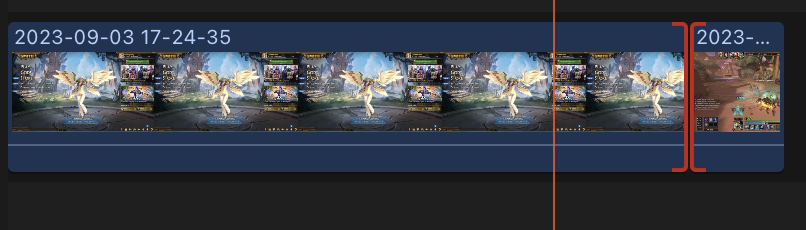
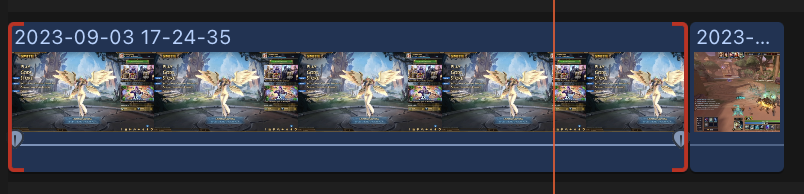
As there titles says I am trying to learn slip editing and roll editing but for some reason I cannot and I don't understand why I cannot either.
Thanks for all the help it is much appreciated!
Thanks for all the help it is much appreciated!
Please Log in to join the conversation.


20 Sep 2023 18:47 #127199
by Ian Brown
Replied by Ian Brown on topic Why can I not slip edit or roll edit these clips?
I don't use such edits myself so I could be wrong but I think you have to use clips which have already been trimmed front and back.
Are you using complete untrimmed clips?
Are you using complete untrimmed clips?
Please Log in to join the conversation.
20 Sep 2023 18:50 #127200
by TGGE
Replied by TGGE on topic Why can I not slip edit or roll edit these clips?
Thank you for the response! Yeah I have only imported the clips currently and that is it.
Please Log in to join the conversation.

20 Sep 2023 20:14 #127206
by TerryB
Replied by TerryB on topic Why can I not slip edit or roll edit these clips?
The red brackets at the edits indicate there's no media beyond the edit points so there's nothing available to slip or roll. Trim the heads and tails from the clips, and you will be able to experiment with slip and roll.
Please Log in to join the conversation.
21 Sep 2023 06:34 #127216
by TGGE
Replied by TGGE on topic Why can I not slip edit or roll edit these clips?
Hi thank you for the reply how do you trim the play heads and tails? Am guessing that the head and tails are the beginning and end of both clips? Sorry I am new and learning all the jargon etc. I thought trying to trim stuff would be a simple thing.
Please Log in to join the conversation.
21 Sep 2023 07:54 #127217
by Ian Brown
Replied by Ian Brown on topic Why can I not slip edit or roll edit these clips?
There are numerous ways as with everything connected with computers.
Usually the main part of the clip is away from the start or end.
You can click and drag to select an area in the clip in the browser before you hit the E key to send it into the timeline or you can send the whole clip into the timeline and drag the front and back ends towards the middle.
There are other ways but that's enough to be going on with.
Usually the main part of the clip is away from the start or end.
You can click and drag to select an area in the clip in the browser before you hit the E key to send it into the timeline or you can send the whole clip into the timeline and drag the front and back ends towards the middle.
There are other ways but that's enough to be going on with.
Please Log in to join the conversation.
21 Sep 2023 11:04 #127220
by TGGE
Replied by TGGE on topic Why can I not slip edit or roll edit these clips?
Normally all I do in the browser is file import the clip and then just click on the clip in the browser then drag it into the timeline. Is that a bad way?
Please Log in to join the conversation.
21 Sep 2023 11:59 - 21 Sep 2023 12:07 #127221
by Ian Brown
Replied by Ian Brown on topic Why can I not slip edit or roll edit these clips?
That's fine except you don't need to drag the clip into the timeline.
With the clip highlighted it's quicker and easier to simply press the E key and the clip will automatically go to the timeline.
Once there you can grab the front or back edge with the mouse and drag it inwards towards the middle of the clip.
Editing works on the principle that you shoot far more than you need . . . you shoot a clip of 10 -30 seconds (or whatever!) but only show maybe the best 3 - 5 seconds in your final video.
That's the idea behind the way professionals work but many amateurs value every second they have shot and are loathe to discard huge chunks.
With the clip highlighted it's quicker and easier to simply press the E key and the clip will automatically go to the timeline.
Once there you can grab the front or back edge with the mouse and drag it inwards towards the middle of the clip.
Editing works on the principle that you shoot far more than you need . . . you shoot a clip of 10 -30 seconds (or whatever!) but only show maybe the best 3 - 5 seconds in your final video.
That's the idea behind the way professionals work but many amateurs value every second they have shot and are loathe to discard huge chunks.
Last edit: 21 Sep 2023 12:07 by Ian Brown.
Please Log in to join the conversation.
21 Sep 2023 13:31 #127225
by TGGE
Replied by TGGE on topic Why can I not slip edit or roll edit these clips?
Thank you for all the information above and for the easier shortcut! I think I have fixed my problem as well! I was just randomly looking around and turned on snapping next to solo selected items and it seemed to fix my problem? So I guess snapping needed to be on to do the two edits.
Please Log in to join the conversation.


22 Sep 2023 02:46 - 22 Sep 2023 02:47 #127239
by anickt
Replied by anickt on topic Why can I not slip edit or roll edit these clips?
I suggest you get some training. It will save you a lot of time. If you are serious, it's well worth paying for the Ripple Training course. Starting out on the right foot will save you much time and frustration. Randomly looking around is not the way to go.
Last edit: 22 Sep 2023 02:47 by anickt.
Please Log in to join the conversation.
22 Sep 2023 08:26 #127246
by Ian Brown
Replied by Ian Brown on topic Why can I not slip edit or roll edit these clips?
Alternatively, if you wanted a FREE FCP course, there is the one provided by Izzy Video . . .
www.izzyvideo.com/final-cut-pro-tutorial/
It has some 20 short lessons lasting a total of nearly 3 hours and also provides media (clips, photos and audio) for you to follow along.
It's about 5 years old now and uses an earlier version of FCP but most of it is still relevant.
www.izzyvideo.com/final-cut-pro-tutorial/
It has some 20 short lessons lasting a total of nearly 3 hours and also provides media (clips, photos and audio) for you to follow along.
It's about 5 years old now and uses an earlier version of FCP but most of it is still relevant.
Please Log in to join the conversation.
23 Sep 2023 01:34 #127262
by anickt
Replied by anickt on topic Why can I not slip edit or roll edit these clips?
Yes - Izzy is a good place to learn the basics. IMHO, the most important thing is to get training from somebody who actually uses FCPX to earn their living as the Ripple guys and Izzy do. There’s plenty of training on YouTube but I can usually tell those who don’t actually use FCPX in their day to day work and they are typically not presenting the strengths of FCP, just rehashing the manual. That’s something else to look for.
Please Log in to join the conversation.
24 Sep 2023 00:47 #127266
by TerryB
Replied by TerryB on topic Why can I not slip edit or roll edit these clips?
A few other good, free tutorials:
Steve at Ripple Training’s 60 minute FCP tutorial overview
Getting Started with FCP:
FCP FTW:
Steve at Ripple Training’s 60 minute FCP tutorial overview
Getting Started with FCP:
FCP FTW:
Please Log in to join the conversation.
24 Sep 2023 03:37 #127268
by TGGE
Replied by TGGE on topic Why can I not slip edit or roll edit these clips?
Thank you for trying to help me at the start it is much appreciated! Sorry for the late reply! will look into everything everyone has said!
Please Log in to join the conversation.
24 Sep 2023 03:38 #127269
by TGGE
Replied by TGGE on topic Why can I not slip edit or roll edit these clips?
Thank you for suggesting to watch tutorials instead maybe I am weird since I don't really get frustrated since at the moment I am only doing simple projectors? But I will 100% take your advice and look at all the options presented to me it is much appreciated! 
Please Log in to join the conversation.
