


- Posts: 27
- Thank you received: 1
3 Post Moderation Rule for New Boarders (25 Jan 2021)
New boarders will have their posts moderated - Don't worry if you cannot see your post immediately.
Anyone notice an MOV file is now SMALLER than a MP4 format file?
12 Aug 2023 19:08 #126772
by mattj
I don't know what is happening here?? Don't even get me started on FCPX logic to labelling a "Web Hosting" destination a MOV file, and a "Computer" destination a MP$ file....
Either way, all things being equal, I get an MOV file output size 22% less than the MP4 all of a sudden. All settings in both exports are set to:
Video Codec: H.264 Better Quality
Resolution: 1920 x 1090
Color Space: Automatic
Audio Format: AAC
Still the MOV file is now SMALLER. WTF is happening here?
Maybe answers the question...why is Apple calling the MOV file format the "Web Hosting" format now. Smaller?
Either way, all things being equal, I get an MOV file output size 22% less than the MP4 all of a sudden. All settings in both exports are set to:
Video Codec: H.264 Better Quality
Resolution: 1920 x 1090
Color Space: Automatic
Audio Format: AAC
Still the MOV file is now SMALLER. WTF is happening here?
Maybe answers the question...why is Apple calling the MOV file format the "Web Hosting" format now. Smaller?
Please Log in to join the conversation.
- Tom Wolsky
-

- Offline
- Moderator
-

12 Aug 2023 19:18 #126773
by Tom Wolsky
Replied by Tom Wolsky on topic Anyone notice an MOV file is now SMALLER than a MP4 format file?
What data rates are the two files using?
Please Log in to join the conversation.


12 Aug 2023 19:52 - 12 Aug 2023 20:14 #126774
by VTC
Replied by VTC on topic Anyone notice an MOV file is now SMALLER than a MP4 format file?
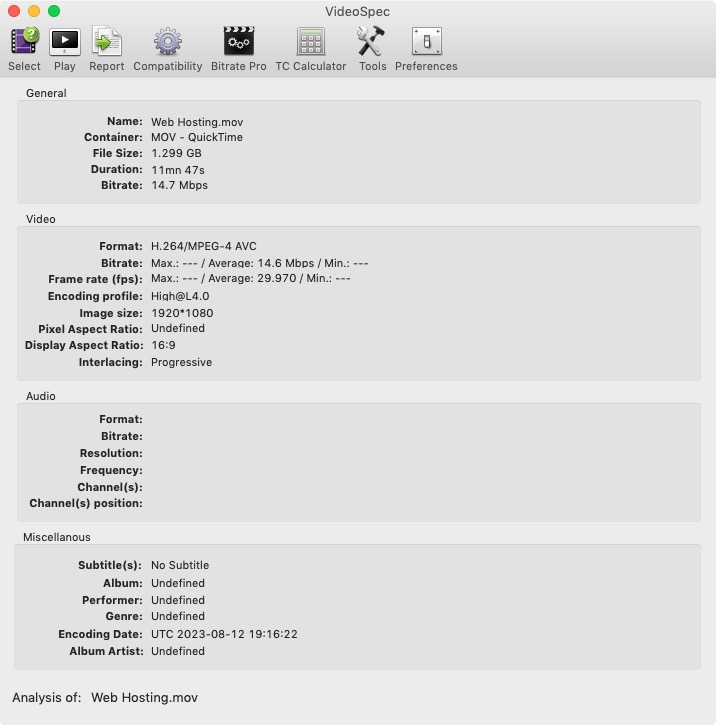
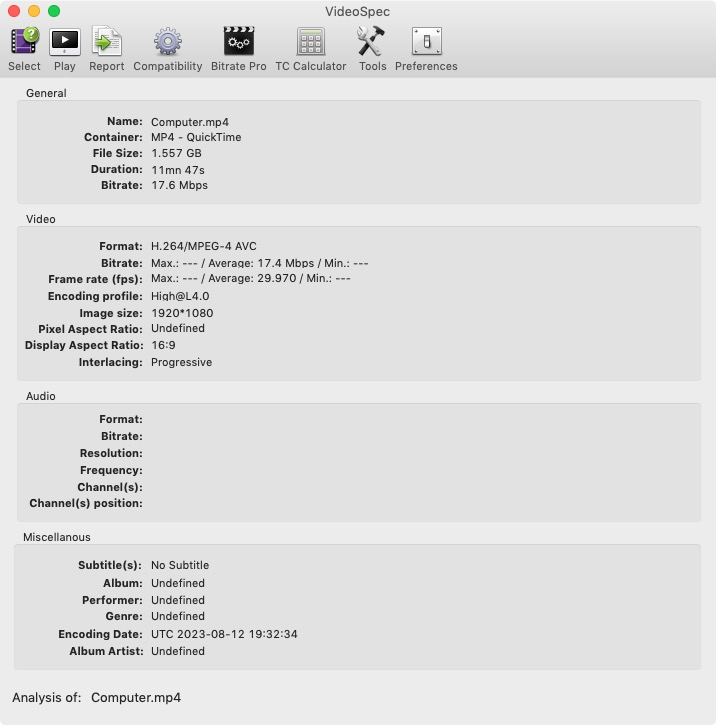
Never having used any of those two setting as I have no idea what they do or what exact control I have over them, outputting the same file with whatever their default properties are results in the MOV having a lower bitrate. (If you want to self-set the bitrate to whatever maxim would be for the codec I'd be using Compressor.)
-
-
Last edit: 12 Aug 2023 20:14 by VTC.
Please Log in to join the conversation.
12 Aug 2023 20:01 #126775
by mattj
Thank for the speedy reply. Sadly, it doesn't seem to show me anymore. If I select a default "Publishing" default setting (Web Hosting or Computer), it doesn't allow me to change that (or even see that info). If I select a "Mastering" (Video and Audio), it will allow me to change the bit rate, but I cannot change the resolution. Is there another way of viewing the bit rate?
Perhaps I need to use the Mastering (Video and Audio) choice for export, so I can select my bit rate? I am locked to the resolution of the project then, though.
These videos are intended for Youtube, so I probably need to find out what bit rate they prefer.
Replied by mattj on topic Anyone notice an MOV file is now SMALLER than a MP4 format file?
Hey Tom -What data rates are the two files using?
Thank for the speedy reply. Sadly, it doesn't seem to show me anymore. If I select a default "Publishing" default setting (Web Hosting or Computer), it doesn't allow me to change that (or even see that info). If I select a "Mastering" (Video and Audio), it will allow me to change the bit rate, but I cannot change the resolution. Is there another way of viewing the bit rate?
Perhaps I need to use the Mastering (Video and Audio) choice for export, so I can select my bit rate? I am locked to the resolution of the project then, though.
These videos are intended for Youtube, so I probably need to find out what bit rate they prefer.
Please Log in to join the conversation.
12 Aug 2023 20:05 #126776
by mattj
Replied by mattj on topic Anyone notice an MOV file is now SMALLER than a MP4 format file?
Never having used any of those two setting as I have no idea what they do or what exact control I have over them, outputting the same file with whatever their default properties are results in the MOV having a lower bitrate.
-
Thanks! I'll have to download that and see what the bit rate is in my videos. I don't know what Apple is doing in those defaults. They don't let you see that in FCPX for some reason.
Please Log in to join the conversation.
12 Aug 2023 20:09 #126777
by mattj
Replied by mattj on topic Anyone notice an MOV file is now SMALLER than a MP4 format file?
Never having used any of those two setting as I have no idea what they do or what exact control I have over them, outputting the same file with whatever their default properties are results in the MOV having a lower bitrate.
-
Sadly, looks like this Video Spec app isn't compatible with Ventura. Dang. Any idea if there are other programs that can do this?
Please Log in to join the conversation.
12 Aug 2023 20:25 #126778
by mattj
Replied by mattj on topic Anyone notice an MOV file is now SMALLER than a MP4 format file?
Looks like the Quicktime player tells me that the Video Data Rate is: 14.35 Mbit/s. Is that what you are looking for? Or do you mean like 8 or 10 bit bit depth?What data rates are the two files using?
Please Log in to join the conversation.
12 Aug 2023 20:55 #126779
by mattj
Replied by mattj on topic Anyone notice an MOV file is now SMALLER than a MP4 format file?
Wow. Looks like the MP4 file has a slightly higher bit rate. 19 Mbit/s. So weird. Not sure what the difference is. Both appear to use the H.264 encoding. Why does one have higher bit rate?
Please Log in to join the conversation.
- Tom Wolsky
-
- Offline
- Moderator
-
12 Aug 2023 21:14 #126780
by Tom Wolsky
Replied by Tom Wolsky on topic Anyone notice an MOV file is now SMALLER than a MP4 format file?
That's just the way they're set in FCP. You have very little control in video exporting from directly in the application. You need Compressor to have real control.
Please Log in to join the conversation.
12 Aug 2023 21:56 #126785
by mattj
Replied by mattj on topic Anyone notice an MOV file is now SMALLER than a MP4 format file?
Thanks Tom. Yeah, I will look into that. I'm not sure if it will help me that much. The content I'm working with (old d library of footage) is only 1080p, and intended for Youtube, so I don't know if I can do a whole lot more to maximize the visual playability from that source. I'd be happy to invest in the Compressor program, if you think this might give me a little better quality exports on the files, without increasing my file sizes by 5X or more, and results in a final format that won't be down converted by Youtube. Any idea how to know if I can obtain a better file quality that meets those requirements?
Please Log in to join the conversation.
12 Aug 2023 22:24 #126786
by mattj
Replied by mattj on topic Anyone notice an MOV file is now SMALLER than a MP4 format file?
Any idea what the differences might be between H.264 files, with one in a MOV container, and one is a MP4 container? I didn't realize there could be that much difference, with the same encoding?
Please Log in to join the conversation.
13 Aug 2023 00:47 #126793
by VTC
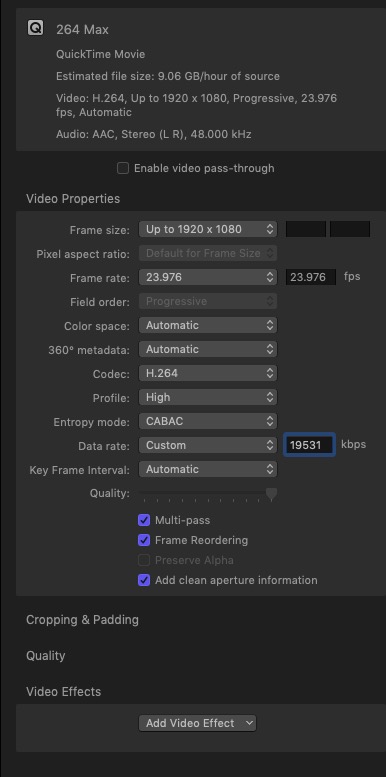
For YT I crank bitrate to the max on 1080p h264 files. It's something like 19,531 if I recall correctly. Compressor also has the option to enable multi-pass encoding, which I never do, for the simple reason that pedestrian YT viewers leave the playback resolution at whatever YT defaults to, usually 360 or 480. I specifically show clients how to dial up the quality from the crap that YT sends you on first play.
Replied by VTC on topic Anyone notice an MOV file is now SMALLER than a MP4 format file?
...so I don't know if I can do a whole lot more to maximize the visual playability... Any idea how to know if I can obtain a better file quality...
For YT I crank bitrate to the max on 1080p h264 files. It's something like 19,531 if I recall correctly. Compressor also has the option to enable multi-pass encoding, which I never do, for the simple reason that pedestrian YT viewers leave the playback resolution at whatever YT defaults to, usually 360 or 480. I specifically show clients how to dial up the quality from the crap that YT sends you on first play.
Please Log in to join the conversation.
13 Aug 2023 15:56 #126798
by mattj
Thanks! Interesting! Is there any reason that bitrate would be too high? Youtube instructions say you can have much higher bitrates for "HDR" content, but recommend lower bitrates for SDR content. Not sure why that would matter. What is the issue with multi-pass? Should I turn that off? I can look further into that.
Replied by mattj on topic Anyone notice an MOV file is now SMALLER than a MP4 format file?
...so I don't know if I can do a whole lot more to maximize the visual playability... Any idea how to know if I can obtain a better file quality...
For YT I crank bitrate to the max on 1080p h264 files. It's something like 19,531 if I recall correctly. Compressor also has the option to enable multi-pass encoding, which I never do, for the simple reason that pedestrian YT viewers leave the playback resolution at whatever YT defaults to, usually 360 or 480. I specifically show clients how to dial up the quality from the crap that YT sends you on first play.
Thanks! Interesting! Is there any reason that bitrate would be too high? Youtube instructions say you can have much higher bitrates for "HDR" content, but recommend lower bitrates for SDR content. Not sure why that would matter. What is the issue with multi-pass? Should I turn that off? I can look further into that.
Please Log in to join the conversation.
13 Aug 2023 17:13 #126800
by VTC
Replied by VTC on topic Anyone notice an MOV file is now SMALLER than a MP4 format file?
Multi-pass essentially fine tunes the first pass and reevaluates the video, making a theoretically smaller and better defined one. I don't use it because it extends conversion times. That and YT does a compression dance on whatever you send them which is never a benefit.
Please Log in to join the conversation.
13 Aug 2023 20:11 #126801
by mattj
Thanks for the thoughts...what kind of "dance" does Youtube do on the video I upload? The reason I ask, is that I would prefer to output in MOV (keep some metadata on my videos while they are stored on my hard drive) and upload those to youtube, rather than bother with MP4, since they seem to be virtually identical, except the actual file name extension.
I created both MOV and MP4 files, with all the exact same settings in Compressor, and the files are nearly identical in size. So, it appears there is a default misconception on MOV files being larger than MP4, and all the advice about using MP4 instead of MOV was simply due to file size and processing time, and is probably not good advice anymore.
Replied by mattj on topic Anyone notice an MOV file is now SMALLER than a MP4 format file?
Multi-pass essentially fine tunes the first pass and reevaluates the video, making a theoretically smaller and better defined one. I don't use it because it extends conversion times. That and YT does a compression dance on whatever you send them which is never a benefit.
Thanks for the thoughts...what kind of "dance" does Youtube do on the video I upload? The reason I ask, is that I would prefer to output in MOV (keep some metadata on my videos while they are stored on my hard drive) and upload those to youtube, rather than bother with MP4, since they seem to be virtually identical, except the actual file name extension.
I created both MOV and MP4 files, with all the exact same settings in Compressor, and the files are nearly identical in size. So, it appears there is a default misconception on MOV files being larger than MP4, and all the advice about using MP4 instead of MOV was simply due to file size and processing time, and is probably not good advice anymore.
Please Log in to join the conversation.


14 Aug 2023 09:07 - 14 Aug 2023 09:09 #126809
by Ian Brown
Replied by Ian Brown on topic Anyone notice an MOV file is now SMALLER than a MP4 format file?
We all have different requirements and theoretical and practical ways of maximising quality abound but the only question I ask myself is does it look good.
Therefore I invariably use Export File (default) formatted for "Computer" with the below settings.

These give me a fast encode time coupled with a high quality result suitable for viewing on computers, TV, projecting or uploading to YouTube etc.
Just try it and see whether it meets your requirements.
Therefore I invariably use Export File (default) formatted for "Computer" with the below settings.
These give me a fast encode time coupled with a high quality result suitable for viewing on computers, TV, projecting or uploading to YouTube etc.
Just try it and see whether it meets your requirements.
Last edit: 14 Aug 2023 09:09 by Ian Brown.
Please Log in to join the conversation.
14 Aug 2023 16:04 #126815
by mattj
Thanks! Yeah, I just wanted to know WTF was going on in the process of the encoding. I never thought twice about it in 30 years I've worked with movie files (since I first had a PC in 1993), but when the popular understanding of MOV files always being bigger than other video files, I realized I didn't know anything about what a movie file really was.
Turns, out the concept of a file format (container) simply containing other items inside, I wanted to know what is inside and how to decide "what" I want inside. I went through all this yesterday with test after test using Compressor. Pretty cool. I know understand how each different video (and audio) codec changes the contents of my container, in addition to various little differences that are "default" to popular "shortcut" settings, like Computer Playback or Web Publishing.
It's interesting to know that you can put the identical items in different containers, and get the exact same size video file out (whether MP4 or MOV), at least when viewed in size by Megabyte. If you look at the actual number of byes, the MOV is strangely still smaller, even with added metadata.
Replied by mattj on topic Anyone notice an MOV file is now SMALLER than a MP4 format file?
We all have different requirements and theoretical and practical ways of maximising quality abound but the only question I ask myself is does it look good.
Therefore I invariably use Export File (default) formatted for "Computer" with the below settings.
These give me a fast encode time coupled with a high quality result suitable for viewing on computers, TV, projecting or uploading to YouTube etc.
Just try it and see whether it meets your requirements.
Thanks! Yeah, I just wanted to know WTF was going on in the process of the encoding. I never thought twice about it in 30 years I've worked with movie files (since I first had a PC in 1993), but when the popular understanding of MOV files always being bigger than other video files, I realized I didn't know anything about what a movie file really was.
Turns, out the concept of a file format (container) simply containing other items inside, I wanted to know what is inside and how to decide "what" I want inside. I went through all this yesterday with test after test using Compressor. Pretty cool. I know understand how each different video (and audio) codec changes the contents of my container, in addition to various little differences that are "default" to popular "shortcut" settings, like Computer Playback or Web Publishing.
It's interesting to know that you can put the identical items in different containers, and get the exact same size video file out (whether MP4 or MOV), at least when viewed in size by Megabyte. If you look at the actual number of byes, the MOV is strangely still smaller, even with added metadata.
Please Log in to join the conversation.
14 Aug 2023 16:38 - 14 Aug 2023 16:39 #126816
by Ian Brown
Replied by Ian Brown on topic Anyone notice an MOV file is now SMALLER than a MP4 format file?
As you are now using Compressor you probably know that you can alter the data rate.
For 1080p the default used by Apple is around 20mbps (20,000kbps).
Without doubt this will give excellent results but for most subjects it is unnecessarily high.
A data rate of 10mbps (10,000kbps) is more than enough for 1080p and results in video files of half the size.
Check it out.
For 1080p the default used by Apple is around 20mbps (20,000kbps).
Without doubt this will give excellent results but for most subjects it is unnecessarily high.
A data rate of 10mbps (10,000kbps) is more than enough for 1080p and results in video files of half the size.
Check it out.
Last edit: 14 Aug 2023 16:39 by Ian Brown.
Please Log in to join the conversation.
16 Aug 2023 22:44 #126845
by mattj
Thanks for the info on this. I did fine tune my way through playback bitrates, depending on the amount of bitrate that I used with Compressor. I landed on 18,500 Kb/s in Compressor with my 1080p 30fps on H.264. Looks like it produces the largest file being streamed back to me (viewed through the SharkWire network analyzer), at 77.6MB for a 2:30s video. Best I can do I think!!!
Replied by mattj on topic Anyone notice an MOV file is now SMALLER than a MP4 format file?
...so I don't know if I can do a whole lot more to maximize the visual playability... Any idea how to know if I can obtain a better file quality...
For YT I crank bitrate to the max on 1080p h264 files. It's something like 19,531 if I recall correctly. Compressor also has the option to enable multi-pass encoding, which I never do, for the simple reason that pedestrian YT viewers leave the playback resolution at whatever YT defaults to, usually 360 or 480. I specifically show clients how to dial up the quality from the crap that YT sends you on first play.
Thanks for the info on this. I did fine tune my way through playback bitrates, depending on the amount of bitrate that I used with Compressor. I landed on 18,500 Kb/s in Compressor with my 1080p 30fps on H.264. Looks like it produces the largest file being streamed back to me (viewed through the SharkWire network analyzer), at 77.6MB for a 2:30s video. Best I can do I think!!!
Please Log in to join the conversation.
