


- Posts: 222
- Thank you received: 4
3 Post Moderation Rule for New Boarders (25 Jan 2021)
New boarders will have their posts moderated - Don't worry if you cannot see your post immediately.
How to find out how much disk space is needed for optimized media?
- FinalCutdown
-
 Topic Author
- Offline
- Elite Member
-

Less
More
11 Aug 2023 15:22 #126749
by FinalCutdown
I am just finishing a 30 min documentary and would like to optimize all media used in my timeline as Sonys XAVC-HS UHD is a little laggy even on my MBP M2 Max 32GB.. I connected a fresh 1 TB, switched the storage folder in the project and tried to transcode my timeline to optimized - but it says "not enough disk space". How can I find out how much space is needed? Does FCPx tell me somewhere the size of the disk needed?
Please Log in to join the conversation.


12 Aug 2023 08:39 #126757
by Ian Brown
Replied by Ian Brown on topic How to find out how much disk space is needed for optimized media?
As a rough rule of thumb ProRes files are around 10 times larger than "normal" camera files.
Make sure your playback quality is set to "Better Performance".
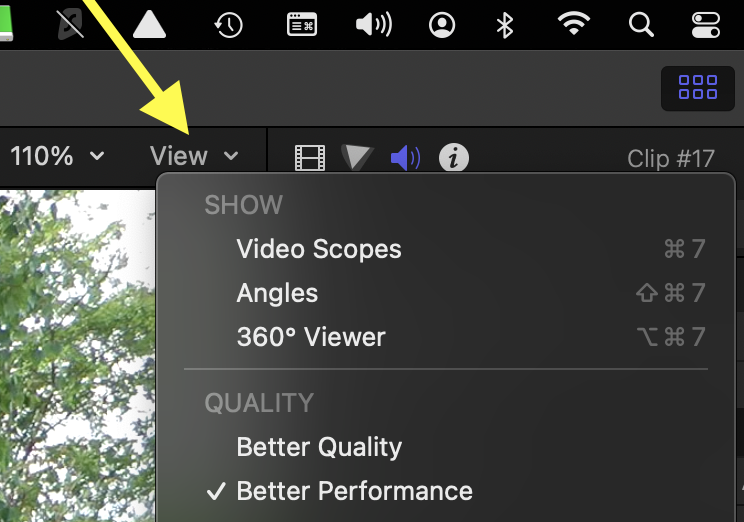
Make sure your playback quality is set to "Better Performance".
Please Log in to join the conversation.
- FinalCutdown
-
Topic Author
- Offline
- Elite Member
-
Less
More
- Posts: 222
- Thank you received: 4
12 Aug 2023 08:44 #126758
by FinalCutdown
Replied by FinalCutdown on topic How to find out how much disk space is needed for optimized media?
Thanks, the problem is I cannot see how long the clips used in the timeline are in total. I think its somehow possible to show at least the length of the clips contained in the timeline. But I forgot how.
It would be great if it would be possible to optimize only the bits used with handles, as some of my files are just fixed cameras for another viewing angle and are up to one hour long - and I use only five seconds of every clip. Is this somehow possible?
"Better Performance" looks even worse than using H264 HD proxies on my system, so its not an option for color grading and finishing.
It would be great if it would be possible to optimize only the bits used with handles, as some of my files are just fixed cameras for another viewing angle and are up to one hour long - and I use only five seconds of every clip. Is this somehow possible?
"Better Performance" looks even worse than using H264 HD proxies on my system, so its not an option for color grading and finishing.
Please Log in to join the conversation.
- FinalCutdown
-
Topic Author
- Offline
- Elite Member
-
Less
More
- Posts: 222
- Thank you received: 4
12 Aug 2023 16:25 #126767
by FinalCutdown
Replied by FinalCutdown on topic How to find out how much disk space is needed for optimized media?
I have the feeling that FCPx even doesnt "know" how much space is needed. I just had to delete all my proxies and recreate them and FCPx tells me that theres not enough disk space, although I already had generated them on the same drive.. Just not in a bunch but folder by folder. I guess I have to do it the same way again...
Please Log in to join the conversation.


12 Aug 2023 16:43 - 12 Aug 2023 16:44 #126769
by VTC
Replied by VTC on topic How to find out how much disk space is needed for optimized media?
The ProRes files I export run 1.1gb per minute. H264 files pop out around 15% (85% less) than that.
(One hour 1080 ProRes = 66gb. One Hour 1080 H264 = 10gb.)
(One hour 1080 ProRes = 66gb. One Hour 1080 H264 = 10gb.)
Last edit: 12 Aug 2023 16:44 by VTC.
Please Log in to join the conversation.
- FinalCutdown
-
Topic Author
- Offline
- Elite Member
-
Less
More
- Posts: 222
- Thank you received: 4
12 Aug 2023 17:08 - 12 Aug 2023 17:08 #126771
by FinalCutdown
Replied by FinalCutdown on topic How to find out how much disk space is needed for optimized media?
For that I have to show all my footage used in my timeline. I know it’s possible but forgot how
Last edit: 12 Aug 2023 17:08 by FinalCutdown.
Please Log in to join the conversation.
- FinalCutdown
-
Topic Author
- Offline
- Elite Member
-
Less
More
- Posts: 222
- Thank you received: 4
12 Aug 2023 21:28 #126781
by FinalCutdown
Replied by FinalCutdown on topic How to find out how much disk space is needed for optimized media?
Its not that easy to calculate: Sometimes I record with a 200 mbit codec, some footage is even shot with the iPhone stock camera at much less.
Please Log in to join the conversation.
- FinalCutdown
-
Topic Author
- Offline
- Elite Member
-
Less
More
- Posts: 222
- Thank you received: 4
12 Aug 2023 22:35 #126787
by FinalCutdown
Found it: Create a smart collection for used media. I hope that I will be able to optimize media in smaller batches.
Replied by FinalCutdown on topic How to find out how much disk space is needed for optimized media?
For that I have to show all my footage used in my timeline. I know it’s possible but forgot how
Found it: Create a smart collection for used media. I hope that I will be able to optimize media in smaller batches.
Please Log in to join the conversation.
- FinalCutdown
-
Topic Author
- Offline
- Elite Member
-
Less
More
- Posts: 222
- Thank you received: 4
13 Aug 2023 16:22 - 13 Aug 2023 16:22 #126799
by FinalCutdown
Replied by FinalCutdown on topic How to find out how much disk space is needed for optimized media?
So thats my workflow:
1. Create a smart collection with "used media"
2. Select all media in this folder and read the duration (in my case 3h 22min
3. Estimate average data rate of optimized media (in my case 688 Mb/s for Prores UHD with 4 audio Channels)
4. Calculate: (688/8 )*60*60=309.600 MB per Hour
309.600*3,3=1.021.680 So it should be just over one TB if I am right..
1. Create a smart collection with "used media"
2. Select all media in this folder and read the duration (in my case 3h 22min
3. Estimate average data rate of optimized media (in my case 688 Mb/s for Prores UHD with 4 audio Channels)
4. Calculate: (688/8 )*60*60=309.600 MB per Hour
309.600*3,3=1.021.680 So it should be just over one TB if I am right..
Last edit: 13 Aug 2023 16:22 by FinalCutdown.
Please Log in to join the conversation.
