


- Posts: 11
- Thank you received: 0
3 Post Moderation Rule for New Boarders (25 Jan 2021)
New boarders will have their posts moderated - Don't worry if you cannot see your post immediately.
M2 MCB Max and Monitors
- Dhruv FCPX
-
 Topic Author
- Offline
- New Member
-

Less
More
06 Aug 2023 12:41 #126701
by Dhruv FCPX
M2 MCB Max and Monitors was created by Dhruv FCPX
Hi guys
Apologies if this has been covered before.
Years ago when I was on Windows I used to have a breakout box on my NLE..which gave me an output to monitor
full scree full quality video on a Tv. With Mac and FCP I have never been able to figure out how to do this. I was advised to buy a separate gadget to achieve this. However now I am thinking to upgrade from Trash Can shape MacPro to M2 notebook pro Max. How would I get a Full Screen Full Resoultion video on a 4K Monitor? (Not just the enlarged video preview window in FCP} Do I still need to buy a dock or something?
Apologies if this has been covered before.
Years ago when I was on Windows I used to have a breakout box on my NLE..which gave me an output to monitor
full scree full quality video on a Tv. With Mac and FCP I have never been able to figure out how to do this. I was advised to buy a separate gadget to achieve this. However now I am thinking to upgrade from Trash Can shape MacPro to M2 notebook pro Max. How would I get a Full Screen Full Resoultion video on a 4K Monitor? (Not just the enlarged video preview window in FCP} Do I still need to buy a dock or something?
Please Log in to join the conversation.


06 Aug 2023 20:02 #126702
by VTC
Replied by VTC on topic M2 MCB Max and Monitors
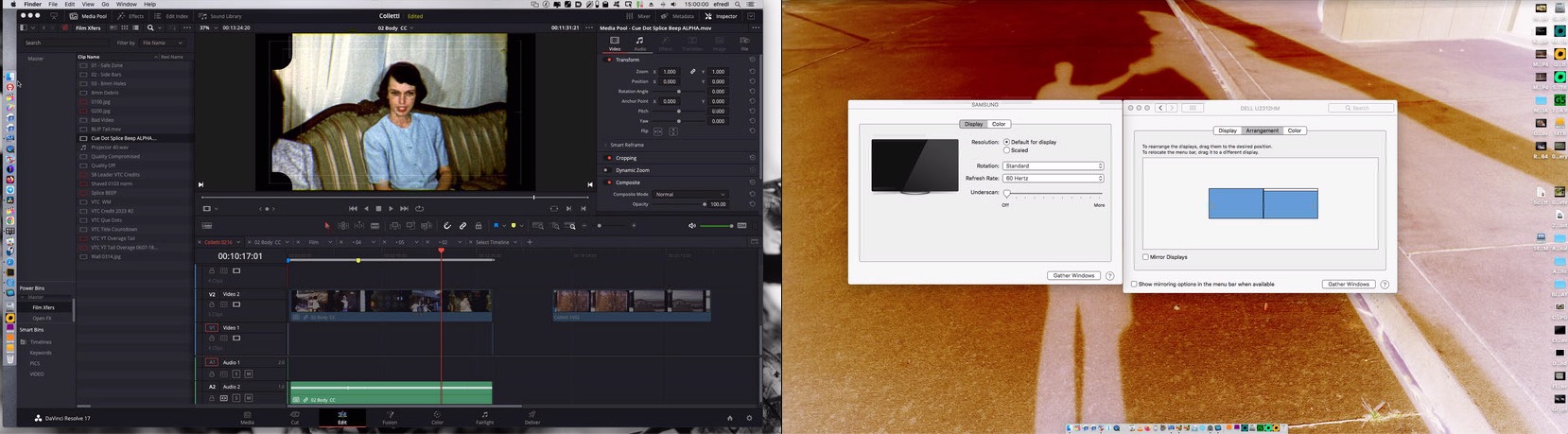
I've never found things more complicated than simply plugging a cable into the computer. No breakout box needed. This setup is four different computers connecting via a 4 port KVM device piped into a Samsung TV & Dell display in the lobby. Even if I only connected to a single computer I could still output from the HDMI ports direct to multiple TVs or displays at will. No intervening box required.
Please Log in to join the conversation.
- Dhruv FCPX
-
Topic Author
- Offline
- New Member
-
Less
More
- Posts: 11
- Thank you received: 0
08 Aug 2023 07:00 #126708
by Dhruv FCPX
Replied by Dhruv FCPX on topic M2 MCB Max and Monitors
Would this show full screen video while editing?
Please Log in to join the conversation.
08 Aug 2023 18:06 #126721
by VTC
Replied by VTC on topic M2 MCB Max and Monitors
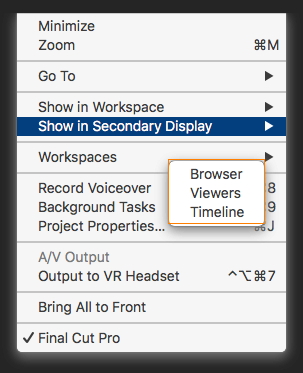
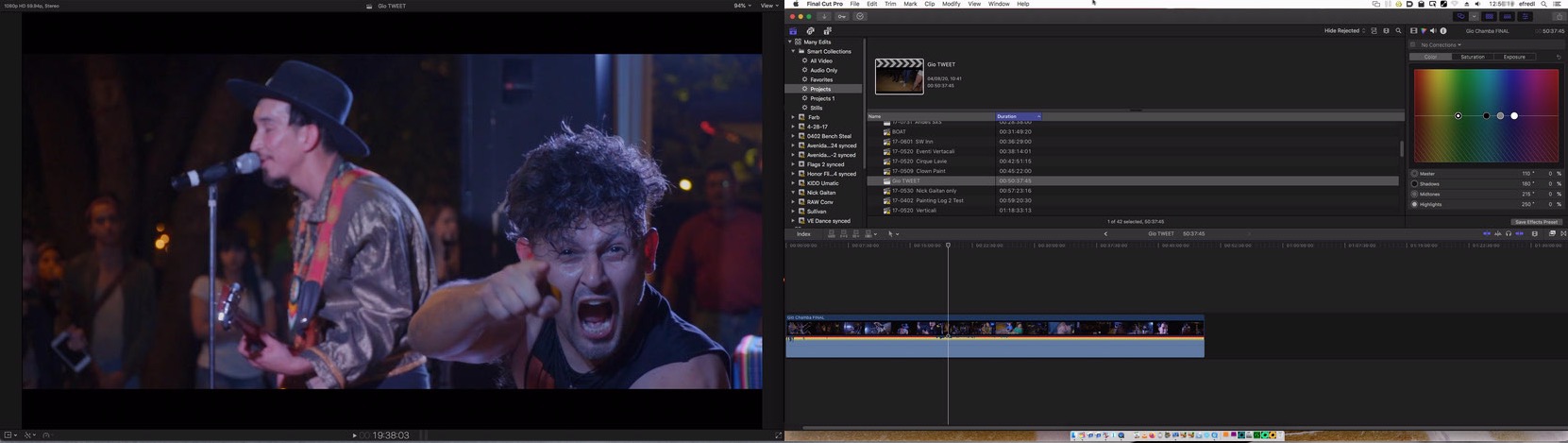
Certainly. This has full viewer on the 32" Samsung (L) and the timeline on the 24" Dell (R).
Please Log in to join the conversation.
- FinalCutdown
-

- Offline
- Elite Member
-

Less
More
- Posts: 222
- Thank you received: 4
09 Aug 2023 08:22 - 09 Aug 2023 08:23 #126725
by FinalCutdown
Replied by FinalCutdown on topic M2 MCB Max and Monitors
As long as you don't work with interlaced video for broadcast and use a properly calibrated monitor, you could get around with an external monitor. I bought the BM mini monitor 3g, which is quite cheap and works in HD. I record in UHD but only have to output in HD, so this is fine for me. This way I can get around this interlaced flickering, have a highly accurate color and I can use a third monitor for the browser window.
BUT the downside is: The MBP max m2 always crashes when waking up from sleep and I hit play with the box connected - so you have to set it to never sleep (a lot of us do this anyway).
AND I have to switch to 50p when I view my UHD 50p footage in the browser and work in a 50p timeline until finalizing - otherwise there is massive shuttering due to the 50i realtime conversion. Then at the end I copy everything over to a 50i timeline and set the box to 50i so I can see the end result for grading and finalizing.
BUT the downside is: The MBP max m2 always crashes when waking up from sleep and I hit play with the box connected - so you have to set it to never sleep (a lot of us do this anyway).
AND I have to switch to 50p when I view my UHD 50p footage in the browser and work in a 50p timeline until finalizing - otherwise there is massive shuttering due to the 50i realtime conversion. Then at the end I copy everything over to a 50i timeline and set the box to 50i so I can see the end result for grading and finalizing.
Last edit: 09 Aug 2023 08:23 by FinalCutdown.
Please Log in to join the conversation.
10 Aug 2023 01:28 #126728
by VTC
Replied by VTC on topic M2 MCB Max and Monitors
Am I doing something wrong? No no no. Don't tell me what it is. Somehow I've managed to output all sorts of frame rates from FCP to the Samsung without suffering any problems or placing some breakout box into the mix.
There's no way I'd use a TV to color grade but after all it's a TV with a rather coarse color profile in comparison to the calibrated displays but it's acceptable enough for presenting the edit.
There's no way I'd use a TV to color grade but after all it's a TV with a rather coarse color profile in comparison to the calibrated displays but it's acceptable enough for presenting the edit.
Please Log in to join the conversation.
- FinalCutdown
-
- Offline
- Elite Member
-
Less
More
- Posts: 222
- Thank you received: 4
10 Aug 2023 05:40 #126732
by FinalCutdown
Replied by FinalCutdown on topic M2 MCB Max and Monitors
That's what I said.  You can get away with color with this output and you can output all frame rates - BUT if you need to work with an interlaced timeline you will get stuttering motion on your output. Do you work in interlaced - 25i?
You can get away with color with this output and you can output all frame rates - BUT if you need to work with an interlaced timeline you will get stuttering motion on your output. Do you work in interlaced - 25i? Please Log in to join the conversation.
- FinalCutdown
-
- Offline
- Elite Member
-
Less
More
- Posts: 222
- Thank you received: 4
11 Aug 2023 06:07 #126742
by FinalCutdown
By the way: What about a decent external monitor which is software calibrated with an xrite?
Replied by FinalCutdown on topic M2 MCB Max and Monitors
There's no way I'd use a TV to color grade.
By the way: What about a decent external monitor which is software calibrated with an xrite?
Please Log in to join the conversation.
- Dhruv FCPX
-
Topic Author
- Offline
- New Member
-
Less
More
- Posts: 11
- Thank you received: 0
11 Aug 2023 11:07 #126743
by Dhruv FCPX
Replied by Dhruv FCPX on topic M2 MCB Max and Monitors
Thank you all guys...what I am still not clear about is:
Would I get full screen Full Quality video on external monitor? Sending the VIWER window will only enlarge that window on a separate monitor..so it would be same as making it full screen in FPC..right? I really need just the Best quality video ..on a Client Monitor..I know Aja D-Tap Pro will do it at a cost of £1200! But can I do it from FPC without additional gadget on a M@ Macbook Pro Max?
Would I get full screen Full Quality video on external monitor? Sending the VIWER window will only enlarge that window on a separate monitor..so it would be same as making it full screen in FPC..right? I really need just the Best quality video ..on a Client Monitor..I know Aja D-Tap Pro will do it at a cost of £1200! But can I do it from FPC without additional gadget on a M@ Macbook Pro Max?
Please Log in to join the conversation.
- FinalCutdown
-
- Offline
- Elite Member
-
Less
More
- Posts: 222
- Thank you received: 4
11 Aug 2023 11:09 #126744
by FinalCutdown
Replied by FinalCutdown on topic M2 MCB Max and Monitors
Again: Get an Ultrastudio Mini Monitor 3G vor 130 Euros. Full Quality HD.
Please Log in to join the conversation.
11 Aug 2023 21:10 - 11 Aug 2023 21:11 #126752
by dmetz
Replied by dmetz on topic M2 MCB Max and Monitors
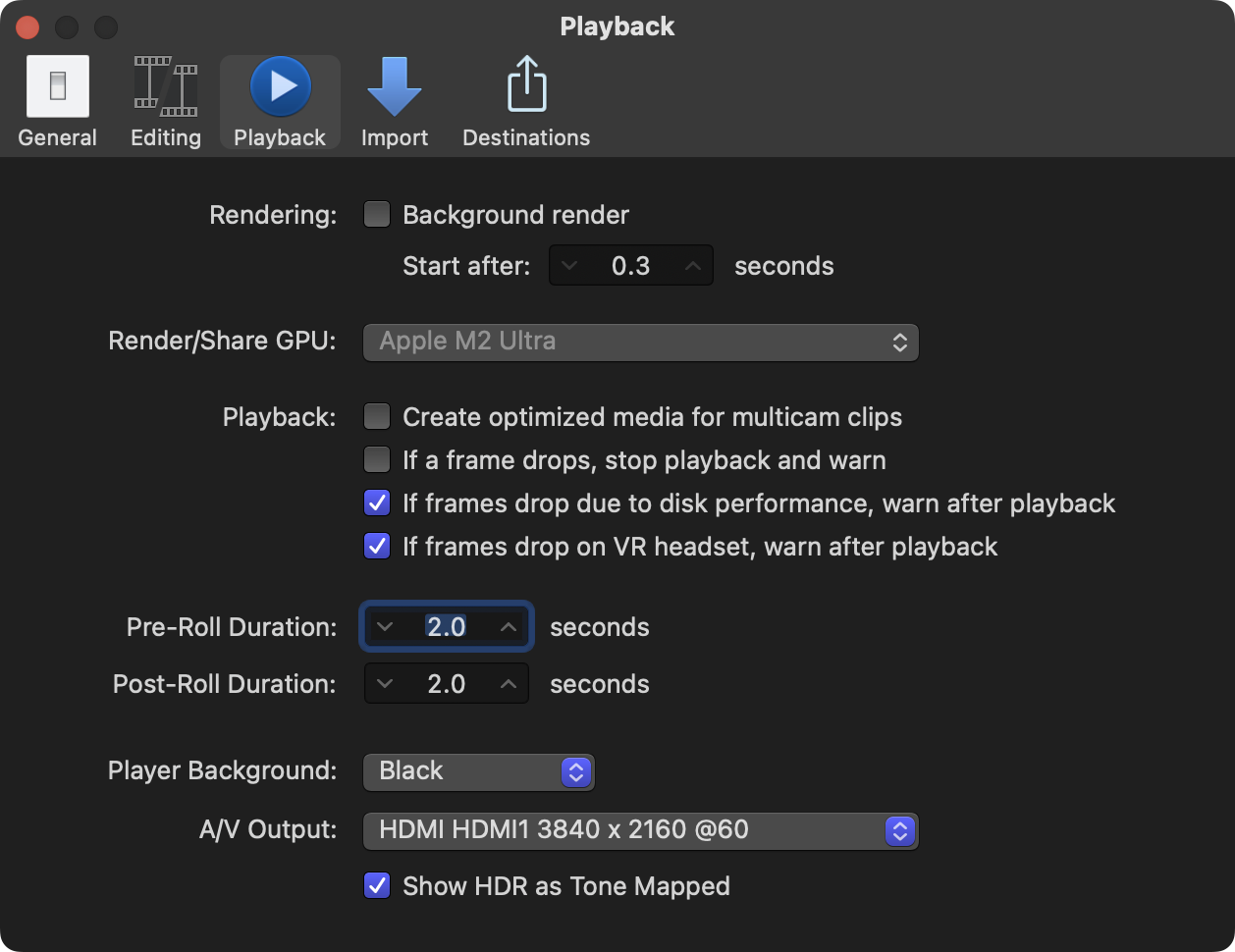
Regardless of the monitor, you can choose an external to be a client monitor without additional hardware (not a Viewer pane, straight video output).
- First, connect your peripherals - will the laptop have more than one monitor connected (aside from the built-in)?
- Go to FCP Settings... in the Playback pane, choose which monitor you want to use in the A/V Output dropdown. Then close prefs.
- Go to the Window menu and select A/V Output (it's a toggle)
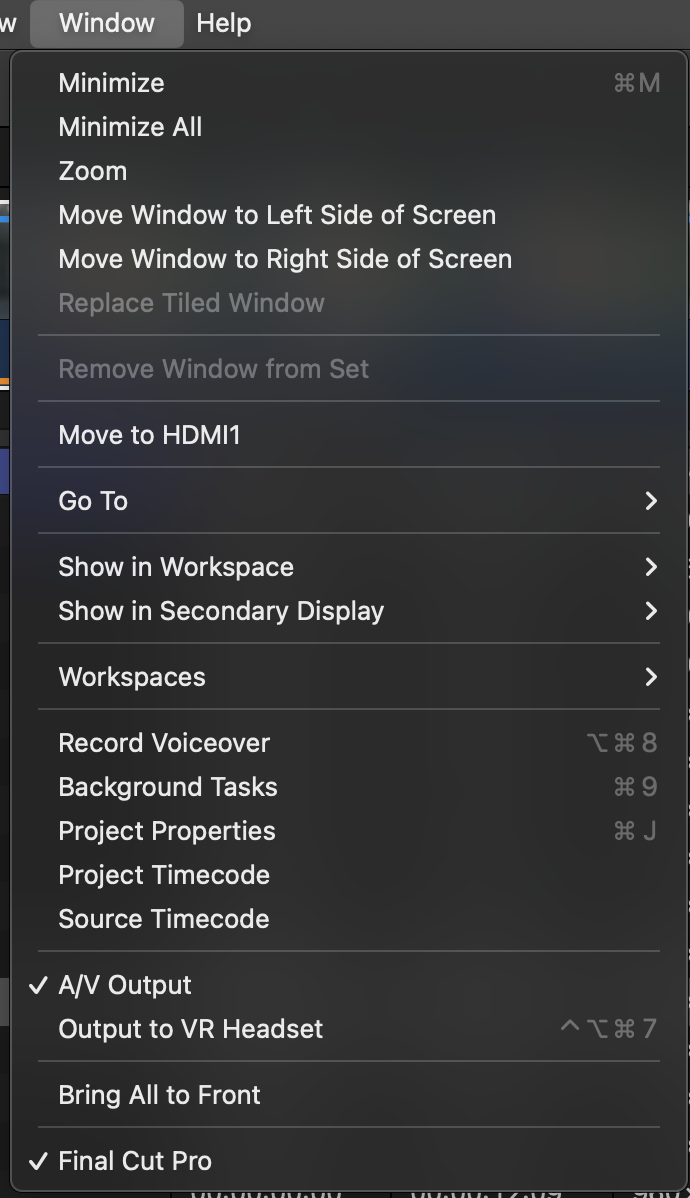
- First, connect your peripherals - will the laptop have more than one monitor connected (aside from the built-in)?
- Go to FCP Settings... in the Playback pane, choose which monitor you want to use in the A/V Output dropdown. Then close prefs.
- Go to the Window menu and select A/V Output (it's a toggle)
Last edit: 11 Aug 2023 21:11 by dmetz.
Please Log in to join the conversation.
- FinalCutdown
-
- Offline
- Elite Member
-
Less
More
- Posts: 222
- Thank you received: 4
12 Aug 2023 08:51 #126759
by FinalCutdown
Replied by FinalCutdown on topic M2 MCB Max and Monitors
Its a pity that we cannot use PCI cards on our macs. This way we could have clean UHD output for less than 200 bucks (decklink mini monitor 4k). If you need UHD the breakout boxes are very expensive. And you always need a monitor that can be hardware calibrated as with a breakout box you cannot use color profiles and software calibration because its the meaning of the box to have a clean output. I am using the LG Electronics 32UN880-B - which even supports UHD and can be hardware calibrated and I was lucky to get it for 400 Euros. So in total I paid around 530 Euros to have a "proper" clean 32 Inch HD output.
Please Log in to join the conversation.
12 Aug 2023 16:32 - 12 Aug 2023 16:35 #126768
by VTC
Replied by VTC on topic M2 MCB Max and Monitors
Here's where reality raises its ugly and unavoidable head.
The only time and place your edit will be 'genuine' is on the device you created it. After that there's an unlimited combination of devices and viewing conditions that'll affect what people experience.
- - - - LOBBY VIEWING - - - -
32" Samsung can be set to: Standard, Movie, Dynamic.
48" Sony can be set to: Vivid, Standard, Custom which further breaks down to Auto, General, Photo, Music, Cinema, Game, Graphics, Sports.
- - - - -
and even then after carefully matching them the Samsung presents harsher (which I favor) than the softer Sony placed but 4 feet away. Mix in fluorescent lights from the ceiling with gentle daylight washing in come mornings versus the brutal setting sun come afternoons here and you've got yourself a cornucopia of versions all from the same video.
Then there's mobile devices and tablets set up to who knows what color scheme and resolution so my approach is not fretting the FULL QUALITY moniker you seek (FQ ProRes being necessarily different than a FQ h264 is different than a FQ MP4 is different than a FQ AVI).
I'll leave you with this... Have an audiophile friend who replaced his $15,000 speaker cables with $35K ones after carefully A/B ing the setup insisting he could discern a definite improvement, all in which the audio envelope changes the moment a chair isn't pushed back beneath the dining table or the closet door gets left open. (I didn't have the heart to point out that he was still listening to his pricey music setup with the same $10 ears.)
The only time and place your edit will be 'genuine' is on the device you created it. After that there's an unlimited combination of devices and viewing conditions that'll affect what people experience.
- - - - LOBBY VIEWING - - - -
32" Samsung can be set to: Standard, Movie, Dynamic.
48" Sony can be set to: Vivid, Standard, Custom which further breaks down to Auto, General, Photo, Music, Cinema, Game, Graphics, Sports.
- - - - -
and even then after carefully matching them the Samsung presents harsher (which I favor) than the softer Sony placed but 4 feet away. Mix in fluorescent lights from the ceiling with gentle daylight washing in come mornings versus the brutal setting sun come afternoons here and you've got yourself a cornucopia of versions all from the same video.
Then there's mobile devices and tablets set up to who knows what color scheme and resolution so my approach is not fretting the FULL QUALITY moniker you seek (FQ ProRes being necessarily different than a FQ h264 is different than a FQ MP4 is different than a FQ AVI).
I'll leave you with this... Have an audiophile friend who replaced his $15,000 speaker cables with $35K ones after carefully A/B ing the setup insisting he could discern a definite improvement, all in which the audio envelope changes the moment a chair isn't pushed back beneath the dining table or the closet door gets left open. (I didn't have the heart to point out that he was still listening to his pricey music setup with the same $10 ears.)
Last edit: 12 Aug 2023 16:35 by VTC.
Please Log in to join the conversation.
- FinalCutdown
-
- Offline
- Elite Member
-
Less
More
- Posts: 222
- Thank you received: 4
12 Aug 2023 21:45 #126783
by FinalCutdown
Replied by FinalCutdown on topic M2 MCB Max and Monitors
That's right: For the clients bigger ist better most of the time. as long as they don't see tooo many flaws of the footage. I was looking for the cheapest hardware setup for color grading and I think it kind of works, as long as the environment is fine.
as long as they don't see tooo many flaws of the footage. I was looking for the cheapest hardware setup for color grading and I think it kind of works, as long as the environment is fine. Please Log in to join the conversation.
