




- Posts: 15
- Thank you received: 0
3 Post Moderation Rule for New Boarders (25 Jan 2021)
New boarders will have their posts moderated - Don't worry if you cannot see your post immediately.
Broadcast volume levels
25 Jul 2023 18:11 #126566
by BIllF
Broadcast volume levels was created by BIllF
Is there a way to lower a project's volume level universally? Still confused as to what the best output level is for commercial broadcast.
Please Log in to join the conversation.

26 Jul 2023 15:31 #126573
by animatola
Replied by animatola on topic Broadcast volume levels
You could just export your Mix as .wav and use Auphonic.com with the appropriate level preset for your deliverables, like -23 LUFS for EBU128 standard.
auphonic.com/help/algorithms/singletrack...nd-true-peak-limiter
It's super easy, works great and they give you 2 hours of uploads for free every month.
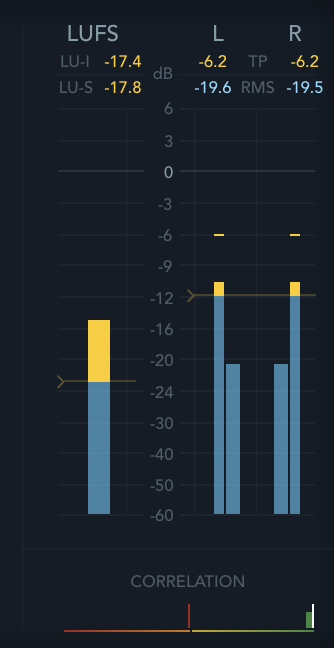
If you want to do it manually, you can select everything in you timeline, make a compound clip and then add the Multimeter audio-effect to it, this displays your program and short term loudness while you play your edit. Then adjust the gain of the compound clip or work with one of the compressors to get to the desired levels.
It's super easy, works great and they give you 2 hours of uploads for free every month.
If you want to do it manually, you can select everything in you timeline, make a compound clip and then add the Multimeter audio-effect to it, this displays your program and short term loudness while you play your edit. Then adjust the gain of the compound clip or work with one of the compressors to get to the desired levels.
Please Log in to join the conversation.

26 Jul 2023 15:42 - 26 Jul 2023 15:48 #126574
by dmetz
Replied by dmetz on topic Broadcast volume levels
For broadcast output I'll typically duplicate my final timeline, select everything, and make it a compound clip (with ISCI name). After that, you can apply your master audio changes to the compound clip.
Check with your distribution partner for levels, as they can vary. Most often, they'll want a CALM-compliant file mixed to -24 LKFS. I do that last step with Waves WLM Plus.
Check with your distribution partner for levels, as they can vary. Most often, they'll want a CALM-compliant file mixed to -24 LKFS. I do that last step with Waves WLM Plus.
Last edit: 26 Jul 2023 15:48 by dmetz.
Please Log in to join the conversation.
- FinalCutdown
-

- Offline
- Elite Member
-

Less
More
- Posts: 222
- Thank you received: 4
26 Jul 2023 18:24 - 26 Jul 2023 18:24 #126578
by FinalCutdown
Replied by FinalCutdown on topic Broadcast volume levels
Control+a to select all Clips then ctrl and + or - to change everything by one db. Broadcast in europe is mostly -23 LUFS. It can vary by +- 1 db so those 1 db steps are fine.
Last edit: 26 Jul 2023 18:24 by FinalCutdown.
Please Log in to join the conversation.
- FinalCutdown
-
- Offline
- Elite Member
-
Less
More
- Posts: 222
- Thank you received: 4
27 Jul 2023 11:06 #126588
by FinalCutdown
Replied by FinalCutdown on topic Broadcast volume levels
Personally I am using Youlean Loudness Meter 2 Pro. Just do a quick Wav-Export import it in Youlean, then you can see the loudness variation as a graphic. Then you can correct very quiet or loud parts in your edit and add the overall volume change to all clips so you get to the integrated target loudness.
Please Log in to join the conversation.


29 Jul 2023 05:41 #126597
by sc_fox
Replied by sc_fox on topic Broadcast volume levels
This is the Final Cut representation of audio in the storyline:
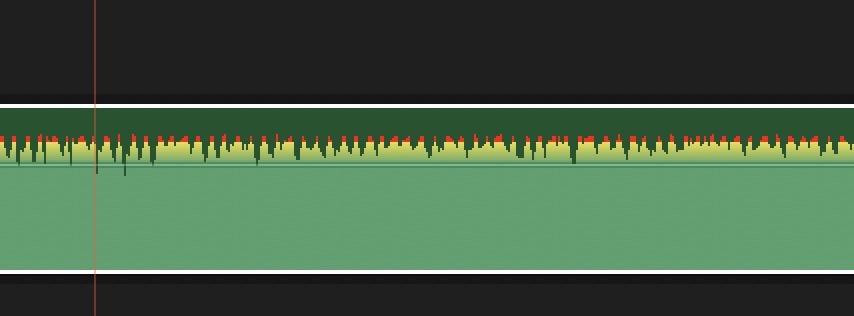
You know that "line" you can grab and move up or down to change the volume, keep that in mind.
Any waveform above the line is loud. Very short sections above the line *might* be allowable (depends on the sound, like: jet engines, etc...)
Any part of the waveform that is yellow is in the "warning zone"... even more loud (or too loud).
Any part of the waveform that is red : SHOULD NOT EXIST!
Any part of the waveform that is "flat across the top" (and red) is going to clip (sound like it's going through a fuzz box).
Your audio should "touch the line" without going over.
After you adjust it to this point, use your ears.
Put on a set of decent headphones and set the Mac's output volume to 50%.
Listen. It should be a comfortable experience. Not too loud that you cringe, not too soft that you have to strain to hear. Fine tune the audio accordingly. (Typically — *down*).
Going on about LUFS, LKFS, or even simply the traditional dB is bound to be confusing. All that stuff takes a good while to learn. I submit that it is all intended to scare off and/or confuse "newbies"... and when people start bringing up subjects like LUFS, etc... I want to know their credentials before I start to buy into anything they're about to say. I've used LUFS meters... I'm not convinced there's any advantage. I don't care how you measure it — metric or imperial, meter or yardstick..., audio is audio.
Final Cut makes it all easy for you. Comfortable is good.
Take it from somebody who's had tinnitus for nearly 40 years — you don't want to purposely damage somebody's hearing with audio that is too loud. Let them do it to themselves — that's what volume controls are for!
You know that "line" you can grab and move up or down to change the volume, keep that in mind.
Any waveform above the line is loud. Very short sections above the line *might* be allowable (depends on the sound, like: jet engines, etc...)
Any part of the waveform that is yellow is in the "warning zone"... even more loud (or too loud).
Any part of the waveform that is red : SHOULD NOT EXIST!
Any part of the waveform that is "flat across the top" (and red) is going to clip (sound like it's going through a fuzz box).
Your audio should "touch the line" without going over.
After you adjust it to this point, use your ears.
Put on a set of decent headphones and set the Mac's output volume to 50%.
Listen. It should be a comfortable experience. Not too loud that you cringe, not too soft that you have to strain to hear. Fine tune the audio accordingly. (Typically — *down*).
Going on about LUFS, LKFS, or even simply the traditional dB is bound to be confusing. All that stuff takes a good while to learn. I submit that it is all intended to scare off and/or confuse "newbies"... and when people start bringing up subjects like LUFS, etc... I want to know their credentials before I start to buy into anything they're about to say. I've used LUFS meters... I'm not convinced there's any advantage. I don't care how you measure it — metric or imperial, meter or yardstick..., audio is audio.
Final Cut makes it all easy for you. Comfortable is good.
Take it from somebody who's had tinnitus for nearly 40 years — you don't want to purposely damage somebody's hearing with audio that is too loud. Let them do it to themselves — that's what volume controls are for!
Please Log in to join the conversation.
31 Jul 2023 16:58 #126616
by dmetz
Replied by dmetz on topic Broadcast volume levels
Comfort and ease is totally fine for most non-broadcast work, no argument there.
The OP asked specifically about broadcast output, which in most cases requires adherence to strict specifications. Failure to meet those specs can result in the output file being rejected - so your spot doesn't make the rotation and the client just wasted a bunch of money on scheduling and/or it doesn't run when it was supposed to.
The technical terms used are part of those specs, and the advice given here is intended genuinely and sincerely, definitely not trying to scare anybody away. It does take some knowledge though, so if you're not inclined or don't have time to learn how, a competent studio can work with you to get a compliant mix. Don't miss that submission deadline!
The OP asked specifically about broadcast output, which in most cases requires adherence to strict specifications. Failure to meet those specs can result in the output file being rejected - so your spot doesn't make the rotation and the client just wasted a bunch of money on scheduling and/or it doesn't run when it was supposed to.
The technical terms used are part of those specs, and the advice given here is intended genuinely and sincerely, definitely not trying to scare anybody away. It does take some knowledge though, so if you're not inclined or don't have time to learn how, a competent studio can work with you to get a compliant mix. Don't miss that submission deadline!
Please Log in to join the conversation.
- FinalCutdown
-
- Offline
- Elite Member
-
Less
More
- Posts: 222
- Thank you received: 4
03 Aug 2023 06:37 - 03 Aug 2023 06:37 #126660
by FinalCutdown
Absolutely right. It's always the same: Some sound "professionals" claim the mix only by ear , colorist claim they just look at their professional monitor and never at scopes. But QC is always by eye AND automatically so you need to use the same tools they use to be safe.
Looking at the waveform in FCPx is in no way reliable as its NOT loudness and its even not an accurate volume-representation, you cannot see clicks or pops which will cross 0db and on some speakers you will not even be able to hear them if they are very short.
Replied by FinalCutdown on topic Broadcast volume levels
Comfort and ease is totally fine for most non-broadcast work, no argument there.
The OP asked specifically about broadcast output, which in most cases requires adherence to strict specifications. Failure to meet those specs can result in the output file being rejected - so your spot doesn't make the rotation and the client just wasted a bunch of money on scheduling and/or it doesn't run when it was supposed to.
The technical terms used are part of those specs, and the advice given here is intended genuinely and sincerely, definitely not trying to scare anybody away. It does take some knowledge though, so if you're not inclined or don't have time to learn how, a competent studio can work with you to get a compliant mix. Don't miss that submission deadline!
Absolutely right. It's always the same: Some sound "professionals" claim the mix only by ear , colorist claim they just look at their professional monitor and never at scopes. But QC is always by eye AND automatically so you need to use the same tools they use to be safe.
Looking at the waveform in FCPx is in no way reliable as its NOT loudness and its even not an accurate volume-representation, you cannot see clicks or pops which will cross 0db and on some speakers you will not even be able to hear them if they are very short.
Last edit: 03 Aug 2023 06:37 by FinalCutdown.
Please Log in to join the conversation.
