


- Posts: 4
- Thank you received: 0
3 Post Moderation Rule for New Boarders (25 Jan 2021)
New boarders will have their posts moderated - Don't worry if you cannot see your post immediately.
Green Screen
- MikeStephenson
-
 Topic Author
- Offline
- New Member
-

Less
More
24 Jul 2023 14:31 #126541
by MikeStephenson
Green Screen was created by MikeStephenson
Hi lads and lasses
Newbie here, in fact this is my first post.
I have recorded some guitar instrumentals and I want to post some of the videos on YouTube. Just me standing there with a guitar is boring so I want to get into green screen stuff, and I have a couple of questions if anyone can help?
I've been looking at some of those portable green screens on eBay, the pop-up ones, but I am often being told that they are old-fashioned and that software can do a better job.
I've got an old iPhone, FilmicPro, Zhiyun Smooth 4 and of course FCPX, and I'm using a Mac.
If anyone has any advice it would be appreciated.
Thanks in advance
Mike
Newbie here, in fact this is my first post.
I have recorded some guitar instrumentals and I want to post some of the videos on YouTube. Just me standing there with a guitar is boring so I want to get into green screen stuff, and I have a couple of questions if anyone can help?
I've been looking at some of those portable green screens on eBay, the pop-up ones, but I am often being told that they are old-fashioned and that software can do a better job.
I've got an old iPhone, FilmicPro, Zhiyun Smooth 4 and of course FCPX, and I'm using a Mac.
If anyone has any advice it would be appreciated.
Thanks in advance
Mike
Please Log in to join the conversation.


24 Jul 2023 17:14 #126543
by VidGreg
Replied by VidGreg on topic Green Screen
Welcome Mike to the fcp.co forums
I think one of the questions you pose is whether or not the software isolation is now good enough to not need "green screens" anymore.
Good question to ask and folks will have different opinions.
I think there is still good reasons to use a dedicated green screen. My experience so far, is that it is easier to clean up the green screen shots than looking for poor isolation where the background is constantly changing. Some image areas may not get properly handled, like areas that get enclosed but leave original background in say the area around arms on hip. Hard to notice if original background is close to replacement. Green screen really stands out.
AI/ML has come and long way to being able to isolate subjects and can be totally perfect, but mostly not and careful editing is needed. Look forward to the day of not needing to do any masking or "rotoscoping" as that is really time consuming. Being able to isolate a moving subject in natural environment without artifacts will be a game changer and I think we are almost there.
As to using a green screen to isolate a static subject playing a guitar, I would indeed use a green screen, or any other solid color background. Paint a wall green, or blue, or purple, etc… and you can key out that color.
Rooms sometimes have one wall that is an accent color and that an be used. Easy to do in recording studio.
Another advantage to a screen/wall is that a the surface is typically flat which helps with isolation and lighting.
WARNING: Make sure that the talent does not wear clothing that contains the same color as the "green screen" and that nothing in the background is the same color/hue. (Unless you want a floating head;-) )
I have several versions of green, blue fabric that I can drape, hang and a smaller pop open screen for talking head shots.
Hope others will chime in about the current state of AI isolation/lifting in video. Is it good enough?
What programs work best? Do you still use "green screens"
Hope this Helps, Greg
I think one of the questions you pose is whether or not the software isolation is now good enough to not need "green screens" anymore.
Good question to ask and folks will have different opinions.
I think there is still good reasons to use a dedicated green screen. My experience so far, is that it is easier to clean up the green screen shots than looking for poor isolation where the background is constantly changing. Some image areas may not get properly handled, like areas that get enclosed but leave original background in say the area around arms on hip. Hard to notice if original background is close to replacement. Green screen really stands out.
AI/ML has come and long way to being able to isolate subjects and can be totally perfect, but mostly not and careful editing is needed. Look forward to the day of not needing to do any masking or "rotoscoping" as that is really time consuming. Being able to isolate a moving subject in natural environment without artifacts will be a game changer and I think we are almost there.
As to using a green screen to isolate a static subject playing a guitar, I would indeed use a green screen, or any other solid color background. Paint a wall green, or blue, or purple, etc… and you can key out that color.
Rooms sometimes have one wall that is an accent color and that an be used. Easy to do in recording studio.
Another advantage to a screen/wall is that a the surface is typically flat which helps with isolation and lighting.
WARNING: Make sure that the talent does not wear clothing that contains the same color as the "green screen" and that nothing in the background is the same color/hue. (Unless you want a floating head;-) )
I have several versions of green, blue fabric that I can drape, hang and a smaller pop open screen for talking head shots.
Hope others will chime in about the current state of AI isolation/lifting in video. Is it good enough?
What programs work best? Do you still use "green screens"
Hope this Helps, Greg
Please Log in to join the conversation.
- MikeStephenson
-
Topic Author
- Offline
- New Member
-
Less
More
- Posts: 4
- Thank you received: 0
24 Jul 2023 18:50 #126546
by MikeStephenson
Replied by MikeStephenson on topic Green Screen
Thanks for your response.
I'm old and retired from gigging, so now I just want to dabble in FCPX and put some guitar instrumentals up: nothing fancy, just a very basic video with different backdrops.
I believe green screen is still the way to go, and because my flat is small I don't have a wall available to paint, or even put up a large green sheet.
I've looked at places like Canva for their background remover but a couple of my old mates have not been too impressed with it, that's why I thought I'd ask on here.
Once again, thanks for your response.
Mike.
I'm old and retired from gigging, so now I just want to dabble in FCPX and put some guitar instrumentals up: nothing fancy, just a very basic video with different backdrops.
I believe green screen is still the way to go, and because my flat is small I don't have a wall available to paint, or even put up a large green sheet.
I've looked at places like Canva for their background remover but a couple of my old mates have not been too impressed with it, that's why I thought I'd ask on here.
Once again, thanks for your response.
Mike.
Please Log in to join the conversation.
- Karsten Schlüter
-

- Offline
- Moderator
-

Less
More
- Posts: 3790
- Thank you received: 718
25 Jul 2023 05:18 #126552
by Karsten Schlüter
Replied by Karsten Schlüter on topic Green Screen
Welcome Mike to fcp.co 
just to add my 5¢ …
I would give one of those pop-up green-screens a go…
That differentiate-ML-matte thingie asks for a rock solid tripod, and a very static background - so no window with a view, no birdie in a cage, no changing light situations. And it asks for a 'newer' Mac with a Apple-silicon-M-CPU.
Green-screen with FCP is a no brainer, FCP is very good-natured, could get tricky in small situations ('spill') - consider a cheap LED-light you put btw. your back and the screen (for our school projects we had such a set, "the worst GS ever" I recalled it, with superb results). Or a soft-box, full frontal/slightly from above (China/50€) …
Only advantage for the 'magic' solution: perfect compo due to identical light situation…
Oh, on your shopping-list missing: a good mic.
Sounds like a fun project
just to add my 5¢ …
I would give one of those pop-up green-screens a go…
That differentiate-ML-matte thingie asks for a rock solid tripod, and a very static background - so no window with a view, no birdie in a cage, no changing light situations. And it asks for a 'newer' Mac with a Apple-silicon-M-CPU.
Green-screen with FCP is a no brainer, FCP is very good-natured, could get tricky in small situations ('spill') - consider a cheap LED-light you put btw. your back and the screen (for our school projects we had such a set, "the worst GS ever" I recalled it, with superb results). Or a soft-box, full frontal/slightly from above (China/50€) …
Only advantage for the 'magic' solution: perfect compo due to identical light situation…
Oh, on your shopping-list missing: a good mic.
Sounds like a fun project
Please Log in to join the conversation.


25 Jul 2023 14:41 #126564
by jrm
Replied by jrm on topic Green Screen
A few thoughts on green screen...
The portable ones work well. The fabric ones can be bulky and annoying to set up. They wrinkle easy, but that can be mitigated by using clamps to stretch the fabric across the stands.
They also make a large collapsable screen that folds into a bag. That can be hung on a single stand and doesn't wrinkle.
Whatever you get, make sure it is wide enough. Your guitar neck extends the necessary width more than you think. Attempting to mask out part of the head that sticks out is not fun at all.
Ideally, you can to light the green screen separately and as evenly as possible. You also want to create as much distance as you can between you and the screen. Also avoid wearing white to reduce "spill" as mush as possible.
The portable ones work well. The fabric ones can be bulky and annoying to set up. They wrinkle easy, but that can be mitigated by using clamps to stretch the fabric across the stands.
They also make a large collapsable screen that folds into a bag. That can be hung on a single stand and doesn't wrinkle.
Whatever you get, make sure it is wide enough. Your guitar neck extends the necessary width more than you think. Attempting to mask out part of the head that sticks out is not fun at all.
Ideally, you can to light the green screen separately and as evenly as possible. You also want to create as much distance as you can between you and the screen. Also avoid wearing white to reduce "spill" as mush as possible.
Please Log in to join the conversation.


25 Jul 2023 17:22 - 25 Jul 2023 17:25 #126565
by Ian Brown
Replied by Ian Brown on topic Green Screen
Cap'n Pugwash reporting for duty, Karsten!
Mike - I have tested out the Scene Removal Mask in FCP and it is pretty good.
Give it a try . . . it won't cost anything and it may be all you need.
Just make sure your camera is on a tripod and shoot a few seconds of video before you or the talent enters the scene.
Mike - I have tested out the Scene Removal Mask in FCP and it is pretty good.
Give it a try . . . it won't cost anything and it may be all you need.
Just make sure your camera is on a tripod and shoot a few seconds of video before you or the talent enters the scene.
Last edit: 25 Jul 2023 17:25 by Ian Brown.
Please Log in to join the conversation.
26 Jul 2023 13:45 - 26 Jul 2023 13:47 #126572
by Ian Brown
Replied by Ian Brown on topic Green Screen
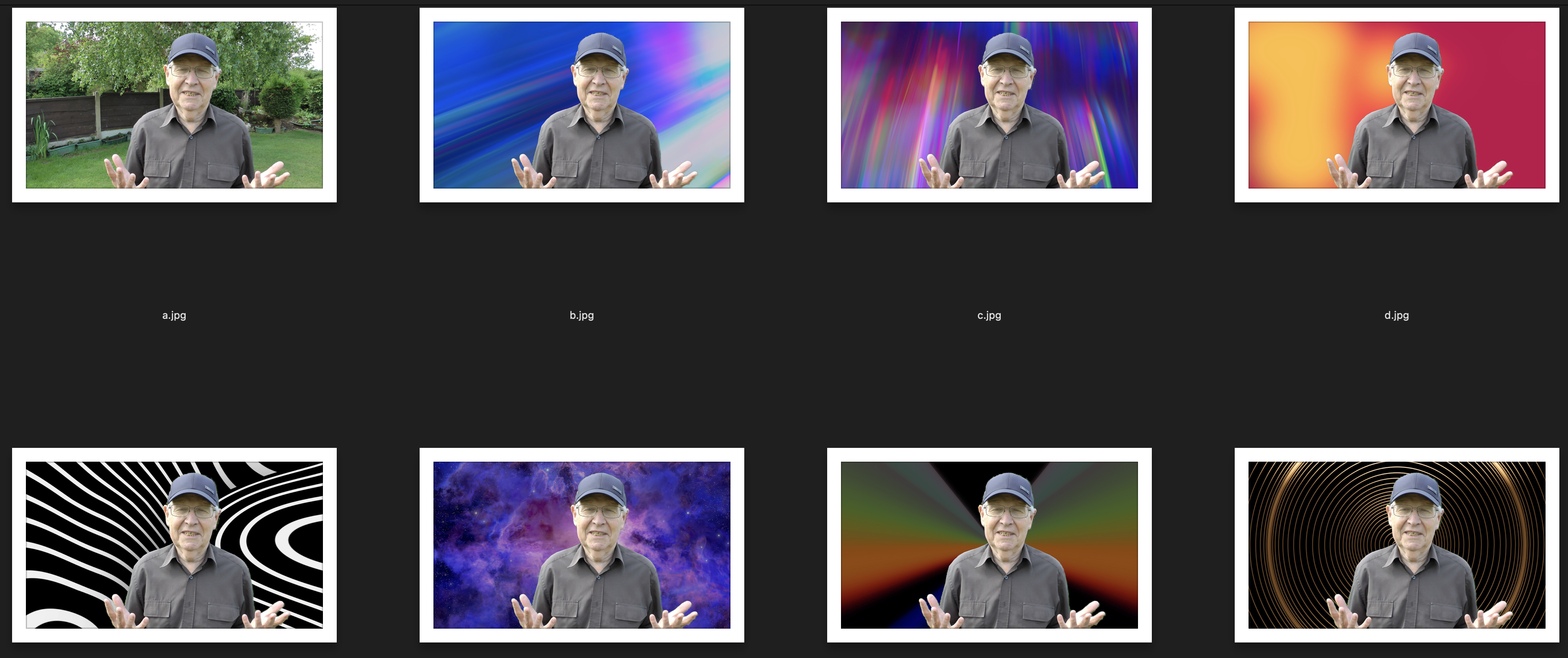
This may illustrate how good the Scene Removal Mask can be. You are supposed to use a simple fairly plain background so I chose a complicated fussy garden with trees, leaves, dark fences and light fence posts etc. etc. The result was pretty good!
Last edit: 26 Jul 2023 13:47 by Ian Brown.
Please Log in to join the conversation.

26 Jul 2023 19:16 #126579
by VTC
Replied by VTC on topic Green Screen
The problem I have with green screens and scene removal tricks is that they always look like.... well, green screens, leaving the talent / product resembling a paper doll cutout.
Nobody can rightly object to a static, black drape background. Where you get into trouble is trying to be cute with some animation or irrelevant busy canvas. Choose to shoot correctly from the start to avoid burning time masking and rotoscoping further down the trail. (As for the above I'd rather have the greenery somewhat defocused than any of those garish alternatives presented.)
Nobody can rightly object to a static, black drape background. Where you get into trouble is trying to be cute with some animation or irrelevant busy canvas. Choose to shoot correctly from the start to avoid burning time masking and rotoscoping further down the trail. (As for the above I'd rather have the greenery somewhat defocused than any of those garish alternatives presented.)
Please Log in to join the conversation.
26 Jul 2023 19:32 #126580
by Ian Brown
Replied by Ian Brown on topic Green Screen
There was no green screen involved . . . just the Scene Removal Mask which takes a couple of seconds to add.
The video was shot in the garden and the garden background was removed leaving the human moving around.
The backgrounds were just quick samples using FCP's generators to give proof of concept in another thread.
The video was shot in the garden and the garden background was removed leaving the human moving around.
The backgrounds were just quick samples using FCP's generators to give proof of concept in another thread.
Please Log in to join the conversation.
- Karsten Schlüter
-
- Offline
- Moderator
-
Less
More
- Posts: 3790
- Thank you received: 718
27 Jul 2023 03:17 #126582
by Karsten Schlüter
Replied by Karsten Schlüter on topic Green Screen
thanks Cap'n for the colorful examples!
And that matte works even with trees in the wind…? Impressive…
And that matte works even with trees in the wind…? Impressive…
Please Log in to join the conversation.
27 Jul 2023 07:53 - 27 Jul 2023 08:21 #126586
by Ian Brown
Replied by Ian Brown on topic Green Screen
There was no wind but the leaves were moving and shimmering. I was expecting it to be a disaster and was amazed by the quality. It's not absolutely perfect but considering that apart from using the tripod, there was no preparation and the shooting and editing were all done in 5 minutes, I think it's a minor miracle. I wonder what it would be like if the background had been plain?
Here is a low quality copy of the video.
drive.google.com/file/d/122vI6OAVDosU4TI...pUA/view?usp=sharing
Here is a low quality copy of the video.
drive.google.com/file/d/122vI6OAVDosU4TI...pUA/view?usp=sharing
Last edit: 27 Jul 2023 08:21 by Ian Brown. Reason: Adding link.
Please Log in to join the conversation.
- Karsten Schlüter
-
- Offline
- Moderator
-
Less
More
- Posts: 3790
- Thank you received: 718
28 Jul 2023 04:36 #126592
by Karsten Schlüter
thanks again for sharing!
And does it offer some/the same manual settings as FCPX' GreenScreen effect? Pixel-peeping your demo, I notice a very small 'border' I would manually adjust with some fall-off …
Replied by Karsten Schlüter on topic Green Screen
… it's a minor miracle. …
thanks again for sharing!
And does it offer some/the same manual settings as FCPX' GreenScreen effect? Pixel-peeping your demo, I notice a very small 'border' I would manually adjust with some fall-off …
Please Log in to join the conversation.
28 Jul 2023 08:17 - 28 Jul 2023 08:21 #126595
by Ian Brown
Replied by Ian Brown on topic Green Screen
You get all these adjustments . . .
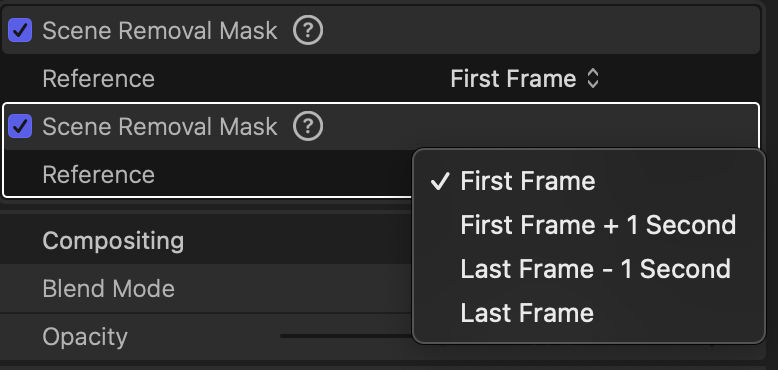
Of course there's a bit of image tearing in my video. I said it wasn't perfect and that is why you don't choose a fussy background like a garden with different colours, brightness levels, shimmering leaves etc.
The effect is not designed for Hollywood professionals with all the time and money in the world but for someone who may be in a hurry or may not have access to a green screen.
It also gives you more freedom to move about as you don't have to worry about moving past the edges of a screen.
Of course there's a bit of image tearing in my video. I said it wasn't perfect and that is why you don't choose a fussy background like a garden with different colours, brightness levels, shimmering leaves etc.
The effect is not designed for Hollywood professionals with all the time and money in the world but for someone who may be in a hurry or may not have access to a green screen.
It also gives you more freedom to move about as you don't have to worry about moving past the edges of a screen.

Last edit: 28 Jul 2023 08:21 by Ian Brown.
Please Log in to join the conversation.
- MikeStephenson
-
Topic Author
- Offline
- New Member
-
Less
More
- Posts: 4
- Thank you received: 0
29 Jul 2023 08:41 #126599
by MikeStephenson
Replied by MikeStephenson on topic Green Screen
Hi Inbro
I was quite impressed by the quality of the screen removal in your video. I have only recently upgraded FCPX to its latest incarnation so I haven't really had time to look into it. But if your video is anything to go by it's going to be a game-changer.
I think it'll be a long while before green screens are a thing of the past, but until then it looks like this addition to the app could be extremely useful indeed.
Like most of us, I'm not looking at Hollywood-style effects, just enough to put on YouTube and show the grandchildren ("Look, kids. Grandad is standing in front of a cruise ship in the middle of the Atlantic Ocean").
I was quite impressed by the quality of the screen removal in your video. I have only recently upgraded FCPX to its latest incarnation so I haven't really had time to look into it. But if your video is anything to go by it's going to be a game-changer.
I think it'll be a long while before green screens are a thing of the past, but until then it looks like this addition to the app could be extremely useful indeed.
Like most of us, I'm not looking at Hollywood-style effects, just enough to put on YouTube and show the grandchildren ("Look, kids. Grandad is standing in front of a cruise ship in the middle of the Atlantic Ocean").
Please Log in to join the conversation.
29 Jul 2023 09:07 - 29 Jul 2023 09:15 #126600
by Ian Brown
Replied by Ian Brown on topic Green Screen
As I mentioned earlier, I was somewhat amazed by how quick and easy it is to do.
You just stick the camera on a tripod and make sure you get a second or so of video before you step into the scene.
Ideally the background should be simple and fairly plain with not too much detail but mine seemed to work reasonably well.
One thing you must avoid is reflective surfaces like windows or mirrors . . . they will kill the effect.
You put the new background of your choice in the timeline with the video of you on top. Then drop the Scene Removal filter on the video of you and it instantly changes and you are in your new location!
If the perspective isn't quite correct you can alter your size and position on the screen using the Transform tools.
You just stick the camera on a tripod and make sure you get a second or so of video before you step into the scene.
Ideally the background should be simple and fairly plain with not too much detail but mine seemed to work reasonably well.
One thing you must avoid is reflective surfaces like windows or mirrors . . . they will kill the effect.
You put the new background of your choice in the timeline with the video of you on top. Then drop the Scene Removal filter on the video of you and it instantly changes and you are in your new location!
If the perspective isn't quite correct you can alter your size and position on the screen using the Transform tools.
Last edit: 29 Jul 2023 09:15 by Ian Brown.
Please Log in to join the conversation.
