


3 Post Moderation Rule for New Boarders (25 Jan 2021)
New boarders will have their posts moderated - Don't worry if you cannot see your post immediately.
Deleting unused parts of footage?
- NealF
-
 Topic Author
- Offline
- Senior Member
-

- I'm a composer, producer, performer and multimedia artist and activist.Not much to say. I'll leave that up to whoever gives a crap after I'm dead.Go to The Real Neal Fox ( http://TheRealNealFox.com ) to find out more than you'd ever want to know.
Less
More
13 Jul 2023 19:52 #126374
by NealF
Deleting unused parts of footage? was created by NealF
Hi.
I have all my footage for a library copied into FCP (10.4.6).
Once I'm done with the project I've got a lot of unused footage as well as parts of used footage. Makes for a very large file.
Is there a way to just delete unused footage?
Also, is there a way to only import the parts of videos you need instead of the whole thing. That would eliminate a large part of the problem.
Thanks.
I have all my footage for a library copied into FCP (10.4.6).
Once I'm done with the project I've got a lot of unused footage as well as parts of used footage. Makes for a very large file.
Is there a way to just delete unused footage?
Also, is there a way to only import the parts of videos you need instead of the whole thing. That would eliminate a large part of the problem.
Thanks.
Please Log in to join the conversation.
13 Jul 2023 22:09 #126376
by Zabobon
Final Cut Pro edits are non-destructive of original media. Whilst this means your archive is larger than you might like it has the advantage that at a future date you can make changes to the edit. It is the nature of video work that you have to consider backing up and archiving large amounts of data.
If you really don't ever want to change the edit you could render out a Master at the same settings as the original media and delete the original footage. But that is not recommended!
Replied by Zabobon on topic Deleting unused parts of footage?
You can delete entire clips that are not used but you cannot delete parts of clips from the original media. This is because the edit references the original clips.Is there a way to just delete unused footage?
Not through the FinalCut import process. You would have to split the video before importing the parts.Also, is there a way to only import the parts of videos you need instead of the whole thing. That would eliminate a large part of the problem.
Final Cut Pro edits are non-destructive of original media. Whilst this means your archive is larger than you might like it has the advantage that at a future date you can make changes to the edit. It is the nature of video work that you have to consider backing up and archiving large amounts of data.
If you really don't ever want to change the edit you could render out a Master at the same settings as the original media and delete the original footage. But that is not recommended!
Please Log in to join the conversation.
13 Jul 2023 22:42 - 13 Jul 2023 22:43 #126377
by NealF
Replied by NealF on topic Deleting unused parts of footage?
Ah. Okay.
Thanks for your reply. Where would I find the steps to delete the unused footage. I do usually end up with clips that don't get used at all in the final.
Thanks for your reply. Where would I find the steps to delete the unused footage. I do usually end up with clips that don't get used at all in the final.
Last edit: 13 Jul 2023 22:43 by NealF.
Please Log in to join the conversation.
14 Jul 2023 08:26 - 14 Jul 2023 10:00 #126378
by Zabobon
To delete them, open the Final Cut Pro Library in Final Cut Pro and choose File>Delete Generated Project Files... Then from the pop up window choose the type you want to delete. You can safely choose all types, Render Files, Generated Media and Proxy Media. After doing this check the size of your Library in the Finder. You should find that it is quite a bit smaller. (Do not try and delete any of these files in the Finder, always do it through the Final Cut Pro App.)
If you really still want to delete actual clips in the Final Cut Pro Library, you can select them in the Final Cut Pro Browser window, right-click and choose "Move to Trash" from the contextual menu. But you want to be really careful that you are only deleting clips that you haven't used.
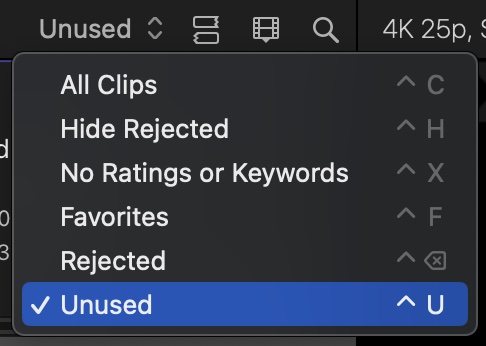
To help find the clips you want to delete, you can set the Browser Window to show "unused clips", in its view setting:
Replied by Zabobon on topic Deleting unused parts of footage?
Before deleting any actual original clips, try deleting render files that have been created whilst you have been editing the project. These are temporary files and it can clear up a lot of space in the Library by deleting them. They can always be regenerated in the future.Where would I find the steps to delete the unused footage. I do usually end up with clips that don't get used at all in the final.Attachment not found
To delete them, open the Final Cut Pro Library in Final Cut Pro and choose File>Delete Generated Project Files... Then from the pop up window choose the type you want to delete. You can safely choose all types, Render Files, Generated Media and Proxy Media. After doing this check the size of your Library in the Finder. You should find that it is quite a bit smaller. (Do not try and delete any of these files in the Finder, always do it through the Final Cut Pro App.)
If you really still want to delete actual clips in the Final Cut Pro Library, you can select them in the Final Cut Pro Browser window, right-click and choose "Move to Trash" from the contextual menu. But you want to be really careful that you are only deleting clips that you haven't used.
To help find the clips you want to delete, you can set the Browser Window to show "unused clips", in its view setting:
Last edit: 14 Jul 2023 10:00 by Zabobon.
Please Log in to join the conversation.
14 Jul 2023 12:34 #126380
by NealF
Replied by NealF on topic Deleting unused parts of footage?
I'm familiar with dumping the render files. That's a big step.
I wasn't sure if viewing the "unused" clips and deleting those would be the correct thing. Didn't want to take a chance. But that should be the thing I need.
Other than that, I'll be trimming clips before importing them.
Thanks.
I wasn't sure if viewing the "unused" clips and deleting those would be the correct thing. Didn't want to take a chance. But that should be the thing I need.
Other than that, I'll be trimming clips before importing them.
Thanks.
Please Log in to join the conversation.

14 Jul 2023 17:13 #126385
by TerryB
Replied by TerryB on topic Deleting unused parts of footage?
You could look at consolidating your project or event.
support.apple.com/guide/final-cut-pro/co...ies-ver9c7660349/mac
Please Log in to join the conversation.
14 Jul 2023 19:42 #126386
by NealF
Replied by NealF on topic Deleting unused parts of footage?
Thanks. I'll check it out.
Please Log in to join the conversation.
14 Jul 2023 19:42 #126387
by NealF
Replied by NealF on topic Deleting unused parts of footage?
Thanks. I'll check it out.
Please Log in to join the conversation.
