


- Posts: 2
- Thank you received: 0
3 Post Moderation Rule for New Boarders (25 Jan 2021)
New boarders will have their posts moderated - Don't worry if you cannot see your post immediately.
Music Track "Dies Away"??? in Final Cut Pro X
- The Seanacus
-
 Topic Author
- Offline
- New Member
-

Less
More
10 Jul 2023 11:00 - 10 Jul 2023 11:11 #126333
by The Seanacus
Music Track "Dies Away"??? in Final Cut Pro X was created by The Seanacus
I've been having an issue recently, whereby some music tracks that I import and use as background music to my projects seem to die away and lose their punch, the longer the playback is running.
When I hit play, the music has full "fullness" or richness. Bass and full sound. But when playing it over the course of 10 seconds or so, I notice that the track becomes a little dulled down, less bassy, tinny, and lacking in oomph. When I hit pause, and then continue playing again, it immediately springs back to fullness, to then die gradually to a more muted track over the next 10 seconds or so. This only happens during playback when editing. When exported, there is no issue with the finished video. But when trying to get a full sense of the sound when editing, this is irritating.
For reference, the iMac I use is i7, 32gb ram etc, and my Final Cut Library is stored on an external hard drive, which feels as though it's accessed really quickly by the program. The tracks that I use as background music are pretty much always mp3. It seems to happen with some tracks more than others.
I've tried searching for similar topics of this specific issue online, but I haven't found anything remotely similar? Any thoughts or
suggestions?
When I hit play, the music has full "fullness" or richness. Bass and full sound. But when playing it over the course of 10 seconds or so, I notice that the track becomes a little dulled down, less bassy, tinny, and lacking in oomph. When I hit pause, and then continue playing again, it immediately springs back to fullness, to then die gradually to a more muted track over the next 10 seconds or so. This only happens during playback when editing. When exported, there is no issue with the finished video. But when trying to get a full sense of the sound when editing, this is irritating.
For reference, the iMac I use is i7, 32gb ram etc, and my Final Cut Library is stored on an external hard drive, which feels as though it's accessed really quickly by the program. The tracks that I use as background music are pretty much always mp3. It seems to happen with some tracks more than others.
I've tried searching for similar topics of this specific issue online, but I haven't found anything remotely similar? Any thoughts or
suggestions?
Last edit: 10 Jul 2023 11:11 by The Seanacus.
Please Log in to join the conversation.
- The Seanacus
-
Topic Author
- Offline
- New Member
-
Less
More
- Posts: 2
- Thank you received: 0
10 Jul 2023 14:00 #126334
by The Seanacus
Replied by The Seanacus on topic Music Track "Dies Away"??? in Final Cut Pro X
SOLVED: Literally discovered by accident that the track, had automatially had "Noise Removal" ticked.
When unticking this, the problem is fixed (even though it then says that there are "problems detected", which is probably why it automatically assigned noise revomal automatically in the first place).
When unticking this, the problem is fixed (even though it then says that there are "problems detected", which is probably why it automatically assigned noise revomal automatically in the first place).
Please Log in to join the conversation.


10 Jul 2023 19:14 - 10 Jul 2023 19:14 #126338
by dmetz
Replied by dmetz on topic Music Track "Dies Away"??? in Final Cut Pro X
It sounds likely that you've got a preference checked to analyze and fix audio on import. I've attached a screenshot of my Import settings.
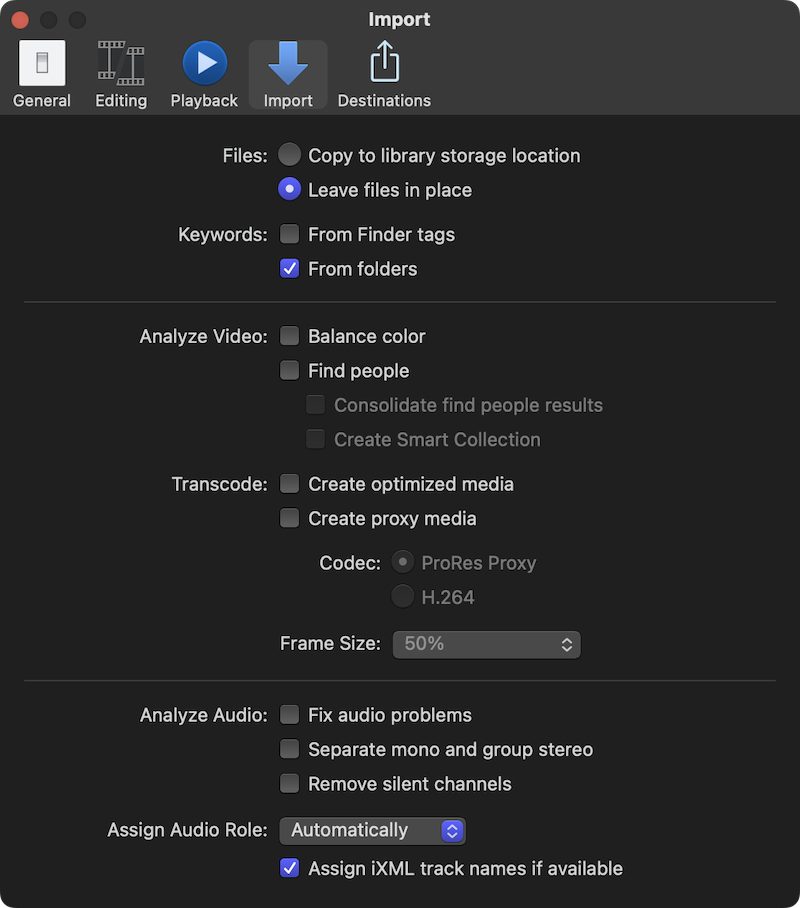
Last edit: 10 Jul 2023 19:14 by dmetz.
Please Log in to join the conversation.
