




- Posts: 1
- Thank you received: 0
3 Post Moderation Rule for New Boarders (25 Jan 2021)
New boarders will have their posts moderated - Don't worry if you cannot see your post immediately.
Combining Frame rates
30 Jun 2023 09:22 #126209
by Rhys098
Combining Frame rates was created by Rhys098
I have footage from 2 cameras.
Ones filmed in 4k at 25p
The other is filmed in 4k at 24p
How can I edit this footage in one timeline with maximum quality?
Can I edit them both In a 25p timeline?
Should I convert the 24p to 25p? if so how?
Thanks in advance
Ones filmed in 4k at 25p
The other is filmed in 4k at 24p
How can I edit this footage in one timeline with maximum quality?
Can I edit them both In a 25p timeline?
Should I convert the 24p to 25p? if so how?
Thanks in advance
Please Log in to join the conversation.


01 Jul 2023 11:30 - 01 Jul 2023 11:38 #126231
by Zabobon
Final Cut Pro is pretty good at handling mixed frame rates without you having to do much.
Assuming your timeline is 25fps, any footage that was filmed at 24fps that you add to that timeline will play at the correct speed (i.e. one second of 24fps footage will last one second).
But in order to achieve this, Final Cut Pro needs to make an extra frame each second by analysing the clip and making 25 frames when there were originally 24 frames (it does this automatically).
This can result in "jumps" or "staggers" in the movement.
Luckily Final Cut Pro gives you some options of how it goes about doing the interpolation and you can pick the best method.
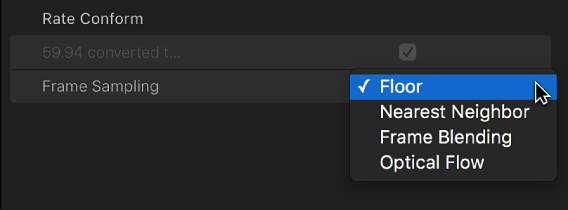
Select the clip in the Timeline (or multiple clips) and go to the Video Inspector. Near the bottom of the panel is a dropdown menu called "Rate Conform - Frame Sampling" which allows you to choose the method for the clip. The best choice for quality is usually "Optical Flow". Note that the clip has to be rendered for you to see the result.
Also note that you can do this the other way around i.e. you can add 25fps footage to a 24fps timeline. It just depends what frame rate you want your final master to be.
Replied by Zabobon on topic Combining Frame rates
Yes, you can.Can I edit them both In a 25p timeline?
Final Cut Pro is pretty good at handling mixed frame rates without you having to do much.
Assuming your timeline is 25fps, any footage that was filmed at 24fps that you add to that timeline will play at the correct speed (i.e. one second of 24fps footage will last one second).
But in order to achieve this, Final Cut Pro needs to make an extra frame each second by analysing the clip and making 25 frames when there were originally 24 frames (it does this automatically).
This can result in "jumps" or "staggers" in the movement.
Luckily Final Cut Pro gives you some options of how it goes about doing the interpolation and you can pick the best method.
Select the clip in the Timeline (or multiple clips) and go to the Video Inspector. Near the bottom of the panel is a dropdown menu called "Rate Conform - Frame Sampling" which allows you to choose the method for the clip. The best choice for quality is usually "Optical Flow". Note that the clip has to be rendered for you to see the result.
Also note that you can do this the other way around i.e. you can add 25fps footage to a 24fps timeline. It just depends what frame rate you want your final master to be.
Last edit: 01 Jul 2023 11:38 by Zabobon.
Please Log in to join the conversation.

05 Jul 2023 18:30 #126270
by dmetz
Replied by dmetz on topic Combining Frame rates
Here's the relevant section in the manual:
support.apple.com/guide/final-cut-pro/co...b44e/10.6.6/mac/12.6
Note that you don't actually need to render to see optical flow results, you simply need to park the playhead on the clip and allow FCP to analyze it. Any edits to a particular clip will require this analysis to take place again.
I seem to recall some special handling of 24/25 conform, where the clip is sped up or slowed down that extra frame without telling you, which would affect audio. For b-roll, no biggie. But if you've got dialog there could be drift issues.
support.apple.com/guide/final-cut-pro/co...b44e/10.6.6/mac/12.6
Note that you don't actually need to render to see optical flow results, you simply need to park the playhead on the clip and allow FCP to analyze it. Any edits to a particular clip will require this analysis to take place again.
I seem to recall some special handling of 24/25 conform, where the clip is sped up or slowed down that extra frame without telling you, which would affect audio. For b-roll, no biggie. But if you've got dialog there could be drift issues.
Please Log in to join the conversation.
