


- Posts: 222
- Thank you received: 4
3 Post Moderation Rule for New Boarders (25 Jan 2021)
New boarders will have their posts moderated - Don't worry if you cannot see your post immediately.
Rotate a clip in the browser
- FinalCutdown
-
 Topic Author
- Offline
- Elite Member
-

Less
More
28 Jun 2023 07:55 #126159
by FinalCutdown
Rotate a clip in the browser was created by FinalCutdown
I attached another camera to a window and set it up upside down. Now it recorded a few hours of footage, but in the browser I cannnot rotate it. In the Inspector under General->Orientation the box says "no value" and is greyed out. Plus: Especially Sony cameras have this horrible "vertical" mode in their metadata, so a lot of video files are rotated 90 degrees when it thinks the camera is held vertical for social media, which cannot be turned of. Is there any way to rotate those clips or to erase or correct the metadata of the files before import? Or is the only way to use compound clips or rotate every single clip in the timeline and preview everything upside down??
Please Log in to join the conversation.


29 Jun 2023 04:22 #126179
by Larrie
Replied by Larrie on topic Rotate a clip in the browser
You can rotate the files in Quicktime using the Edit Menu. Depending your OSX version you can also do it in the finder by clicking on the file and clicking on the Rotate Left option.
Please Log in to join the conversation.
- FinalCutdown
-
Topic Author
- Offline
- Elite Member
-
Less
More
- Posts: 222
- Thank you received: 4
29 Jun 2023 13:59 #126188
by FinalCutdown
Replied by FinalCutdown on topic Rotate a clip in the browser
Thanks Larrie, I can indeed rotate in Quicktime player, but it will reencode the whole file, which takes lots of time and degrades quality, and I am not sure if it keeps all of my 10 audio channels. I was hoping for a fix via metadata.
Please Log in to join the conversation.
- FinalCutdown
-
Topic Author
- Offline
- Elite Member
-
Less
More
- Posts: 222
- Thank you received: 4
29 Jun 2023 15:08 #126190
by FinalCutdown
Replied by FinalCutdown on topic Rotate a clip in the browser
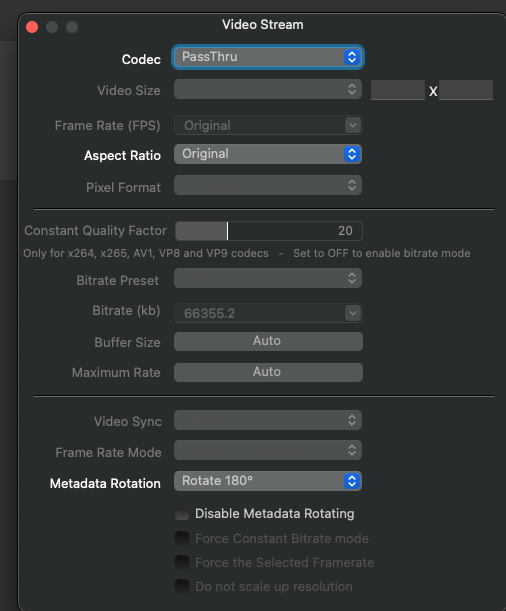
I found a solution: FFMPEG can do it. I am using FFWorks to make it easier. You can set it to Video and Audio pass through and still edit the field "metadata rotation" or "Disable Metadata Rotating", depending which one you want.
It doesnt reencode but still has to copy everything to a new file, with an 80 gig file it still takes like 15 minutes on an external ssd.. Its still a pity that this is not supported in FCPx natively.
It doesnt reencode but still has to copy everything to a new file, with an 80 gig file it still takes like 15 minutes on an external ssd.. Its still a pity that this is not supported in FCPx natively.
Please Log in to join the conversation.
- FinalCutdown
-
Topic Author
- Offline
- Elite Member
-
Less
More
- Posts: 222
- Thank you received: 4
29 Jun 2023 15:08 #126191
by FinalCutdown
Replied by FinalCutdown on topic Rotate a clip in the browser
Heres a Screenshot of FFWorks.
Please Log in to join the conversation.
- FinalCutdown
-
Topic Author
- Offline
- Elite Member
-
Less
More
- Posts: 222
- Thank you received: 4
29 Jun 2023 15:14 #126192
by FinalCutdown
Replied by FinalCutdown on topic Rotate a clip in the browser
Does anyone know why the "orientation" field in FCPx Inspector under "Extended" is always greyed out? Is there a way to activate it?
Please Log in to join the conversation.


29 Jun 2023 15:42 #126193
by DaveM
That field is likely only active when a source media file with "properly supported" metadata is imported to FCP. You can't expect FCP to support everything that every possible camera maker or other application includes or doesn't include in a file, can you?
A better question is perhaps why you would assume that a mistake made in production should necessarily be fixable in post?
Replied by DaveM on topic Rotate a clip in the browser
Does anyone know why the "orientation" field in FCPx Inspector under "Extended" is always greyed out? Is there a way to activate it?
That field is likely only active when a source media file with "properly supported" metadata is imported to FCP. You can't expect FCP to support everything that every possible camera maker or other application includes or doesn't include in a file, can you?
A better question is perhaps why you would assume that a mistake made in production should necessarily be fixable in post?
Please Log in to join the conversation.
- FinalCutdown
-
Topic Author
- Offline
- Elite Member
-
Less
More
- Posts: 222
- Thank you received: 4
29 Jun 2023 15:51 #126194
by FinalCutdown
Replied by FinalCutdown on topic Rotate a clip in the browser
I am sorry, I would never dare to question or criticise this fantastic application my fellow believers.. Its just that Sony cameras like the FX3 for example immediately tag a video as vertical if the camera is slightly tilted before recording starts, you cannot switch the function off which is horrible for a "professional" camera.
Please Log in to join the conversation.
- FinalCutdown
-
Topic Author
- Offline
- Elite Member
-
Less
More
- Posts: 222
- Thank you received: 4
29 Jun 2023 15:53 #126195
by FinalCutdown
Replied by FinalCutdown on topic Rotate a clip in the browser
By the way: even apples own iphone video codec does not support orientation, nor does any sony camera I tested (FX3, A7 III, Zv-1) or drone footage (mavic mini 2).
Please Log in to join the conversation.
- FinalCutdown
-
Topic Author
- Offline
- Elite Member
-
Less
More
- Posts: 222
- Thank you received: 4
29 Jun 2023 16:31 - 29 Jun 2023 16:32 #126197
by FinalCutdown
Replied by FinalCutdown on topic Rotate a clip in the browser
You were right! Rotating in finder does not transcode the file - only the quicktime player forces me to save the file after rotating and retranscode it. The only disadvantage: It takes a lot of time in the finder as well and if I have to rotate 180 degrees, I have to wait double the time because I can only rotate in steps of 90You can rotate the files in Quicktime using the Edit Menu. Depending your OSX version you can also do it in the finder by clicking on the file and clicking on the Rotate Left option.
Last edit: 29 Jun 2023 16:32 by FinalCutdown.
Please Log in to join the conversation.
- François-Xavier NOULENS
-

- Offline
- New Member
-

Less
More
- Posts: 6
- Thank you received: 1
29 Jun 2023 17:09 - 29 Jun 2023 17:09 #126199
by François-Xavier NOULENS
Replied by François-Xavier NOULENS on topic Rotate a clip in the browser
1- Open ... iMovie
2- Batch Rotate you clips in there
3 - Export iMovie project as FcpX Library in iMovie menu
done.
2- Batch Rotate you clips in there
3 - Export iMovie project as FcpX Library in iMovie menu
done.
Last edit: 29 Jun 2023 17:09 by François-Xavier NOULENS.
Please Log in to join the conversation.
- FinalCutdown
-
Topic Author
- Offline
- Elite Member
-
Less
More
- Posts: 222
- Thank you received: 4
29 Jun 2023 17:15 #126200
by FinalCutdown
Replied by FinalCutdown on topic Rotate a clip in the browser
Thanks! Great to know that IMovie can fix it 
Please Log in to join the conversation.
29 Jun 2023 22:10 - 30 Jun 2023 01:35 #126203
by DaveM
I can't speak to the functionality of the FX3, as I don't have one. But, is it possible to rotate an image/movie in-camera after recording, so that it is saved in that new orientation? Would Catalyst Browse or Catalyst Prepare be able to do a rotation without having to re-encode? I would agree that not being able to lock either a horizontal or vertical recording mode prior to actually recording (i.e., during setup of a camera or other artistic reasons) would seem to be a weird limitation.
I apologize if I sounded a bit brusk in my previous response. There is a tendency for many to be somewhat lackadaisical in approach when acquiring footage, let's say, and along with it an expectation of some sort of "easy button" in post that can fix anything. Equally frustrating is the expectation that FCP support every sort of metadata and codec variant created by camera makers (where, in reality, the makers need to provide info to Apple well in advance, along with collaboration regarding codecs and other things).
On the iPhone you can lock orientation for recording, at least with some 3rd-party camera apps.
With the camera recording things upside down, the assumed orientation would be the standard/expected one ("landscape" if there is more than one choice). So, the "Orientation" field in FCP wouldn't necessarily apply, as what you'd want to do is actually rotate the image (i.e., modify it) after it was recorded. If the use of a camera presumes a standard "landscape" mode of operation, there would likely be no reason to even have metadata for "orientation" (hence the "No value" shown in the Inspector for many clips).
And, yes, DaVinci Resolve and AVID Media Composer both allow changes to attributes, such as rotation, for clips prior to editing them into a sequence.
Back to FCP...
If you select the clip the Browser and choose the Clip -> Open Clip menu item, you can select the video "track" and change the rotation in the Inspector. Don't forget to "back out" of the clip when done. This works well for a one-off "bad" clip but would quickly become tedious for many clips.
@FinalCutdown, if you feel strongly about this issue, you might want to consider submitting a bug report or feature request to Sony (about the "orientation" issue) and one to Apple about making more "clip attributes" editable via the Inspector.
Cheers.
Replied by DaveM on topic Rotate a clip in the browser
I am sorry, I would never dare to question or criticise this fantastic application my fellow believers.. Its just that Sony cameras like the FX3 for example immediately tag a video as vertical if the camera is slightly tilted before recording starts, you cannot switch the function off which is horrible for a "professional" camera.
I can't speak to the functionality of the FX3, as I don't have one. But, is it possible to rotate an image/movie in-camera after recording, so that it is saved in that new orientation? Would Catalyst Browse or Catalyst Prepare be able to do a rotation without having to re-encode? I would agree that not being able to lock either a horizontal or vertical recording mode prior to actually recording (i.e., during setup of a camera or other artistic reasons) would seem to be a weird limitation.
I apologize if I sounded a bit brusk in my previous response. There is a tendency for many to be somewhat lackadaisical in approach when acquiring footage, let's say, and along with it an expectation of some sort of "easy button" in post that can fix anything. Equally frustrating is the expectation that FCP support every sort of metadata and codec variant created by camera makers (where, in reality, the makers need to provide info to Apple well in advance, along with collaboration regarding codecs and other things).
On the iPhone you can lock orientation for recording, at least with some 3rd-party camera apps.
With the camera recording things upside down, the assumed orientation would be the standard/expected one ("landscape" if there is more than one choice). So, the "Orientation" field in FCP wouldn't necessarily apply, as what you'd want to do is actually rotate the image (i.e., modify it) after it was recorded. If the use of a camera presumes a standard "landscape" mode of operation, there would likely be no reason to even have metadata for "orientation" (hence the "No value" shown in the Inspector for many clips).
And, yes, DaVinci Resolve and AVID Media Composer both allow changes to attributes, such as rotation, for clips prior to editing them into a sequence.
Back to FCP...
If you select the clip the Browser and choose the Clip -> Open Clip menu item, you can select the video "track" and change the rotation in the Inspector. Don't forget to "back out" of the clip when done. This works well for a one-off "bad" clip but would quickly become tedious for many clips.
@FinalCutdown, if you feel strongly about this issue, you might want to consider submitting a bug report or feature request to Sony (about the "orientation" issue) and one to Apple about making more "clip attributes" editable via the Inspector.
Cheers.
Last edit: 30 Jun 2023 01:35 by DaveM.
Please Log in to join the conversation.
- FinalCutdown
-
Topic Author
- Offline
- Elite Member
-
Less
More
- Posts: 222
- Thank you received: 4
30 Jun 2023 07:44 #126206
by FinalCutdown
Replied by FinalCutdown on topic Rotate a clip in the browser
Thanks a lot, to open the clip in the browser is a great hint for huge files. For smaller ones and batch rotation I think I will use the finder if it's 90 degrees. You are right: the FX3 issue applies only to vertical-mode so a simple finder click helps. The other large file is a camera mounted to a window, due to weight and space it had to be mounted upside down. I think to rotate in camera is not workable as there are lots of files and after filming I immediately backup all cards with hedge and checksum verification to multiple drives - I have to because if a card fails insurance will not pay anything. So correction can only be done when files are already copied. I am not sure if sony even allows to rotate in camera.. Still its a sony bug.. they call it a feature for "creators"..
Please Log in to join the conversation.
- FinalCutdown
-
Topic Author
- Offline
- Elite Member
-
Less
More
- Posts: 222
- Thank you received: 4
30 Jun 2023 07:49 #126207
by FinalCutdown
Replied by FinalCutdown on topic Rotate a clip in the browser
I still don't know if they even read those bug reports, I never received an answer and bugs remain.
Please Log in to join the conversation.
30 Jun 2023 12:34 - 30 Jun 2023 12:36 #126210
by DaveM
For some reason, the webpage version of the Apple Feedback Assistant is hamstrung. However, there is an application bundled with recent macOS versions. If you use your AppleID, you can get a free account with developer.apple.com. Once you have a login, you can then use the bundled Feedback Assistant application:
/System/Library/CoreServices/Applications/Feedback Assistant.app
The bundled version of Feedback Assistant will provide a verification and a case "code" when you submit. You can also include/upload files to support your report.
@joema uses the bundled version to report issues, ones that have been fixed. Apparently, this version of Feedback Assistant goes directly to the FCP team (unlike the webpage version). Once you get a login, it takes little time to request feature enhancements. The more people report or suggest things, the more likely Apple will respond/act...
Replied by DaveM on topic Rotate a clip in the browser
I still don't know if they even read those bug reports, I never received an answer and bugs remain.
For some reason, the webpage version of the Apple Feedback Assistant is hamstrung. However, there is an application bundled with recent macOS versions. If you use your AppleID, you can get a free account with developer.apple.com. Once you have a login, you can then use the bundled Feedback Assistant application:
/System/Library/CoreServices/Applications/Feedback Assistant.app
The bundled version of Feedback Assistant will provide a verification and a case "code" when you submit. You can also include/upload files to support your report.
@joema uses the bundled version to report issues, ones that have been fixed. Apparently, this version of Feedback Assistant goes directly to the FCP team (unlike the webpage version). Once you get a login, it takes little time to request feature enhancements. The more people report or suggest things, the more likely Apple will respond/act...
Last edit: 30 Jun 2023 12:36 by DaveM.
Please Log in to join the conversation.

30 Jun 2023 21:04 #126216
by VTC
Replied by VTC on topic Rotate a clip in the browser
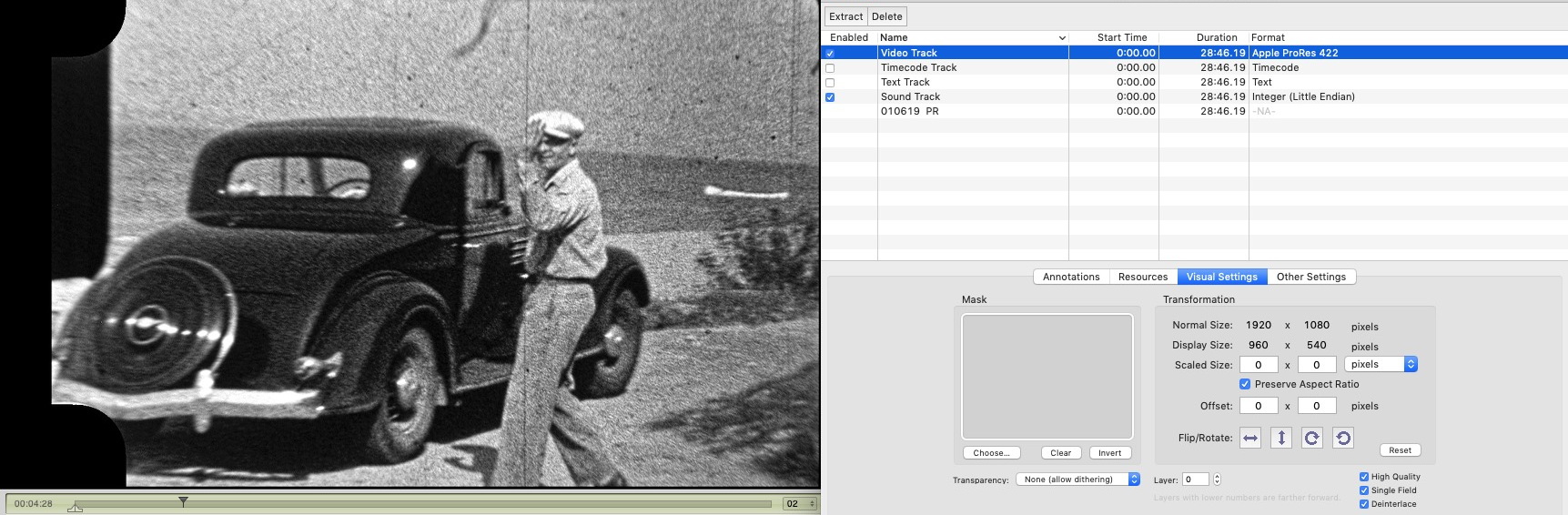
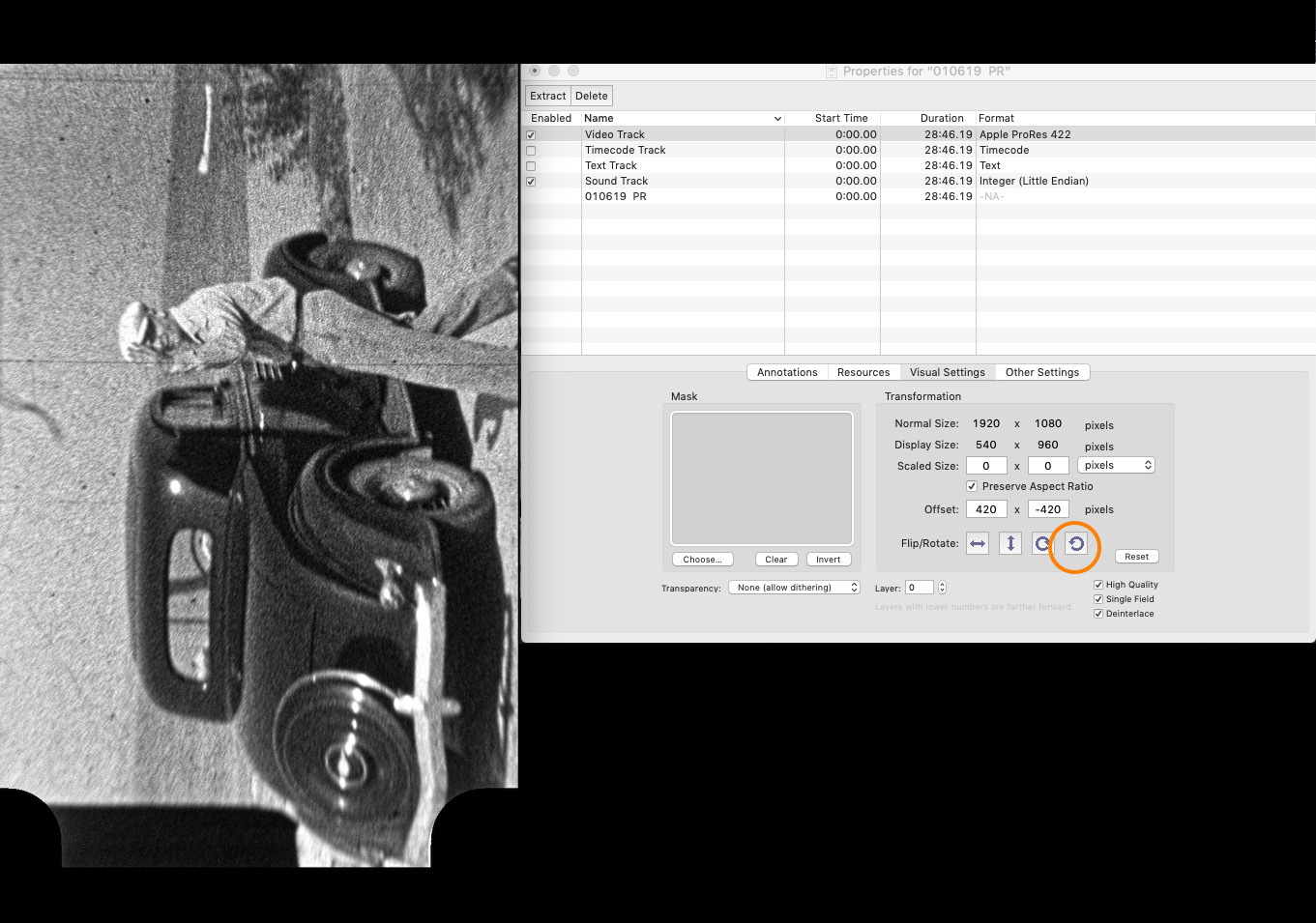
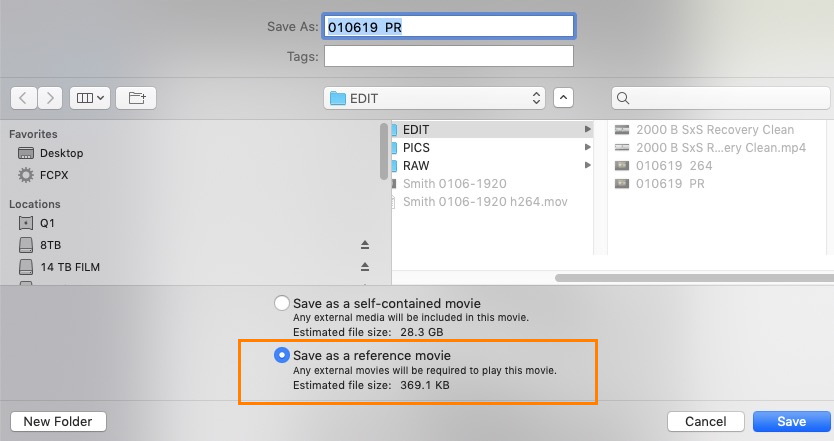
Easily done if you have Quicktime 7 or so languishing about. No re-encode needed. Creates a reference file, in this case the 691kb files behaves the same as the 28gb file.
Please Log in to join the conversation.
- FinalCutdown
-
Topic Author
- Offline
- Elite Member
-
Less
More
- Posts: 222
- Thank you received: 4
01 Jul 2023 20:29 #126234
by FinalCutdown
Replied by FinalCutdown on topic Rotate a clip in the browser
Thanks VTC. So I need an older QuickTime version? Can't find it in QT Player 10.5
Please Log in to join the conversation.

02 Jul 2023 17:28 #126238
by sc_fox
Replied by sc_fox on topic Rotate a clip in the browser
If you create a project of *any* aspect ratio, add a gap of the length you generally need, then create a Compound Clip of the Gap, then you have a means to rotate any other clip inside that gap and apply it in any other aspect ratio project.
Ok... that even confused me...
A compound clip receives the characteristics of the project in which it is created! Those characteristics can be carried over into other projects.
An example:
I need to rotate a horizontal clip into a vertical format.
I'll create a 9:16 vertical format project (1080x1920). Add a gap to the storyline of say, 10 seconds. Select the Gap and make a Compound Clip. I'll just name it Rotator for this example. This can be used over and over again as long as you make duplicates first and use the duplicates for actual clips.
I'll go into a horizontal format project (1920x1080). I will add the Compound Clip (a duplicate) to the storyline. I'll double click on it to open it. Add the horizontal format clip and Rotate it 90º. I'll need to scale it (generally) to fit. Since the pixel sizes are the same, in this case, the Scale All should be set to 177.7778%, a fairly easy number to remember [the aspect ratio of 1920x1080 times 100% or H ÷ V x 100%].
No reencoding.
No waiting for exports.
No duplication of media.
* if you're working with 4K materials, you may need to adjust everything accordingly.
This isn't a bulk solution, but it is a way to take care of these rotations as you're adding clips at the beginning of a project.
HTH
My eyes glazed over a lot of the responses... If this has already been suggested... then, never mind.
Ok... that even confused me...
A compound clip receives the characteristics of the project in which it is created! Those characteristics can be carried over into other projects.
An example:
I need to rotate a horizontal clip into a vertical format.
I'll create a 9:16 vertical format project (1080x1920). Add a gap to the storyline of say, 10 seconds. Select the Gap and make a Compound Clip. I'll just name it Rotator for this example. This can be used over and over again as long as you make duplicates first and use the duplicates for actual clips.
I'll go into a horizontal format project (1920x1080). I will add the Compound Clip (a duplicate) to the storyline. I'll double click on it to open it. Add the horizontal format clip and Rotate it 90º. I'll need to scale it (generally) to fit. Since the pixel sizes are the same, in this case, the Scale All should be set to 177.7778%, a fairly easy number to remember [the aspect ratio of 1920x1080 times 100% or H ÷ V x 100%].
No reencoding.
No waiting for exports.
No duplication of media.
* if you're working with 4K materials, you may need to adjust everything accordingly.
This isn't a bulk solution, but it is a way to take care of these rotations as you're adding clips at the beginning of a project.
HTH
My eyes glazed over a lot of the responses... If this has already been suggested... then, never mind.
Please Log in to join the conversation.
