



- Posts: 38
- Thank you received: 0
3 Post Moderation Rule for New Boarders (25 Jan 2021)
New boarders will have their posts moderated - Don't worry if you cannot see your post immediately.
How to get these kind of effects
22 Jun 2023 04:12 #126079
by gdgross
How to get these kind of effects was created by gdgross
Hi all - newbie video guy here. I'm a musician trying to make content and music vids for my band on the cheap.
I dig the look of this video:
I see that it's 24fps, but looks like the actual apparent frame rate is 12fps because every adjacent frame is identical.
That part is easy; I can shoot at double speed and slow the frame rate, or just do in FCPX. Many ways to achieve the frame rate I want ultimately.
The other thing i notice is that it seems like sometimes the light balance, or camera setting changes between frames. I can achieve this if I shoot a bunch of pictures in sports mode on my sony a6500, but it seems like a laborious way to shoot a whole music video. Any idea if there's some kind of plugin that achieves this, or some other shortcut?
I also dig the drawn-in animation. Any ideas what programs ppl use to do this? Is animation these days as laborious as I imagine, drawing things in frame by frame?
Thanks all
I dig the look of this video:
I see that it's 24fps, but looks like the actual apparent frame rate is 12fps because every adjacent frame is identical.
That part is easy; I can shoot at double speed and slow the frame rate, or just do in FCPX. Many ways to achieve the frame rate I want ultimately.
The other thing i notice is that it seems like sometimes the light balance, or camera setting changes between frames. I can achieve this if I shoot a bunch of pictures in sports mode on my sony a6500, but it seems like a laborious way to shoot a whole music video. Any idea if there's some kind of plugin that achieves this, or some other shortcut?
I also dig the drawn-in animation. Any ideas what programs ppl use to do this? Is animation these days as laborious as I imagine, drawing things in frame by frame?
Thanks all
Please Log in to join the conversation.


23 Jun 2023 01:30 - 23 Jun 2023 01:35 #126085
by VTC
Replied by VTC on topic How to get these kind of effects
The missed frame look might be stutter or strobe effect with maybe some motion blur smoothing things out. Here's a guy that's done the work for you.
www.bretfx.com/product/smooth_strobe/
As far as animation is concerned... Takes oodles of time to do what was done. That's why there's a credit to the animation guy.
www.bretfx.com/product/smooth_strobe/
As far as animation is concerned... Takes oodles of time to do what was done. That's why there's a credit to the animation guy.
Last edit: 23 Jun 2023 01:35 by VTC.
Please Log in to join the conversation.

23 Jun 2023 02:21 #126086
by DaveM
Replied by DaveM on topic How to get these kind of effects
For the animation, you could always try to find someone who is starting out or in school for animation/VFX, depending on your budget.
Please Log in to join the conversation.
23 Jun 2023 16:49 #126090
by gdgross
Replied by gdgross on topic How to get these kind of effects
Thanks guys
Please Log in to join the conversation.
24 Jun 2023 17:24 #126105
by gdgross
Replied by gdgross on topic How to get these kind of effects
ok, think I'm going to forestall the real animation for the time being, at least for the next video. I may hire it out for the future, and use some stock animations for now. I did chat with the person that animated the video I linked to above, and as we all suspected it's not cheap, being hand drawn!
I also tried Bret's frame rate decimator on a clip; it seems to work well. Was wondering if there's a way to make it look more "stop motion-y". Would love to have some frames with very slightly different exposure levels and such as if I'd taken a series of pictures rather than a video with all the frames having the same settings.
Any easy ways to do this?
I also tried Bret's frame rate decimator on a clip; it seems to work well. Was wondering if there's a way to make it look more "stop motion-y". Would love to have some frames with very slightly different exposure levels and such as if I'd taken a series of pictures rather than a video with all the frames having the same settings.
Any easy ways to do this?
Please Log in to join the conversation.
24 Jun 2023 20:36 #126106
by DaveM
By "Bret's frame rate decimator", are you actually referring to the BretFX Smooth Strobe effect?
https://www.bretfx.com/product/smooth_strobe/
Replied by DaveM on topic How to get these kind of effects
By "Bret's frame rate decimator", are you actually referring to the BretFX Smooth Strobe effect?
https://www.bretfx.com/product/smooth_strobe/
Please Log in to join the conversation.
24 Jun 2023 20:38 #126107
by gdgross
yes, haha sorry.
Replied by gdgross on topic How to get these kind of effects
By "Bret's frame rate decimator", are you actually referring to the BretFX Smooth Strobe effect?
https://www.bretfx.com/product/smooth_strobe/
yes, haha sorry.
Please Log in to join the conversation.
24 Jun 2023 20:50 #126108
by DaveM
Replied by DaveM on topic How to get these kind of effects
motionvfx.com has some plugins that may be useful (in addition to others):
mMusic Video:
www.motionvfx.com/store,mmusic-video,p3698.html
mMusic Video 2:
www.motionvfx.com/store,mmusic-video-2,p3953.html
mMusic Video:
www.motionvfx.com/store,mmusic-video,p3698.html
mMusic Video 2:
www.motionvfx.com/store,mmusic-video-2,p3953.html
Please Log in to join the conversation.
25 Jun 2023 02:11 #126110
by VTC
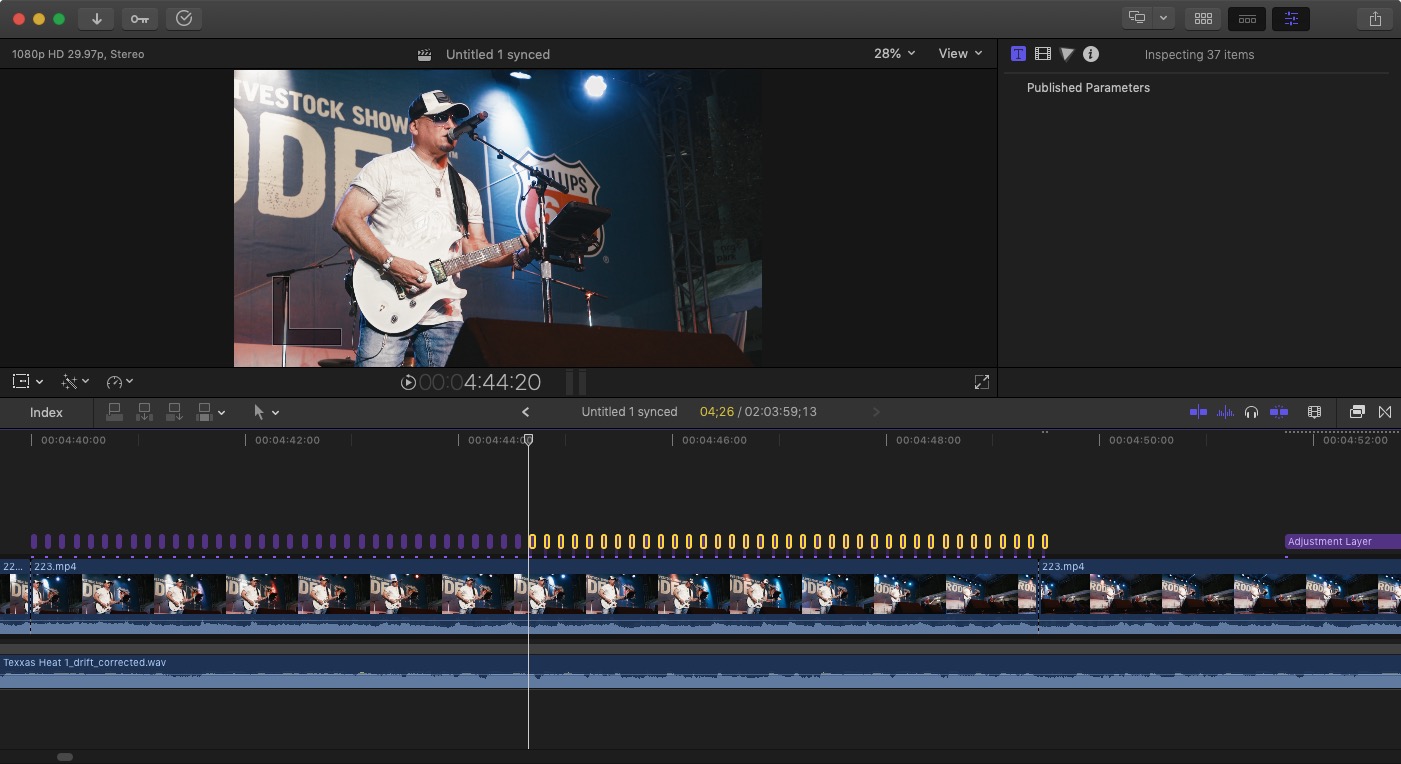
Adjustment layer. Set any number or variety of parameters. Cut to frame or two. Duplicate Duplicate Duplicate Duplicate like a mad man. Be advised alternating exposure on every other frame or group of frames will come across as a flicker. Tried it with this example and no matter the exposure or tint or contrast adjusted it came across as flickering video.
Replied by VTC on topic How to get these kind of effects
...some frames with very slightly different exposure levels... Any easy ways to do this?
Adjustment layer. Set any number or variety of parameters. Cut to frame or two. Duplicate Duplicate Duplicate Duplicate like a mad man. Be advised alternating exposure on every other frame or group of frames will come across as a flicker. Tried it with this example and no matter the exposure or tint or contrast adjusted it came across as flickering video.
Please Log in to join the conversation.
