




- Posts: 4
- Thank you received: 0
3 Post Moderation Rule for New Boarders (25 Jan 2021)
New boarders will have their posts moderated - Don't worry if you cannot see your post immediately.
Black screen/only audio exporting
18 Jun 2023 11:56 #126013
by Bobkata
Black screen/only audio exporting was created by Bobkata
So i am pretty new to fcpx and this is my first project and i've tried exporting everywhere - the laptop, an external drive, cloud but every time it exports it is a 35 minute mp4 black screen video with audio. I have no idea how i can fix this and i'm eager to hear what your solutions are! Thanks in advance!
Please Log in to join the conversation.


18 Jun 2023 13:46 #126014
by cseeman
Replied by cseeman on topic Black screen/only audio exporting
Are you on macOS Ventura 13.4?
Are you using 100 or 120 fps 10-bit 4:2:2 sources that may come from Sony FX3 or A7SIII or similar type camera?
Are you using 100 or 120 fps 10-bit 4:2:2 sources that may come from Sony FX3 or A7SIII or similar type camera?
Please Log in to join the conversation.

18 Jun 2023 14:08 #126015
by joema
Replied by joema on topic Black screen/only audio exporting
If it's the above-mentioned problem, it's not unique to Sony 10-bit H264 XAVC-S at 100 and 120 fps. It also happens on DJI Mavic 3 and Mavic 3 Pro 5.1k 10-bit H264 material -- ALL frame rates. It is unique to Apple Silicon; does not happen on Intel.
This is not an FCP bug; it also happens with Resolve. It is a MacOS bug which started with Ventura 13.4 on Apple Silicon. It should be fixed in 13.5, and the reports from beta users indicate it is. Final release date of Ventura 13.5 is not known.
For new Sony material, the workaround is use XAVC-HS (HEVC) on Sony, which also supports 10-bit 4:2:2. Likewise on DJI Mavic 3, you can use HEVC (H265) which does not have the problem.
There is a good argument the HEVC codecs should be used anyway since 10-bit and 4:2:2 material is better supported than 10-bit H264.
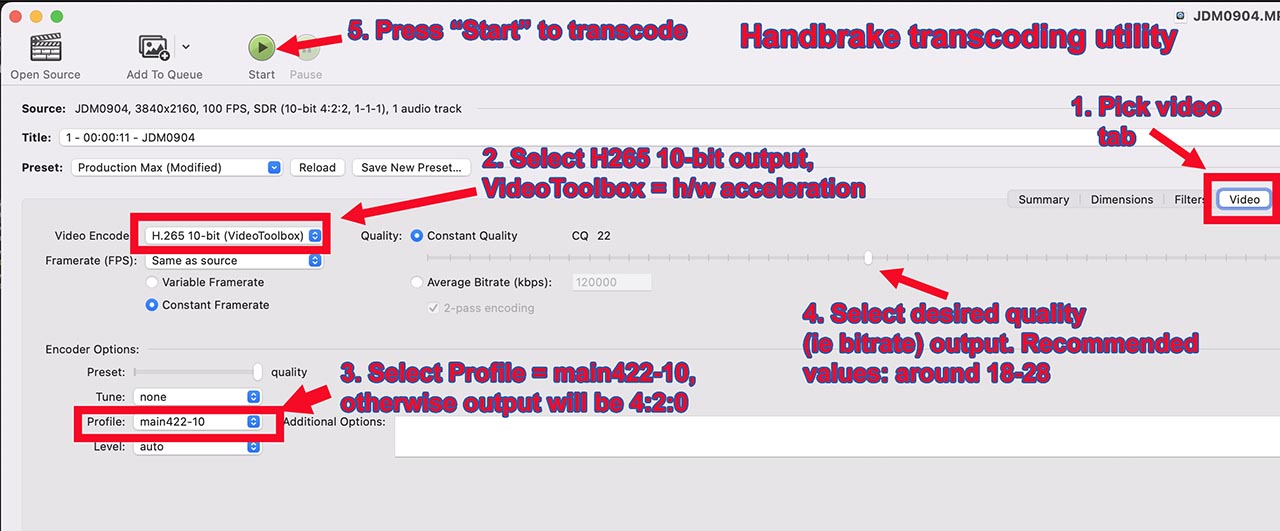
For existing material the only solution is transcode that to HEVC with Handbrake. The attached graphic shows the required options.
If the original media is not Sony XAVC-S or DJI 5.1k from the Mavic 3, state the specific camera and codec characteristics. Will it play in Quicktime Player?
This is not an FCP bug; it also happens with Resolve. It is a MacOS bug which started with Ventura 13.4 on Apple Silicon. It should be fixed in 13.5, and the reports from beta users indicate it is. Final release date of Ventura 13.5 is not known.
For new Sony material, the workaround is use XAVC-HS (HEVC) on Sony, which also supports 10-bit 4:2:2. Likewise on DJI Mavic 3, you can use HEVC (H265) which does not have the problem.
There is a good argument the HEVC codecs should be used anyway since 10-bit and 4:2:2 material is better supported than 10-bit H264.
For existing material the only solution is transcode that to HEVC with Handbrake. The attached graphic shows the required options.
If the original media is not Sony XAVC-S or DJI 5.1k from the Mavic 3, state the specific camera and codec characteristics. Will it play in Quicktime Player?
Please Log in to join the conversation.
18 Jun 2023 15:43 #126016
by cseeman
Replied by cseeman on topic Black screen/only audio exporting
the workaround is use XAVC-HS (HEVC) on Sony, which also supports 10-bit 4:2:2.
Thanks. This is critically important. I wish there were a way to Pin this so people will see the solution and avoid the problem for now.
Thanks. This is critically important. I wish there were a way to Pin this so people will see the solution and avoid the problem for now.
Please Log in to join the conversation.
18 Jun 2023 16:59 #126018
by Bobkata
Replied by Bobkata on topic Black screen/only audio exporting
The footage is airdropped from my iphone 14 pro directly onto my laptop.
Please Log in to join the conversation.
18 Jun 2023 17:02 #126019
by Bobkata
Replied by Bobkata on topic Black screen/only audio exporting
I used export settings which i saw in a youtube video because i'm new so the exact settings are :
Format ; computer
VC : H.264 Multi-pass
res: 1920x1080
CS : Wide gamut - Rec.2020
AF : AAC
Format ; computer
VC : H.264 Multi-pass
res: 1920x1080
CS : Wide gamut - Rec.2020
AF : AAC
Please Log in to join the conversation.
18 Jun 2023 17:04 #126020
by Bobkata
Replied by Bobkata on topic Black screen/only audio exporting
Also the footage is 60fps 1920x1080 (HDR) captured on iPhone 14 pro
Please Log in to join the conversation.
18 Jun 2023 19:31 #126027
by joema
Replied by joema on topic Black screen/only audio exporting
I just tried 1080p/60 10-bit 4:2:0 HEVC HDR from my iPhone 13 Pro, and it seemed to work OK. I could see it OK in Finder's QuickLook, also in FCP 10.6.6 on Ventura 13.4 on an M1 Ultra Mac Studio.
I tried it in an SDR library and SDR project, also in an HDR library and HDR project, using the posted export settings. It seemed to work OK.
Not sure what version of MacOS, FCP and Mac hardware the OP is on. There were some issues with older versions not handling HEVC correctly but that was a long time ago.
I tried it in an SDR library and SDR project, also in an HDR library and HDR project, using the posted export settings. It seemed to work OK.
Not sure what version of MacOS, FCP and Mac hardware the OP is on. There were some issues with older versions not handling HEVC correctly but that was a long time ago.
Please Log in to join the conversation.

20 Jul 2023 09:36 #126448
by xavi
Replied by xavi on topic Black screen/only audio exporting
I have the same problem. I hope it will fixed with Ventura 13.5. To work with this kind of archives what I do is opening with Adobe Premiere. Export a sequence with same frame rates and then import this clip to FCPX. It works. But it is a shame to do it. But it is the only way I found to use this footage recorded at 120fps.
Please Log in to join the conversation.
