


- Posts: 175
- Thank you received: 5
3 Post Moderation Rule for New Boarders (25 Jan 2021)
New boarders will have their posts moderated - Don't worry if you cannot see your post immediately.
Video Export with Super Fast SSD
- CBlakeston
-
 Topic Author
- Offline
- Elite Member
-

Less
More
17 Jun 2023 10:50 - 17 Jun 2023 10:51 #125996
by CBlakeston
Video Export with Super Fast SSD was created by CBlakeston
Posting this in case it helps anyone else. Having moved from an M1 MacBook Air to an M1 Mac Studio this week I took the opportunity to revamp my editing storage. Buying an Acasis Thunderbolt 4 Enclosure an WD Black sn850x 4TB SSD m2 drive to fit into it. In speed tests it reaches the theoretical max data Thunderbolt 4 transfer rate of 3050 Read/Write. This thing is a beast.
Just exported my first video to it with a run time of 17m 10s.
It took 2m 21s. Wow, Very cool.
For fun, I exported to one of the many Samsung T7 SSD drives I have connected over USBC to see how much slower it would be. It took 2m 23s. 🤣 The moral of the story is, a super fast SSD drive won't speed up exports.
I mean.. the money I spent building my own external SSD in an enclosure over buying a prebuilt 4TB external was about the same.. so no harm done.. but its interesting the bottle neck isn't the drive speed it's how fast the software can export.
Just exported my first video to it with a run time of 17m 10s.
It took 2m 21s. Wow, Very cool.
For fun, I exported to one of the many Samsung T7 SSD drives I have connected over USBC to see how much slower it would be. It took 2m 23s. 🤣 The moral of the story is, a super fast SSD drive won't speed up exports.
I mean.. the money I spent building my own external SSD in an enclosure over buying a prebuilt 4TB external was about the same.. so no harm done.. but its interesting the bottle neck isn't the drive speed it's how fast the software can export.
Last edit: 17 Jun 2023 10:51 by CBlakeston. Reason: Spelling
Please Log in to join the conversation.


17 Jun 2023 13:05 #125999
by joema
That is generally correct, because even on an M1 Mac Studio, you typically are bottlenecked on some type of computation during export. Once your SSD bandwidth reaches about 1,000 megabytes/sec, it's less common to hit an I/O limit, so further increasing I/O bandwidth is less likely to help. The limiting factor in export performance could be visible: CPU or GPU, or non-visible: video accelerators.
If you divide the export size in megabytes by number of seconds, that is frequently 500 megabytes per sec or less. An infinitely-fast SSD would be little help.
That said, if you have an all-ProRes workflow, it can make a big difference. E.g, if the source files are 4k or 6k ProRes 422, and you create 50% ProRes proxies, that can reach 5,000 megabytes/sec on an M1 Ultra.
Or if you have a 4k timeline (using any codec) which is rendered to cache (which by default is ProRes 422), and you export to 4k ProRes 422, FCP will simply copy those cache segments to the output file. That also can reach over 5,000 megabytes/sec.
Replied by joema on topic Video Export with Super Fast SSD
...The moral of the story is, a super fast SSD drive won't speed up exports...
That is generally correct, because even on an M1 Mac Studio, you typically are bottlenecked on some type of computation during export. Once your SSD bandwidth reaches about 1,000 megabytes/sec, it's less common to hit an I/O limit, so further increasing I/O bandwidth is less likely to help. The limiting factor in export performance could be visible: CPU or GPU, or non-visible: video accelerators.
If you divide the export size in megabytes by number of seconds, that is frequently 500 megabytes per sec or less. An infinitely-fast SSD would be little help.
That said, if you have an all-ProRes workflow, it can make a big difference. E.g, if the source files are 4k or 6k ProRes 422, and you create 50% ProRes proxies, that can reach 5,000 megabytes/sec on an M1 Ultra.
Or if you have a 4k timeline (using any codec) which is rendered to cache (which by default is ProRes 422), and you export to 4k ProRes 422, FCP will simply copy those cache segments to the output file. That also can reach over 5,000 megabytes/sec.
Please Log in to join the conversation.
- CBlakeston
-
Topic Author
- Offline
- Elite Member
-
Less
More
- Posts: 175
- Thank you received: 5
17 Jun 2023 13:09 #126000
by CBlakeston
Replied by CBlakeston on topic Video Export with Super Fast SSD
That's good to know, thanks. I'm assuming the faster read speed may help with thumbnail / audio wave generation? But I guess that might have an I/O limit to?
Please Log in to join the conversation.
18 Jun 2023 20:30 - 18 Jun 2023 20:50 #126028
by joema
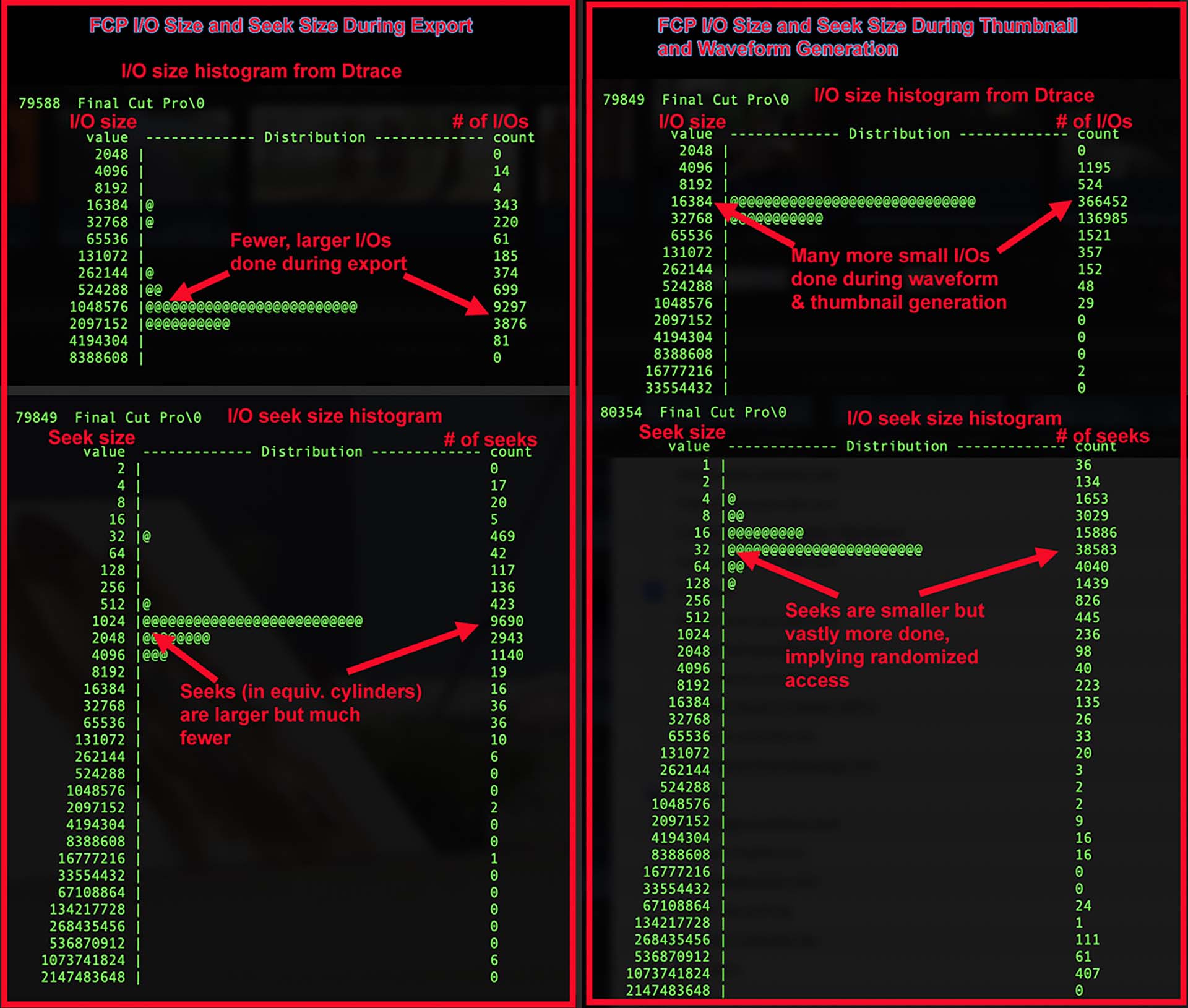
Attached is a study I did of FCP disk I/O characteristics during export vs during thumbnail and waveform generation. As previously discussed this shows they have totally different behavior. During export it is characterized by very large (about 1 megabyte) sequential writes with relatively few seek operations.
By contrast during waveform and thumbnail generation it is characterized by small random I/Os and far more seeks.
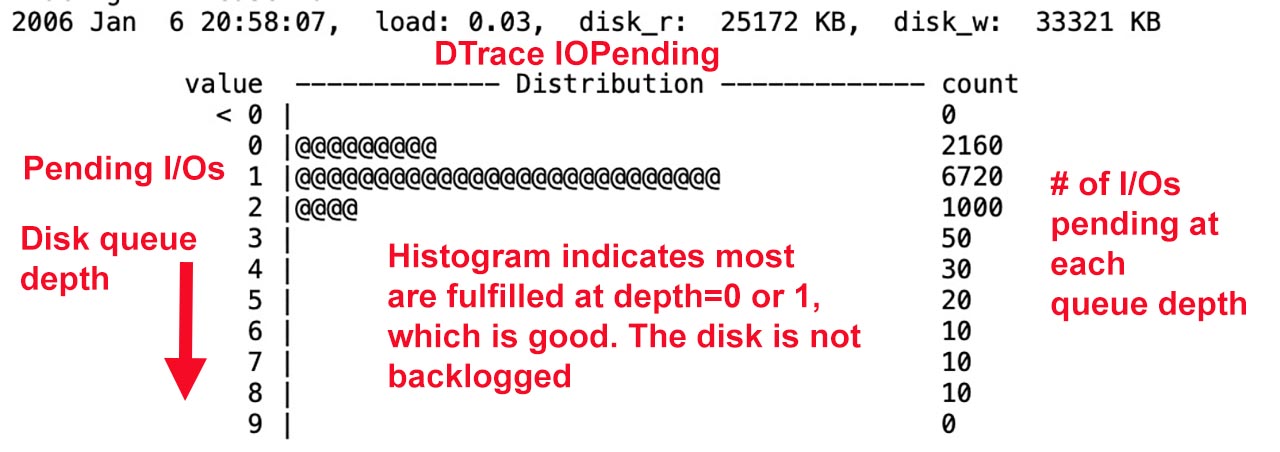
It would be nice if we could see the disk queue depth or pending I/O queue, since that is very revealing about whether you face an I/O bottleneck. Unfortunately that Dtrace command called "iopending" has not worked in MacOS for several years. I attach an older version from back then.
Replied by joema on topic Video Export with Super Fast SSD
I'm assuming the faster read speed may help with thumbnail / audio wave generation? But I guess that might have an I/O limit to?
Attached is a study I did of FCP disk I/O characteristics during export vs during thumbnail and waveform generation. As previously discussed this shows they have totally different behavior. During export it is characterized by very large (about 1 megabyte) sequential writes with relatively few seek operations.
By contrast during waveform and thumbnail generation it is characterized by small random I/Os and far more seeks.
It would be nice if we could see the disk queue depth or pending I/O queue, since that is very revealing about whether you face an I/O bottleneck. Unfortunately that Dtrace command called "iopending" has not worked in MacOS for several years. I attach an older version from back then.
Last edit: 18 Jun 2023 20:50 by joema.
Please Log in to join the conversation.
- CBlakeston
-
Topic Author
- Offline
- Elite Member
-
Less
More
- Posts: 175
- Thank you received: 5
18 Jun 2023 20:32 #126029
by CBlakeston
Replied by CBlakeston on topic Video Export with Super Fast SSD
Really interesting, thanks.
Please Log in to join the conversation.

18 Jun 2023 22:27 #126031
by VTC
Replied by VTC on topic Video Export with Super Fast SSD
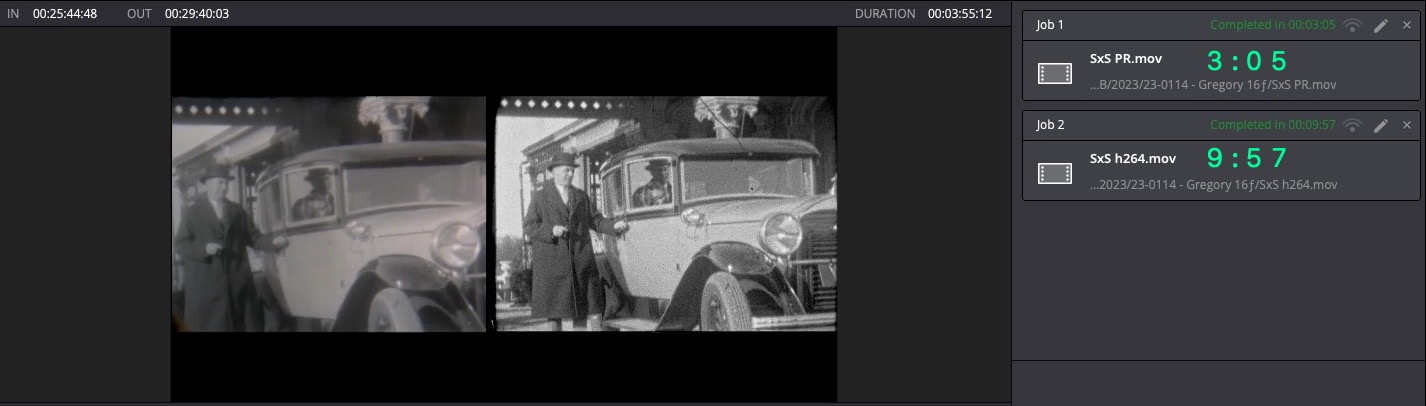
Also depends on output of the codec. My setup has ProRes files finishing 3-4x quicker than h264 in both Resolve and FCP.
Please Log in to join the conversation.
