


- Posts: 1080
- Thank you received: 106
3 Post Moderation Rule for New Boarders (25 Jan 2021)
New boarders will have their posts moderated - Don't worry if you cannot see your post immediately.
Quicktime Capture Focus Changes and Hunts?
04 May 2023 00:49 - 04 May 2023 00:52 #125229
by Redifer
Quicktime Capture Focus Changes and Hunts? was created by Redifer
I'm on Ventura 13.3.1 but it also did this on 13.2.x. Mac Studio.
I'm using my Magewell USB Capture HDMI Gen 2 in an attempt to capture gameplay to edit later. But Quicktime is altering the focus in real time for no reason. Quicktime > New Movie Recording / Video and Audio > USB Capture 3 / Quality > Maximum. Check it out:
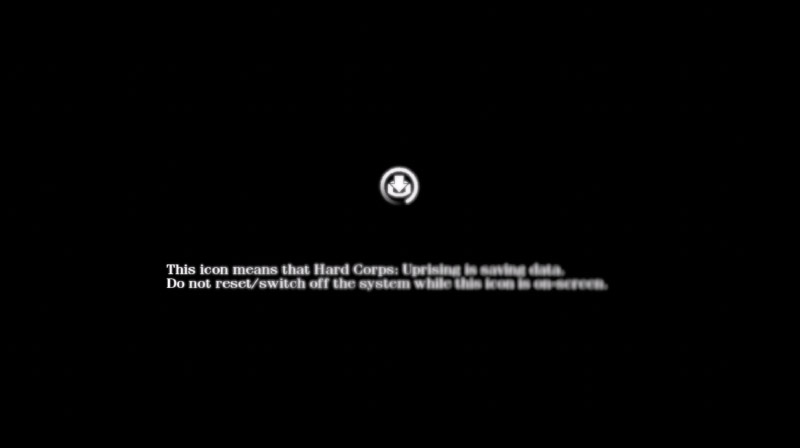
As we see early in the capture, the focus is hunting, and part of the text is blurry where it should not be.

We get to the title screen and it decides that PRESS START BUTTON should be in focus, but everything else needs to be bokeh'd out.
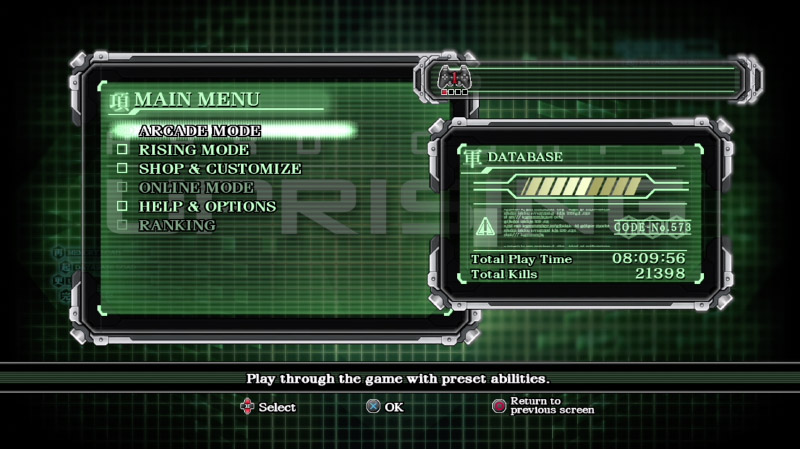
This next menu screen seems fine and it figures nothing needs to be bokeh'd out.
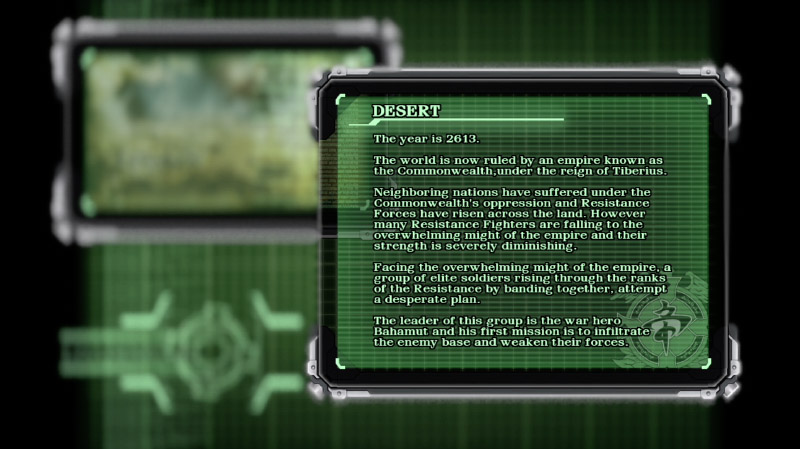
Once again Quicktime figures only the text needs to be in focus and that I want nothing else to be.

I get into the gameplay and now everything is out of focus, which naturally renders the footage unusable.
NOTES:
-OBS will capture everything as it should be, but OBS is more of a pain in the ass to use and I find it drops frames here and there when attempting to write to ProRes422. That renders the footage unusable as well. Quicktime has never dropped frames.
-This exact capturing setup used to work perfectly fine.
-The Magewell device is driverless. It is not causing the issue otherwise it would also show up in OBS.
-I'm wondering if this has anything to do with my new iPhone 14 Pro? It's not connected to the computer as I try to capture, but maybe Quicktime has that same fake-bokeh "cinematic" junk that's built into the iPhones? Maybe once I connected it and tried to use it as a web cam it changed something somewhere? If so, any idea where I could check and turn this undesired nonsense off? This all just seems very related to how the iPhone works to me.
I'm using my Magewell USB Capture HDMI Gen 2 in an attempt to capture gameplay to edit later. But Quicktime is altering the focus in real time for no reason. Quicktime > New Movie Recording / Video and Audio > USB Capture 3 / Quality > Maximum. Check it out:
As we see early in the capture, the focus is hunting, and part of the text is blurry where it should not be.
We get to the title screen and it decides that PRESS START BUTTON should be in focus, but everything else needs to be bokeh'd out.
This next menu screen seems fine and it figures nothing needs to be bokeh'd out.
Once again Quicktime figures only the text needs to be in focus and that I want nothing else to be.
I get into the gameplay and now everything is out of focus, which naturally renders the footage unusable.
NOTES:
-OBS will capture everything as it should be, but OBS is more of a pain in the ass to use and I find it drops frames here and there when attempting to write to ProRes422. That renders the footage unusable as well. Quicktime has never dropped frames.
-This exact capturing setup used to work perfectly fine.
-The Magewell device is driverless. It is not causing the issue otherwise it would also show up in OBS.
-I'm wondering if this has anything to do with my new iPhone 14 Pro? It's not connected to the computer as I try to capture, but maybe Quicktime has that same fake-bokeh "cinematic" junk that's built into the iPhones? Maybe once I connected it and tried to use it as a web cam it changed something somewhere? If so, any idea where I could check and turn this undesired nonsense off? This all just seems very related to how the iPhone works to me.
Last edit: 04 May 2023 00:52 by Redifer.
Please Log in to join the conversation.

04 May 2023 01:06 - 04 May 2023 01:11 #125230
by DaveM
Replied by DaveM on topic Quicktime Capture Focus Changes and Hunts?
Joe, I know this doesn't directly apply to your issue but have you thought about using something like ScreenFlow? It seems to be able to access and record any camera source that normally shows up. It provides many more options for processing the captured media and exporting it than QT Player.
Addendum: Yikes, ScreenFlow has gotten quite pricey ($169+). I've had it for so long (upgrades are fairly cheap) that I hadn't realized what the full price was...
Addendum: Yikes, ScreenFlow has gotten quite pricey ($169+). I've had it for so long (upgrades are fairly cheap) that I hadn't realized what the full price was...
Last edit: 04 May 2023 01:11 by DaveM.
Please Log in to join the conversation.
04 May 2023 01:13 - 04 May 2023 01:13 #125231
by Redifer
Replied by Redifer on topic Quicktime Capture Focus Changes and Hunts?
Yes, I have Screenflow. But it does not obey the framerate I set in the Magewell. The thing is that I don't want it processed at all. Just saved.
Last edit: 04 May 2023 01:13 by Redifer.
Please Log in to join the conversation.

04 May 2023 14:04 #125238
by joema
That is strange. I have the same Magewell card, Mac Studio running Ventura 13.3.1. I've never seen this but I usually don't do screen captures. I don't have an iPhone 14 pro. Yes it superficially looks like some AI bokeh effect.
Have you ever used your iPhone 14 Pro for the new Continuity Camera feature? If so maybe something about it got stuck. You could try making sure that is totally disabled, also totally disable Universal Control in System Settings.
I will be busy for the next week, but after that I could do some more tests.
Replied by joema on topic Quicktime Capture Focus Changes and Hunts?
....-I'm wondering if this has anything to do with my new iPhone 14 Pro? It's not connected to the computer as I try to capture, but maybe Quicktime has that same fake-bokeh "cinematic" junk that's built into the iPhones? Maybe once I connected it and tried to use it as a web cam it changed something somewhere? If so, any idea where I could check and turn this undesired nonsense off? This all just seems very related to how the iPhone works to me.
That is strange. I have the same Magewell card, Mac Studio running Ventura 13.3.1. I've never seen this but I usually don't do screen captures. I don't have an iPhone 14 pro. Yes it superficially looks like some AI bokeh effect.
Have you ever used your iPhone 14 Pro for the new Continuity Camera feature? If so maybe something about it got stuck. You could try making sure that is totally disabled, also totally disable Universal Control in System Settings.
I will be busy for the next week, but after that I could do some more tests.
Please Log in to join the conversation.

04 May 2023 17:13 #125242
by VTC
Replied by VTC on topic Quicktime Capture Focus Changes and Hunts?
Please Log in to join the conversation.
04 May 2023 19:35 #125243
by Redifer
Thanks, but I talked about OBS in the original post. It sometimes drops/repeats frames.
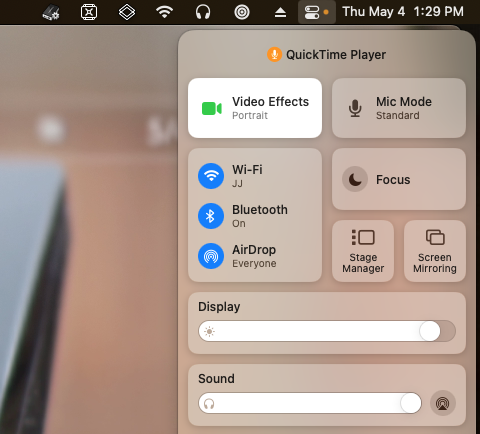
Problem solved.
Replied by Redifer on topic Quicktime Capture Focus Changes and Hunts?
Look into OBS perhaps?
Thanks, but I talked about OBS in the original post. It sometimes drops/repeats frames.
Yes, I tried that out and I think that's what triggered this. Turns out there's an entire "Portrait" video effect that's applied via Control Center. Why it's there and not in Quicktime itself is beyond me. Anyway I disabled it and it's fine now!joema wrote: Have you ever used your iPhone 14 Pro for the new Continuity Camera feature?
Problem solved.
Please Log in to join the conversation.
04 May 2023 20:10 #125244
by DaveM
Replied by DaveM on topic Quicktime Capture Focus Changes and Hunts?
Nice catch, Joe!
Your initial impression of the issue was key, along with Joe M's pointer...
Your initial impression of the issue was key, along with Joe M's pointer...
Please Log in to join the conversation.
