




- Posts: 7
- Thank you received: 0
3 Post Moderation Rule for New Boarders (25 Jan 2021)
New boarders will have their posts moderated - Don't worry if you cannot see your post immediately.
Help with frame rates
25 Apr 2023 20:50 #125086
by stitch666
Help with frame rates was created by stitch666
Hi everyone. Just to start off with I only use FCP to a very basic level as it is a hobby. I am a psychological therapist and use FCP to make YouTube videos which are mostly talking heads of me talking about various topics.
I am making my first video where I talk about some psychological concepts by referring to another YouTube video. I am screen recording said YouTube video using OBS and import that into FCP. I am then going to import Sony a6400 of my talking head footage and then edit them together as Picture in Picture.
I am unsure about what frame rates I should be using. I record at 25FPS using my Sony. I have tried changing it to NTSC and filming at 30fps in the past which has picked up loads of light flicker. 25 fps doesn't pick up any flicker at all (I am aware of the reasons behind this).
When I screen record using OBS I can set the recording to record at 25 FPS, however when I play this footage back on a 25FPS FCP timeline it isn't smooth. I am guessing this is because I am screen recording at 25FPS when my monitor is running at 60.
I could set OBS to screen record at either 30 or 60 FPS but then that won't work well on a 25FPS timeline. If I use a 30FPS timeline then my a6400 footage won't look great being recorded at 25FPS.
I am guessing the answer is to record my talking head footage at 30 FPS, screen record at 30FPS and work on a 30FPS timeline and somehow deal with the light flicker. Is that the only realistic option to get everything looking good? Or am I missing something else obvious?
Thanks.
I am making my first video where I talk about some psychological concepts by referring to another YouTube video. I am screen recording said YouTube video using OBS and import that into FCP. I am then going to import Sony a6400 of my talking head footage and then edit them together as Picture in Picture.
I am unsure about what frame rates I should be using. I record at 25FPS using my Sony. I have tried changing it to NTSC and filming at 30fps in the past which has picked up loads of light flicker. 25 fps doesn't pick up any flicker at all (I am aware of the reasons behind this).
When I screen record using OBS I can set the recording to record at 25 FPS, however when I play this footage back on a 25FPS FCP timeline it isn't smooth. I am guessing this is because I am screen recording at 25FPS when my monitor is running at 60.
I could set OBS to screen record at either 30 or 60 FPS but then that won't work well on a 25FPS timeline. If I use a 30FPS timeline then my a6400 footage won't look great being recorded at 25FPS.
I am guessing the answer is to record my talking head footage at 30 FPS, screen record at 30FPS and work on a 30FPS timeline and somehow deal with the light flicker. Is that the only realistic option to get everything looking good? Or am I missing something else obvious?
Thanks.
Please Log in to join the conversation.


25 Apr 2023 22:13 - 25 Apr 2023 22:16 #125087
by DaveM
Replied by DaveM on topic Help with frame rates
This is really more of a shooting/production issue than anything to do with FCP.
However, you could try using battery-powered LED lighting (not using power mains) to reduce/eliminate flickering when recording at 30 fps. Or, you could try using a shutter angle/speed that is a multiple of your power frequency (50 Hz). A shutter speed of 1/50 or 1/100 would help reduce/eliminate flicker.
There may be an issue with your camera, in that it may not support changing the shutter speed/angle for a given FPS recording setting (for its "movie recordings").
It's a bit weird that OBS doesn't see to record "well enough" at 25 fps. I haven't really used OBS, so I can't speak to it. You might want to consider getting ScreenFlow, or at least trying it to see if that helps. macOS has built-in screen recording, so that may be another option (not my choice).
Some combination of these (and other) suggestions should help. Testing various workflows (from shooting through creation of the final deliverable) will save you from headaches down the road.
Hope this helps...
However, you could try using battery-powered LED lighting (not using power mains) to reduce/eliminate flickering when recording at 30 fps. Or, you could try using a shutter angle/speed that is a multiple of your power frequency (50 Hz). A shutter speed of 1/50 or 1/100 would help reduce/eliminate flicker.
There may be an issue with your camera, in that it may not support changing the shutter speed/angle for a given FPS recording setting (for its "movie recordings").
It's a bit weird that OBS doesn't see to record "well enough" at 25 fps. I haven't really used OBS, so I can't speak to it. You might want to consider getting ScreenFlow, or at least trying it to see if that helps. macOS has built-in screen recording, so that may be another option (not my choice).
Some combination of these (and other) suggestions should help. Testing various workflows (from shooting through creation of the final deliverable) will save you from headaches down the road.
Hope this helps...
Last edit: 25 Apr 2023 22:16 by DaveM.
Please Log in to join the conversation.

26 Apr 2023 15:48 #125097
by dmetz
Replied by dmetz on topic Help with frame rates
I'd be inclined to try a simple test: record yourself at 25fps, set OBS to record at 60, and do a quick edit in a 25fps timeline to see how it looks.
Final Cut handles rate mismatches pretty well in my experience, and if you can keep it simple, so much the better. If the results of the test aren't acceptable, you haven't spent a ton of time and can continue the quest.
Final Cut handles rate mismatches pretty well in my experience, and if you can keep it simple, so much the better. If the results of the test aren't acceptable, you haven't spent a ton of time and can continue the quest.
Please Log in to join the conversation.
26 Apr 2023 16:01 #125098
by stitch666
Thanks for your response. I tried recording at 60 with OBS and dropped it into a 25fps timeline and it looked really choppy. The screen recording itself plays back fine outside of FCP so it doesn’t seem to like being on a 25fps timeline. Anything outside of matching the fps of the screen record with the fps of the timeline just doesn’t seem to look good at all.
I’ve had a play around again with changing my camera to NTSC and filming at 30fps whilst playing with the shutter speeds and I think I can make it work. I have to deal with the slight crop which is manageable, and I have to be a little cautious of which Philip Hue lights I have on either above me or behind me due to flicker (banding) but due to the nature of the video that stuff isn’t particularly important and I can get away with a battery operated key light. So I think for now keeping the camera at 30fps, the timeline at 30fps and the screen record at 30fps is going to work the best with all things taken into consideration.
Replied by stitch666 on topic Help with frame rates
I'd be inclined to try a simple test: record yourself at 25fps, set OBS to record at 60, and do a quick edit in a 25fps timeline to see how it looks.
Final Cut handles rate mismatches pretty well in my experience, and if you can keep it simple, so much the better. If the results of the test aren't acceptable, you haven't spent a ton of time and can continue the quest.
Thanks for your response. I tried recording at 60 with OBS and dropped it into a 25fps timeline and it looked really choppy. The screen recording itself plays back fine outside of FCP so it doesn’t seem to like being on a 25fps timeline. Anything outside of matching the fps of the screen record with the fps of the timeline just doesn’t seem to look good at all.
I’ve had a play around again with changing my camera to NTSC and filming at 30fps whilst playing with the shutter speeds and I think I can make it work. I have to deal with the slight crop which is manageable, and I have to be a little cautious of which Philip Hue lights I have on either above me or behind me due to flicker (banding) but due to the nature of the video that stuff isn’t particularly important and I can get away with a battery operated key light. So I think for now keeping the camera at 30fps, the timeline at 30fps and the screen record at 30fps is going to work the best with all things taken into consideration.
Please Log in to join the conversation.

26 Apr 2023 18:56 #125100
by joema
Replied by joema on topic Help with frame rates
Stitch666, this area can be complicated, and not just to basic users.
If you are in a country with 25 fps mains power, it is normally best to shoot, record and edit at 25 fps. If you shoot at a different frame rate, that can cause an interference pattern (rolling bands, flickering, etc). Your shutter speed for 25 fps video should be 1/50th or 1/48th, the so-called "180-degree rule".
Be careful in FCP -- by default the timeline frame rate will assume the frame rate of the first clip added. Click on the project icon and use the Inspector (CMD+4) to verify the project frame rate.
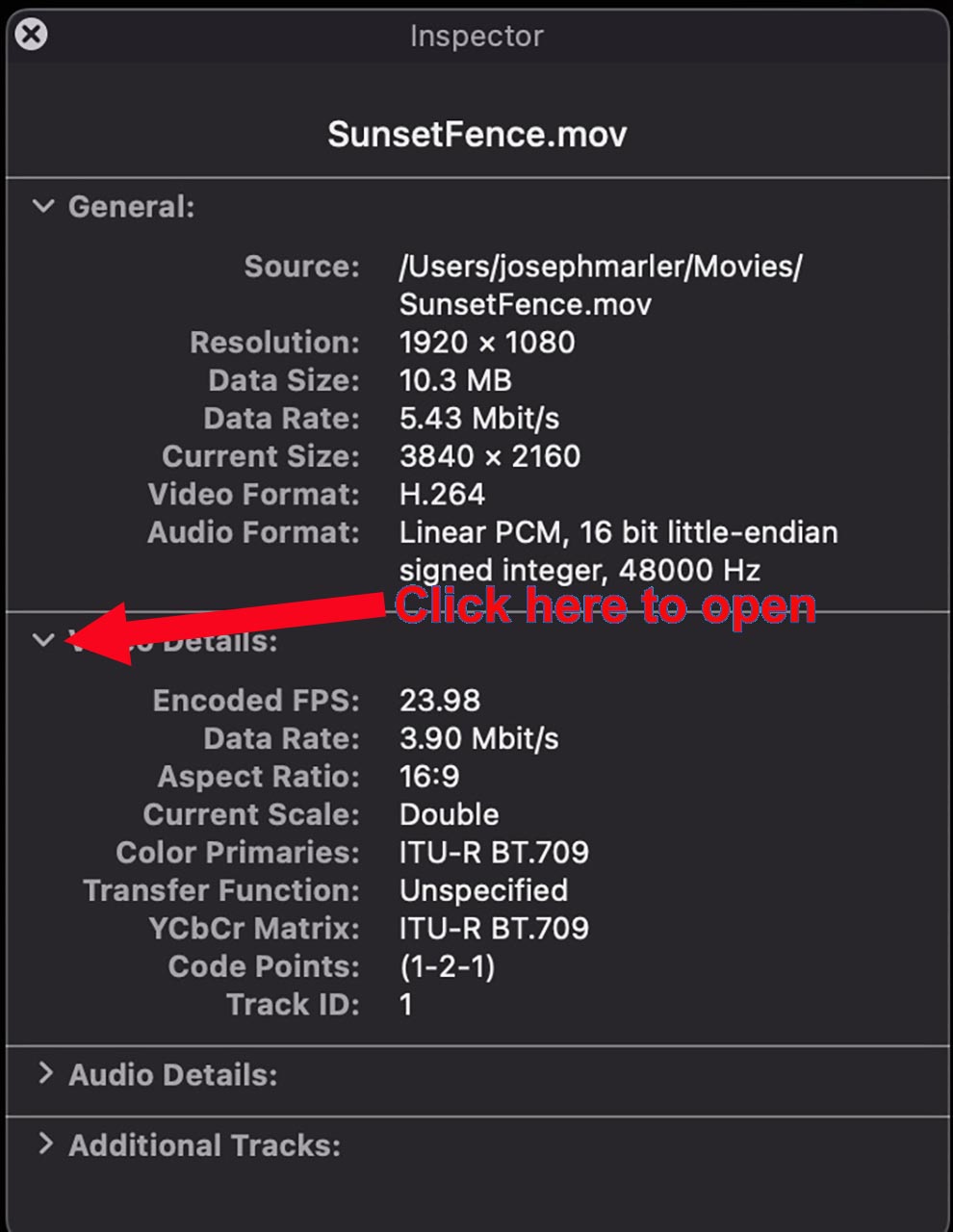
If you are combining OBS recordings with material you shoot, first verify the frame rate of the OBS files. The best way is double check that by playing in Quicktime Player and doing CMD+I, then spinning down the disclosure triangle. See attached. However the 3rd-party app Invisor is a lot better, shows more video metadata, and allows side-by-side comparison of multiple files in a grid-like format: apps.apple.com/us/app/invisor-media-file...or/id442947586?mt=12
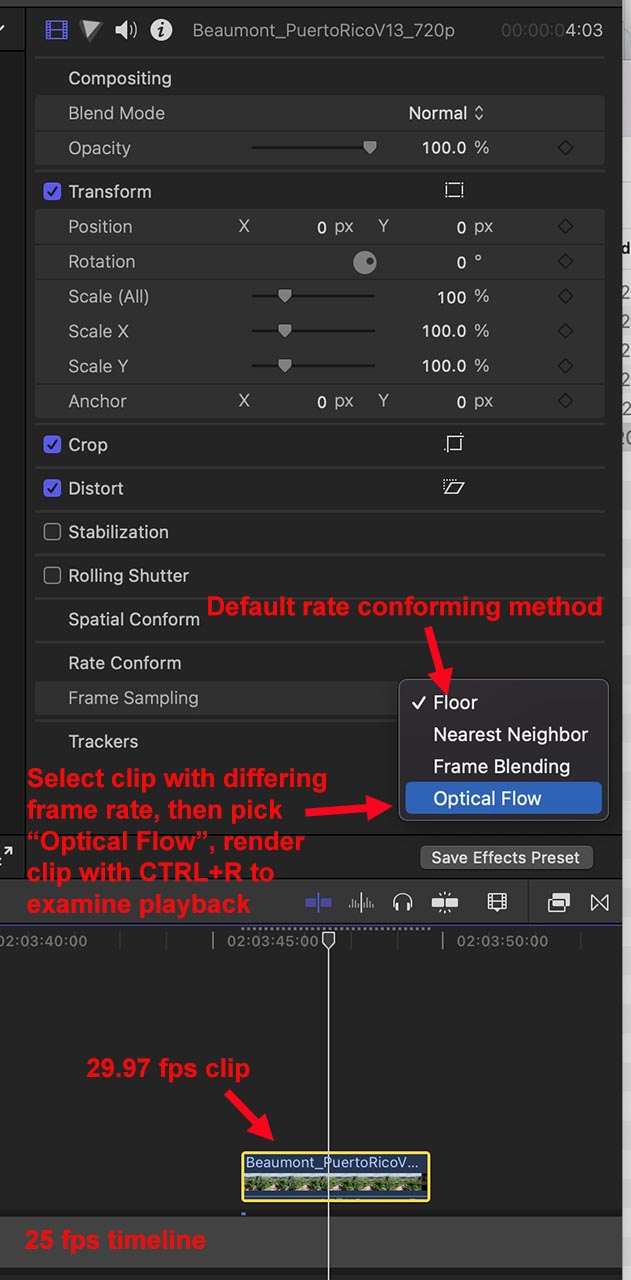
If all the files are at 25 fps, it should be smooth without any jerkiness. As a workaround you can use optical flow rate conforming, which solves some problems but is much more compute-intensive: help.apple.com/finalcutpro/mac/10.4.6/en.lproj/ver3363b44e.html
If you are in a country with 25 fps mains power, it is normally best to shoot, record and edit at 25 fps. If you shoot at a different frame rate, that can cause an interference pattern (rolling bands, flickering, etc). Your shutter speed for 25 fps video should be 1/50th or 1/48th, the so-called "180-degree rule".
Be careful in FCP -- by default the timeline frame rate will assume the frame rate of the first clip added. Click on the project icon and use the Inspector (CMD+4) to verify the project frame rate.
If you are combining OBS recordings with material you shoot, first verify the frame rate of the OBS files. The best way is double check that by playing in Quicktime Player and doing CMD+I, then spinning down the disclosure triangle. See attached. However the 3rd-party app Invisor is a lot better, shows more video metadata, and allows side-by-side comparison of multiple files in a grid-like format: apps.apple.com/us/app/invisor-media-file...or/id442947586?mt=12
If all the files are at 25 fps, it should be smooth without any jerkiness. As a workaround you can use optical flow rate conforming, which solves some problems but is much more compute-intensive: help.apple.com/finalcutpro/mac/10.4.6/en.lproj/ver3363b44e.html
Please Log in to join the conversation.
26 Apr 2023 19:01 #125101
by stitch666
thanks for the reply. I understand about recording at 25fps and what causes flicker. The difficulty I have is when I set OBS to screen record at 25fps, and then place that on a 25fps timeline it isn’t smooth. It’s not lagging, it looks like it’s dropping a frame or so at a regular interval which I guessed was because I’m recording a screen which is set to 30hz so I figured I should record at the same refresh rate as the screen. If I set OBS to record at 30fps and put that on a 30fps timeline it looks fine. Obviously that means I then have to record my other video at 30fps…
Replied by stitch666 on topic Help with frame rates
Stitch666, this area can be complicated, and not just to basic users.
If you are in a country with 25 fps mains power, it is normally best to shoot, record and edit at 25 fps. If you shoot at a different frame rate, that can cause an interference pattern (rolling bands, flickering, etc). Your shutter speed for 25 fps video should be 1/50th or 1/48th, the so-called "180-degree rule".
Be careful in FCP -- by default the timeline frame rate will assume the frame rate of the first clip added. Click on the project icon and use the Inspector (CMD+4) to verify the project frame rate.
If you are combining OBS recordings with material you shoot, first verify the frame rate of the OBS files. The best way is double check that by playing in Quicktime Player and doing CMD+I, then spinning down the disclosure triangle. See attached. However the 3rd-party app Invisor is a lot better, shows more video metadata, and allows side-by-side comparison of multiple files in a grid-like format: apps.apple.com/us/app/invisor-media-file...or/id442947586?mt=12
If all the files are at 25 fps, it should be smooth without any jerkiness. As a workaround you can use optical flow rate conforming, which solves some problems but is much more compute-intensive: help.apple.com/finalcutpro/mac/10.4.6/en.lproj/ver3363b44e.html
thanks for the reply. I understand about recording at 25fps and what causes flicker. The difficulty I have is when I set OBS to screen record at 25fps, and then place that on a 25fps timeline it isn’t smooth. It’s not lagging, it looks like it’s dropping a frame or so at a regular interval which I guessed was because I’m recording a screen which is set to 30hz so I figured I should record at the same refresh rate as the screen. If I set OBS to record at 30fps and put that on a 30fps timeline it looks fine. Obviously that means I then have to record my other video at 30fps…
Please Log in to join the conversation.
26 Apr 2023 21:06 #125105
by joema
Replied by joema on topic Help with frame rates
I don't think it's related to the screen refresh rate. It's possible when you set OBS to record at 25 fps, it's not really doing that. You could check the OBS metadata with Quicktime Player or ideally with Invisor.
If OBS is producing a variable frame rate file, that could also cause it. Why it would not do that at 30 fps, I don't know.
Another possibility is the source material on the OBS input is really 30 fps, and when you tell OBS to record 25 fps, it is simply doing a rate conversion of 30 to 25. 30 to 25 or 25 to 30 will cause jerky playback. The situation would be similar to putting 30 fps in a 24 fps timeline. See this Gerald Undone video, starting at 09:18:
If OBS is producing a variable frame rate file, that could also cause it. Why it would not do that at 30 fps, I don't know.
Another possibility is the source material on the OBS input is really 30 fps, and when you tell OBS to record 25 fps, it is simply doing a rate conversion of 30 to 25. 30 to 25 or 25 to 30 will cause jerky playback. The situation would be similar to putting 30 fps in a 24 fps timeline. See this Gerald Undone video, starting at 09:18:
Please Log in to join the conversation.
26 Apr 2023 21:30 #125108
by stitch666
I’ve just spoken to someone else who does this regularly. Looking at the video I am recording from YouTube, that video is at 30fps, so I wonder if that’s why it works at 30fps on OBS. It’s not to do with my monitor frequency, it’s more to do with the fps of the original video I’m screen recording.
Either way, screen recording at 30fps and putting it on a 30fps timeline seems to be working fine. I just have to be cautious with my Hue lights. My battery operated key lights are fine.
Thanks for the info.
Replied by stitch666 on topic Help with frame rates
I don't think it's related to the screen refresh rate. It's possible when you set OBS to record at 25 fps, it's not really doing that. You could check the OBS metadata with Quicktime Player or ideally with Invisor.
If OBS is producing a variable frame rate file, that could also cause it. Why it would not do that at 30 fps, I don't know.
Another possibility is the source material on the OBS input is really 30 fps, and when you tell OBS to record 25 fps, it is simply doing a rate conversion of 30 to 25. 30 to 25 or 25 to 30 will cause jerky playback. The situation would be similar to putting 30 fps in a 24 fps timeline. See this Gerald Undone video, starting at 09:18:
I’ve just spoken to someone else who does this regularly. Looking at the video I am recording from YouTube, that video is at 30fps, so I wonder if that’s why it works at 30fps on OBS. It’s not to do with my monitor frequency, it’s more to do with the fps of the original video I’m screen recording.
Either way, screen recording at 30fps and putting it on a 30fps timeline seems to be working fine. I just have to be cautious with my Hue lights. My battery operated key lights are fine.
Thanks for the info.
Please Log in to join the conversation.
27 Apr 2023 11:45 - 27 Apr 2023 11:46 #125113
by joema
Yes, if the Youtube video is 30 fps, OBS cannot change that to a smooth 25 fps. It can "force" it by periodically discarding certain frames, which is what causes the jerkiness.
You basically have two options:
(1) What you described above -- record 30 fps in OBS and also shoot new material at 30 fps with your camera, then edit on a 30 fps timeline. The final exported product will be 30 fps. The tradeoff is a possible lighting issue due to 25 Hz mains power vs 30 fps frame rate.
(2) Record 30 fps in OBS, but shoot 25 fps on your camera, and edit in a 25 fps timeline. The 30 fps material will be rate conformed to 25 fps. Initially it will be jerky but you can use "optical flow" to smooth that. The cost is higher CPU when rendering. See attached. The benefit (if it works OK) is it would prevent future problems with lighting artifacts. For playback in your locale, 25 fps might be more compatible in some cases. But if the material will be uploaded to a streaming service that's probably not an issue.
Replied by joema on topic Help with frame rates
..Looking at the video I am recording from YouTube, that video is at 30fps, so I wonder if that’s why it works at 30fps on OBS. It’s not to do with my monitor frequency, it’s more to do with the fps of the original video I’m screen recording...Either way, screen recording at 30fps and putting it on a 30fps timeline seems to be working fine. I just have to be cautious with my Hue lights. My battery operated key lights are fine....
Yes, if the Youtube video is 30 fps, OBS cannot change that to a smooth 25 fps. It can "force" it by periodically discarding certain frames, which is what causes the jerkiness.
You basically have two options:
(1) What you described above -- record 30 fps in OBS and also shoot new material at 30 fps with your camera, then edit on a 30 fps timeline. The final exported product will be 30 fps. The tradeoff is a possible lighting issue due to 25 Hz mains power vs 30 fps frame rate.
(2) Record 30 fps in OBS, but shoot 25 fps on your camera, and edit in a 25 fps timeline. The 30 fps material will be rate conformed to 25 fps. Initially it will be jerky but you can use "optical flow" to smooth that. The cost is higher CPU when rendering. See attached. The benefit (if it works OK) is it would prevent future problems with lighting artifacts. For playback in your locale, 25 fps might be more compatible in some cases. But if the material will be uploaded to a streaming service that's probably not an issue.
Last edit: 27 Apr 2023 11:46 by joema.
Please Log in to join the conversation.
