




- Posts: 17
- Thank you received: 0
3 Post Moderation Rule for New Boarders (25 Jan 2021)
New boarders will have their posts moderated - Don't worry if you cannot see your post immediately.
Titles > Custom Text > Settings
13 Apr 2023 14:48 - 13 Apr 2023 14:49 #124925
by erickp
Titles > Custom Text > Settings was created by erickp
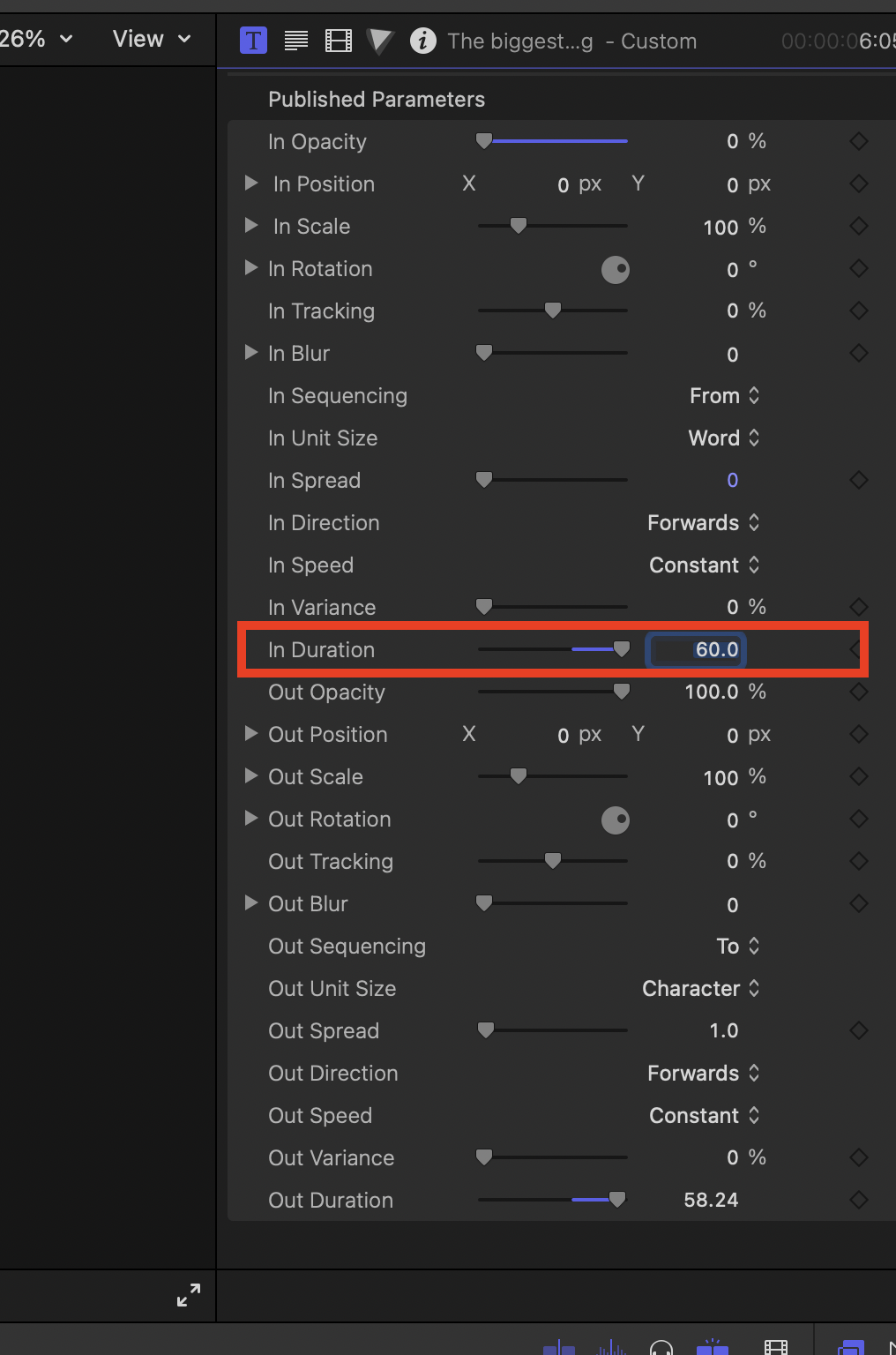
Is there a way to increase the "In Duration" time of the Custom Text? The slider allows changing between 5.0 and 60.0. When I try to type 90.0, it reverts back to 60.0.
If there isn't a way within this module, is there a third-party plugin that allows for finer control? Thanks!
If there isn't a way within this module, is there a third-party plugin that allows for finer control? Thanks!
Last edit: 13 Apr 2023 14:49 by erickp.
Please Log in to join the conversation.
- Tom Wolsky
-

- Offline
- Moderator
-

13 Apr 2023 14:56 #124926
by Tom Wolsky
Replied by Tom Wolsky on topic Titles > Custom Text > Settings
90. is 90 seconds, 1:30. Is that what you want? Select the title in the timeline, press Control-D, and type 90. (that's nine zero period).
Please Log in to join the conversation.
13 Apr 2023 15:20 #124927
by erickp
Replied by erickp on topic Titles > Custom Text > Settings
No, not in the timeline. I'm referring to the settings located in the custom text "published parameters" > "In Duration." It seems to max out at 60, and I can't go beyond that, which is strange. For context, I have my "unit size" set to word, so the sentence animations come in word by word, and I'm trying to control the speed at which it animates in each word.
Please Log in to join the conversation.


13 Apr 2023 15:23 - 13 Apr 2023 15:30 #124928
by DaveM
Replied by DaveM on topic Titles > Custom Text > Settings
If you know Motion or would like to learn it, you could control/right-click the Custom Text title in the Browser and choose to open it in Motion. There, you could adjust some of the parameters.
There are numerous other title plugins that also allow for control of animated properties.
There are numerous other title plugins that also allow for control of animated properties.
Last edit: 13 Apr 2023 15:30 by DaveM.
Please Log in to join the conversation.
13 Apr 2023 15:51 #124929
by erickp
Replied by erickp on topic Titles > Custom Text > Settings
I was trying to avoid that trip to Motion, but I'll give it a go when I have a moment. You mentioned various plugins that give you animation control similar to Custom Text. Would you mind providing names or links for any of these? Thank you.
Please Log in to join the conversation.
13 Apr 2023 16:16 - 13 Apr 2023 16:18 #124930
by DaveM
Replied by DaveM on topic Titles > Custom Text > Settings
There are hundreds, if not thousands, of text/titling plugins for FCP.
A couple of places to check out would be FXFactory.com and motionvfx.com. You could easily spend many hours at those sites, checking out what they have to offer...
A couple of places to check out would be FXFactory.com and motionvfx.com. You could easily spend many hours at those sites, checking out what they have to offer...
Last edit: 13 Apr 2023 16:18 by DaveM.
Please Log in to join the conversation.

13 Apr 2023 16:21 - 13 Apr 2023 16:31 #124931
by dmetz
Replied by dmetz on topic Titles > Custom Text > Settings
Alternatively, you could drop your Custom Text clip into a Compound clip, and slow down the comp. Works great!
EDIT: Tested with the 'In Duration' set to 60, and a lengthy-ish paragraph animating in by word. This resulted in a 2 second animation. Compounded it and set the compound to 25% speed, animation took 8 sec.
EDIT: Tested with the 'In Duration' set to 60, and a lengthy-ish paragraph animating in by word. This resulted in a 2 second animation. Compounded it and set the compound to 25% speed, animation took 8 sec.
Last edit: 13 Apr 2023 16:31 by dmetz.
Please Log in to join the conversation.
13 Apr 2023 18:10 #124933
by erickp
Replied by erickp on topic Titles > Custom Text > Settings
Yes, I use both of these and some others, but I haven't encountered anything specific to this situation. I'm sure there might be, but I don't have that kind of time to play around with thousands of plugins. I just thought since you mentioned it that you had a specific one in mind. Thanks.
Please Log in to join the conversation.
13 Apr 2023 18:12 #124934
by erickp
Interesting solution. I think I'll give this a try and see if it'll work for what I'm doing. Thank you!
Replied by erickp on topic Titles > Custom Text > Settings
Alternatively, you could drop your Custom Text clip into a Compound clip, and slow down the comp. Works great!
EDIT: Tested with the 'In Duration' set to 60, and a lengthy-ish paragraph animating in by word. This resulted in a 2 second animation. Compounded it and set the compound to 25% speed, animation took 8 sec.
Interesting solution. I think I'll give this a try and see if it'll work for what I'm doing. Thank you!
Please Log in to join the conversation.


14 Apr 2023 06:25 #124937
by sc_fox
Replied by sc_fox on topic Titles > Custom Text > Settings
Try out Custom SC (Title) from
fcpxtemplates.com/downloads/
The In and Out Durations have been changed to % of Length of Clip - and - they can overlap each other (the in and out will combine by adding together... you'll have to try it out!)
Also, the Out animations will always end on the last frame (the built in Custom Title starts its out animation near the halfway mark and times out from there.)
HTH
fcpxtemplates.com/downloads/
The In and Out Durations have been changed to % of Length of Clip - and - they can overlap each other (the in and out will combine by adding together... you'll have to try it out!)
Also, the Out animations will always end on the last frame (the built in Custom Title starts its out animation near the halfway mark and times out from there.)
HTH
Please Log in to join the conversation.
14 Apr 2023 16:16 #124939
by erickp
This worked perfectly! Much more control. Thank you!
Replied by erickp on topic Titles > Custom Text > Settings
Try out Custom SC (Title) from
fcpxtemplates.com/downloads/
The In and Out Durations have been changed to % of Length of Clip - and - they can overlap each other (the in and out will combine by adding together... you'll have to try it out!)
Also, the Out animations will always end on the last frame (the built in Custom Title starts its out animation near the halfway mark and times out from there.)
HTH
This worked perfectly! Much more control. Thank you!
Please Log in to join the conversation.
