


- Posts: 49
- Thank you received: 0
3 Post Moderation Rule for New Boarders (25 Jan 2021)
New boarders will have their posts moderated - Don't worry if you cannot see your post immediately.
Is there a crop available for 4K 2.39:1?
03 Apr 2023 10:20 #124849
by BeatGirl
Is there a crop available for 4K 2.39:1? was created by BeatGirl
I'm working on original files which are 4096x2160 (4K DCP) but you need to view it in 4096x1716 to get the projected AR.
The built-in widescreen filter doesn't offer a 2.39:1 crop, and even then it doesn't work properly due to the way the master file is formatted (I tried 2.35:1) but it seems to massively overcrop the image.
Any suggestions?
The built-in widescreen filter doesn't offer a 2.39:1 crop, and even then it doesn't work properly due to the way the master file is formatted (I tried 2.35:1) but it seems to massively overcrop the image.
Any suggestions?
Please Log in to join the conversation.
03 Apr 2023 14:06 - 03 Apr 2023 14:49 #124852
by Zabobon
For option 1:
This short YouTube Video explains how to make a Project any Aspect Ratio you would like.
This is not adding black bars but in effect cropping off the top and bottom of frame. And the dimensions can be whatever you want so, 4096x1716 would be the dimensions you type in when you set your custom size.
For option 2:
If on the other hand you simply want to overlay black bars to simulate cropping by projection crop and they need to be of an exact custom size you could do that by making a PNG 4096x2160 in say, Photoshop, with bars at the correct position top and bottom and transparent in the center and bringing that PNG in as a top layer in Final Cut Pro.
For the second option you could even make the bars directly in Final Cut Pro by making two rectangular black rectangles and carefully positioning them.
Replied by Zabobon on topic Is there a crop available for 4K 2.39:1?
Do you want to change the Project Aspect Ratio to 4096x1716 or overlay black bars to visually show 4096x1716?Any suggestions?
For option 1:
This short YouTube Video explains how to make a Project any Aspect Ratio you would like.
This is not adding black bars but in effect cropping off the top and bottom of frame. And the dimensions can be whatever you want so, 4096x1716 would be the dimensions you type in when you set your custom size.
For option 2:
If on the other hand you simply want to overlay black bars to simulate cropping by projection crop and they need to be of an exact custom size you could do that by making a PNG 4096x2160 in say, Photoshop, with bars at the correct position top and bottom and transparent in the center and bringing that PNG in as a top layer in Final Cut Pro.
For the second option you could even make the bars directly in Final Cut Pro by making two rectangular black rectangles and carefully positioning them.
Last edit: 03 Apr 2023 14:49 by Zabobon.
Please Log in to join the conversation.
03 Apr 2023 14:13 #124853
by BeatGirl
Replied by BeatGirl on topic Is there a crop available for 4K 2.39:1?
Thanks fo the tip. However, I need to keep the anamorphic squueze so I can export the file for grading, but with the correct 2.39:1 crop top and bottom.
Please Log in to join the conversation.
03 Apr 2023 14:41 #124854
by Zabobon
Replied by Zabobon on topic Is there a crop available for 4K 2.39:1?
Ah, so, the footage was shot with an anamorphic lens?However, I need to keep the anamorphic squueze so I can export the file for grading, but with the correct 2.39:1 crop top and bottom.
Please Log in to join the conversation.
03 Apr 2023 15:16 #124855
by BeatGirl
Replied by BeatGirl on topic Is there a crop available for 4K 2.39:1?
It's a 4K scan taken from a 2 perf 35mm negative.
Please Log in to join the conversation.
03 Apr 2023 15:52 - 03 Apr 2023 16:00 #124856
by Zabobon
www.digital-intermediate.co.uk/examples/2perf/2perf.htm
And you are editing 4096x2160 scans in a 4096x2160 timeline? In which case what are you actually seeing in your Final Cut Pro timeline? Can you upload an image?
Also - hopefully someone on this Forum will have had direct experience working with scanned 2 perf 35mm and share their working method.
Replied by Zabobon on topic Is there a crop available for 4K 2.39:1?
So, as far as I can understand there is no anamorphic squeeze in the original frames. They were cropped wide originally.It's a 4K scan taken from a 2 perf 35mm negative.
www.digital-intermediate.co.uk/examples/2perf/2perf.htm
And you are editing 4096x2160 scans in a 4096x2160 timeline? In which case what are you actually seeing in your Final Cut Pro timeline? Can you upload an image?
Also - hopefully someone on this Forum will have had direct experience working with scanned 2 perf 35mm and share their working method.
Last edit: 03 Apr 2023 16:00 by Zabobon.
Please Log in to join the conversation.
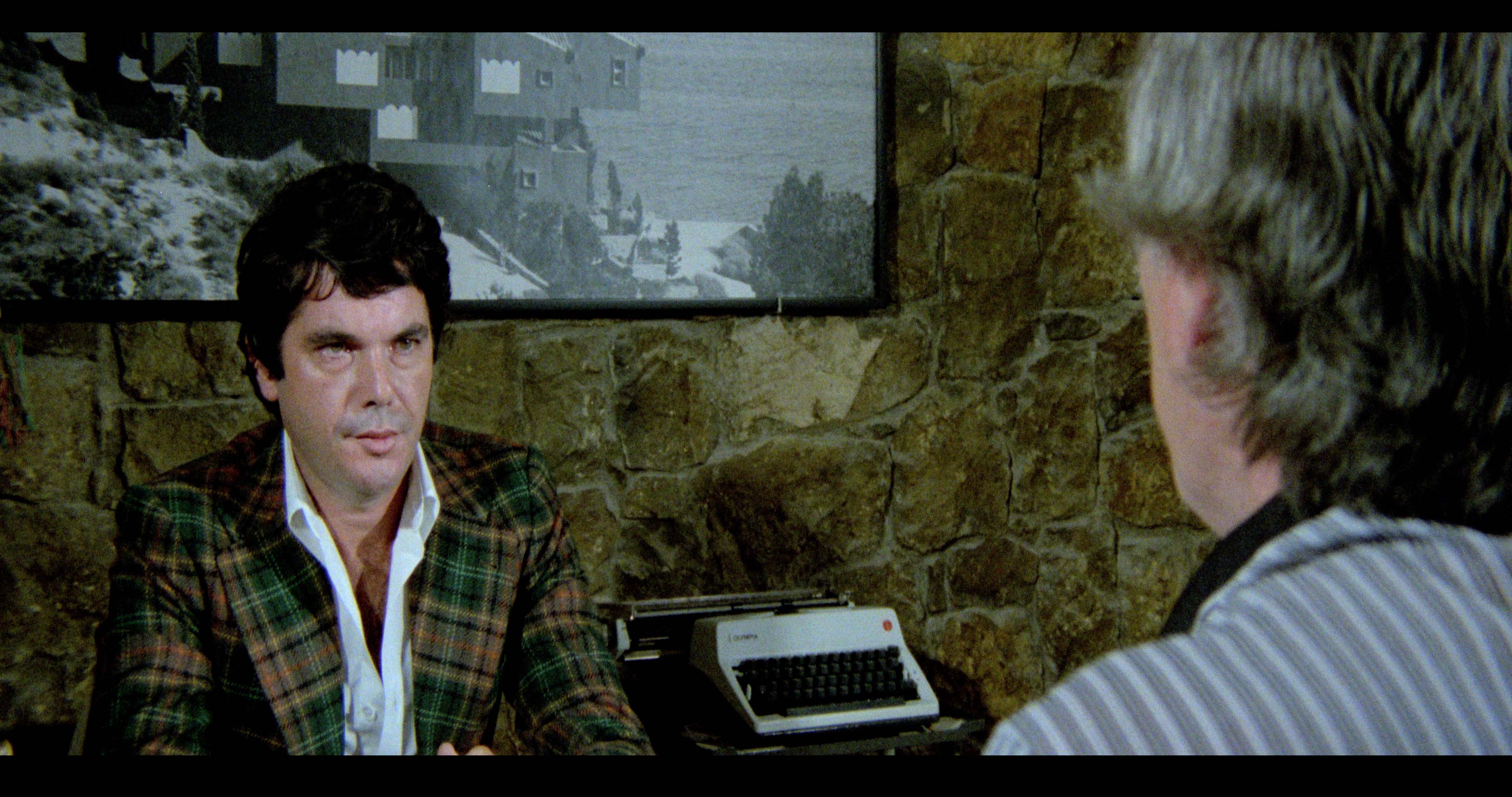
03 Apr 2023 16:10 - 03 Apr 2023 20:20 #124858
by Zabobon
Apologies but I think you are just going to have to hope someone here has direct experience of working with this type of scan...
Replied by Zabobon on topic Is there a crop available for 4K 2.39:1?
So, that does indeed look like it is squeezed anamorphically as well as being cropped wide...attached sample.
Apologies but I think you are just going to have to hope someone here has direct experience of working with this type of scan...
Last edit: 03 Apr 2023 20:20 by Zabobon.
Please Log in to join the conversation.


03 Apr 2023 17:18 #124860
by DaveM
Replied by DaveM on topic Is there a crop available for 4K 2.39:1?
Is the letterboxing shown in your sample image part of the actual scan?
4096 x 1714 is a more accurate frame size for a 2.39:1 aspect ratio...
4096 x 1714 is a more accurate frame size for a 2.39:1 aspect ratio...
Please Log in to join the conversation.
03 Apr 2023 17:19 #124861
by BeatGirl
Replied by BeatGirl on topic Is there a crop available for 4K 2.39:1?
Yes, that is exactly how the 4k scan was supplied.
Please Log in to join the conversation.
03 Apr 2023 17:45 - 03 Apr 2023 18:05 #124863
by DaveM
Replied by DaveM on topic Is there a crop available for 4K 2.39:1?
Seems wasteful to use scanning resolution that includes the letterboxing instead of just for the actual image.
So, do you want to output the final image with letterboxing or not?
It is probably just me, but is the actual image portion of the frame supposed to be 2.33:1 (and not the frame including the letterboxing), in order to have the image look correct? Then, you could add letterboxing to then change the frame AR to 2.39:1... ???
As a test, I imported the still into an image editing app and changed the 4096 x 2160 image into 4096 x 1716/1714. The resulting image seems a bit too wide (which seems due to the top and bottom letterboxing on the original). Curious...
So, do you want to output the final image with letterboxing or not?
It is probably just me, but is the actual image portion of the frame supposed to be 2.33:1 (and not the frame including the letterboxing), in order to have the image look correct? Then, you could add letterboxing to then change the frame AR to 2.39:1... ???
As a test, I imported the still into an image editing app and changed the 4096 x 2160 image into 4096 x 1716/1714. The resulting image seems a bit too wide (which seems due to the top and bottom letterboxing on the original). Curious...
Last edit: 03 Apr 2023 18:05 by DaveM.
Please Log in to join the conversation.
03 Apr 2023 18:07 #124864
by BeatGirl
Replied by BeatGirl on topic Is there a crop available for 4K 2.39:1?
Please Log in to join the conversation.
03 Apr 2023 19:02 - 07 Apr 2023 13:44 #124865
by DaveM
Yup. That's clear. Zaboban mentioned another reference earlier in the thread.
"Easy Button" Workflow
This workflow is based on the assumption that the provided still frame image has the letterboxing that we aren't considering part of the actual image. Using Compressor in this case to get to a proper aspect ratio of 2.39:1 (if that's correct) from the provided 4096 x 2160 frame size would yield a nominal frame size of 4096 x 1716.
- Bring the master file into Compressor.
- Select a ProRes 422 HQ (or better) preset and in the Video tab you select “Letterbox Area of Source” for the Cropping setting.
- Then control-click (right-click) the output setting in the main (batch) area, and select “New Job with Selected Output”. This “chains” the output to another batch setting.
- Use the same preset for the second item in the chain, and in the Video tab choose Custom for the Frame size, then enter the dimensions (4096 x 1716 for this example).
- Run the batch and you get two output files, one for each step. The second file would then become the new master file that could be sent to the colorist, or used for doing any editing…
- For both settings used in Compressor, I did set the Video tab Quality for Resize filter to “Anti-aliased (Best)".
- The primary benefit, besides a slight more automated workflow, of using Compressor is that you can choose a higher quality resizing algorithm than the one built into Final Cut Pro...
More Detailed Workflow
The still you provided is 4096 x 2160, which is 1.90:1 (1.8963:1), as is. The original film frame image could be 2.33:1 if the source was the negative of the film (depending on any matte used in the camera during filming). 2-perf 35mm is usually printed at 2.39:1 (or the earlier 2.35:1).
Did the original film frame image have the letterboxing as part of the actual image in the frame? Or, was the letterboxing added during the scanning process? Knowing the exact look of the source image is important, in lieu of a geometric reference in-frame (for determining proper aspect ratio). Sometimes a matte is used during filming and that could affect how the image ends up in the negative and the final print.
First, the image needs to be de-squeezed to the proper aspect ratio. Let's leave the width as 4096. Should the de-squeeze operation include the full image as you've provided it, or after the letterboxing has been removed? Without a clear circular/square object in-frame, it's not easy to tell just from looking at the still whether the image has been properly de-squeezed. You could use a percentage based on the difference from the scanned still frame and the original aspect ratio, but that might be only an approximation.
With the black bars removed (the bottom is thicker than the top), the image y-scale could be adjusted (leaving the x-scale/dimension alone) to fix the image aspect ratio (due to the scanning or original matting, if applicable).
Additional Comments:
- The Widescreen adjustment layer (in Titles) that you referred to seems to be only applicable for Projects/timelines with 16:9 frame aspect ratios.
- The image on a 2-perf 35mm film print should have an aspect ratio of 2.39:1, depending on when the print was made. During the 1970s, with changes in procedures and equipment, the original 2.35:1 used in early 2-perf 35mm Techniscope migrated to 2.39:1.
- Without knowing the specifics of the scanning process and what the actual film print image for a frame looked like (on the actual film — was the scan made from the original negative, final print, or?), it's difficult to know exactly how to scale the still frame shown in this thread. A decent guess would be that only the non-black part of the still frame be used. Once that top and bottom border are removed (they are unequal) and the image vertically centered, then i'ts just a matter of scaling the y-scale value by 1.8963/2.39, which is approximately 79.34%. That resulting image should fit the 4096 x 1716 frame size.
- A recent HBO series was shot as 2-perf 35mm film ("I Know This Much is True"). The show was shot with a 2:1 print extraction in mind (i.e., framed for a 2:1 final output). So, no reference to 2.33:1 or 2.39:1 as an aspect ratio. Not knowing the framing intent (or aspect ratio for delivery) would make it less easy to do a conversion were the film scanned at a different aspect ratio (as is the case with the OP's example still)...
Replied by DaveM on topic Is there a crop available for 4K 2.39:1?
It's a 2 perf techniscope film.
en.wikipedia.org/wiki/Techniscope
Yup. That's clear. Zaboban mentioned another reference earlier in the thread.
"Easy Button" Workflow
This workflow is based on the assumption that the provided still frame image has the letterboxing that we aren't considering part of the actual image. Using Compressor in this case to get to a proper aspect ratio of 2.39:1 (if that's correct) from the provided 4096 x 2160 frame size would yield a nominal frame size of 4096 x 1716.
- Bring the master file into Compressor.
- Select a ProRes 422 HQ (or better) preset and in the Video tab you select “Letterbox Area of Source” for the Cropping setting.
- Then control-click (right-click) the output setting in the main (batch) area, and select “New Job with Selected Output”. This “chains” the output to another batch setting.
- Use the same preset for the second item in the chain, and in the Video tab choose Custom for the Frame size, then enter the dimensions (4096 x 1716 for this example).
- Run the batch and you get two output files, one for each step. The second file would then become the new master file that could be sent to the colorist, or used for doing any editing…
- For both settings used in Compressor, I did set the Video tab Quality for Resize filter to “Anti-aliased (Best)".
- The primary benefit, besides a slight more automated workflow, of using Compressor is that you can choose a higher quality resizing algorithm than the one built into Final Cut Pro...
More Detailed Workflow
The still you provided is 4096 x 2160, which is 1.90:1 (1.8963:1), as is. The original film frame image could be 2.33:1 if the source was the negative of the film (depending on any matte used in the camera during filming). 2-perf 35mm is usually printed at 2.39:1 (or the earlier 2.35:1).
Did the original film frame image have the letterboxing as part of the actual image in the frame? Or, was the letterboxing added during the scanning process? Knowing the exact look of the source image is important, in lieu of a geometric reference in-frame (for determining proper aspect ratio). Sometimes a matte is used during filming and that could affect how the image ends up in the negative and the final print.
First, the image needs to be de-squeezed to the proper aspect ratio. Let's leave the width as 4096. Should the de-squeeze operation include the full image as you've provided it, or after the letterboxing has been removed? Without a clear circular/square object in-frame, it's not easy to tell just from looking at the still whether the image has been properly de-squeezed. You could use a percentage based on the difference from the scanned still frame and the original aspect ratio, but that might be only an approximation.
With the black bars removed (the bottom is thicker than the top), the image y-scale could be adjusted (leaving the x-scale/dimension alone) to fix the image aspect ratio (due to the scanning or original matting, if applicable).
Additional Comments:
- The Widescreen adjustment layer (in Titles) that you referred to seems to be only applicable for Projects/timelines with 16:9 frame aspect ratios.
- The image on a 2-perf 35mm film print should have an aspect ratio of 2.39:1, depending on when the print was made. During the 1970s, with changes in procedures and equipment, the original 2.35:1 used in early 2-perf 35mm Techniscope migrated to 2.39:1.
- Without knowing the specifics of the scanning process and what the actual film print image for a frame looked like (on the actual film — was the scan made from the original negative, final print, or?), it's difficult to know exactly how to scale the still frame shown in this thread. A decent guess would be that only the non-black part of the still frame be used. Once that top and bottom border are removed (they are unequal) and the image vertically centered, then i'ts just a matter of scaling the y-scale value by 1.8963/2.39, which is approximately 79.34%. That resulting image should fit the 4096 x 1716 frame size.
- A recent HBO series was shot as 2-perf 35mm film ("I Know This Much is True"). The show was shot with a 2:1 print extraction in mind (i.e., framed for a 2:1 final output). So, no reference to 2.33:1 or 2.39:1 as an aspect ratio. Not knowing the framing intent (or aspect ratio for delivery) would make it less easy to do a conversion were the film scanned at a different aspect ratio (as is the case with the OP's example still)...
Last edit: 07 Apr 2023 13:44 by DaveM.
Please Log in to join the conversation.

07 Apr 2023 03:37 - 07 Apr 2023 03:38 #124882
by Redifer
Replied by Redifer on topic Is there a crop available for 4K 2.39:1?
If you're making a DCP, you'll want to create a project that's 4096 x 1716 and just work in that. You don't want to use any different resolutions if your final destination is 4K DCP scope.
You can move your 16:9 4K clips up and down and reframe them in the 2.39 area.
You can move your 16:9 4K clips up and down and reframe them in the 2.39 area.
Last edit: 07 Apr 2023 03:38 by Redifer.
Please Log in to join the conversation.
07 Apr 2023 13:47 - 07 Apr 2023 14:50 #124884
by DaveM
The OP didn't mention whether the deliverable would be in a Full or a Scope container/frame. There seemed to be some confusion about cropping the 4096 x 2160 image to get a 2.39:1 aspect ratio (and some mention about 4096 x 1716). Then, in seeming contradiction, the OP mentions keeping the distorted version (see the sample frame still image provided) for the colorist.
So, yeah, you'd think one would deliver a 4096 x 1716 image (with the correct aspect ratio) in either a Scope or Full container/frame size...
Replied by DaveM on topic Is there a crop available for 4K 2.39:1?
If you're making a DCP, you'll want to create a project that's 4096 x 1716 and just work in that. You don't want to use any different resolutions if your final destination is 4K DCP scope.
You can move your 16:9 4K clips up and down and reframe them in the 2.39 area.
The OP didn't mention whether the deliverable would be in a Full or a Scope container/frame. There seemed to be some confusion about cropping the 4096 x 2160 image to get a 2.39:1 aspect ratio (and some mention about 4096 x 1716). Then, in seeming contradiction, the OP mentions keeping the distorted version (see the sample frame still image provided) for the colorist.
So, yeah, you'd think one would deliver a 4096 x 1716 image (with the correct aspect ratio) in either a Scope or Full container/frame size...
Last edit: 07 Apr 2023 14:50 by DaveM. Reason: Attempted to clarify things...
Please Log in to join the conversation.
07 Apr 2023 14:57 #124885
by BeatGirl
Replied by BeatGirl on topic Is there a crop available for 4K 2.39:1?
The final project is Blu-ray, and possibly UHD BD. I was asked to keep the format as supplied for grading and restoration purposes. I've since been informed that the restoration/grading studio will handle the file output and crop etc as they have dedicated tools for the job.
Please Log in to join the conversation.
07 Apr 2023 15:10 - 07 Apr 2023 15:11 #124886
by DaveM
Thanks for following up. I've never personally dealt with a 2-perf transfer before, so I learned some new things, especially that people are still using 2-perf film to shoot projects.
The confusing thing (for me, at least) was what you were actually supposed to be doing in/with FCP. Keeping the original scanned image format for archival purposes makes sense. I still don't understand what you were trying to do with the scanned film. As I described above, if the purpose is to extract the image minus the letterboxing and correct the aspect ratio, then something like Compressor or DaVinci Resolve could easily handle that task with high quality ("dedicated tools" sounds like what people say when they want to overcharge for something).
Anyway, I learned a bunch about 2-perf 35mm filmmaking, so thanks for bringing up the topic...
Replied by DaveM on topic Is there a crop available for 4K 2.39:1?
The final project is Blu-ray, and possibly UHD BD. I was asked to keep the format as supplied for grading and restoration purposes. I've since been informed that the restoration/grading studio will handle the file output and crop etc as they have dedicated tools for the job.
Thanks for following up. I've never personally dealt with a 2-perf transfer before, so I learned some new things, especially that people are still using 2-perf film to shoot projects.
The confusing thing (for me, at least) was what you were actually supposed to be doing in/with FCP. Keeping the original scanned image format for archival purposes makes sense. I still don't understand what you were trying to do with the scanned film. As I described above, if the purpose is to extract the image minus the letterboxing and correct the aspect ratio, then something like Compressor or DaVinci Resolve could easily handle that task with high quality ("dedicated tools" sounds like what people say when they want to overcharge for something).
Anyway, I learned a bunch about 2-perf 35mm filmmaking, so thanks for bringing up the topic...
Last edit: 07 Apr 2023 15:11 by DaveM.
Please Log in to join the conversation.
07 Apr 2023 15:26 - 07 Apr 2023 15:29 #124887
by BeatGirl
Replied by BeatGirl on topic Is there a crop available for 4K 2.39:1?
Actually, the film was shot in the 1970s. A lot of films were shot 2 perf in Italy and Spain back then as a cost-saving measure. The way 2 perf film was shot, you need to edit out a few frames before and after each shot. That means every different scene change, so it's quite a lot of work!
en.wikipedia.org/wiki/Negative_pulldown#2-perf
en.wikipedia.org/wiki/Negative_pulldown#2-perf
Last edit: 07 Apr 2023 15:29 by BeatGirl.
Please Log in to join the conversation.
07 Apr 2023 16:09 - 07 Apr 2023 16:10 #124890
by DaveM
From the frame still image you provided, it's pretty clear that the hair, clothing, and the typewriter were from the late 1960s or 1970s.
The "Dollars Trilogy" by Sergio Leone also used 2-perf. That was around 1964 to 1966 (release dates). "THX 1138" and "American Graffiti" were also shot on 2-perf.
With finer grain modern film stock, 2-perf is still being used today, as much for artist reasons as for any cost savings.
This doesn't make sense. Are you talking about editing/handling actual, physical film, in general, or what? I don't see how 2-perf would be any different than other 35mm formats for editing, except consideration of the lower resolution when deiciding on resizing the image. Please clarify. Thanks.
Replied by DaveM on topic Is there a crop available for 4K 2.39:1?
Actually, the film was shot in the 1970s. A lot of films were shot 2 perf in Italy and Spain back then as a cost-saving measure.
From the frame still image you provided, it's pretty clear that the hair, clothing, and the typewriter were from the late 1960s or 1970s.
The "Dollars Trilogy" by Sergio Leone also used 2-perf. That was around 1964 to 1966 (release dates). "THX 1138" and "American Graffiti" were also shot on 2-perf.
With finer grain modern film stock, 2-perf is still being used today, as much for artist reasons as for any cost savings.
The way 2 perf film was shot, you need to edit out a few frames before and after each shot. That means every different scene change, so it's quite a lot of work!
en.wikipedia.org/wiki/Negative_pulldown#2-perf
This doesn't make sense. Are you talking about editing/handling actual, physical film, in general, or what? I don't see how 2-perf would be any different than other 35mm formats for editing, except consideration of the lower resolution when deiciding on resizing the image. Please clarify. Thanks.
Last edit: 07 Apr 2023 16:10 by DaveM.
Please Log in to join the conversation.
07 Apr 2023 21:16 - 07 Apr 2023 21:17 #124892
by Redifer
Yeah I was under the impression he was delivering to scope. But since then we've found out it's for Blu-ray which can only handle 16:9. And we've also discovered that other people are dealing with that part, so I'd just stick with whatever the raw size of the scanned images is.
Replied by Redifer on topic Is there a crop available for 4K 2.39:1?
The OP didn't mention whether the deliverable would be in a Full or a Scope container/frame.
Yeah I was under the impression he was delivering to scope. But since then we've found out it's for Blu-ray which can only handle 16:9. And we've also discovered that other people are dealing with that part, so I'd just stick with whatever the raw size of the scanned images is.
Last edit: 07 Apr 2023 21:17 by Redifer.
Please Log in to join the conversation.
