


- Posts: 2
- Thank you received: 0
3 Post Moderation Rule for New Boarders (25 Jan 2021)
New boarders will have their posts moderated - Don't worry if you cannot see your post immediately.
Am I crazy, or are these little things causing everyone huge frustrations w/FCP?
- Dolmetscher007
-
 Topic Author
- Offline
- New Member
-

Less
More
31 Mar 2023 17:27 #124824
by Dolmetscher007
Am I crazy, or are these little things causing everyone huge frustrations w/FCP? was created by Dolmetscher007
First and foremost, this is not a rant. I know that "tone" is hard to convey in print, so I just want to say, I love FCP, and the whole FCP/Motion workflow. The following questions are meant as a call for help, not a rant. Maybe someone else has these same issues, and can help.
Capitalization...
I edit a daily video for a client who is very text heavy. I end up having to type out a lot of text into the FCP interface. Whenever I type a word, and then press space bar, the first letter of that word always changes to a capital letter. At first, it was just a little annoying, but now... it has begun to drive me crazy.
Question: Is there... ANY WAY... to disable the "Autocapitalize" feature in FCP that capitalizes the first letter of the first word of text?
"Home"... and... "End"
While typing text, if I want to go back to the beginning of the text, probably to correct the "autocapitalized" feature from above, if I press "Home" (on my 3rd party keyboard) or the Mac keyboard short cut Cmd + <--, instead of going to the beginning of the text I'm editing... it moves my playhead to the beginning of the whole project.
Question: Is there a way to have the Home key (or keyboard shortcut command) respect that I am in the middle of typing text, and do not want to go back to the beginning of the project? But without changing the Home and End keyboard commands in FCP > Commands > Customize...? I like using Home and End for these functions during normal editing, but not when typing.
Trim "handles" are impossible to "grab"
Anybody even notice that if you go to trim a clip for any reason, the top, bottom, right, and left trim handles, are so small, and so set to the edge, that you can lose your mind trying to grab them to move them? If you can finally get ONE to move... then you can kind of work around all this by moving the whole thing around to get the other side away from the edge, but... this is so annoying, it can make you scream after a while.
Ken Burns Start and End boxes are... infuriatingly difficult to grab, resize, and work with
I do a lot of KB effect, and even after months and months of daily use, I STILL find that I want to throw my computer out into the yard after the 300th time I was trying to adjust the "End" box (red), but it switched to adjusting the "Start" box (green). The start and end boxes are SO DIFFICULT to grab, move, and resize. And many times, even if you can grab the right box, and you can resize it... the resizing action is SO wonky... it doesn't resize smoothly, it suddenly jumps around resizing in a very wonky way, until I really stop... take a breath... and suuuuuper carefully go back and resize the resize I just did.
Question: Is there some way to help with this?
Capitalization...
I edit a daily video for a client who is very text heavy. I end up having to type out a lot of text into the FCP interface. Whenever I type a word, and then press space bar, the first letter of that word always changes to a capital letter. At first, it was just a little annoying, but now... it has begun to drive me crazy.
Question: Is there... ANY WAY... to disable the "Autocapitalize" feature in FCP that capitalizes the first letter of the first word of text?
"Home"... and... "End"
While typing text, if I want to go back to the beginning of the text, probably to correct the "autocapitalized" feature from above, if I press "Home" (on my 3rd party keyboard) or the Mac keyboard short cut Cmd + <--, instead of going to the beginning of the text I'm editing... it moves my playhead to the beginning of the whole project.
Question: Is there a way to have the Home key (or keyboard shortcut command) respect that I am in the middle of typing text, and do not want to go back to the beginning of the project? But without changing the Home and End keyboard commands in FCP > Commands > Customize...? I like using Home and End for these functions during normal editing, but not when typing.
Trim "handles" are impossible to "grab"
Anybody even notice that if you go to trim a clip for any reason, the top, bottom, right, and left trim handles, are so small, and so set to the edge, that you can lose your mind trying to grab them to move them? If you can finally get ONE to move... then you can kind of work around all this by moving the whole thing around to get the other side away from the edge, but... this is so annoying, it can make you scream after a while.
Ken Burns Start and End boxes are... infuriatingly difficult to grab, resize, and work with
I do a lot of KB effect, and even after months and months of daily use, I STILL find that I want to throw my computer out into the yard after the 300th time I was trying to adjust the "End" box (red), but it switched to adjusting the "Start" box (green). The start and end boxes are SO DIFFICULT to grab, move, and resize. And many times, even if you can grab the right box, and you can resize it... the resizing action is SO wonky... it doesn't resize smoothly, it suddenly jumps around resizing in a very wonky way, until I really stop... take a breath... and suuuuuper carefully go back and resize the resize I just did.
Question: Is there some way to help with this?
Please Log in to join the conversation.
- Tom Wolsky
-

- Offline
- Moderator
-

31 Mar 2023 18:35 #124825
by Tom Wolsky
Replied by Tom Wolsky on topic Am I crazy, or are these little things causing everyone huge frustrations w/FCP?
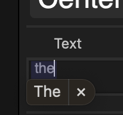
The autocapitalize is I think an OS function. After you press the spacebar, you have to click the x.
No good way for home or end in text except to lean on the left or right arrow keys.
Click in the Viewer and tap Cmd- -.
The KB problem may be worse on some systems and media. I'm not seeing much jumping about when I drag the OSC or the corners.
No good way for home or end in text except to lean on the left or right arrow keys.
Click in the Viewer and tap Cmd- -.
The KB problem may be worse on some systems and media. I'm not seeing much jumping about when I drag the OSC or the corners.
Please Log in to join the conversation.
- Tom Wolsky
-
- Offline
- Moderator
-
31 Mar 2023 18:51 #124827
by Tom Wolsky
Replied by Tom Wolsky on topic Am I crazy, or are these little things causing everyone huge frustrations w/FCP?
Sorry, before you press the spacebar not after.
Please Log in to join the conversation.


31 Mar 2023 18:53 - 05 Apr 2023 15:11 #124828
by DaveM
You might try option-arrow keys to jump in word increments.
You might try learning some of the keyboard shortcuts for moving between clips and selecting various trim spots, etc.
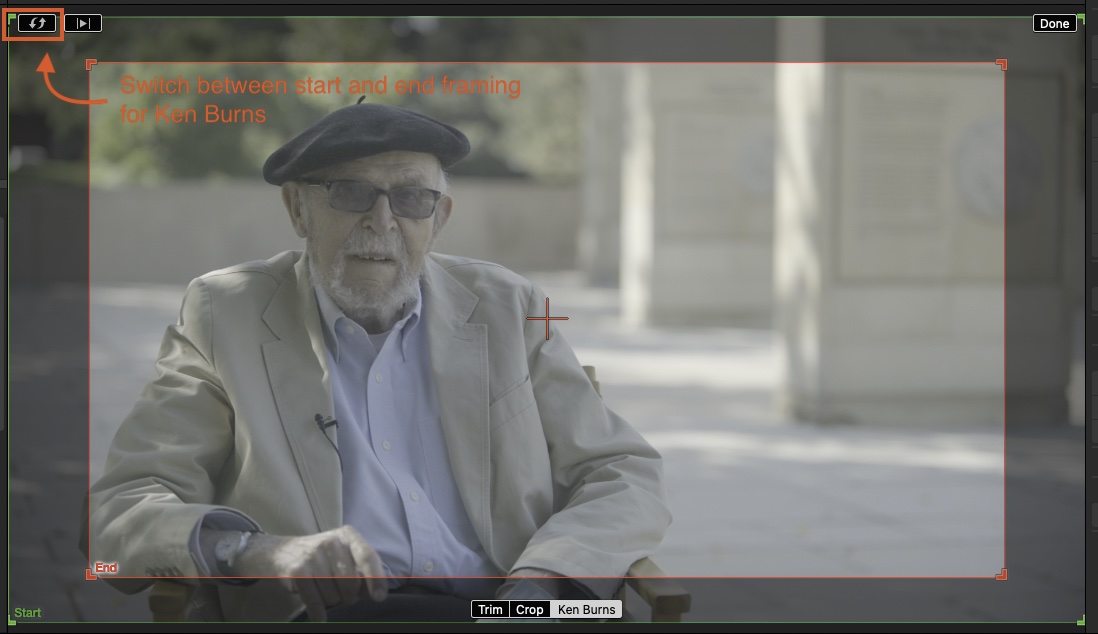
The start-end toggle might help...
Replied by DaveM on topic Am I crazy, or are these little things causing everyone huge frustrations w/FCP?
First and foremost, this is not a rant. I know that "tone" is hard to convey in print, so I just want to say, I love FCP, and the whole FCP/Motion workflow. The following questions are meant as a call for help, not a rant. Maybe someone else has these same issues, and can help.
Capitalization...
"Home"... and... "End"
You might try option-arrow keys to jump in word increments.
Trim "handles" are impossible to "grab"
You might try learning some of the keyboard shortcuts for moving between clips and selecting various trim spots, etc.
Ken Burns Start and End boxes are... infuriatingly difficult to grab, resize, and work with
The start-end toggle might help...
Last edit: 05 Apr 2023 15:11 by DaveM.
Please Log in to join the conversation.

01 Apr 2023 03:29 - 01 Apr 2023 03:36 #124834
by VTC
Replied by VTC on topic Am I crazy, or are these little things causing everyone huge frustrations w/FCP?
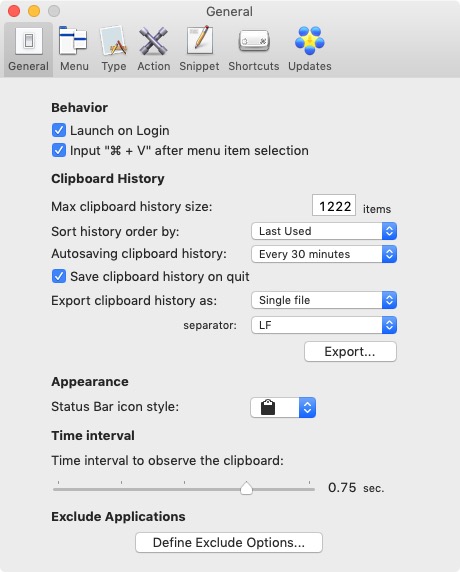
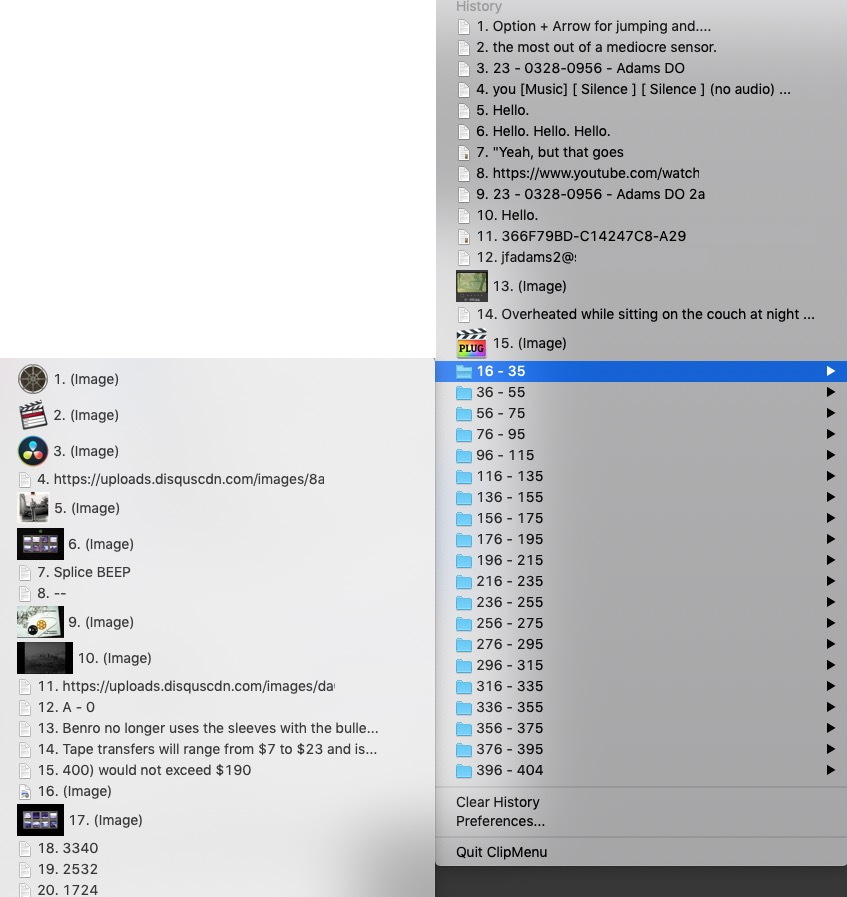
Option + Arrow for jumping and....Why on earth are you typing in FC? The guy's supplying you with text so just copy/paste that from what he provides. Get the freebie ClipMenu. It'll hold as much hierarchal text and photos and whatever you can imagine.
Last edit: 01 Apr 2023 03:36 by VTC.
Please Log in to join the conversation.


04 Apr 2023 04:00 #124868
by Larrie
Replied by Larrie on topic Am I crazy, or are these little things causing everyone huge frustrations w/FCP?
Is the client is providing you with printouts instead of electronic text files? If so, take a photo of the printouts with your phone and use the text recognition option to copy it and then paste it into your word processor.
Please Log in to join the conversation.

05 Apr 2023 14:48 #124876
by smojo
Replied by smojo on topic Am I crazy, or are these little things causing everyone huge frustrations w/FCP?
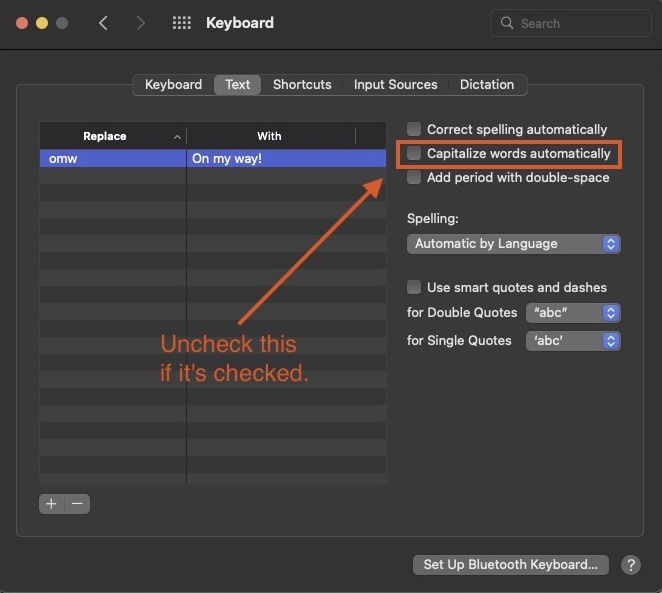
In system settings, go to keyboard, then input sources and click on edit, then turn off Capitalize words automatically.
Please Log in to join the conversation.
