


- Posts: 11
- Thank you received: 0
3 Post Moderation Rule for New Boarders (25 Jan 2021)
New boarders will have their posts moderated - Don't worry if you cannot see your post immediately.
How can I export edited clips to Photos
- DaveGadgeteer
-
 Topic Author
- Offline
- New Member
-

Less
More
25 Mar 2023 18:28 #124735
by DaveGadgeteer
How can I export edited clips to Photos was created by DaveGadgeteer
I've made a movie in FCP from hundreds of iPhone clips, stills and videos, that I've edited trimmed and shortened.
Now I need to get those final edited clips into Apple Photos for a photo slideshow alternative presentation.
Bing chat has given me several recipes, like exporting selected clips via XML, but so far they always end up as one long movie, not separate files that I could put in a Photos album for slide show purposes.
Is there a way to get the final forms of these clips exported separately? The stills could be 5 second movies if necessary, but the movies need to be short movies.
Now I need to get those final edited clips into Apple Photos for a photo slideshow alternative presentation.
Bing chat has given me several recipes, like exporting selected clips via XML, but so far they always end up as one long movie, not separate files that I could put in a Photos album for slide show purposes.
Is there a way to get the final forms of these clips exported separately? The stills could be 5 second movies if necessary, but the movies need to be short movies.
Please Log in to join the conversation.


25 Mar 2023 20:45 #124736
by VTC
Replied by VTC on topic How can I export edited clips to Photos
Not certain Resolve free version will do Scene Cut Detection but that'd be one way. The other option is to export a FCP XML file, throw into Davinci and then in the Deliver page output as separate clips.
Please Log in to join the conversation.

25 Mar 2023 21:27 #124737
by DaveM
Replied by DaveM on topic How can I export edited clips to Photos
If I understand you correctly, you would like to export all of the edited clips in your timeline/Project, as is, instead of the entire timeline/Project. If so, then you could use CommandPost's "Batch Export Active Timeline" feature.
You would select the clips you'd like to export in the Project/timeline (or command-A for all clips) and then choose "Batch Export Active Timeline" from the CommandPost menu.
CommandPost
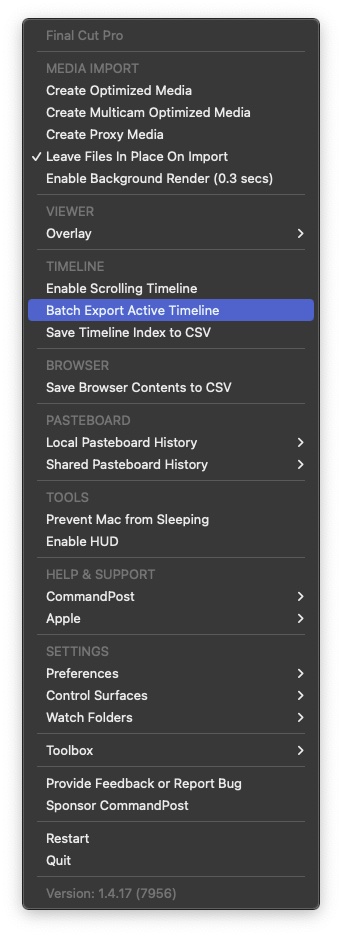
You would select the clips you'd like to export in the Project/timeline (or command-A for all clips) and then choose "Batch Export Active Timeline" from the CommandPost menu.
CommandPost
Please Log in to join the conversation.
- DaveGadgeteer
-
Topic Author
- Offline
- New Member
-
Less
More
- Posts: 11
- Thank you received: 0
25 Mar 2023 22:43 #124738
by DaveGadgeteer
Replied by DaveGadgeteer on topic How can I export edited clips to Photos
Wow, Command Post is exactly what I needed!
Thank you!
Thank you!
Please Log in to join the conversation.
- DaveGadgeteer
-
Topic Author
- Offline
- New Member
-
Less
More
- Posts: 11
- Thank you received: 0
27 Mar 2023 23:21 #124758
by DaveGadgeteer
Replied by DaveGadgeteer on topic How can I export edited clips to Photos
What's a safe way to abort a long export?
I presume the computer has to be dedicated to this export, and not be used for anything else until it finishes.
The export I tried was too long. Actually it never finished.
But how should I abort a long Command Post job to cause least trouble?
I presume the computer has to be dedicated to this export, and not be used for anything else until it finishes.
The export I tried was too long. Actually it never finished.
But how should I abort a long Command Post job to cause least trouble?
Please Log in to join the conversation.
