




- Posts: 3
- Thank you received: 0
3 Post Moderation Rule for New Boarders (25 Jan 2021)
New boarders will have their posts moderated - Don't worry if you cannot see your post immediately.
Losing Motion titles when transferring to another computer ?
17 Feb 2023 06:21 #124228
by Xavier C.
Hi,
I had a collaborator make some video editing for me and adding motion titles (FCP Titles Collection - free). I have the same titles installed too in the right folder (Motion Templates/Titles). I can see them in the titles browser and load it manually.
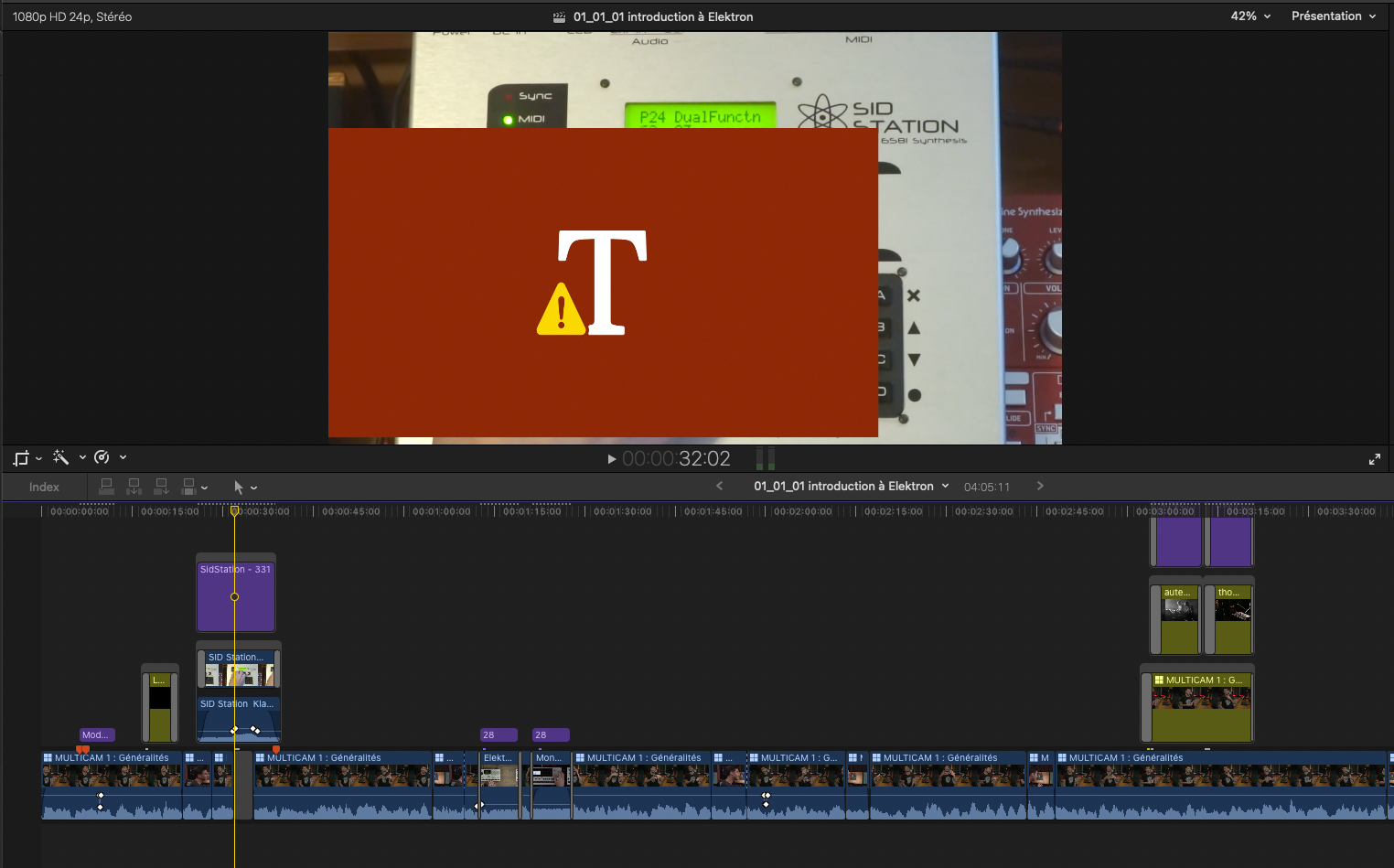
But whenever I open the FCPX project from my collaborator, all those titles turn red.
What I've tried so far :
- replacing my titles folder with his
- tried with pFixer (all templates)
- update motion (FCPX was already)
- reboot a few times after changes
What you should know :
- There are several user profiles on my collaborator's machine.
- Collaborator's laptop is MacBook pro retina 2014
- Mine is MacBook pro M1 pro 2021 running Monterey
What would you suggest ?
Thanks.
I had a collaborator make some video editing for me and adding motion titles (FCP Titles Collection - free). I have the same titles installed too in the right folder (Motion Templates/Titles). I can see them in the titles browser and load it manually.
But whenever I open the FCPX project from my collaborator, all those titles turn red.
What I've tried so far :
- replacing my titles folder with his
- tried with pFixer (all templates)
- update motion (FCPX was already)
- reboot a few times after changes
What you should know :
- There are several user profiles on my collaborator's machine.
- Collaborator's laptop is MacBook pro retina 2014
- Mine is MacBook pro M1 pro 2021 running Monterey
What would you suggest ?
Thanks.
Please Log in to join the conversation.
- Tom Wolsky
-

- Offline
- Moderator
-

17 Feb 2023 12:52 #124230
by Tom Wolsky
Replied by Tom Wolsky on topic Losing Motion titles when transferring to another computer ?
Do you have the fonts they're using?
Please Log in to join the conversation.
17 Feb 2023 14:25 #124232
by Xavier C.
Replied by Xavier C. on topic Losing Motion titles when transferring to another computer ?
Yes. We're using Ubuntu, which is installed on both.
Please Log in to join the conversation.


17 Feb 2023 17:23 #124236
by dmetz
Replied by dmetz on topic Losing Motion titles when transferring to another computer ?
You could try having your collaborator export the timeline as XML. That 2014 machine tops out at Big Sur, but we don't know if that's what is installed.
Do you have to update the library when you open it initially?
Do you have to update the library when you open it initially?
Please Log in to join the conversation.

17 Feb 2023 20:44 #124248
by Zabobon
Replied by Zabobon on topic Losing Motion titles when transferring to another computer ?
By everything you've said, titles in same relative folders etc there should be no problem. But... as there is a problem, another thing you could try is have your collaborator make the storage location of the Motion template files inside the Library before saving the Library again and giving it to you.
Then when you open the Library on your Mac the motion templates needed for the project will be embedded in there.
In case you need instructions to do that:
larryjordan.com/articles/how-to-set-or-c...es-in-final-cut-pro/
Then when you open the Library on your Mac the motion templates needed for the project will be embedded in there.
In case you need instructions to do that:
larryjordan.com/articles/how-to-set-or-c...es-in-final-cut-pro/
Please Log in to join the conversation.
