




- Posts: 15
- Thank you received: 0
3 Post Moderation Rule for New Boarders (25 Jan 2021)
New boarders will have their posts moderated - Don't worry if you cannot see your post immediately.
New to FCP and I am in HELL
14 Feb 2023 18:59 #124148
by dmf92
New to FCP and I am in HELL was created by dmf92
I started using FCP under a week ago and was initially happy and impressed. I am now finding it to be utterly diabolical.
I have a short (1.5 minute) video. I have been tinkering with it very much, and started out with a bunch of imported 4k product footage that I edited down. The file has ballooned to 130GB.
I am on a Macbook Pro with M1 Pro chip and latest FCP software. Whatever I do, I get the infernal spinning beachball for 10 minutes straight. I have wasted hours.
I have followed all the standard suggestions I found online, e.g. here: lutslounge.com/speed-up-final-cut-pro/
Nothing has worked. My short video project has simply become unworkable. The software is completely unusable.
I hope I am missing something simple which could be corrected. Even if this is the case, I can't help but think that the app design is trashy. How on earth could a 1.5 minute video balloon to such chaos? And then, how could that chaos remain even after following all the online info I could get my hands on, tinkering endlessly?!
I have a short (1.5 minute) video. I have been tinkering with it very much, and started out with a bunch of imported 4k product footage that I edited down. The file has ballooned to 130GB.
I am on a Macbook Pro with M1 Pro chip and latest FCP software. Whatever I do, I get the infernal spinning beachball for 10 minutes straight. I have wasted hours.
I have followed all the standard suggestions I found online, e.g. here: lutslounge.com/speed-up-final-cut-pro/
Nothing has worked. My short video project has simply become unworkable. The software is completely unusable.
I hope I am missing something simple which could be corrected. Even if this is the case, I can't help but think that the app design is trashy. How on earth could a 1.5 minute video balloon to such chaos? And then, how could that chaos remain even after following all the online info I could get my hands on, tinkering endlessly?!
The topic has been locked.
14 Feb 2023 19:31 #124150
by dmf92
Replied by dmf92 on topic New to FCP and I am in HELL
In case it's relevant, my library is on an external SSD (Samsung X5)
The topic has been locked.
14 Feb 2023 19:34 #124151
by dmf92
Replied by dmf92 on topic New to FCP and I am in HELL
And part of the reason it's so upsetting is that I can't even do much to fix it, because every miniscule action leads to the damned beachball
The topic has been locked.


14 Feb 2023 20:04 - 15 Feb 2023 02:41 #124152
by DaveM
Replied by DaveM on topic New to FCP and I am in HELL
We're gonna probably gonna need more info... 
If you're having trouble launching FCP, you could try holding the option key and then clicking on the dock icon. This will open a dialogue window. You can click cancel to see if FCP finishes startup. Then, you could try to open your Library. Let us know how that works.
Also, you might check your external drive and make sure it's formatted with APFS (best for SSDs). Other formats cause issues with FCP.
If you're having trouble launching FCP, you could try holding the option key and then clicking on the dock icon. This will open a dialogue window. You can click cancel to see if FCP finishes startup. Then, you could try to open your Library. Let us know how that works.
Also, you might check your external drive and make sure it's formatted with APFS (best for SSDs). Other formats cause issues with FCP.
Last edit: 15 Feb 2023 02:41 by DaveM.
The topic has been locked.
14 Feb 2023 20:09 #124153
by dmf92
Replied by dmf92 on topic New to FCP and I am in HELL
I just tried creating proxies following online instructions and I'm greeted with "missing proxies". Now FCP just spontaneously quits shortly after opening the project...
This happened very fast. The library was huge for a while, yet it ran fast. For some reason the last few edits pushed it over the edge and it went from super smooth to diabolical overnight.
I'm using a good computer and a good external SSD for a very short video. Everything was running fine until the last few edits. Something very odd has happened
This happened very fast. The library was huge for a while, yet it ran fast. For some reason the last few edits pushed it over the edge and it went from super smooth to diabolical overnight.
I'm using a good computer and a good external SSD for a very short video. Everything was running fine until the last few edits. Something very odd has happened
The topic has been locked.
14 Feb 2023 20:15 #124154
by dmf92
Replied by dmf92 on topic New to FCP and I am in HELL
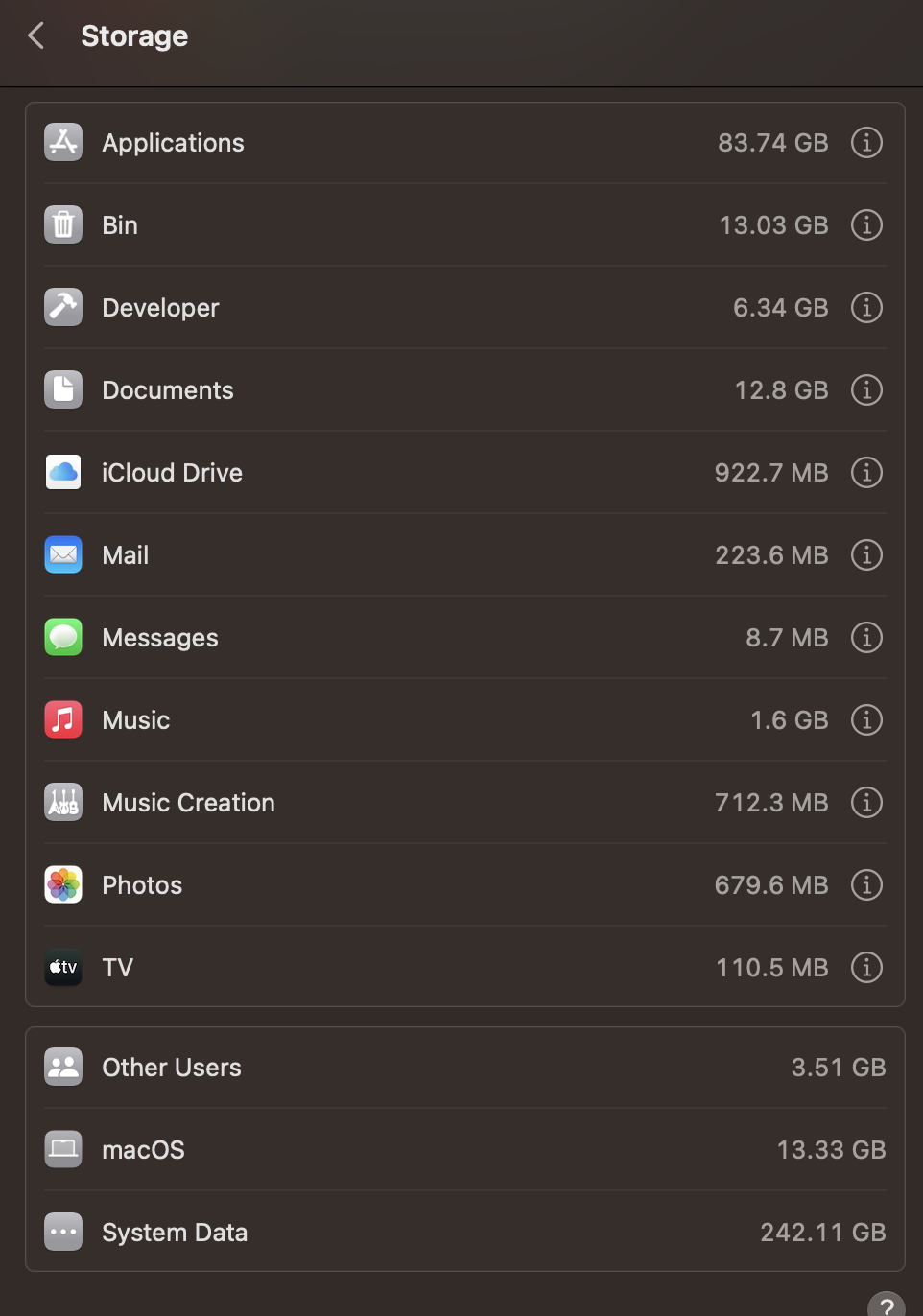
in case it's relevant, my system data has ballooned since I started this project, on my mac's internal SSD. Over 200GB. Again, this is all for a 1 min vid. There's 30 seconds of 4K product footage. The rest is either stock footage or logos etc.
The topic has been locked.
14 Feb 2023 20:19 #124155
by DaveM
Replied by DaveM on topic New to FCP and I am in HELL
Look at the last section of my previous message, which I just updated...
The topic has been locked.
14 Feb 2023 20:30 - 14 Feb 2023 20:31 #124156
by DaveM
Replied by DaveM on topic New to FCP and I am in HELL
From macOS Help:
- System Data: Contains files that don’t fall into the categories listed here. This category primarily includes files and data used by the system, such as log files, caches, VM files, and other runtime system resources. Also included are temporary files, fonts, app support files, and plug-ins. You can’t manage the contents of this category. The contents are managed by macOS, and the category varies in size depending on the current state of your Mac. You can manage your data that falls outside the other categories using Finder or the 3rd party apps that created it.
Last edit: 14 Feb 2023 20:31 by DaveM.
The topic has been locked.
14 Feb 2023 20:34 #124157
by DaveM
In the Viewer's View menu (upper right of the Viewer), you can choose "original/optimized", "proxy preferred", or "proxy only". If you choose "original/optimized" you shouldn't see proxy missing warnings/icons...
Replied by DaveM on topic New to FCP and I am in HELL
I just tried creating proxies following online instructions and I'm greeted with "missing proxies". Now FCP just spontaneously quits shortly after opening the project...
In the Viewer's View menu (upper right of the Viewer), you can choose "original/optimized", "proxy preferred", or "proxy only". If you choose "original/optimized" you shouldn't see proxy missing warnings/icons...
The topic has been locked.
14 Feb 2023 21:17 #124158
by dmf92
Replied by dmf92 on topic New to FCP and I am in HELL
I was unable to identify the page you're referring to.
Luckily I solved this issue typing stuff into Terminal found off Google. I happened to recently do some Time Machine backups and apparently this created a bunch of local snapshots taking up half my entire internal SSD. Lovely! Apple's really doing a number on me.
Luckily I did a behemoth upload of the compressed FCP Library file just before these issues, onto OneDrive, and am now downloading it. My internet is being slow and the file was 118GB, so this will take a while.
All the other project files were trashed and trash was emptied. I couldn't take it any more. I couldn't do a single damned thing without the beachball spinning for half an hour, so it didn't seem I could do much to salvage any of these versions.
Something bonkers happened between the file's 118GB and 130GB versions (i.e. over the last day of editing). Hopefully the download brings me back to before this problem. But even if it does, I still need to make a few tweaks, and it might be that those last few extra GB pushed my hardware over the edge, and this might happen all over again. So it would be great if I could find some way of reducing the Library file size once it's downloaded.
I never anticipated any of this could be possible. I needed 30 secs of 4K footage working on a 1TB Samsung X5 and an M1 Pro chip... I had no idea files could balloon like this. Thank god I was working off an external drive
Luckily I solved this issue typing stuff into Terminal found off Google. I happened to recently do some Time Machine backups and apparently this created a bunch of local snapshots taking up half my entire internal SSD. Lovely! Apple's really doing a number on me.
Luckily I did a behemoth upload of the compressed FCP Library file just before these issues, onto OneDrive, and am now downloading it. My internet is being slow and the file was 118GB, so this will take a while.
All the other project files were trashed and trash was emptied. I couldn't take it any more. I couldn't do a single damned thing without the beachball spinning for half an hour, so it didn't seem I could do much to salvage any of these versions.
Something bonkers happened between the file's 118GB and 130GB versions (i.e. over the last day of editing). Hopefully the download brings me back to before this problem. But even if it does, I still need to make a few tweaks, and it might be that those last few extra GB pushed my hardware over the edge, and this might happen all over again. So it would be great if I could find some way of reducing the Library file size once it's downloaded.
I never anticipated any of this could be possible. I needed 30 secs of 4K footage working on a 1TB Samsung X5 and an M1 Pro chip... I had no idea files could balloon like this. Thank god I was working off an external drive
The topic has been locked.
14 Feb 2023 21:27 - 14 Feb 2023 21:39 #124159
by DaveM
Replied by DaveM on topic New to FCP and I am in HELL
Okay, so you have a 1 TB external drive. If your FCP media (108 to 130 GB, or thereabouts) is the only thing on that drive, you shouldn't have any issues.
However, it seems like your internal SSD may have gotten full. What size is it?
Also, how much RAM does your system have? This is why I asked about the screenshots and the info they'd provide.
Depending on other applications running while using FCP, your system's RAM could run out and then it would start using the slow (in comparison) internal SSD as RAM. If your internal SSD fills up, then things would get real slow (very bad). You want to keep around 20% of any drive empty.
As far as the size of your FCP media goes, you may want to look at the Importing preferences/settings for FCP and see if "create optimized" or "create proxies" are turned on. If so, this might explain at least some of the space being used on your external drive.
Again, what is the formating used on your external SSD (Samsung X5). Select the drive and do a "Get Info" in the Finder. If you just started using it after you got it, it is likely formatted with ExFAT or NTFS, which can cause issues with FCP.
However, it seems like your internal SSD may have gotten full. What size is it?
Also, how much RAM does your system have? This is why I asked about the screenshots and the info they'd provide.
Depending on other applications running while using FCP, your system's RAM could run out and then it would start using the slow (in comparison) internal SSD as RAM. If your internal SSD fills up, then things would get real slow (very bad). You want to keep around 20% of any drive empty.
As far as the size of your FCP media goes, you may want to look at the Importing preferences/settings for FCP and see if "create optimized" or "create proxies" are turned on. If so, this might explain at least some of the space being used on your external drive.
Again, what is the formating used on your external SSD (Samsung X5). Select the drive and do a "Get Info" in the Finder. If you just started using it after you got it, it is likely formatted with ExFAT or NTFS, which can cause issues with FCP.
Last edit: 14 Feb 2023 21:39 by DaveM.
The topic has been locked.
14 Feb 2023 22:04 #124164
by DaveM
FYI, that isn't going to solve the issue beyond the short-term. Once you turn Time Machine back on, it will create a new set of snapshots.
Replied by DaveM on topic New to FCP and I am in HELL
Luckily I solved this issue typing stuff into Terminal found off Google. I happened to recently do some Time Machine backups and apparently this created a bunch of local snapshots taking up half my entire internal SSD. Lovely! Apple's really doing a number on me.
FYI, that isn't going to solve the issue beyond the short-term. Once you turn Time Machine back on, it will create a new set of snapshots.
The topic has been locked.
14 Feb 2023 23:22 #124166
by dmf92
Replied by dmf92 on topic New to FCP and I am in HELL
I have 16GB of RAM and I check an app called "iStatistica" frequently, which reports that I only tend to use 50% or so of my RAM. I previously had an Intel Mac Mini which I upgraded to 32GB of RAM, and in my experience the 16GB I have now on-chip is more efficient than 32GB with the Intel CPU.
The 1TB external drive has never been too full, I don't think. It's always had at least 100GB free AFAIK. I'll try to free it up some more before re-opening the OneDrive download. I'm 5.7GB through a 118GB download, so it'll be a while unfortunately.
I figured the Terminal commands wouldn't be a permanent solution. I resolved to just stop bothering with backups to an external drive. I'll have to rely on cloud solutions, as having half my internal drive clogged up is not practical.
I Googled around the problems I've been having with FCP and I've seen people complaining about a 20 min video ballooning to 20GB or so, but a 1 minute vid ballooning to 130GB seems bonkers. I wish there were some straight-forward way to bring the library size down after it has already ballooned. It seems to be the renders folder which is carrying all the weight.
The 1TB external drive has never been too full, I don't think. It's always had at least 100GB free AFAIK. I'll try to free it up some more before re-opening the OneDrive download. I'm 5.7GB through a 118GB download, so it'll be a while unfortunately.
I figured the Terminal commands wouldn't be a permanent solution. I resolved to just stop bothering with backups to an external drive. I'll have to rely on cloud solutions, as having half my internal drive clogged up is not practical.
I Googled around the problems I've been having with FCP and I've seen people complaining about a 20 min video ballooning to 20GB or so, but a 1 minute vid ballooning to 130GB seems bonkers. I wish there were some straight-forward way to bring the library size down after it has already ballooned. It seems to be the renders folder which is carrying all the weight.
The topic has been locked.
14 Feb 2023 23:27 - 14 Feb 2023 23:32 #124167
by dmf92
Replied by dmf92 on topic New to FCP and I am in HELL
and for context, I structured the video ad I'm working on by using iMovie initially. I was busy dealing with 3D printing the product parts out and figured I'd get help with the video editing after the product shoot. I only needed 30 secs of footage to slot into the ad. But I later realised I could edit fairly easily myself and would only need help with color grading. I didn't suspect that all my little tweaks were duplicating the files in this way. I assumed that what I was doing was a normal part of editing.
After tweaking settings (background rendering off etc., in line with this: lutslounge.com/speed-up-final-cut-pro/) I shouldn't encounter this file size ballooning again, right?
My initial experience with FCP was very positive. Everything was snappy. So it was quite a shock to go from that to having terminally ill project files I couldn't even tinker with to attempt a fix, since everything would beachball. I want to make sure I understand what happened to avoid this ever happening again. I suppose it's key to keep an eye on the file size early on.
After tweaking settings (background rendering off etc., in line with this: lutslounge.com/speed-up-final-cut-pro/) I shouldn't encounter this file size ballooning again, right?
My initial experience with FCP was very positive. Everything was snappy. So it was quite a shock to go from that to having terminally ill project files I couldn't even tinker with to attempt a fix, since everything would beachball. I want to make sure I understand what happened to avoid this ever happening again. I suppose it's key to keep an eye on the file size early on.
Last edit: 14 Feb 2023 23:32 by dmf92.
The topic has been locked.

14 Feb 2023 23:34 - 14 Feb 2023 23:35 #124168
by joema
If you are not on Ventura 13.2.1 (released yesterday) there is a known bug which can cause FCP to crash on startup. Make sure you are on that version of Ventura.
Make sure you have sufficient free disk space - at least 20% free.
The reason FCP is taking lots of space is likely due to render files. You can delete those, provided FCP will start. Procedure:
- Select Library in the left sidebar
- File>Delete Generated Library Files>Delete Render Files>All
Make sure background rendering is OFF:
Final Cut Pro>Settings>Playback:
- Turn off Background render
- Turn off Create Optimized Media for Multicam Clips
In Final Cut Pro>Settings>Import, select Leave Files In Place. That will ensure any subsequent imports via drag/drop from Finder are "in place" not copied to the library, which takes more space.
Do not add any 3rd-party effects until your system is running smoothly.
Replied by joema on topic New to FCP and I am in HELL
...Now FCP just spontaneously quits shortly after opening the project...
If you are not on Ventura 13.2.1 (released yesterday) there is a known bug which can cause FCP to crash on startup. Make sure you are on that version of Ventura.
Make sure you have sufficient free disk space - at least 20% free.
The reason FCP is taking lots of space is likely due to render files. You can delete those, provided FCP will start. Procedure:
- Select Library in the left sidebar
- File>Delete Generated Library Files>Delete Render Files>All
Make sure background rendering is OFF:
Final Cut Pro>Settings>Playback:
- Turn off Background render
- Turn off Create Optimized Media for Multicam Clips
In Final Cut Pro>Settings>Import, select Leave Files In Place. That will ensure any subsequent imports via drag/drop from Finder are "in place" not copied to the library, which takes more space.
Do not add any 3rd-party effects until your system is running smoothly.
Last edit: 14 Feb 2023 23:35 by joema.
The topic has been locked.
14 Feb 2023 23:44 - 14 Feb 2023 23:46 #124169
by dmf92
Replied by dmf92 on topic New to FCP and I am in HELL
thanks, I'm on the latest version.
For some reason "Delete Render Files>All" never worked. I saw it on various YouTube videos, online articles etc. and so tried it multiple times. Yet, when I "show package contents" and find what is causing the library file size, it's the renders folder.
All the other settings you mention I have already changed. But I guess that will help me out in future and wouldn't bring down the size of the current project files?
I have been running "FCPeffects" plug-ins but this did not coincide with the onset of problems.
For some reason "Delete Render Files>All" never worked. I saw it on various YouTube videos, online articles etc. and so tried it multiple times. Yet, when I "show package contents" and find what is causing the library file size, it's the renders folder.
All the other settings you mention I have already changed. But I guess that will help me out in future and wouldn't bring down the size of the current project files?
I have been running "FCPeffects" plug-ins but this did not coincide with the onset of problems.
Last edit: 14 Feb 2023 23:46 by dmf92.
The topic has been locked.
15 Feb 2023 00:03 #124170
by joema
The indicated space consumption in Finder could be lagging based on various things. If you are comfortable looking inside the library in Finder, you can generally delete the "Render Files" folder. It is usually safe but do so at your own risk. The 3rd-party utility Final Cut Library Manager will do that (and many other things) for you: www.arcticwhiteness.com/finalcutlibrarymanager/
A good, safe, free 3rd-party utility for examining disk space consumption is OmniDiskSweeper: www.omnigroup.com/more
Replied by joema on topic New to FCP and I am in HELL
For some reason "Delete Render Files>All" never worked. I saw it on various YouTube videos, online articles etc. and so tried it multiple times. Yet, when I "show package contents" and find what is causing the library file size, it's the renders folder...
The indicated space consumption in Finder could be lagging based on various things. If you are comfortable looking inside the library in Finder, you can generally delete the "Render Files" folder. It is usually safe but do so at your own risk. The 3rd-party utility Final Cut Library Manager will do that (and many other things) for you: www.arcticwhiteness.com/finalcutlibrarymanager/
A good, safe, free 3rd-party utility for examining disk space consumption is OmniDiskSweeper: www.omnigroup.com/more
The topic has been locked.
15 Feb 2023 00:16 #124171
by dmf92
Replied by dmf92 on topic New to FCP and I am in HELL
I did delete the renders folder but the app started crashing entirely so I just deleted the library and am now re-downloading an older version from the cloud.
Thanks for the suggestions. I use Omni already. Is FCLM worth it? Can it do things that can't be done manually through FCP? I'm primed to pay for a solution that would prevent this issue in future but I suppose I should check if it's actually capable of doing things that can't be done through FCP.
Thanks for the suggestions. I use Omni already. Is FCLM worth it? Can it do things that can't be done manually through FCP? I'm primed to pay for a solution that would prevent this issue in future but I suppose I should check if it's actually capable of doing things that can't be done through FCP.
The topic has been locked.
- Tom Wolsky
-

- Offline
- Moderator
-

15 Feb 2023 01:09 #124172
by Tom Wolsky
Replied by Tom Wolsky on topic New to FCP and I am in HELL
100G of a 1TB drive means it’s full. Minimum free space on any drive is 15%.
If the media was external. and you deleted all generated files from the library, including optimized and render files, there is no way the library could be 130GB.
If the media was external. and you deleted all generated files from the library, including optimized and render files, there is no way the library could be 130GB.
The topic has been locked.
15 Feb 2023 01:26 #124173
by dmf92
Replied by dmf92 on topic New to FCP and I am in HELL
no matter what I did the file stayed huge and ran sluggish. Once I download the backup, if it happens again, I'll use QuickTime to run a screen capture video and show you. I followed various online sources' instructions and it just wouldn't budge
The topic has been locked.
