


- Posts: 3
- Thank you received: 0
3 Post Moderation Rule for New Boarders (25 Jan 2021)
New boarders will have their posts moderated - Don't worry if you cannot see your post immediately.
LOST/corrupted FCP project Files. Please Help if you can ?
- purplestorm123
-
 Topic Author
- Offline
- New Member
-

Less
More
22 Jan 2023 03:25 #123748
by purplestorm123
Hello,
I have been working on a documentary for the past few months and I had made backups to my laptop as well as external hard drive. The external hard drive contained the library content and the project files (keeping files in place) as the Macbook Pro has a small internal memory.
The hard drive crashed a few weeks ago and I have paid for a very expensive data recovery service to retrieve the data, most of the files were restored, simple content files although not ALL. But the main issue was the project files itself. As you know this is where all the manual work is stored and all those edits and the main framework of the project, from the past two months.
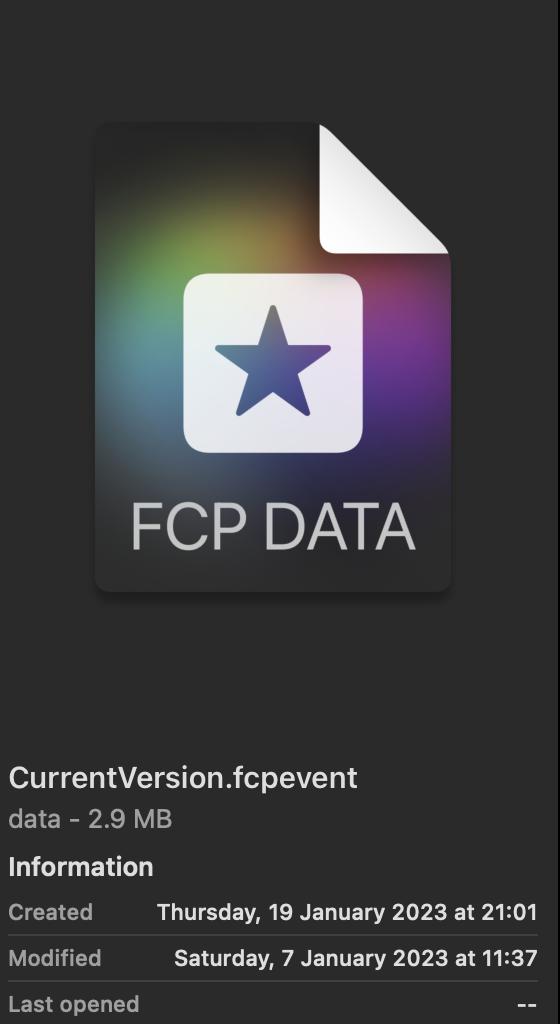
The project files seem to have been renamed and reformatted through the recovery process and I have no idea why or how to open them. The thumbnail has eve bee changed from the purple box with four stars to the image attached.
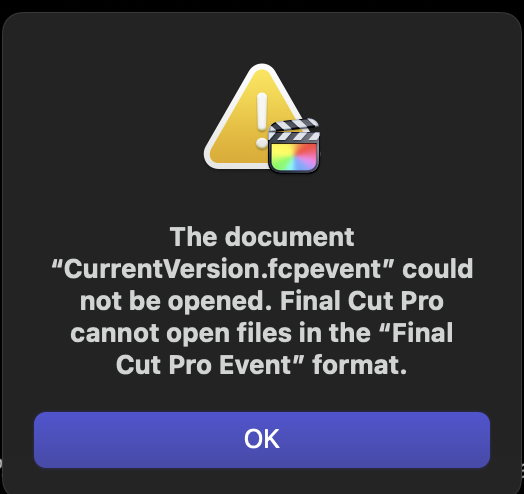
Please see images attached, it has renamed them all to Current Version.fcpevent. Which I receive an error message for upon opening.
I have tried to find a similar case but cannot. The external drives were already formatted to exfat. The data recoverer recovered through his Windows system, could that have had an affect?
I had older backups of the projects on my laptop, but when I opened these they are also not allowing me to relink all files without serious gaps. The only source of the library content itself was on the compromised drive, this was my biggest mistake...in hindsight
I am more a creative and not tech savy and so I am really crumbling at the feet of this almighty problem and facing being fired if I cannot deliver the project on time as promised. I do not have time to start it again.
If there is any advice that you could offer me, I would be eternally grateful for it!
I have been working on a documentary for the past few months and I had made backups to my laptop as well as external hard drive. The external hard drive contained the library content and the project files (keeping files in place) as the Macbook Pro has a small internal memory.
The hard drive crashed a few weeks ago and I have paid for a very expensive data recovery service to retrieve the data, most of the files were restored, simple content files although not ALL. But the main issue was the project files itself. As you know this is where all the manual work is stored and all those edits and the main framework of the project, from the past two months.
The project files seem to have been renamed and reformatted through the recovery process and I have no idea why or how to open them. The thumbnail has eve bee changed from the purple box with four stars to the image attached.
Please see images attached, it has renamed them all to Current Version.fcpevent. Which I receive an error message for upon opening.
I have tried to find a similar case but cannot. The external drives were already formatted to exfat. The data recoverer recovered through his Windows system, could that have had an affect?
I had older backups of the projects on my laptop, but when I opened these they are also not allowing me to relink all files without serious gaps. The only source of the library content itself was on the compromised drive, this was my biggest mistake...in hindsight
I am more a creative and not tech savy and so I am really crumbling at the feet of this almighty problem and facing being fired if I cannot deliver the project on time as promised. I do not have time to start it again.
If there is any advice that you could offer me, I would be eternally grateful for it!
Please Log in to join the conversation.


22 Jan 2023 14:52 - 22 Jan 2023 15:01 #123754
by Zabobon
Replied by Zabobon on topic LOST/corrupted FCP project Files. Please Help if you can ?
Final Cut Pro makes automatic backups of the Library data files and saves these timestamped backups in Movies/Final Cut Backups. So, you might be in luck as this is a location on your Mac and not the external drive.
These are backups of the data files, not the media files but it sounds like you have the media files.
larryjordan.com/articles/find-access-and...l-cut-pro-x-backups/
These are backups of the data files, not the media files but it sounds like you have the media files.
larryjordan.com/articles/find-access-and...l-cut-pro-x-backups/
Last edit: 22 Jan 2023 15:01 by Zabobon.
Please Log in to join the conversation.
- purplestorm123
-
Topic Author
- Offline
- New Member
-
Less
More
- Posts: 3
- Thank you received: 0
23 Jan 2023 03:43 #123771
by purplestorm123
Replied by purplestorm123 on topic LOST/corrupted FCP project Files. Please Help if you can ?
Hey, yes I did find some old backups already there. It has helped a little but some of the files seem still to be corrupted and causing the whole project to black out. I am dealing with a recovery technician in Indonesia and seems like his mac knowledge is not as in-depth as his windows knowledge, so I am trying to solve the riddle with little tech knowledge and a language barrier. Ha, new experience...sure one I wont forget. Thank you for your input, I always appreciate people taking the time to help!
Please Log in to join the conversation.
