




- Posts: 8
- Thank you received: 0
3 Post Moderation Rule for New Boarders (25 Jan 2021)
New boarders will have their posts moderated - Don't worry if you cannot see your post immediately.
Syncing material with different frame rates
21 Jan 2023 06:52 #123741
by RebeccaT
Syncing material with different frame rates was created by RebeccaT
Hello!
Would be really grateful for some advice.
I have material recorded on an iPhone 13 in 4K, 3840 x 2160, 24 fps which I need to sync with material recorded on a Sony PXW, 1920 x 1080, 25 fps.
Is there a way to import / export the 25 fps material into fcp with a 24 fps? Or vice versa?
Is there a function in FCP that can sync material which has been recorded with different frame rates?
Thank you!
Would be really grateful for some advice.
I have material recorded on an iPhone 13 in 4K, 3840 x 2160, 24 fps which I need to sync with material recorded on a Sony PXW, 1920 x 1080, 25 fps.
Is there a way to import / export the 25 fps material into fcp with a 24 fps? Or vice versa?
Is there a function in FCP that can sync material which has been recorded with different frame rates?
Thank you!
Please Log in to join the conversation.


21 Jan 2023 10:40 - 27 Jan 2023 10:14 #123742
by Zabobon
In a way, this is done automatically in Final Cut Pro. But it can be tricky to fully understand what goes on.
From your description, I am assuming your main footage is the iPhone 24fps and the Sony 25fps Footage is "extra" to be added in. (But what I am describing works in reverse too, i.e. if the Sony is the main footage).
So, assuming iPhone 24fps is main footage of Project:
If you have made a Project using "Automatic Settings" and you have already put some of your iPhone Footage into the Timeline, then you will have a Project at 24fps 4K, 3840 x 2160.
Now when you drag some Sony footage that was shot at 25fps to this Project Timeline, the 25fps footage will be played so that it keeps its overall timing. In other words if you have a 1 minute shot at 24fps in the timeline and you add a 1 minute shot at 25fps they will both last exactly 1 minute (and any sound will be in sync).
But in order to accomplish this Final Cut Pro will interpolate frames in the 25fps Sony footage (using Frame Sampling) and this can show up as staggers (especially on panning shots).
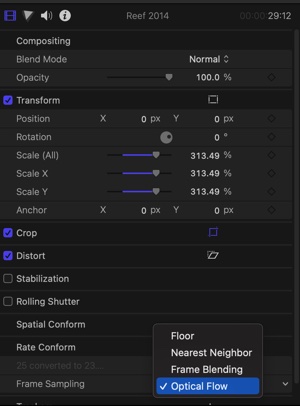
I have found that changing the default Frame Sampling of Final Cut Pro doing this from "Floor" to "Optical Flow" usually fixes this.
This is done by selecting each Sony clip in the timeline, and in the Inspector, Frame Sampling, choosing "show" and "Optical Flow" (or any of the other options - you can experiment to see what works best).
Hope that helps!
EDIT - If I have made the wrong assumption and your Sony footage is the main footage (and the iPhone footage is for some added in shots) then all the above still holds but in reverse. In that case, your Project Timeline would be 25fps and the dragged in iPhone 24fps footage would be interpolated by Final Cut Pro. You would still use "Optical Flow" (but in this case on the added in iPhone Footage) to stop any staggers.
As a side comment, this is one of the amazing things about working in Final Cut Pro. Once a project is set up you can drag any content onto the timeline and Final Cut Pro will automatically conform it to match the project settings. So, you can easily add GoPro footage or iPhone footage to projects that you are editing.
Replied by Zabobon on topic Syncing material with different frame rates
Is there a function in FCP that can sync material which has been recorded with different frame rates?
In a way, this is done automatically in Final Cut Pro. But it can be tricky to fully understand what goes on.
From your description, I am assuming your main footage is the iPhone 24fps and the Sony 25fps Footage is "extra" to be added in. (But what I am describing works in reverse too, i.e. if the Sony is the main footage).
So, assuming iPhone 24fps is main footage of Project:
If you have made a Project using "Automatic Settings" and you have already put some of your iPhone Footage into the Timeline, then you will have a Project at 24fps 4K, 3840 x 2160.
Now when you drag some Sony footage that was shot at 25fps to this Project Timeline, the 25fps footage will be played so that it keeps its overall timing. In other words if you have a 1 minute shot at 24fps in the timeline and you add a 1 minute shot at 25fps they will both last exactly 1 minute (and any sound will be in sync).
But in order to accomplish this Final Cut Pro will interpolate frames in the 25fps Sony footage (using Frame Sampling) and this can show up as staggers (especially on panning shots).
I have found that changing the default Frame Sampling of Final Cut Pro doing this from "Floor" to "Optical Flow" usually fixes this.
This is done by selecting each Sony clip in the timeline, and in the Inspector, Frame Sampling, choosing "show" and "Optical Flow" (or any of the other options - you can experiment to see what works best).
Hope that helps!
EDIT - If I have made the wrong assumption and your Sony footage is the main footage (and the iPhone footage is for some added in shots) then all the above still holds but in reverse. In that case, your Project Timeline would be 25fps and the dragged in iPhone 24fps footage would be interpolated by Final Cut Pro. You would still use "Optical Flow" (but in this case on the added in iPhone Footage) to stop any staggers.
As a side comment, this is one of the amazing things about working in Final Cut Pro. Once a project is set up you can drag any content onto the timeline and Final Cut Pro will automatically conform it to match the project settings. So, you can easily add GoPro footage or iPhone footage to projects that you are editing.
Last edit: 27 Jan 2023 10:14 by Zabobon.
Please Log in to join the conversation.
