


- Posts: 2
- Thank you received: 0
3 Post Moderation Rule for New Boarders (25 Jan 2021)
New boarders will have their posts moderated - Don't worry if you cannot see your post immediately.
Ken Burns odd behavior (auto zoom/scale issue)
- Kenneth Burns
-
 Topic Author
- Offline
- New Member
-

Less
More
18 Jan 2023 21:32 #123708
by Kenneth Burns
Ken Burns odd behavior (auto zoom/scale issue) was created by Kenneth Burns
Hello! Trying to do a simple Ken Burns effect to pan across and zoom on a screen grab video recording. For some reason when I apply the Ken Burns effect, it zooms in and disregards my Start and End parameters. Please help! Tried deleting preferences already to no avail. Here is a video of the issue happening.
www.dropbox.com/s/xr5sa3mrtij0l22/2023-0...%2013-28-04.mp4?dl=0
www.dropbox.com/s/xr5sa3mrtij0l22/2023-0...%2013-28-04.mp4?dl=0
Please Log in to join the conversation.


19 Jan 2023 15:40 #123725
by DaveM
Replied by DaveM on topic Ken Burns odd behavior (auto zoom/scale issue)
Thanks for providing the screen grab video.
From the video, it appears as if you are missing a few steps to get the effect to "commit". You need to select the clip you're working on and, at the end, click the "Done" button. To test the effect use the "Play Loop" button at the upper left of the Viewer.
For more details, check out the manual:
support.apple.com/en-ca/guide/final-cut-...9c/10.6.2/mac/11.5.1
From the video, it appears as if you are missing a few steps to get the effect to "commit". You need to select the clip you're working on and, at the end, click the "Done" button. To test the effect use the "Play Loop" button at the upper left of the Viewer.
For more details, check out the manual:
support.apple.com/en-ca/guide/final-cut-...9c/10.6.2/mac/11.5.1
Please Log in to join the conversation.
- Kenneth Burns
-
Topic Author
- Offline
- New Member
-
Less
More
- Posts: 2
- Thank you received: 0
19 Jan 2023 17:52 #123728
by Kenneth Burns
Replied by Kenneth Burns on topic Ken Burns odd behavior (auto zoom/scale issue)
Hi Dave, thanks for your suggestions. I tried them out and also followed the steps given in the manual a "T" and the same error is happening. Could it be something to do with my video resolution?? Here is a new video showing the steps and it still not behaving as expected. Thanks for your help!
www.dropbox.com/s/r4kdrgd31mtkzej/2023-0...%2009-48-57.mp4?dl=0
www.dropbox.com/s/r4kdrgd31mtkzej/2023-0...%2009-48-57.mp4?dl=0
Please Log in to join the conversation.


20 Jan 2023 11:27 - 20 Jan 2023 13:52 #123735
by Zabobon
Replied by Zabobon on topic Ken Burns odd behavior (auto zoom/scale issue)
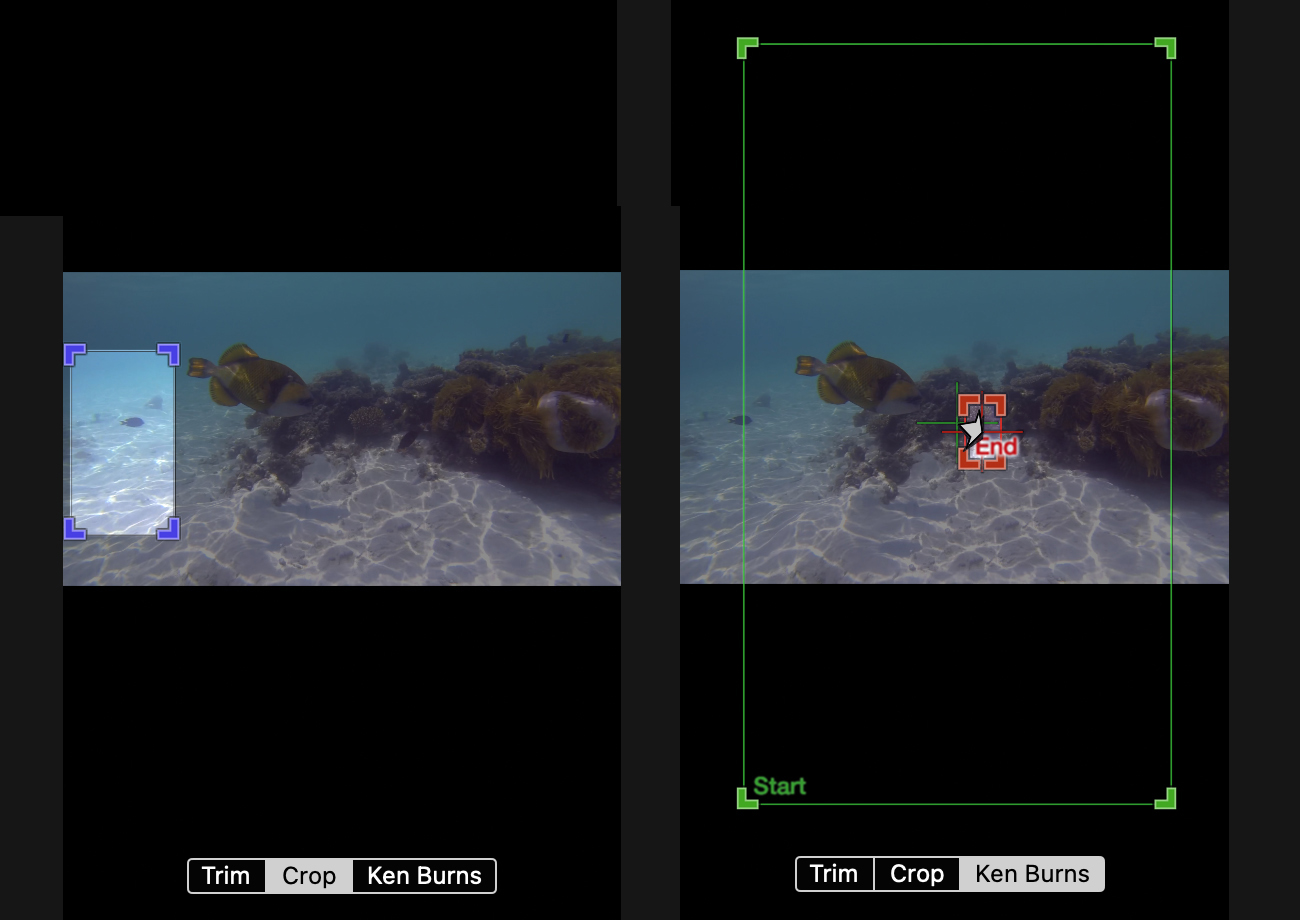
I wonder if the clip might be "cropped" and have "Ken Burns". When I was playing around trying to replicate what you are getting I found that it is possible to apply a simple "crop" to a clip (which has the effect of scaling the whole clip) and apply a "Ken Burns" move on top of that. This seemed to reproduce the odd behaviour of the Ken Burns starting already zoomed in when the clip was played.
Last edit: 20 Jan 2023 13:52 by Zabobon.
Please Log in to join the conversation.

20 Jan 2023 12:31 #123736
by Albo
Replied by Albo on topic Ken Burns odd behavior (auto zoom/scale issue)
You should watch this video from Mark Spencer.
Please Log in to join the conversation.
20 Jan 2023 14:58 #123738
by DaveM
Replied by DaveM on topic Ken Burns odd behavior (auto zoom/scale issue)
It seems like Zaboban's description is correct. It does look like you've already cropped the clip and then apply a Ken Burn's effect. Perhaps, you should select the clip and make sure all effects are removed (start from an unaltered clip).
If your cropping is to create a vertical aspect ratio video, you could change the timeline/Project settings to the appropriate frame size. Then, you would only see the portion of a clip that fits in the timeline frame size (depending on the clip's Spatial Conform setting). You could use the Transform effect to move the visible part of the clip, as desired. Then, if you want to add a Ken Burn's effect to further zoom in, you should be able to do so. And, for example, if you are using 4K clips in an HD (vertical or horizontal) timeline/Project you can zoom in up to 200% without losing resolution.
Sorry, I may not fully understand what you're trying to achieve. Please provide a more detailed description of the Project, clip sizes, etc.
If your cropping is to create a vertical aspect ratio video, you could change the timeline/Project settings to the appropriate frame size. Then, you would only see the portion of a clip that fits in the timeline frame size (depending on the clip's Spatial Conform setting). You could use the Transform effect to move the visible part of the clip, as desired. Then, if you want to add a Ken Burn's effect to further zoom in, you should be able to do so. And, for example, if you are using 4K clips in an HD (vertical or horizontal) timeline/Project you can zoom in up to 200% without losing resolution.
Sorry, I may not fully understand what you're trying to achieve. Please provide a more detailed description of the Project, clip sizes, etc.
Please Log in to join the conversation.
