




- Posts: 38
- Thank you received: 0
3 Post Moderation Rule for New Boarders (25 Jan 2021)
New boarders will have their posts moderated - Don't worry if you cannot see your post immediately.
Two basic questions
07 Jan 2023 17:48 - 07 Jan 2023 18:02 #123549
by gdgross
Two basic questions was created by gdgross
Hi all, relatively inexperienced fcpx user here, though I've been low-level using it for years. Recently I've been making a few lyric videos for my band's songs, like this one:
The bulk of the time consuming work is mainly the fine adjusting the timing of when the titles/lyrics appear and disappear, their locations, etc. to match when they are sung in the song and where I want them to appear on the video. One question I have that how to edit multiple titles at once. When I select multiple titles at once and attempt to edit the font or the x or y coordinate, fcpx only changes one of them. I assume I'm doing something wrong, but I can't figure out what!
I made a quick little screen recording to demonstrate:
Secondly, I'm using the basic title generator for this and you can see on the timeline all the individual clips I have to make the words appear at the right times. Is there a better thing to use besides a title generator for this purpose?
Thanks all for the help!
The bulk of the time consuming work is mainly the fine adjusting the timing of when the titles/lyrics appear and disappear, their locations, etc. to match when they are sung in the song and where I want them to appear on the video. One question I have that how to edit multiple titles at once. When I select multiple titles at once and attempt to edit the font or the x or y coordinate, fcpx only changes one of them. I assume I'm doing something wrong, but I can't figure out what!
I made a quick little screen recording to demonstrate:
Secondly, I'm using the basic title generator for this and you can see on the timeline all the individual clips I have to make the words appear at the right times. Is there a better thing to use besides a title generator for this purpose?
Thanks all for the help!
Last edit: 07 Jan 2023 18:02 by gdgross.
Please Log in to join the conversation.
- Tom Wolsky
-

- Offline
- Moderator
-

07 Jan 2023 17:53 #123550
by Tom Wolsky
Replied by Tom Wolsky on topic Two basic questions
Your illustrations weren’t linked to the message.
Please Log in to join the conversation.
07 Jan 2023 18:02 #123551
by gdgross

Replied by gdgross on topic Two basic questions
Ah, sorry! editedYour illustrations weren’t linked to the message.
Please Log in to join the conversation.


08 Jan 2023 12:08 - 08 Jan 2023 14:21 #123554
by Zabobon
Replied by Zabobon on topic Two basic questions
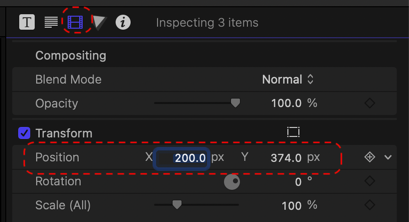
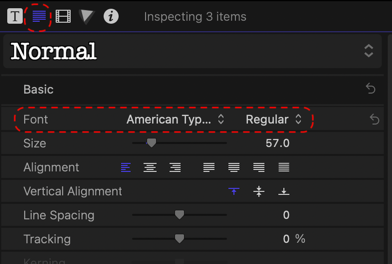
To answer your first question. Selecting multiple titles, going to the Inspector and adjusting font and/or x y positioning does work to set all to the new font and adjust their relative positioning (I have just tried it to confirm my memory of this). These are the two panes to use in the Inspector:
Last edit: 08 Jan 2023 14:21 by Zabobon. Reason: Added images
Please Log in to join the conversation.
10 Jan 2023 17:48 #123588
by gdgross
Replied by gdgross on topic Two basic questions
ok thanks! so I must have some setting wrong or something, then, I imagine...any idea what this might be?
Please Log in to join the conversation.
11 Jan 2023 09:47 #123599
by Zabobon
Replied by Zabobon on topic Two basic questions
It seems that to adjust the relative positioning of multiple selected titles you need to do it in the "video inspector" pane rather than the "type inspector" pane (see my first screenshot). To change the fonts for multiple selected titles use the "type inspector" (see my second screenshot). Not sure of the logic of this but it's how it is.
Please Log in to join the conversation.
- Tom Wolsky
-
- Offline
- Moderator
-
11 Jan 2023 13:22 #123602
by Tom Wolsky
Replied by Tom Wolsky on topic Two basic questions
You can also change position in the Text inspector.
Please Log in to join the conversation.
11 Jan 2023 14:23 #123604
by Zabobon
Replied by Zabobon on topic Two basic questions
>>You can also change position in the Text inspector.<<
Yes, but weirdly enough (as the OP pointed out) that doesn't work with multiple titles selected. To move the position of multiple selected titles is seems it has to be done in the Video Inspector.
Yes, but weirdly enough (as the OP pointed out) that doesn't work with multiple titles selected. To move the position of multiple selected titles is seems it has to be done in the Video Inspector.
Please Log in to join the conversation.
11 Jan 2023 16:31 #123605
by gdgross
Ah gotcha, thanks. I didn't catch that distinction earlier.
Replied by gdgross on topic Two basic questions
It seems that to adjust the relative positioning of multiple selected titles you need to do it in the "video inspector" pane rather than the "type inspector" pane (see my first screenshot). To change the fonts for multiple selected titles use the "type inspector" (see my second screenshot). Not sure of the logic of this but it's how it is.
Ah gotcha, thanks. I didn't catch that distinction earlier.
Please Log in to join the conversation.
