


- Posts: 27
- Thank you received: 1
3 Post Moderation Rule for New Boarders (25 Jan 2021)
New boarders will have their posts moderated - Don't worry if you cannot see your post immediately.
Anyone else using iCloud as their content source?
05 Jan 2023 21:27 #123521
by mattj
Anyone else using iCloud as their content source? was created by mattj
Hi all -
Newbie here. I've just begun editing content I've been shooting for about 5 years (haven't had time to publish it before now). I have a 1.2TB iCloud library of all my content. I shoot it all from my iPhones right now, though adding 360 Action cams this year, and maybe one other handheld Sony cam.
I have a local copy of the entire library on a Samsung Pro 2TB NVMe external SSD, connected to my MBP M1 Max by TB4 port. I have been copying the original media files to the library, so I don't have to deal with broken links later when I move my library files to a new external drive.
I just filled up the internal 1TB drive with about 35 rough cut videos. I've only completed about 5 of them, but I haven't started publishing them yet, as I don't yet have a Youtube channel name, so I don't want to delete the render files and move any of them off to a backup drive (slower spinning discs).
Does anyone else use iCloud for all their content storage? I'm open to suggestions. I've been doing it like this for the years while I was only shooting content, and not publishing it. Now, I wonder if I should continue to manage such a large iCloud library as my backup solution to all original media clips, or consider a different approach.
Would it make sense to quit paying Apple so much every month for the iCloud storage and manage it all through local hard drives and backup solutions?
Thanks for any thoughts you may have!
Newbie here. I've just begun editing content I've been shooting for about 5 years (haven't had time to publish it before now). I have a 1.2TB iCloud library of all my content. I shoot it all from my iPhones right now, though adding 360 Action cams this year, and maybe one other handheld Sony cam.
I have a local copy of the entire library on a Samsung Pro 2TB NVMe external SSD, connected to my MBP M1 Max by TB4 port. I have been copying the original media files to the library, so I don't have to deal with broken links later when I move my library files to a new external drive.
I just filled up the internal 1TB drive with about 35 rough cut videos. I've only completed about 5 of them, but I haven't started publishing them yet, as I don't yet have a Youtube channel name, so I don't want to delete the render files and move any of them off to a backup drive (slower spinning discs).
Does anyone else use iCloud for all their content storage? I'm open to suggestions. I've been doing it like this for the years while I was only shooting content, and not publishing it. Now, I wonder if I should continue to manage such a large iCloud library as my backup solution to all original media clips, or consider a different approach.
Would it make sense to quit paying Apple so much every month for the iCloud storage and manage it all through local hard drives and backup solutions?
Thanks for any thoughts you may have!
Please Log in to join the conversation.

12 Jun 2023 17:49 #125904
by Gabriela
Replied by Gabriela on topic Anyone else using iCloud as their content source?
I don't understand why this hasn't gotten any responses yet. I have the exact same question. Well, the question for me is actually a bit different. I'm wondering HOW to leave my files in place from iCloud. I don't know how to technically do this properly. If anyone could help that'd be great, thank you
Please Log in to join the conversation.


13 Jun 2023 14:00 - 13 Jun 2023 14:11 #125917
by Ian Brown
Replied by Ian Brown on topic Anyone else using iCloud as their content source?
It's OK storing media for backup purposes on the cloud but you shouldn't try editing it from there as the broadband speed may not be enough.
Unless you have a very poor/old computer you probably don't need any render files so you can get rid of them to free up tons of space . . . as a rule of thumb they take up around 10 times as much space as the camera video.
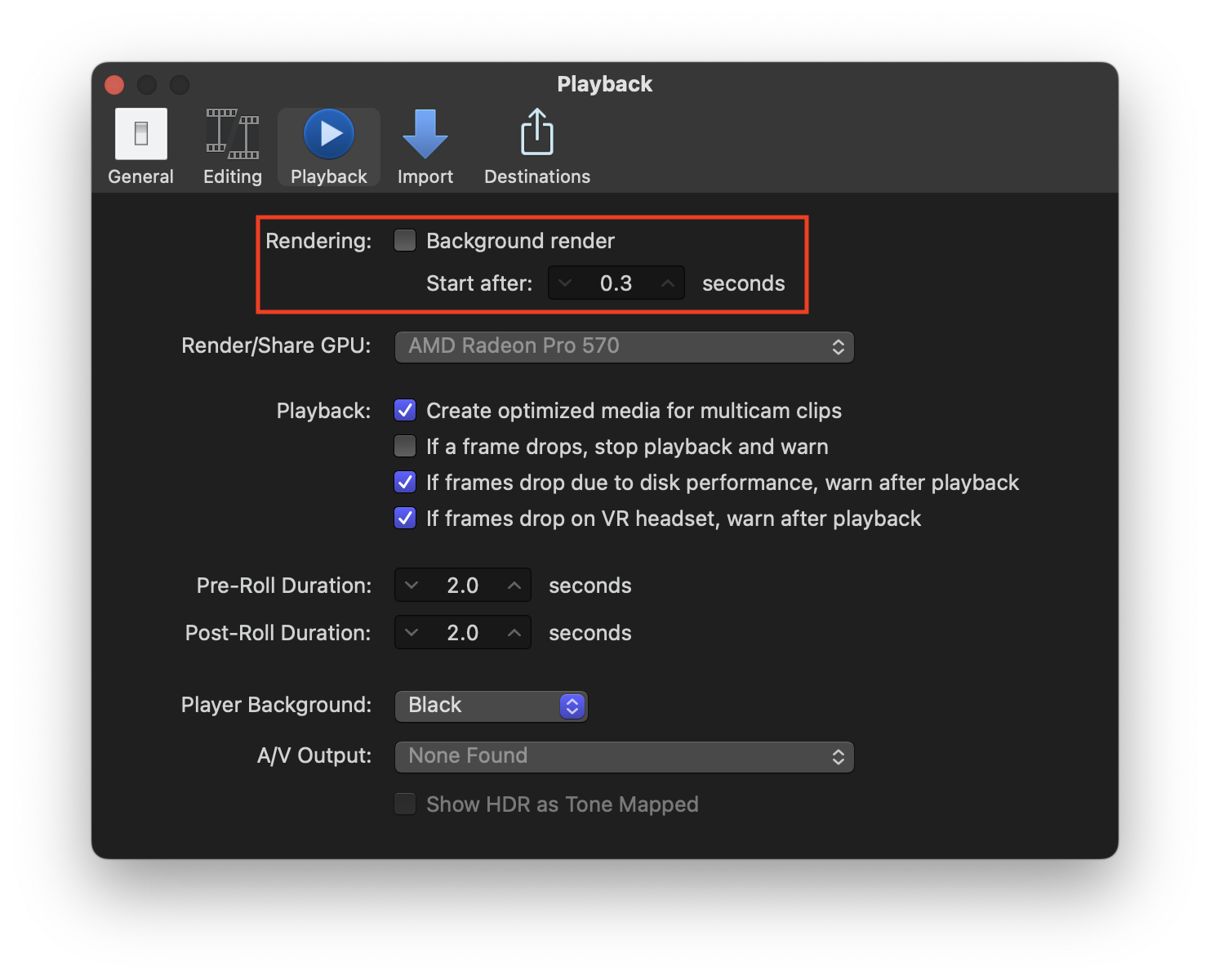
After you have deleted them open Final Cut Pro/Preferences/Playback and turn off Background Render.If you find your computer can't manage without them it is easy enough to re-create them.
For storage you don't need expensive SSDs . . . massive, cheap USB 3.0 HDDs are fine. I even use them for editing up to 4K with no problems. I have got SSDs but have never found any need for their extra speed when editing. YMMV
This short video shows how to delete existing render files.
I suggest deleting ALL the files from the Library which is towards the end of the video
Unless you have a very poor/old computer you probably don't need any render files so you can get rid of them to free up tons of space . . . as a rule of thumb they take up around 10 times as much space as the camera video.
After you have deleted them open Final Cut Pro/Preferences/Playback and turn off Background Render.If you find your computer can't manage without them it is easy enough to re-create them.
For storage you don't need expensive SSDs . . . massive, cheap USB 3.0 HDDs are fine. I even use them for editing up to 4K with no problems. I have got SSDs but have never found any need for their extra speed when editing. YMMV
This short video shows how to delete existing render files.
I suggest deleting ALL the files from the Library which is towards the end of the video
Last edit: 13 Jun 2023 14:11 by Ian Brown. Reason: Adding info
Please Log in to join the conversation.
- MichelleGehl
-

- Offline
- New Member
-

Less
More
- Posts: 9
- Thank you received: 1
03 Aug 2023 07:28 - 07 Aug 2023 11:24 #126663
by MichelleGehl
Replied by MichelleGehl on topic Anyone else using iCloud as their content source?
Thanks for this topic! I've found some useful notes for myself here! Recently, I had to set up iCloud Mail on my Mac and this post was very helpful:
setapp.com/how-to/set-up-icloud-mail-on-your-mac
So maybe it will help you too. Check out their blog section, there are a lot of helpful posts about everything related to macOS.
Last edit: 07 Aug 2023 11:24 by MichelleGehl.
Please Log in to join the conversation.
03 Aug 2023 08:58 #126664
by Ian Brown
Replied by Ian Brown on topic Anyone else using iCloud as their content source?
Assuming your computer is not terribly slow you will never need render files unless your project contains some very complex effects.
If your playback during editing is jerky you will need to render but as long as it is smooth there is no need.
For years I always rendered my project before exporting until Tom Wolsky told me that it was not necessary, when you start to export, the video is rendered automatically.
If your playback during editing is jerky you will need to render but as long as it is smooth there is no need.
For years I always rendered my project before exporting until Tom Wolsky told me that it was not necessary, when you start to export, the video is rendered automatically.
Please Log in to join the conversation.
03 Aug 2023 14:02 #126666
by mattj
Replied by mattj on topic Anyone else using iCloud as their content source?
Yeah, I must be the only silly person to ever do this! 
So, What I managed to figure out is...
I use the MACOS Photos application on my Macbook Pro to manage the source content to the iCloud. It stays automatically sync'd. As I shoot new video from my iPhones, and connect them to power and WIFI, video automatically uploads to the cloud, and then the MACOS Photos app automatically downloads them to the Mackbook Pro.
Then, I can simply select each video clip I want from the Photos app on the Macbook Pro, and I drag it over to FCPX and drop it into an event, within a library I'm working in and then they are duplicated there, leaving all the iCloud files in place and unmodified. So far so good!
So, What I managed to figure out is...
I use the MACOS Photos application on my Macbook Pro to manage the source content to the iCloud. It stays automatically sync'd. As I shoot new video from my iPhones, and connect them to power and WIFI, video automatically uploads to the cloud, and then the MACOS Photos app automatically downloads them to the Mackbook Pro.
Then, I can simply select each video clip I want from the Photos app on the Macbook Pro, and I drag it over to FCPX and drop it into an event, within a library I'm working in and then they are duplicated there, leaving all the iCloud files in place and unmodified. So far so good!
Please Log in to join the conversation.
03 Aug 2023 14:07 #126667
by mattj
Replied by mattj on topic Anyone else using iCloud as their content source?
I have found that I can edit from original media (1080p H.264) for almost all of my video, using a Macbook Pro M1 Max, except recently, with the addition of simple generators (I think they are called - simple graphic lines and arrows and circles on the screen), then I started dropping frames during playback in some places. I was a little shocked this M1 Max can't keep up. Hope I'm doing something wrong, but otherwise I've had to start transcoding media to Optimized to avoid the dropped frames.
Please Log in to join the conversation.
03 Aug 2023 14:29 - 03 Aug 2023 14:35 #126668
by Ian Brown
Replied by Ian Brown on topic Anyone else using iCloud as their content source?
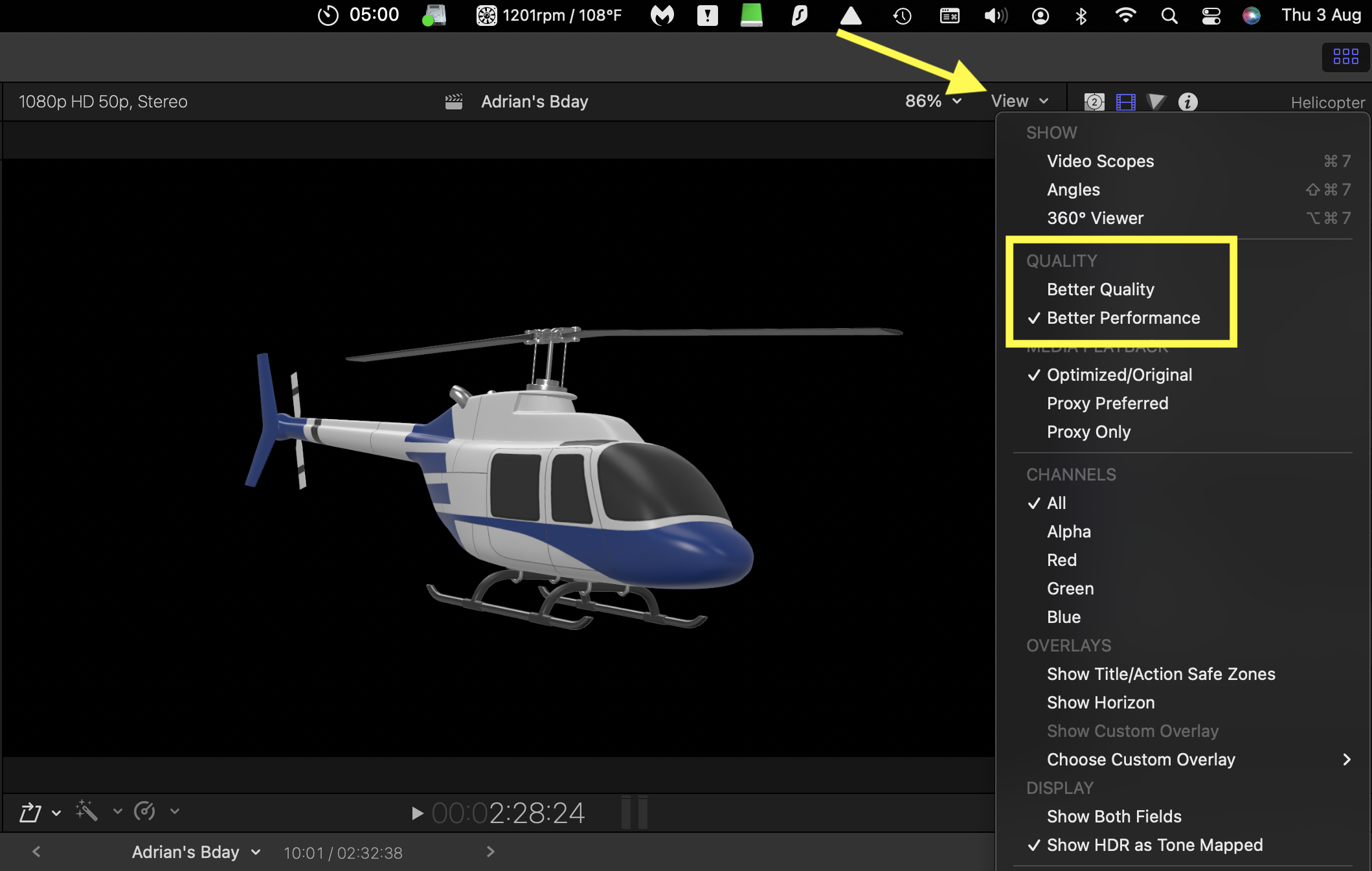
Make sure the playback Viewer window is set to "Better Performance" . . . NOT "Better Quality".
Last edit: 03 Aug 2023 14:35 by Ian Brown.
Please Log in to join the conversation.
03 Aug 2023 14:43 #126669
by Ian Brown
Replied by Ian Brown on topic Anyone else using iCloud as their content source?
Is your SSD nearly full?
Anything over 75% and you risk things slowing down.
If it has too much on it try deleting the render files as shown in the video above.
Anything over 75% and you risk things slowing down.
If it has too much on it try deleting the render files as shown in the video above.
Please Log in to join the conversation.
- Tom Wolsky
-

- Offline
- Moderator
-

03 Aug 2023 16:01 #126670
by Tom Wolsky
Replied by Tom Wolsky on topic Anyone else using iCloud as their content source?
Make sure you’re updated to 10.6.8.
Please Log in to join the conversation.
