


3 Post Moderation Rule for New Boarders (25 Jan 2021)
New boarders will have their posts moderated - Don't worry if you cannot see your post immediately.
How to get a 12fps feel on text animation MOTION


31 Dec 2022 08:46 - 31 Dec 2022 08:49 #123426
by bcassin
Owner InnerParakeet
www.innerparakeet.com
How to get a 12fps feel on text animation MOTION was created by bcassin
Hello!
I've used the text behavior Quiver to get some text to well... quiver. What I want to do is use a behavior to get the quivering text to move like it is stop motion/ or that each shape change looks like a 12fps animation.
I think the solution would be use the quantize behavior but I am having no luck getting it to act in a way that would have the text step slowly through the deformations. Any thoughts would be appreciated.
I've included a video showing the quiver behavior, at the 5 second mark I pause playback of the motion timeline and step through the animation using the arrow keys to simulate the look I want to get.
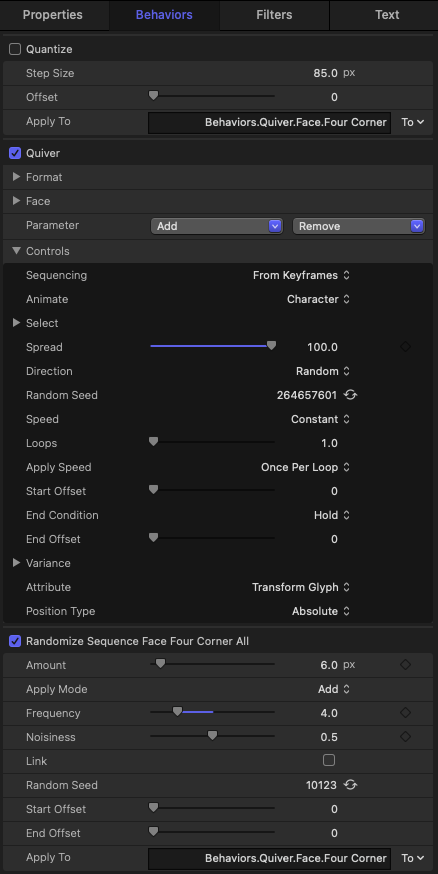
Screen shot of my behavior stack:
I've used the text behavior Quiver to get some text to well... quiver. What I want to do is use a behavior to get the quivering text to move like it is stop motion/ or that each shape change looks like a 12fps animation.
I think the solution would be use the quantize behavior but I am having no luck getting it to act in a way that would have the text step slowly through the deformations. Any thoughts would be appreciated.
I've included a video showing the quiver behavior, at the 5 second mark I pause playback of the motion timeline and step through the animation using the arrow keys to simulate the look I want to get.
Screen shot of my behavior stack:
Owner InnerParakeet
www.innerparakeet.com
Last edit: 31 Dec 2022 08:49 by bcassin.
Please Log in to join the conversation.


31 Dec 2022 19:48 - 31 Dec 2022 21:36 #123428
by VTC
Replied by VTC on topic How to get a 12fps feel on text animation MOTION
I'm thinking animate it a few seconds, compound clip it, then stretch to slower/faster taste. (Motion's not my bag so I tend to brute force it into doing what I want it to do.)
Might pick up some how-to pointers from this presentation:
- - - fcp.co/forum/6-motion-5/25600-wiggly-text-in-motion-5 - - -
(Another splendid example where embedded audio is not your friend.)
Might pick up some how-to pointers from this presentation:
- - - fcp.co/forum/6-motion-5/25600-wiggly-text-in-motion-5 - - -
(Another splendid example where embedded audio is not your friend.)
Last edit: 31 Dec 2022 21:36 by VTC.
Please Log in to join the conversation.
31 Dec 2022 23:53 #123430
by bcassin
Owner InnerParakeet
www.innerparakeet.com
Replied by bcassin on topic How to get a 12fps feel on text animation MOTION
I ended up solving it by putting the text with the Quiver behaviors (minus the quantize) into a group and then applying the strobe effect to that group. Had to adjust the amount but it worked out well:)
Owner InnerParakeet
www.innerparakeet.com
Please Log in to join the conversation.
