




- Posts: 26
- Thank you received: 1
3 Post Moderation Rule for New Boarders (25 Jan 2021)
New boarders will have their posts moderated - Don't worry if you cannot see your post immediately.
Original Files are in the Library but not linked
29 Dec 2022 18:17 #123408
by Shorty01
Original Files are in the Library but not linked was created by Shorty01
Hello everyone,
I have moved to a new Mac a while ago and I haven't touched FCP X since then.
Opening a 900GB Library which has all the Original Files stored into it, I was confronted with the red screens of unlinked clips. Now I know there is a relink option and I guess I could just copy all the files out of the library and link them from another folder.
But my question is ... Why does this happen? The files are there. They are of the original specs.
I have moved to a new Mac a while ago and I haven't touched FCP X since then.
Opening a 900GB Library which has all the Original Files stored into it, I was confronted with the red screens of unlinked clips. Now I know there is a relink option and I guess I could just copy all the files out of the library and link them from another folder.
But my question is ... Why does this happen? The files are there. They are of the original specs.
Please Log in to join the conversation.
- Tom Wolsky
-

- Offline
- Moderator
-

29 Dec 2022 18:38 #123409
by Tom Wolsky
Replied by Tom Wolsky on topic Original Files are in the Library but not linked
Can you post a screenshot of what you’re seeing in the Viewer?
Please Log in to join the conversation.
29 Dec 2022 18:45 #123410
by Shorty01
Replied by Shorty01 on topic Original Files are in the Library but not linked
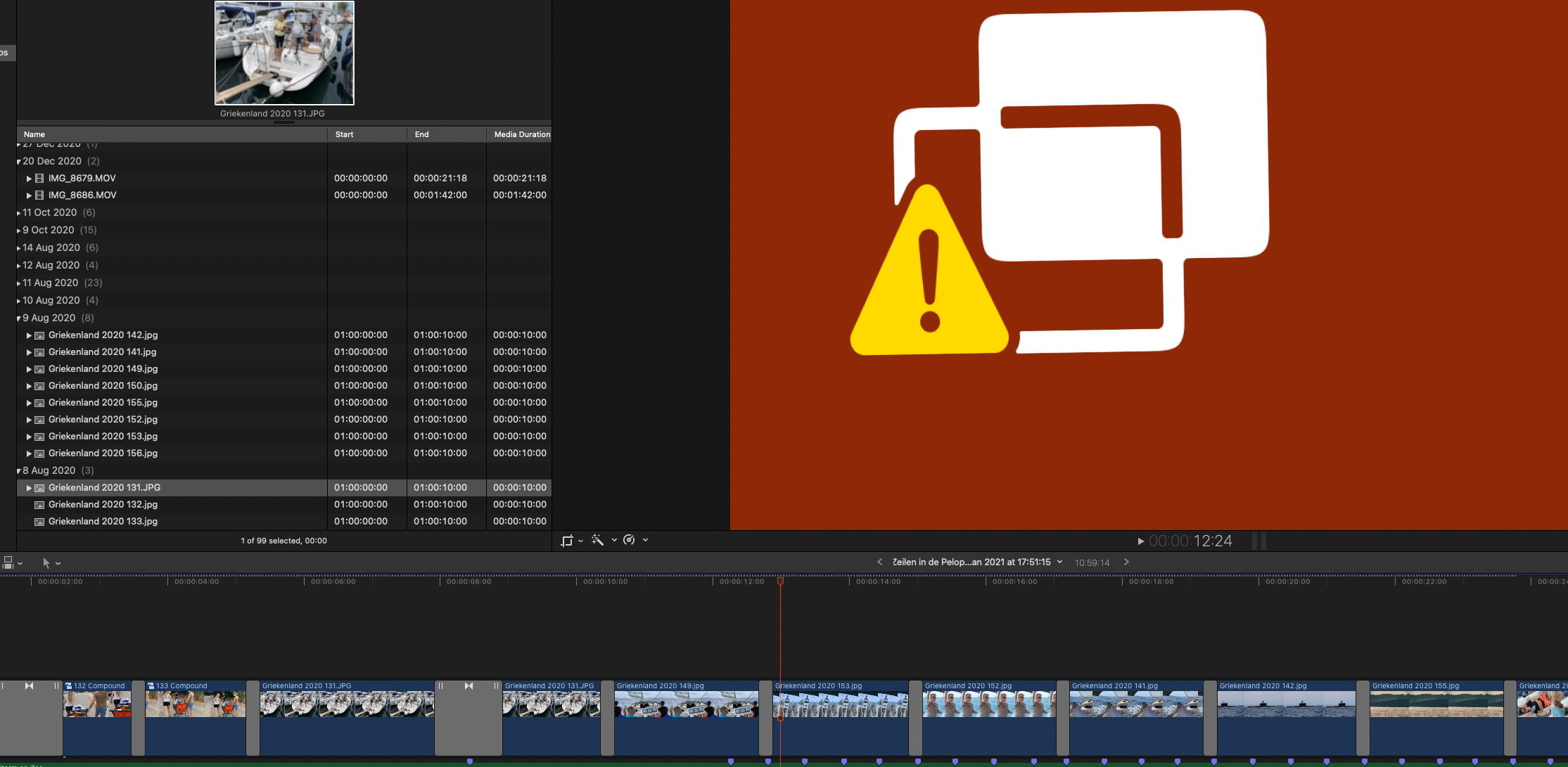
Hi Tom,
Here it is.
By the way, I tried replacing the files in the timeline with the version from the browser and that works, except or the timing. So the files are there.
Here it is.
By the way, I tried replacing the files in the timeline with the version from the browser and that works, except or the timing. So the files are there.
Please Log in to join the conversation.
29 Dec 2022 18:46 #123411
by Shorty01
Replied by Shorty01 on topic Original Files are in the Library but not linked
O that was a bad example. I still had another clip highlighted, but anyway the files work.
Please Log in to join the conversation.


29 Dec 2022 18:53 #123412
by TerryB
Replied by TerryB on topic Original Files are in the Library but not linked
That's a Missing Effect icon.
support.apple.com/guide/final-cut-pro/al...cons-verd1f977a7/mac
Please Log in to join the conversation.
29 Dec 2022 19:45 #123413
by Shorty01
Replied by Shorty01 on topic Original Files are in the Library but not linked
Ahahh! That makes sense. I switched to an M1.
Thanks a lot
Thanks a lot
Please Log in to join the conversation.


30 Dec 2022 03:48 #123417
by anickt
Replied by anickt on topic Original Files are in the Library but not linked
After any major change it’s not unusual for the files to become unlinked. Just relink the files. There’s no need to make any changes to the file locations.
Please Log in to join the conversation.
30 Dec 2022 12:40 #123419
by Shorty01
Replied by Shorty01 on topic Original Files are in the Library but not linked
No TerryB was right. It was an effect that was not valid anymore, although it was updated.
I could not relink.
The problem is solved by deleting a color preset that I used on all files
I could not relink.
The problem is solved by deleting a color preset that I used on all files
Please Log in to join the conversation.

05 Jan 2023 21:08 #123518
by mattj
Replied by mattj on topic Original Files are in the Library but not linked
Interesting...I has a similar issue, but I think my hard drive was just full (weird though, system never alerted me it was full or approaching full). I think it was deleting the files a few moments after I dragged them into the library, and then told me they were missing. Weird way for FCPX to do this. I would have preferred a warning the hard drive was full and no more media could be added. 
Please Log in to join the conversation.
07 Jan 2023 22:08 #123552
by Shorty01
Replied by Shorty01 on topic Original Files are in the Library but not linked
Hmm … you would think that would be a job for OS X not for FCP.
But a full disk can lead to unexpected situations.
Did you try cleaning up some space or an external disk?
But a full disk can lead to unexpected situations.
Did you try cleaning up some space or an external disk?
Please Log in to join the conversation.
