


- Posts: 222
- Thank you received: 4
3 Post Moderation Rule for New Boarders (25 Jan 2021)
New boarders will have their posts moderated - Don't worry if you cannot see your post immediately.
Apply custom equalization preset to multiple clips in bin (not in the timeline)
- FinalCutdown
-
 Topic Author
- Offline
- Elite Member
-

Less
More
21 Dec 2022 09:32 - 21 Dec 2022 09:36 #123370
by FinalCutdown
Apply custom equalization preset to multiple clips in bin (not in the timeline) was created by FinalCutdown
I have imported a lot of raw footage video with eight audio tracks in FCPX.
They were recorded with lots of headroom - so they are very quiet.
Usually I have to apply an EQ-Effect with additional gain in the highs to bring the gain up and ad some transparency to the lav mics which soud a little dull. Then the volume is right so I can control the rest with the volume slider.
To save time I would like to apply the EQ-preset to certain tracks of ALL my raw footage.
But this doesnt seem possible.
I cannot add a saved effects preset to clips wich are not in the timeline.
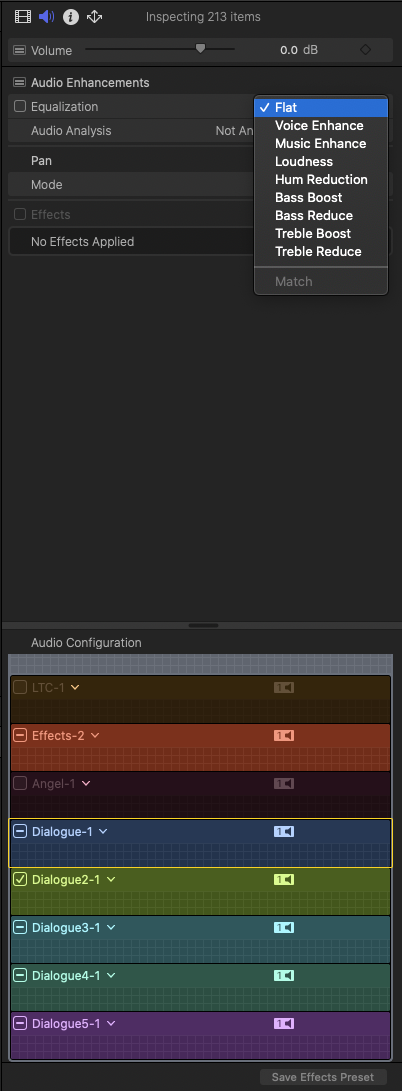
I just can add eq manually or choose from one of those presets in the menu of the EQ tab.
Is there a way to save my eq preset to this menu without creating an effect for it?
Or is there a way to add my effect to audio tracks of clips in my bin (not in the timeline?)
They were recorded with lots of headroom - so they are very quiet.
Usually I have to apply an EQ-Effect with additional gain in the highs to bring the gain up and ad some transparency to the lav mics which soud a little dull. Then the volume is right so I can control the rest with the volume slider.
To save time I would like to apply the EQ-preset to certain tracks of ALL my raw footage.
But this doesnt seem possible.
I cannot add a saved effects preset to clips wich are not in the timeline.
I just can add eq manually or choose from one of those presets in the menu of the EQ tab.
Is there a way to save my eq preset to this menu without creating an effect for it?
Or is there a way to add my effect to audio tracks of clips in my bin (not in the timeline?)
Last edit: 21 Dec 2022 09:36 by FinalCutdown.
Please Log in to join the conversation.
- FinalCutdown
-
Topic Author
- Offline
- Elite Member
-
Less
More
- Posts: 222
- Thank you received: 4
21 Dec 2022 12:35 #123373
by FinalCutdown
Replied by FinalCutdown on topic Apply custom equalization preset to multiple clips in bin (not in the timeline)
It doesnt even seem possible to go into the EQ-Editor when multiple tracks of multiple clips are selected. I can only add those presets.. stange.
Please Log in to join the conversation.
- Buhardilla
-

- Offline
- Premium Member
-

Less
More
- Posts: 105
- Thank you received: 16
21 Dec 2022 22:48 #123376
by Buhardilla
Replied by Buhardilla on topic Apply custom equalization preset to multiple clips in bin (not in the timeline)
I was thinking about how this could be done. And the only solution I could think of would be with an application like iZotope RX10. But unfortunately it is not compatible with FCP.
Please Log in to join the conversation.
