




- Posts: 28
- Thank you received: 0
3 Post Moderation Rule for New Boarders (25 Jan 2021)
New boarders will have their posts moderated - Don't worry if you cannot see your post immediately.
FCP bug: copied clips don't paste in correct spot
15 Dec 2022 20:34 - 16 Dec 2022 00:50 #123310
by Shadowfax
FCP bug: copied clips don't paste in correct spot was created by Shadowfax
I'm only having this issue in one of my projects. For some reason, whenever I paste a clip, it doesn't paste where I have the skim marker positioned and instead pastes before the previous clip. I've uploaded some screenshots to help illustrate what I'm saying.
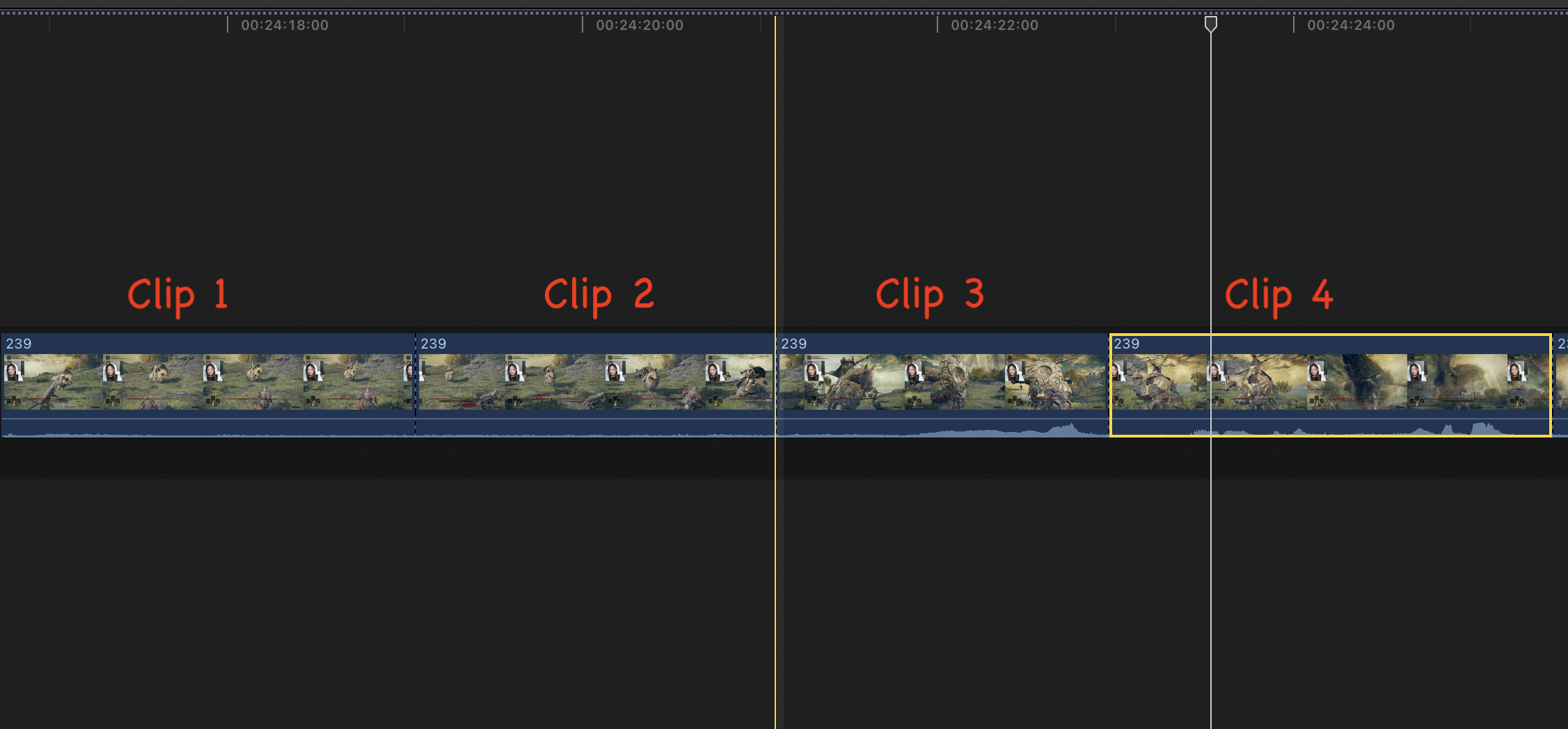
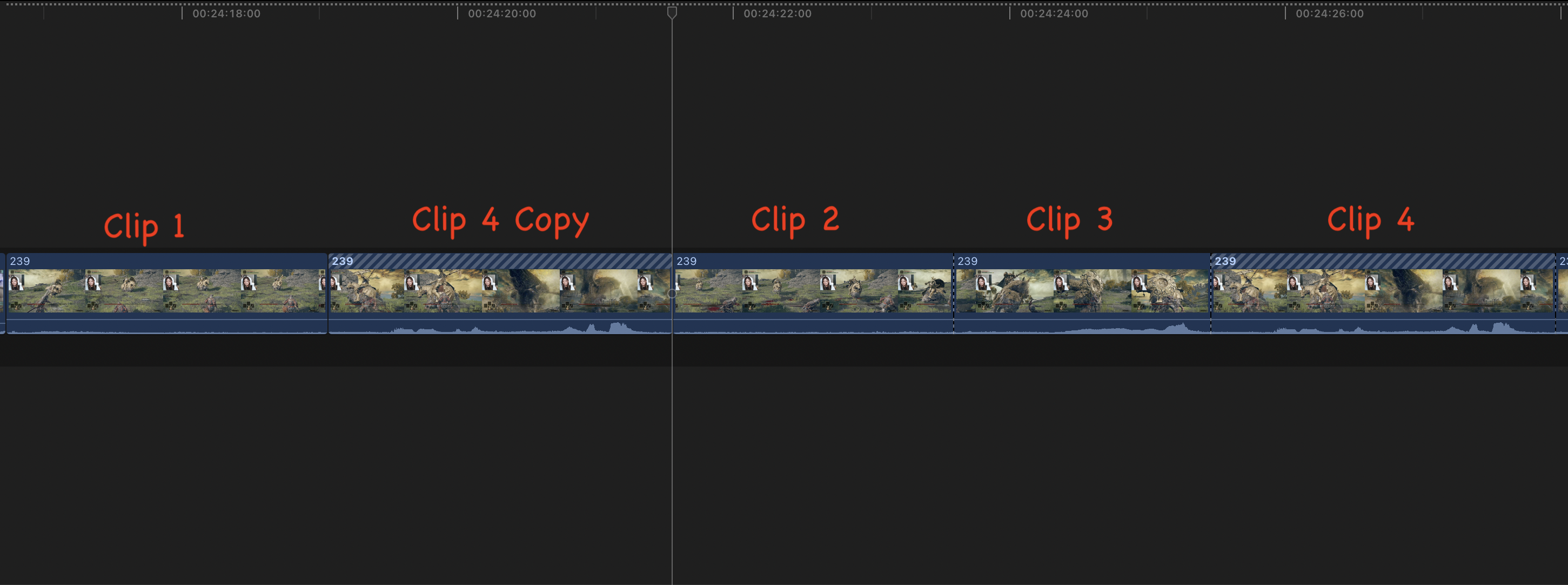
In this example, the copy of clip 4 should be pasting before clip 3 (where I have the skim marker positioned), but for some reason it's pasting before clip 2 instead.
This same issue is also occurring when I try to insert gaps.
UPDATE: The problem still persists, but I noticed that it only occurs on a portion of my project's timeline. If I try pasting a clip anywhere in the first 2/3 or so of my timeline, it pastes normally. The issue only occurs in the last 1/3 of the timeline. Super weird.
In this example, the copy of clip 4 should be pasting before clip 3 (where I have the skim marker positioned), but for some reason it's pasting before clip 2 instead.
This same issue is also occurring when I try to insert gaps.
UPDATE: The problem still persists, but I noticed that it only occurs on a portion of my project's timeline. If I try pasting a clip anywhere in the first 2/3 or so of my timeline, it pastes normally. The issue only occurs in the last 1/3 of the timeline. Super weird.
Last edit: 16 Dec 2022 00:50 by Shadowfax. Reason: New information
Please Log in to join the conversation.


15 Dec 2022 23:31 #123313
by Redifer
Replied by Redifer on topic FCP bug: copied clips don't paste in correct spot
I can't seem to replicate this behavior. Does it still do this after restarting Final Cut Pro and also the entire computer?
Please Log in to join the conversation.
16 Dec 2022 00:11 #123321
by Shadowfax
Replied by Shadowfax on topic FCP bug: copied clips don't paste in correct spot
I've tried restarting both FCP and my computer, and it doesn't make a difference unfortunately. I'm running the latest version of FCP.
Please Log in to join the conversation.
16 Dec 2022 00:51 #123323
by Shadowfax
Replied by Shadowfax on topic FCP bug: copied clips don't paste in correct spot
UPDATE: The problem still persists, but I noticed that it only occurs on a portion of my project's timeline. If I try pasting a clip anywhere in the first 2/3 or so of my timeline, it pastes normally. The issue only occurs in the last 1/3 of the timeline. Super weird.
Please Log in to join the conversation.

16 Dec 2022 01:36 #123324
by joema
Thank you for the graphics and clear description of the problem.
You can try resetting FCP preferences (step 11 on this page): https://support.apple.com/en-us/HT203477
That said, each project exists internally as a separate SQLite database. I suspect the problem is some kind of problem unique to that database. As a precaution I'd suggest making a file backup of the library (assuming it's not too large if using internal media). That way if further troubleshooting steps makes it worse, you have a backup in addition to the FCP auto backups, which are by default in /Movies/Final Cut Backups.
You can try creating another project and doing a copy/paste of all clips from the problematic timeline to the new one. That causes creation of a new database and will sometimes resolve minor issues.
If that doesn't work, export a project XML, create a new test library and import the project XML to that library. That translates the internal SQL format of the project database to XML, then vice-versa on the import. The new library also contains new events, each of which is also a separate SQLite database. If that works you could probably rename the project in the new library, then create a blank event (for example called TransferEvent), copy the project to that event, then copy the event to the first library. Copying a project to another library within an event can be more reliable than just copying the bare project.
Please post your results after trying these steps.
Replied by joema on topic FCP bug: copied clips don't paste in correct spot
...only having this issue in one of my projects..The issue only occurs in the last 1/3 of the timeline. Super weird.
Thank you for the graphics and clear description of the problem.
You can try resetting FCP preferences (step 11 on this page): https://support.apple.com/en-us/HT203477
That said, each project exists internally as a separate SQLite database. I suspect the problem is some kind of problem unique to that database. As a precaution I'd suggest making a file backup of the library (assuming it's not too large if using internal media). That way if further troubleshooting steps makes it worse, you have a backup in addition to the FCP auto backups, which are by default in /Movies/Final Cut Backups.
You can try creating another project and doing a copy/paste of all clips from the problematic timeline to the new one. That causes creation of a new database and will sometimes resolve minor issues.
If that doesn't work, export a project XML, create a new test library and import the project XML to that library. That translates the internal SQL format of the project database to XML, then vice-versa on the import. The new library also contains new events, each of which is also a separate SQLite database. If that works you could probably rename the project in the new library, then create a blank event (for example called TransferEvent), copy the project to that event, then copy the event to the first library. Copying a project to another library within an event can be more reliable than just copying the bare project.
Please post your results after trying these steps.
Please Log in to join the conversation.
16 Dec 2022 02:58 #123325
by Shadowfax
Replied by Shadowfax on topic FCP bug: copied clips don't paste in correct spot
I pasted all of the clips to a new project timeline and that seems to have done the trick! No idea what caused the issue in the first place, but thanks a ton for getting me back to normal!You can try creating another project and doing a copy/paste of all clips from the problematic timeline to the new one. That causes creation of a new database and will sometimes resolve minor issues.
Please Log in to join the conversation.
