


- Posts: 129
- Thank you received: 2
3 Post Moderation Rule for New Boarders (25 Jan 2021)
New boarders will have their posts moderated - Don't worry if you cannot see your post immediately.
How To Stop Final Cut From Optimizing Media for Multicam Clips
26 Nov 2022 19:27 - 26 Nov 2022 19:31 #123074
by Smesh
Hi guys.
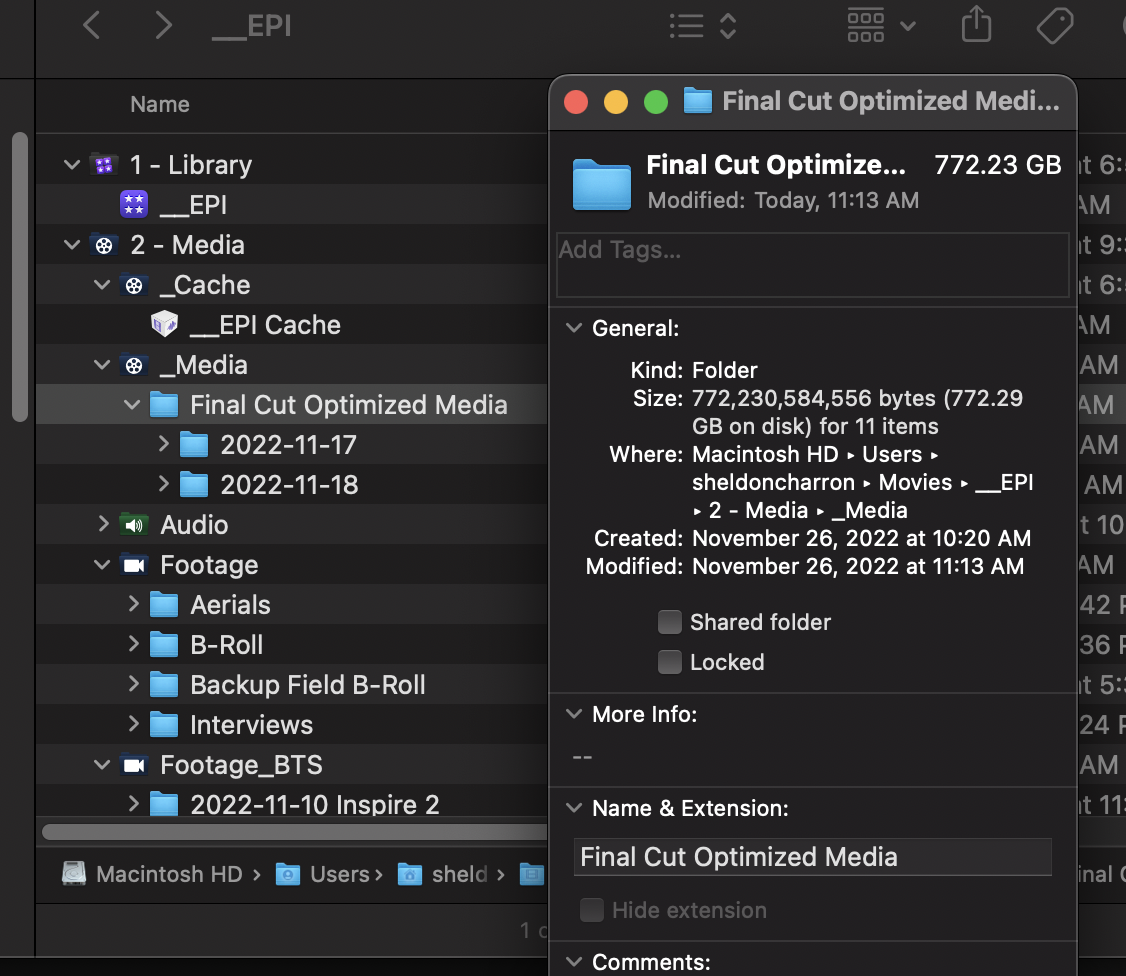
Is there a way to stop FCPX from optimizing media in Multicam clips? I have 10 bit XF-AVC files from canon c500 ii and c70 for two angles, but there is no option to turn off creation of optimized media that I can find. This ends up generating almost 800 GB of unnecessary media for my project.
I have an 8TB internal SSD in my maxed out MBP and would prefer to work off that but that 800 GB takes up a massive chunk for four interviews with two angles each. Also, it actually reduced the quality to ProRes 422. The original compressed clips are ~980 GB.
The XF-AVC files play fine, and I color grade in Davinci Resolve using XLM round trip, so I would prefer to edit the media as is.
Is there a way to STOP FCPX from transcoding these clips?
Is there a way to stop FCPX from optimizing media in Multicam clips? I have 10 bit XF-AVC files from canon c500 ii and c70 for two angles, but there is no option to turn off creation of optimized media that I can find. This ends up generating almost 800 GB of unnecessary media for my project.
I have an 8TB internal SSD in my maxed out MBP and would prefer to work off that but that 800 GB takes up a massive chunk for four interviews with two angles each. Also, it actually reduced the quality to ProRes 422. The original compressed clips are ~980 GB.
The XF-AVC files play fine, and I color grade in Davinci Resolve using XLM round trip, so I would prefer to edit the media as is.
Is there a way to STOP FCPX from transcoding these clips?
Last edit: 26 Nov 2022 19:31 by Smesh.
Please Log in to join the conversation.
- Tom Wolsky
-

- Offline
- Moderator
-

26 Nov 2022 19:36 #123075
by Tom Wolsky
Replied by Tom Wolsky on topic How To Stop Final Cut From Optimizing Media for Multicam Clips
Uncheck the setting in FCP Playback preferences. It’s on by default.
Please Log in to join the conversation.
26 Nov 2022 19:40 - 26 Nov 2022 19:42 #123076
by Smesh
Ahhhh! Thank you! I was looking under import settings which is off. Never thought to check playback settings. You would think they would have that in the New Multicam Clip Dialog Window.
Any danger in deleting the Multicam clips from the browser and the optimized media folders from finder then recreating multicam clips?
Replied by Smesh on topic How To Stop Final Cut From Optimizing Media for Multicam Clips
Uncheck the setting in FCP Playback preferences. It’s on by default.
Ahhhh! Thank you! I was looking under import settings which is off. Never thought to check playback settings. You would think they would have that in the New Multicam Clip Dialog Window.
Any danger in deleting the Multicam clips from the browser and the optimized media folders from finder then recreating multicam clips?
Last edit: 26 Nov 2022 19:42 by Smesh.
Please Log in to join the conversation.
- Tom Wolsky
-
- Offline
- Moderator
-
26 Nov 2022 20:07 #123078
by Tom Wolsky
Replied by Tom Wolsky on topic How To Stop Final Cut From Optimizing Media for Multicam Clips
No need to redo the multicam clips. Just delete the optimized. They will revert to using original media.
Please Log in to join the conversation.
