




- Posts: 5
- Thank you received: 0
3 Post Moderation Rule for New Boarders (25 Jan 2021)
New boarders will have their posts moderated - Don't worry if you cannot see your post immediately.
Why are my clips relocating in my library?
15 Nov 2022 16:33 - 16 Nov 2022 13:24 #122893
by smacuser
Why are my clips relocating in my library? was created by smacuser
Hey all, new here so please bear with me.
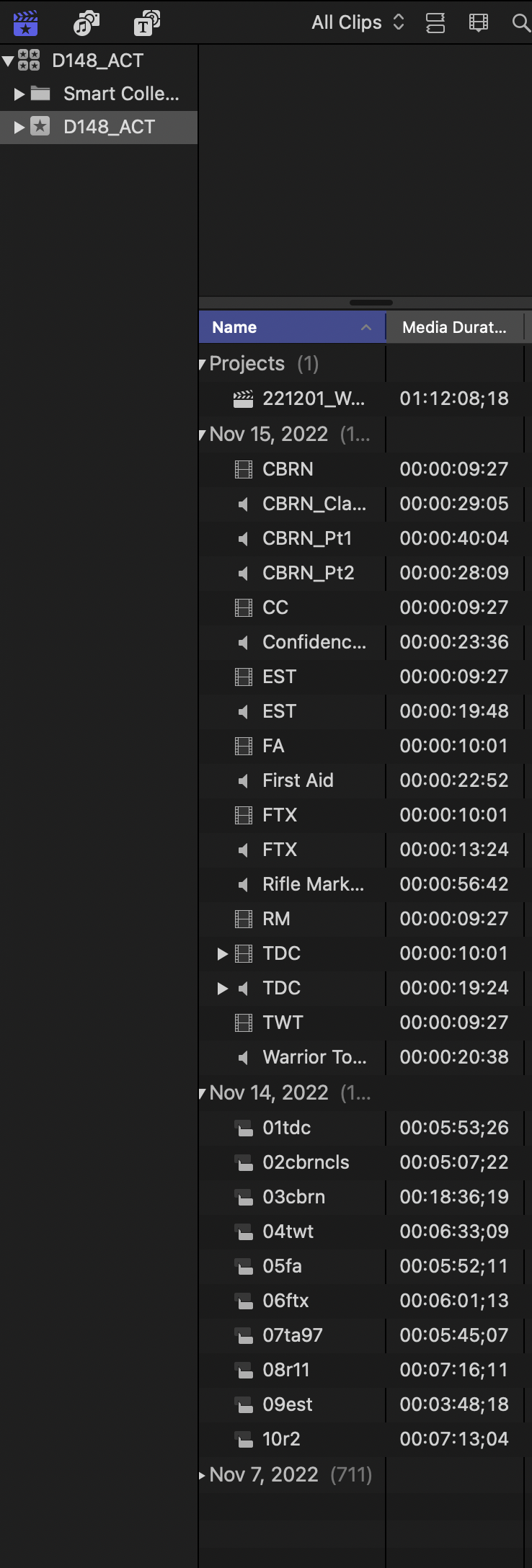
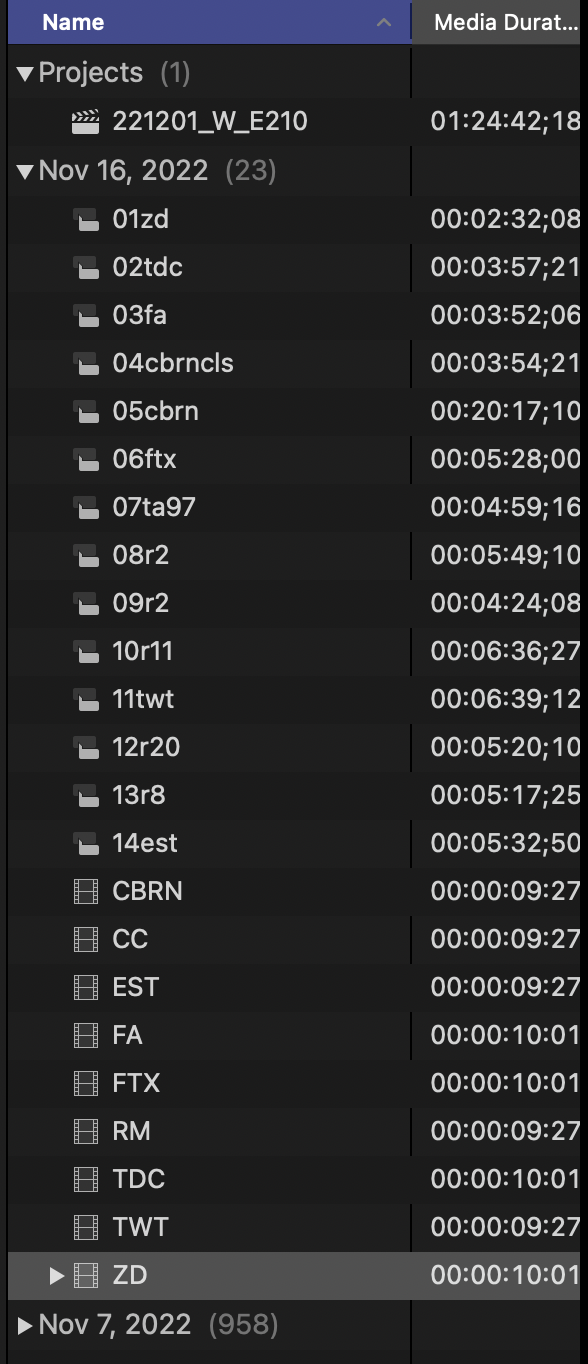
Over the last month or so, my clips will change places in my library (I hope I am using the right terminology). In the 2 screenshots below, the first one will import at the date created. Then, for no relevant reason, they move to today's date. The one containing 711 clips were merged on Nov 7. That one used to be 8 different sub-libraries for each day the clips were created.
TIA.
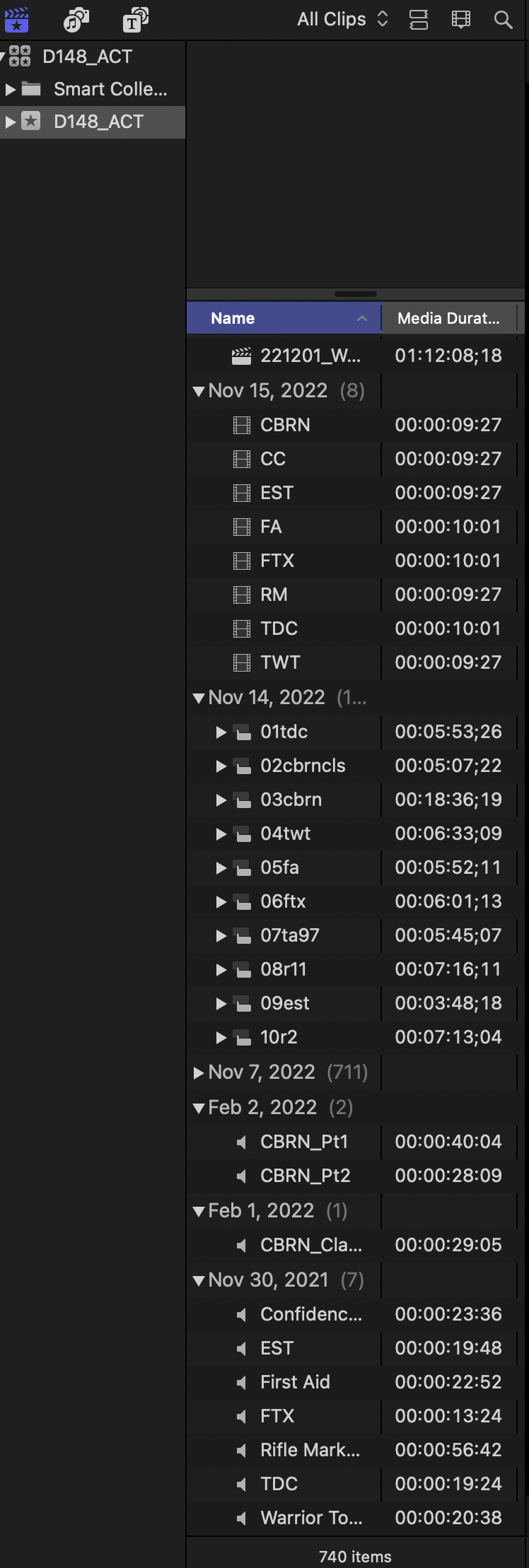
Over the last month or so, my clips will change places in my library (I hope I am using the right terminology). In the 2 screenshots below, the first one will import at the date created. Then, for no relevant reason, they move to today's date. The one containing 711 clips were merged on Nov 7. That one used to be 8 different sub-libraries for each day the clips were created.
TIA.
Last edit: 16 Nov 2022 13:24 by smacuser.
Please Log in to join the conversation.


15 Nov 2022 22:49 #122907
by dmetz
Replied by dmetz on topic Why are my clips relocating in my library?
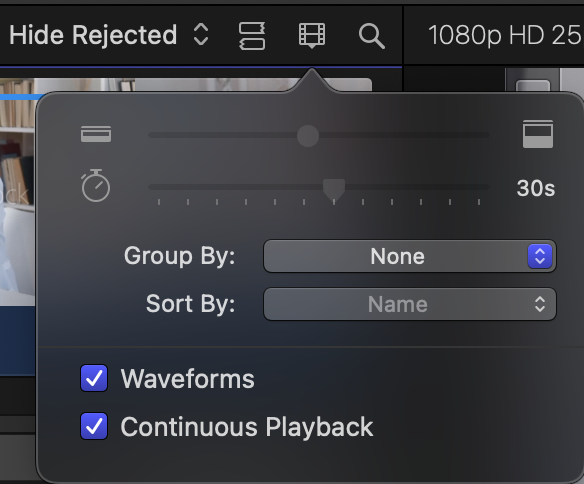
Your browser sort settings are different between the two, so they may not have. Check your sort/group settings, and the filter.
Please Log in to join the conversation.
15 Nov 2022 23:47 - 16 Nov 2022 13:22 #122908
by smacuser
Thank for your reply dmetz. I gave that a try, but it didn't work. It just happens without reason or warning. In fact, I'm working on another project, stepped away and came back; same thing happened.
I recently had my 2019 iMac reset for other issues and reinstalled FCP, I'm pretty sure I even reset my preferences as well. I also have other goofy stuff happening. I have to turn off my background rendering otherwise I get the spinning beachball and have to force quit whenever I make an edit. But that's for another topic. lol.
Replied by smacuser on topic Why are my clips relocating in my library?
Your browser sort settings are different between the two, so they may not have. Check your sort/group settings, and the filter.
Thank for your reply dmetz. I gave that a try, but it didn't work. It just happens without reason or warning. In fact, I'm working on another project, stepped away and came back; same thing happened.
I recently had my 2019 iMac reset for other issues and reinstalled FCP, I'm pretty sure I even reset my preferences as well. I also have other goofy stuff happening. I have to turn off my background rendering otherwise I get the spinning beachball and have to force quit whenever I make an edit. But that's for another topic. lol.
Last edit: 16 Nov 2022 13:22 by smacuser.
Please Log in to join the conversation.
16 Nov 2022 18:37 #122916
by dmetz
Replied by dmetz on topic Why are my clips relocating in my library?
Very strange. I haven't heard of this happening before... maybe there's a rogue background process (not related directly to FCP)...
Do you have any antivirus / auto-scanning software running? Creation dates / modification dates shouldn't change unless something is touching those files. It used to be fairly common for "cleaning" software to cause more problems than they solve.
Do you have any antivirus / auto-scanning software running? Creation dates / modification dates shouldn't change unless something is touching those files. It used to be fairly common for "cleaning" software to cause more problems than they solve.
Please Log in to join the conversation.
16 Nov 2022 19:03 #122919
by smacuser
Replied by smacuser on topic Why are my clips relocating in my library?
We've been using the same anti-virus for years; Malwarebytes. Clips are uploaded from a server onto a SSD card and edited from there. One project per card.
Well, for now, I'm just going to have to try some workarounds until I land upon a fix.
Thanks for your time.
Well, for now, I'm just going to have to try some workarounds until I land upon a fix.
Thanks for your time.
Please Log in to join the conversation.
- Tom Wolsky
-

- Offline
- Moderator
-

16 Nov 2022 19:22 #122920
by Tom Wolsky
Replied by Tom Wolsky on topic Why are my clips relocating in my library?
Run MalwareBytes only when needed and when all other operations are shut down.
Please Log in to join the conversation.
16 Nov 2022 19:58 - 16 Nov 2022 20:00 #122922
by dmetz
Replied by dmetz on topic Why are my clips relocating in my library?
Many servers will alter date stamps when a file is copied. I suspect the storage and handling of your source media is at the root of this issue, perhaps with the added help of the anti-malware.
Last edit: 16 Nov 2022 20:00 by dmetz.
Please Log in to join the conversation.
16 Nov 2022 20:07 - 16 Nov 2022 21:54 #122923
by smacuser
Replied by smacuser on topic Why are my clips relocating in my library?
We've been running this operation for over a couple of years now. I edit between 8-10 one hour projects a week. I wonder why it's all of a sudden. And as said before, everything uploads as it should, then in the middle of editing it changes.
I just had Malwarebytes uninstalled, so I'll see where that takes me.
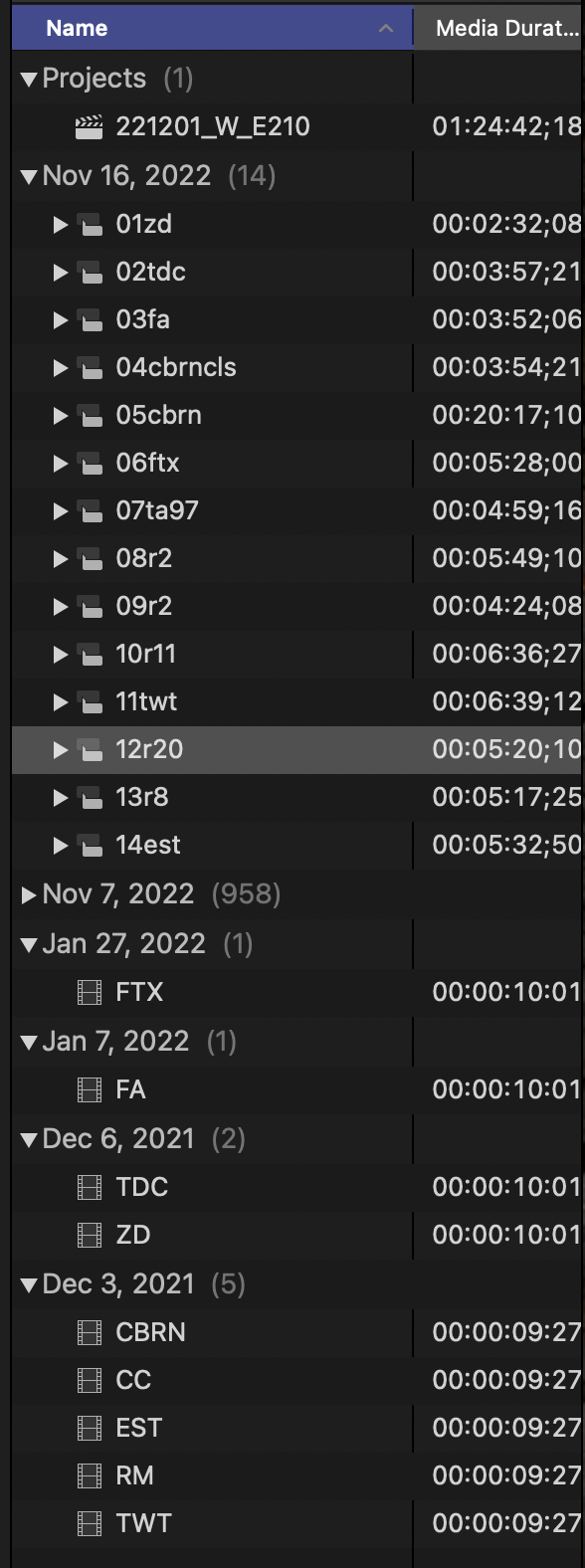
Edit: Also note that clips imported from my desktop will migrate, as well after I had Malwarebytes uninstalled.
(see below, this happened within 2 minutes).
I just had Malwarebytes uninstalled, so I'll see where that takes me.
Edit: Also note that clips imported from my desktop will migrate, as well after I had Malwarebytes uninstalled.
(see below, this happened within 2 minutes).
Last edit: 16 Nov 2022 21:54 by smacuser.
Please Log in to join the conversation.

16 Nov 2022 23:41 - 17 Nov 2022 01:14 #122925
by DaveM
Replied by DaveM on topic Why are my clips relocating in my library?
I'd suggest that you take note of your Browser clip grouping setting (menu shown by dmetz).
Move the "Last Modified", "Date Imported", and "Content Created" columns in the Browser as needed so that you can see the values (you might need to right-click the column header to make those columns visible) . You can drag the column headers to move columns for a better view of things, as needed.
Take note of the Created and Modified values from the source files in the Finder (using Get Info). Add/Import the files into FCP and note the Last Modified, Date Imported, and Content Created values.
When/If the files jump to another date grouping, see if the Last Modified, Date Imported, or Content Created values have changed, as well as the Created and Modified values in the Finder. This might be helpful in trying to figure out the behavior.
It would also be good to note what, if anything you did in FCP after importing/adding the files and when things changed.
P.S. - It wouldn't hurt to delete your FCP preferences, restart your computer, and then try some testing...
Move the "Last Modified", "Date Imported", and "Content Created" columns in the Browser as needed so that you can see the values (you might need to right-click the column header to make those columns visible) . You can drag the column headers to move columns for a better view of things, as needed.
Take note of the Created and Modified values from the source files in the Finder (using Get Info). Add/Import the files into FCP and note the Last Modified, Date Imported, and Content Created values.
When/If the files jump to another date grouping, see if the Last Modified, Date Imported, or Content Created values have changed, as well as the Created and Modified values in the Finder. This might be helpful in trying to figure out the behavior.
It would also be good to note what, if anything you did in FCP after importing/adding the files and when things changed.
P.S. - It wouldn't hurt to delete your FCP preferences, restart your computer, and then try some testing...
Last edit: 17 Nov 2022 01:14 by DaveM. Reason: edited for clarity improvement (hopefully)
Please Log in to join the conversation.
