


- Posts: 1080
- Thank you received: 106
3 Post Moderation Rule for New Boarders (25 Jan 2021)
New boarders will have their posts moderated - Don't worry if you cannot see your post immediately.
SD card from Zoom shows no files or subfolders. Ventura Filesystem broken?
13 Nov 2022 06:26 - 13 Nov 2022 06:29 #122850
by Redifer
I updated to Ventura last night. Big mistake I guess.
Before, I had no issues accessing files on the SD card used by my Zoom H6 microphone. But now Ventura doesn't show any folders or files. I had to boot up my old 2013 Mac Pro with Mojave and air drop the files to myself. Big OOPS by Apple. How could they mess up the file system? Makes the computer rather unusable if I can't access my files. Can I UPGRADE back to MacOS 12 without losing my data? SD card is FAT-32. Big yikes, Apple.
I waited until it was at least 13.0.1 instead of just 13.0 hoping they would fix some bugs. Guess not.
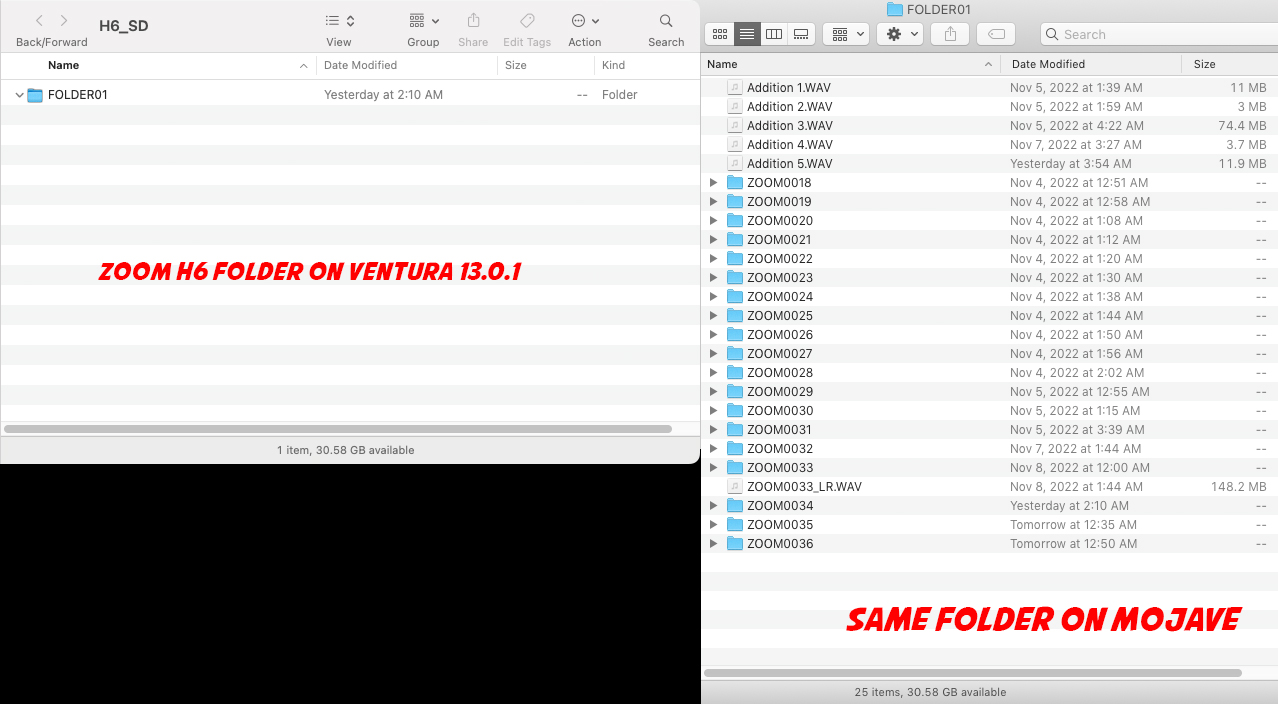
Before, I had no issues accessing files on the SD card used by my Zoom H6 microphone. But now Ventura doesn't show any folders or files. I had to boot up my old 2013 Mac Pro with Mojave and air drop the files to myself. Big OOPS by Apple. How could they mess up the file system? Makes the computer rather unusable if I can't access my files. Can I UPGRADE back to MacOS 12 without losing my data? SD card is FAT-32. Big yikes, Apple.
I waited until it was at least 13.0.1 instead of just 13.0 hoping they would fix some bugs. Guess not.
Last edit: 13 Nov 2022 06:29 by Redifer.
Please Log in to join the conversation.

13 Nov 2022 16:05 #122855
by VTC
Replied by VTC on topic SD card from Zoom shows no files or subfolders. Ventura Filesystem broken?
Using a card reader? If so hook up directly to the H6 via USB reading the card from the Zoom. Had a similar problem a while back and the card folders were as they should be in the Zoom but not in the reader.
Please Log in to join the conversation.
13 Nov 2022 22:15 #122859
by Redifer
Replied by Redifer on topic SD card from Zoom shows no files or subfolders. Ventura Filesystem broken?
Yes SD card reader. But the same results happen with the Mac Studio's built-in card reader. Bringing the Zoom in every time isn't really an option as that lives in the studio.
Please Log in to join the conversation.
14 Nov 2022 01:36 #122863
by VTC
Replied by VTC on topic SD card from Zoom shows no files or subfolders. Ventura Filesystem broken?
It's sad you're not invested enough in finding a solution that you won't make the effort to bring it to the computer and try it. That attitude suggests people will be wasting their time offering help.
Please Log in to join the conversation.
14 Nov 2022 01:45 #122864
by Redifer
Replied by Redifer on topic SD card from Zoom shows no files or subfolders. Ventura Filesystem broken?
The hell? I'm just telling you how it is. I'm sorry that your solution is not a realistic workaround for me. I do not subscribe to the philosophy of "Change your habits whenever Apple changes something because they know better than you". Not that I think that's the case here, I think it's just a bug (for now).
It's far easier to Air Drop the files to myself than disconnect the Zoom, bring it here, drop the files, and then take it back every single time. The main issue here is the file system seems to be broken when it was fine before, and that is concerning.
It's far easier to Air Drop the files to myself than disconnect the Zoom, bring it here, drop the files, and then take it back every single time. The main issue here is the file system seems to be broken when it was fine before, and that is concerning.
Please Log in to join the conversation.

14 Nov 2022 02:01 #122866
by DaveM
Beyond your personal situation, we are trying to figure out this situation. It's irrelevant if connecting your recorder directly and testing the SD card that way is something you want to do in your normal workflow, or not. By testing your recorder it might help to determine what's actually happening. Your apparent attitude is not helpful and comes across in less than a good light.
The best advice is to wait for a 13.1 or 13.2 release, not just a 13.0.x release, AND to wait to see if there are reports of issues...
Replied by DaveM on topic SD card from Zoom shows no files or subfolders. Ventura Filesystem broken?
The hell? I'm just telling you how it is. I'm sorry that your solution is not a realistic workaround for me. I do not subscribe to the philosophy of "Change your habits whenever Apple changes something because they know better than you". Not that I think that's the case here, I think it's just a bug (for now).
It's far easier to Air Drop the files to myself than disconnect the Zoom, bring it here, drop the files, and then take it back every single time. The main issue here is the file system seems to be broken when it was fine before, and that is concerning.
Beyond your personal situation, we are trying to figure out this situation. It's irrelevant if connecting your recorder directly and testing the SD card that way is something you want to do in your normal workflow, or not. By testing your recorder it might help to determine what's actually happening. Your apparent attitude is not helpful and comes across in less than a good light.
The best advice is to wait for a 13.1 or 13.2 release, not just a 13.0.x release, AND to wait to see if there are reports of issues...
Please Log in to join the conversation.
14 Nov 2022 02:13 #122867
by Redifer
Replied by Redifer on topic SD card from Zoom shows no files or subfolders. Ventura Filesystem broken?
Well I can't wait for 13.1 since I already have 13.0.1. There will always be issues with any version of MacOS, I just hope that they're not ones that affect my workflow. He also suggested that I DO that, not TRY that. To me, his language suggested I change my workflow and call it a day. I don't really understand his reaction when he came back later thinking I'm not invested enough to TRY it.
Anyway, problem solved. Or mitigated, rather.
Anyway, problem solved. Or mitigated, rather.
Please Log in to join the conversation.


14 Nov 2022 17:49 #122880
by Larrie
Replied by Larrie on topic SD card from Zoom shows no files or subfolders. Ventura Filesystem broken?
Just finished testing Ventura 13.0.1 with the SD card from my Zoom H6. The files and folder structure showed up as expected.
Ventura is running on an SSD plugged into my M1 Mini through the TB port on the back of the machine. The SSD has several USB ports. The SD card was plugged into a reader that was plugged into one of the SSD USB ports.
Ventura is running on an SSD plugged into my M1 Mini through the TB port on the back of the machine. The SSD has several USB ports. The SD card was plugged into a reader that was plugged into one of the SSD USB ports.
Please Log in to join the conversation.
15 Nov 2022 00:17 #122889
by Redifer
Replied by Redifer on topic SD card from Zoom shows no files or subfolders. Ventura Filesystem broken?
I'm thinking it might be random. After I updated, I noticed that Ventura was complaining to a couple FCP plugins were "damaged" and offered to move them to the trash for me. I had to redownload them and they were fine. Same with a couple of applications. They couldn't be launched because they were damaged. Redownloading the same version of the app worked fine. Not sure how this would effect my SD card which was not mounted as I updated. Maybe the new OS just has less tolerance for errors that already exist? Just a guess, of course.
Please Log in to join the conversation.
15 Nov 2022 15:57 #122892
by VTC
Replied by VTC on topic SD card from Zoom shows no files or subfolders. Ventura Filesystem broken?
"...his language suggested I change my workflow and call it a day."
At no time was there a suggestion to change your workflow but to conduct a TEST to see where the bottleneck might be.
I'll forgive your obstinance in not trying such a simple test if English isn't your native tongue and something went amiss in translation but not your laziness refusing removing the H6 from the studio & taking it to the edit station to determine if the problem lies with the Zoom, the card, or the computer OS.
At no time was there a suggestion to change your workflow but to conduct a TEST to see where the bottleneck might be.
I'll forgive your obstinance in not trying such a simple test if English isn't your native tongue and something went amiss in translation but not your laziness refusing removing the H6 from the studio & taking it to the edit station to determine if the problem lies with the Zoom, the card, or the computer OS.
Please Log in to join the conversation.
15 Nov 2022 21:46 #122904
by Redifer
Replied by Redifer on topic SD card from Zoom shows no files or subfolders. Ventura Filesystem broken?
VTC... my very first post said it worked perfectly fine with the 2013 Mac Pro so that kind of rules out the Zoom.
Anyway let's stop arguing back and forth. This is silly.
Anyway let's stop arguing back and forth. This is silly.
Please Log in to join the conversation.
