


- Posts: 2
- Thank you received: 0
3 Post Moderation Rule for New Boarders (25 Jan 2021)
New boarders will have their posts moderated - Don't worry if you cannot see your post immediately.
Film Music Composer creating long meditation video with one clip
- Matahari00
-
 Topic Author
- Offline
- New Member
-

Less
More
13 Nov 2022 02:06 #122842
by Matahari00
HI All,
I am a film and tv music composer and Im creating some meditation videos with my music for YouTube. I am using 1 clip I got from Pond5 repeated for 20 minutes. Is there a way to key command repeat them? ( I do this in Logic Pro with sections all day long) I've been copying and pasting until I hit 20 minutes.
Also once I have them all on my timeline, I want to somehow create transitions between all the clips so they don't look jumpy every time the clip starts again. Is there away to batch transition all the edits or do I have to go and do it manually one by one?
Thanx!
I am a film and tv music composer and Im creating some meditation videos with my music for YouTube. I am using 1 clip I got from Pond5 repeated for 20 minutes. Is there a way to key command repeat them? ( I do this in Logic Pro with sections all day long) I've been copying and pasting until I hit 20 minutes.
Also once I have them all on my timeline, I want to somehow create transitions between all the clips so they don't look jumpy every time the clip starts again. Is there away to batch transition all the edits or do I have to go and do it manually one by one?
Thanx!
Please Log in to join the conversation.


13 Nov 2022 04:36 - 13 Nov 2022 15:38 #122848
by DaveM
Replied by DaveM on topic Film Music Composer creating long meditation video with one clip
Select your clip and add it to the Project/timeline. Select the clip there and copy it. Then, repeatedly paste until you reach 20 minutes (a little more is good since you'll need extra content to add transitions and not drop back below 20 minutes).
You can then "command-A" to select all of the clips and then "command-T" to add a one second default cross dissolve transition between all clips, as well as at the beginning and end of the timeline. Trim the end of the timeline to get to the exact duration you'd like.
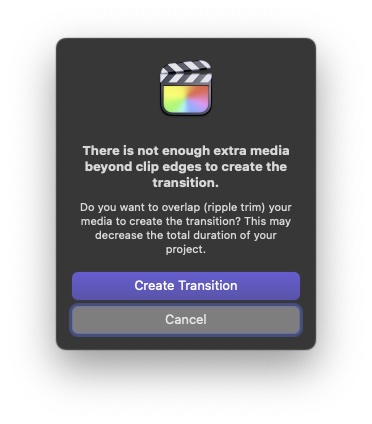
Note: you might see a warning about not having "extra media" (handles) when you apply the transitions (see attached image). You can click on "Create Transition" and each clip will simply be "shortened" so that the transition can be applied. If your clip is, say, 30 seconds long, you need to treat it as effectively 28 seconds (if you use the default cross dissolve transition and duration of 1 second).
You could open the timeline Index to search for and select all transitions if you want to modify their durations after the fact. Or, before adding the transitions, you could change the default duration in the Editing preferences.
You can then "command-A" to select all of the clips and then "command-T" to add a one second default cross dissolve transition between all clips, as well as at the beginning and end of the timeline. Trim the end of the timeline to get to the exact duration you'd like.
Note: you might see a warning about not having "extra media" (handles) when you apply the transitions (see attached image). You can click on "Create Transition" and each clip will simply be "shortened" so that the transition can be applied. If your clip is, say, 30 seconds long, you need to treat it as effectively 28 seconds (if you use the default cross dissolve transition and duration of 1 second).
You could open the timeline Index to search for and select all transitions if you want to modify their durations after the fact. Or, before adding the transitions, you could change the default duration in the Editing preferences.
Last edit: 13 Nov 2022 15:38 by DaveM.
Please Log in to join the conversation.


13 Nov 2022 04:58 #122849
by Larrie
Replied by Larrie on topic Film Music Composer creating long meditation video with one clip
The clips you insert into the timeline from the browser need have a shorter duration than in the browser for the transitions to work correctly. For example, if the browser clip is 10 seconds long make a selection that is 8 or 9 seconds and insert that into the timeline.
Please Log in to join the conversation.

13 Nov 2022 17:43 #122856
by VTC
My approach to the 'lacking handles' problem is to 'hold' or freeze frame at head and tail... 0.75 secs for each allows a 1.5 sec transition that hides any jump and avoids the 'not enough media' semaphore flags.
Replied by VTC on topic Film Music Composer creating long meditation video with one clip
I want to somehow create transitions between all the clips so they don't look jumpy every time the clip starts again.
My approach to the 'lacking handles' problem is to 'hold' or freeze frame at head and tail... 0.75 secs for each allows a 1.5 sec transition that hides any jump and avoids the 'not enough media' semaphore flags.
Please Log in to join the conversation.
- Matahari00
-
Topic Author
- Offline
- New Member
-
Less
More
- Posts: 2
- Thank you received: 0
14 Nov 2022 00:35 #122860
by Matahari00
Replied by Matahari00 on topic Film Music Composer creating long meditation video with one clip
Thank You! I had a feeling this could be done. I was adding each transition one at time...took me forever!
Please Log in to join the conversation.
