


- Posts: 18
- Thank you received: 0
3 Post Moderation Rule for New Boarders (25 Jan 2021)
New boarders will have their posts moderated - Don't worry if you cannot see your post immediately.
Help fixing difficult colour gradients please
- honeybadger
-
 Topic Author
- Offline
- New Member
-

Less
More
09 Nov 2022 15:34 - 09 Nov 2022 20:01 #122809
by honeybadger
Help fixing difficult colour gradients please was created by honeybadger
Hi all,
I have a lot of driving shots from a DJI Osmo Pocket stuck to the inside of my Landy windscreen to get acton/b-roll shots etc. For most shots there is an ND4 filter stuck to the front of it. This system has always worked well.
Then I put a plastic sheeting inside all of my windows so that you can't smash the windows easily, and in the case of the windscreen to stop UV rays burning me, it seems to work well for that.
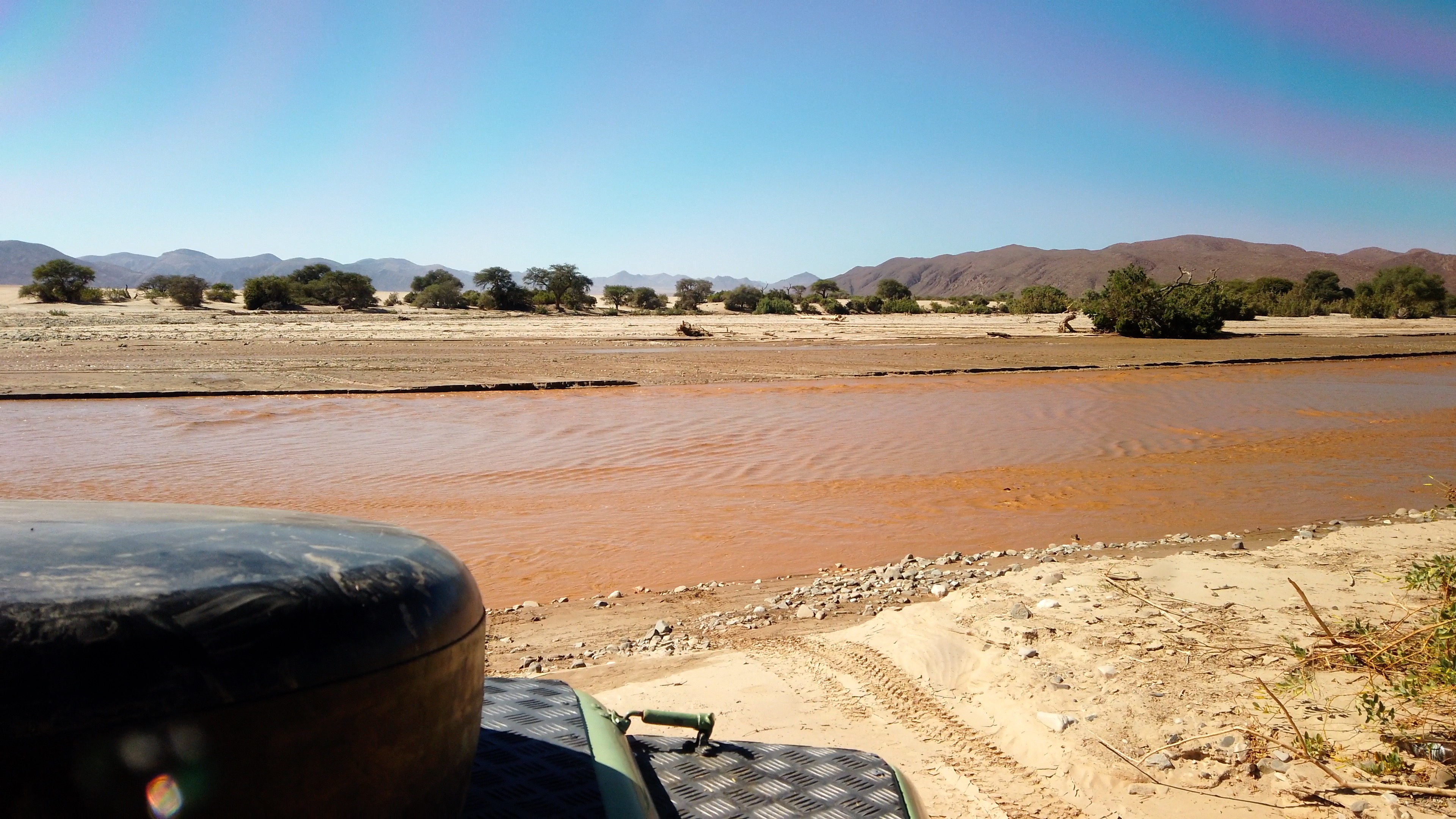
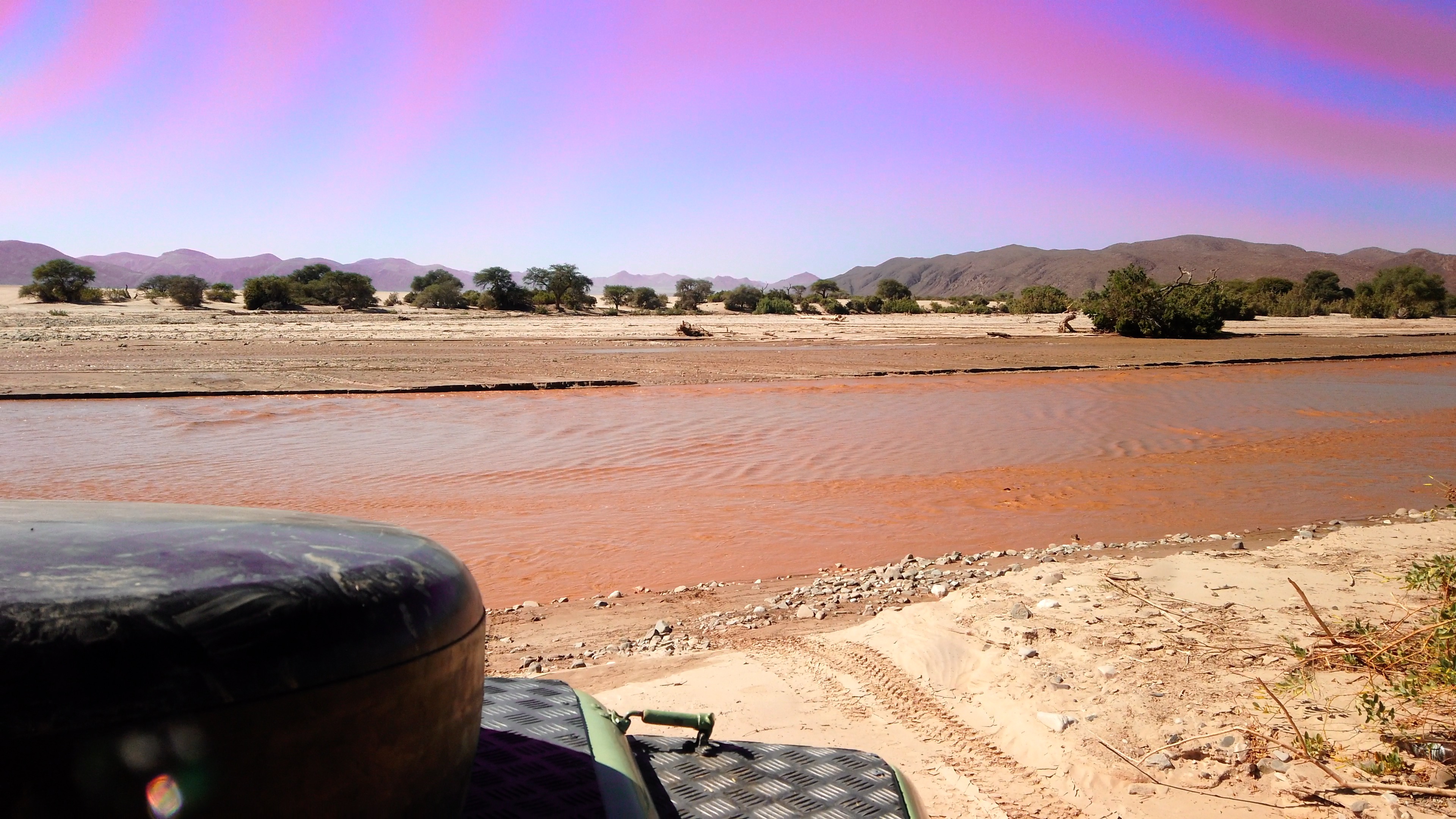
However, as you can see from the attached frame export I think it put a lovely circular pink effect into the footage from the DJI, and I have about 100 shots like this I need to use.
The first photo is how it looks in FCP, the second photo where it is very pink is where I jacked up the settings in Hue vs Hue so its easier to see.
Is there any way that I can make the sky consistently blue/white or failing that, at least reduce the pink rings to they aren't so notable please?
I have a lot of driving shots from a DJI Osmo Pocket stuck to the inside of my Landy windscreen to get acton/b-roll shots etc. For most shots there is an ND4 filter stuck to the front of it. This system has always worked well.
Then I put a plastic sheeting inside all of my windows so that you can't smash the windows easily, and in the case of the windscreen to stop UV rays burning me, it seems to work well for that.
However, as you can see from the attached frame export I think it put a lovely circular pink effect into the footage from the DJI, and I have about 100 shots like this I need to use.
The first photo is how it looks in FCP, the second photo where it is very pink is where I jacked up the settings in Hue vs Hue so its easier to see.
Is there any way that I can make the sky consistently blue/white or failing that, at least reduce the pink rings to they aren't so notable please?
Last edit: 09 Nov 2022 20:01 by honeybadger.
Please Log in to join the conversation.


09 Nov 2022 16:24 #122810
by joema
Replied by joema on topic Help fixing difficult colour gradients please
True fixed-value NDs normally don't cause problems like that. However the ND4 filter might contain a polarization element which can cause artifacts that were accentuated by the plastic sheeting. Can you give specifics of the exact make, model and mfg # of the ND4 filter?
Fixing things like this in post can be difficult. You could try selecting the pink regions with a color mask, then changing the color to match the blue sky. You can also adjust the mask's softness slider.
If that doesn't work, here is a tutorial about using the built-in FCP motion tracker to do sky replacement:
Fixing things like this in post can be difficult. You could try selecting the pink regions with a color mask, then changing the color to match the blue sky. You can also adjust the mask's softness slider.
If that doesn't work, here is a tutorial about using the built-in FCP motion tracker to do sky replacement:
Please Log in to join the conversation.
- honeybadger
-
Topic Author
- Offline
- New Member
-
Less
More
- Posts: 18
- Thank you received: 0
10 Nov 2022 09:33 #122814
by honeybadger
Replied by honeybadger on topic Help fixing difficult colour gradients please
Thanks. No luck using any kind of colour mask to replace the pink for the blue - seems to be a pixelated gradient mess - so any kind of colour mask selection (single click, or wide circle selection) doesn't cleanly pick out the pink, seems to pick blue which you are then trying to replace with blue which doesnt work using the Hue vs Hue method....
This is all a bit new to me, out of my depth a bit, but will keep experimenting...
This is all a bit new to me, out of my depth a bit, but will keep experimenting...
Please Log in to join the conversation.
10 Nov 2022 14:45 #122820
by joema
The Osmo Pocket material may be highly-compressed 8-bit 4:2:0, so that can limit the ability to adjust colors in post. This is why 10-bit 4:2:2 codecs are so valuable.
However you can try both 3D and HSL color masks in the Color Board or Color Wheels effect. The 3D mask is usually smoother, plus you can adjust the softness slider.
If that doesn't work your only option might be sky replacement as shown in the link I previously posted.
Here is a brief tutorial from Ripple Training on using combinations of color masks and shape masks:
Punching up a Shot Using Masks
Replied by joema on topic Help fixing difficult colour gradients please
Thanks. No luck using any kind of colour mask to replace the pink for the blue - seems to be a pixelated gradient mess...
The Osmo Pocket material may be highly-compressed 8-bit 4:2:0, so that can limit the ability to adjust colors in post. This is why 10-bit 4:2:2 codecs are so valuable.
However you can try both 3D and HSL color masks in the Color Board or Color Wheels effect. The 3D mask is usually smoother, plus you can adjust the softness slider.
If that doesn't work your only option might be sky replacement as shown in the link I previously posted.
Here is a brief tutorial from Ripple Training on using combinations of color masks and shape masks:
Punching up a Shot Using Masks
Please Log in to join the conversation.
