




- Posts: 6
- Thank you received: 0
3 Post Moderation Rule for New Boarders (25 Jan 2021)
New boarders will have their posts moderated - Don't worry if you cannot see your post immediately.
Problem with cutout Ken Burns
03 Nov 2022 20:34 - 03 Nov 2022 20:36 #122755
by El Versus
Problem with cutout Ken Burns was created by El Versus
Hola a todos. Estoy tratando de hacer un efecto de zoom con Ken Burns, pero el efecto tiene la misma duración que el clip que lo contiene. Me gustaría que el zoom funcionara más y se mantuviera en una escala fija durante el clip. ¿Hay alguna manera de hacer esto con Ken Burns? Hola a todos. Estoy tratando de hacer un efecto de zoom con Ken Burns, pero el efecto tiene la misma duración que el clip que lo contiene. Me gustaría que el zoom se ejecutara mucho antes y se mantuviera en una escala fija durante el clip. ¿Hay alguna manera de hacer esto con Ken Burns?
Espero su ayuda, gracias.
Espero su ayuda, gracias.
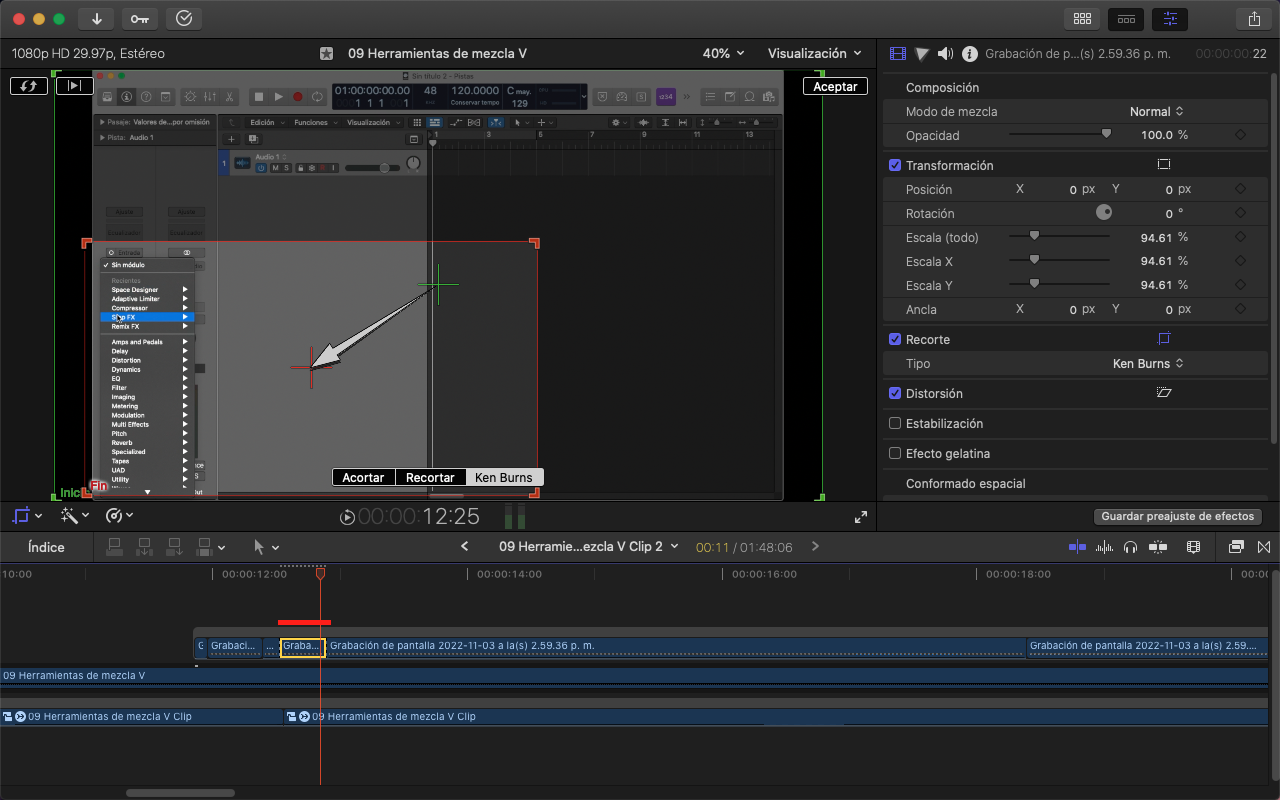
Last edit: 03 Nov 2022 20:36 by El Versus.
Please Log in to join the conversation.


03 Nov 2022 22:35 #122756
by DaveM
Replied by DaveM on topic Problem with cutout Ken Burns
One way...
Blade the clip into two. Adjust the length of each resullting clip, as desired. Apply Ken Burns to first clip. Copy and paste the Ken Burns effect to the second clip and make the start and end points the same.
Then, when you play back the two clips, the first clip has the Ken Burns effect applied and the second clip continues at the point where the first clips ends.
Cheers.
Blade the clip into two. Adjust the length of each resullting clip, as desired. Apply Ken Burns to first clip. Copy and paste the Ken Burns effect to the second clip and make the start and end points the same.
Then, when you play back the two clips, the first clip has the Ken Burns effect applied and the second clip continues at the point where the first clips ends.
Cheers.
Please Log in to join the conversation.
03 Nov 2022 22:39 #122757
by El Versus
Replied by El Versus on topic Problem with cutout Ken Burns
Thanks for your help. Works. Although, it takes a while to scale both clips to match. Do you have a quicker way to scale both clips?
Thanks.
Thanks.
Please Log in to join the conversation.
