


- Posts: 103
- Thank you received: 2
3 Post Moderation Rule for New Boarders (25 Jan 2021)
New boarders will have their posts moderated - Don't worry if you cannot see your post immediately.
FCP footage in Premiere
31 Oct 2022 11:08 - 31 Oct 2022 11:19 #122674
by Brinky
FCP footage in Premiere was created by Brinky
Hi, I want to share raw footage imported into FCP to a client with Premiere. He's having problems importing. Unsupporte codec 'aivx'. As I understand a quicktime issue. Is there an easy way to fix this without converting everhything? Thanks
ps footage is shot with a FX6. Footage shot with a BM in proress used in FCP is imported in premiere without a problem.
ps footage is shot with a FX6. Footage shot with a BM in proress used in FCP is imported in premiere without a problem.
Last edit: 31 Oct 2022 11:19 by Brinky.
Please Log in to join the conversation.
- Tom Wolsky
-

- Offline
- Moderator
-

31 Oct 2022 12:05 #122675
by Tom Wolsky
Replied by Tom Wolsky on topic FCP footage in Premiere
Could you post the complete specs of the media?
Please Log in to join the conversation.
31 Oct 2022 12:12 - 31 Oct 2022 12:23 #122676
by Brinky
Replied by Brinky on topic FCP footage in Premiere
Hi Tom,
I've attached a clip. (Hope this works) Shot on Sony FX6. Imported in FCP X. I'm trying to share the videofiles with the client.
regards Peter
I've attached a clip. (Hope this works) Shot on Sony FX6. Imported in FCP X. I'm trying to share the videofiles with the client.
regards Peter
Last edit: 31 Oct 2022 12:23 by Brinky.
Please Log in to join the conversation.


31 Oct 2022 14:22 - 31 Oct 2022 14:25 #122679
by DaveM
Replied by DaveM on topic FCP footage in Premiere
The "AIVX" codec is simply some custom (Sony?) way of saying XAVC 4K (QFHD) 4:2:2/10-bit footage. The issue has nothing to do with FCP or QuickTime.
The codec designation must be new enough that some tools/applications can't properly read those types of files. Have you tried Adobe Media Encoder to see if it'll read the files?
Are the original files from the camera in MXF format?
The codec designation must be new enough that some tools/applications can't properly read those types of files. Have you tried Adobe Media Encoder to see if it'll read the files?
Are the original files from the camera in MXF format?
Last edit: 31 Oct 2022 14:25 by DaveM.
Please Log in to join the conversation.
31 Oct 2022 14:33 #122680
by Brinky
Replied by Brinky on topic FCP footage in Premiere
Hi, Original MXF, quicktime and fcp no problem. Premiere but also VLC won't play the files. Also media encoder is not working. Thanks
Please Log in to join the conversation.
31 Oct 2022 14:40 #122681
by DaveM
Replied by DaveM on topic FCP footage in Premiere
It's the "AIVX" codec flag that is causing the issue. Applications like VLC that use ffmpeg for processing all have issues reading those types of files.
A solution would be to transcode the original files to ProRes 422 (or better) and pass those along, where you'd maintain optimal quality. If quality isn't paramount, you could transcode the original media to H.264/XAVC files. Compressor works with your sample file...
A solution would be to transcode the original files to ProRes 422 (or better) and pass those along, where you'd maintain optimal quality. If quality isn't paramount, you could transcode the original media to H.264/XAVC files. Compressor works with your sample file...
Please Log in to join the conversation.
31 Oct 2022 15:18 - 31 Oct 2022 15:21 #122683
by Brinky
Replied by Brinky on topic FCP footage in Premiere
Thanks, Proress will give large files.. As it is shot in log3 do you think XAVC will give enough room to grade the footage?
ps I could give this a try myself
ps I could give this a try myself
Last edit: 31 Oct 2022 15:21 by Brinky.
Please Log in to join the conversation.
31 Oct 2022 15:31 - 31 Oct 2022 15:33 #122684
by DaveM
If you open one of the original files using Invisor or MediaInfo you can look over the video specs and use them as a guide when configuring the settings in Compressor (for transcoding the originals). You should be able to use a preset or customize one to yield a high quality conversion with an H.264 (AVC) codec.
Depending on your transcode settings, the footage should remain unchanged (stay in log and in 10-bit, which are important for having "enough room" to grade)...
Replied by DaveM on topic FCP footage in Premiere
Thanks, Proress will give large files.. As it is shot in log3 do you think XAVC will give enough room to grade the footage?
ps I could give this a try myself
If you open one of the original files using Invisor or MediaInfo you can look over the video specs and use them as a guide when configuring the settings in Compressor (for transcoding the originals). You should be able to use a preset or customize one to yield a high quality conversion with an H.264 (AVC) codec.
Depending on your transcode settings, the footage should remain unchanged (stay in log and in 10-bit, which are important for having "enough room" to grade)...
Last edit: 31 Oct 2022 15:33 by DaveM.
Please Log in to join the conversation.
31 Oct 2022 15:59 #122685
by DaveM
Replied by DaveM on topic FCP footage in Premiere
I'm a bit confused... I just looked at some sample footage from an FX6 that I have (in MXF file format) and it doesn't use the AIVX codec.
How did you create the .mov file, from which you took the snippet you posted (520_2152.mov)? If the original files are MXF, how did you get/create the .mov file(s)?
Would you post the file metadata report from one of the original MXF files using Invisor or MediaInfo? Thanks.
How did you create the .mov file, from which you took the snippet you posted (520_2152.mov)? If the original files are MXF, how did you get/create the .mov file(s)?
Would you post the file metadata report from one of the original MXF files using Invisor or MediaInfo? Thanks.
Please Log in to join the conversation.
31 Oct 2022 16:11 #122686
by Brinky
Replied by Brinky on topic FCP footage in Premiere
Sorry don't have the specific original files. The sample is what FCP made of it after importing.
Please Log in to join the conversation.
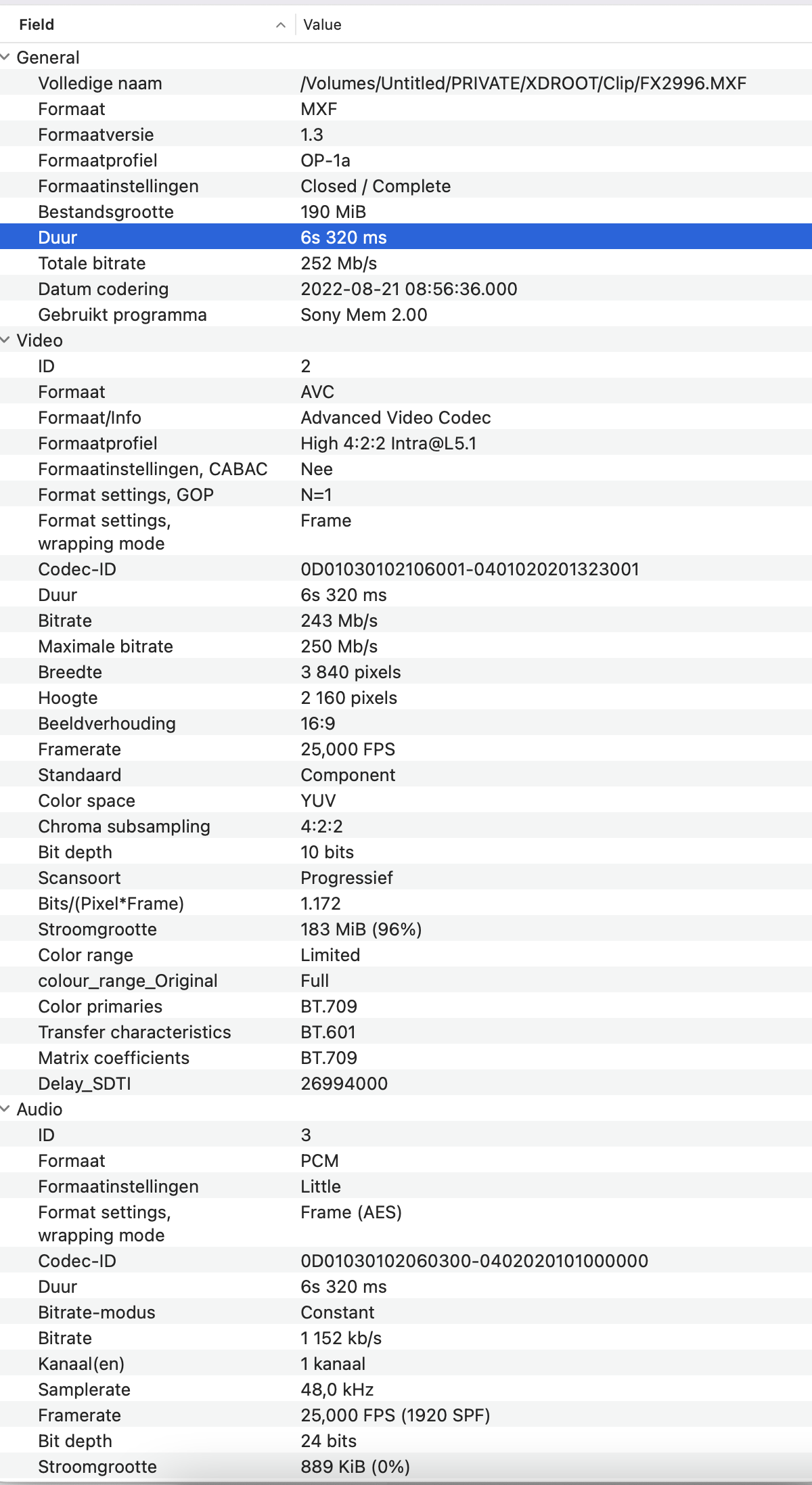
31 Oct 2022 17:29 #122689
by DaveM
Okay, there is no sign of "aivx" in the file metadata you posted. The codec is shown as AVC.
Have you tried importing that MXF file into Premiere?
Which version of FCP are you using? macOS version? Is it a demo version?
The only mention I can find for the AIVX codec is nearly 10 years ago... Curious...
Replied by DaveM on topic FCP footage in Premiere
Got the media info from another clip straight out of the cam. It's Dutch hope you can make sense out of it

Okay, there is no sign of "aivx" in the file metadata you posted. The codec is shown as AVC.
Have you tried importing that MXF file into Premiere?
Which version of FCP are you using? macOS version? Is it a demo version?
The only mention I can find for the AIVX codec is nearly 10 years ago... Curious...
Please Log in to join the conversation.
31 Oct 2022 17:50 #122690
by Brinky
Replied by Brinky on topic FCP footage in Premiere
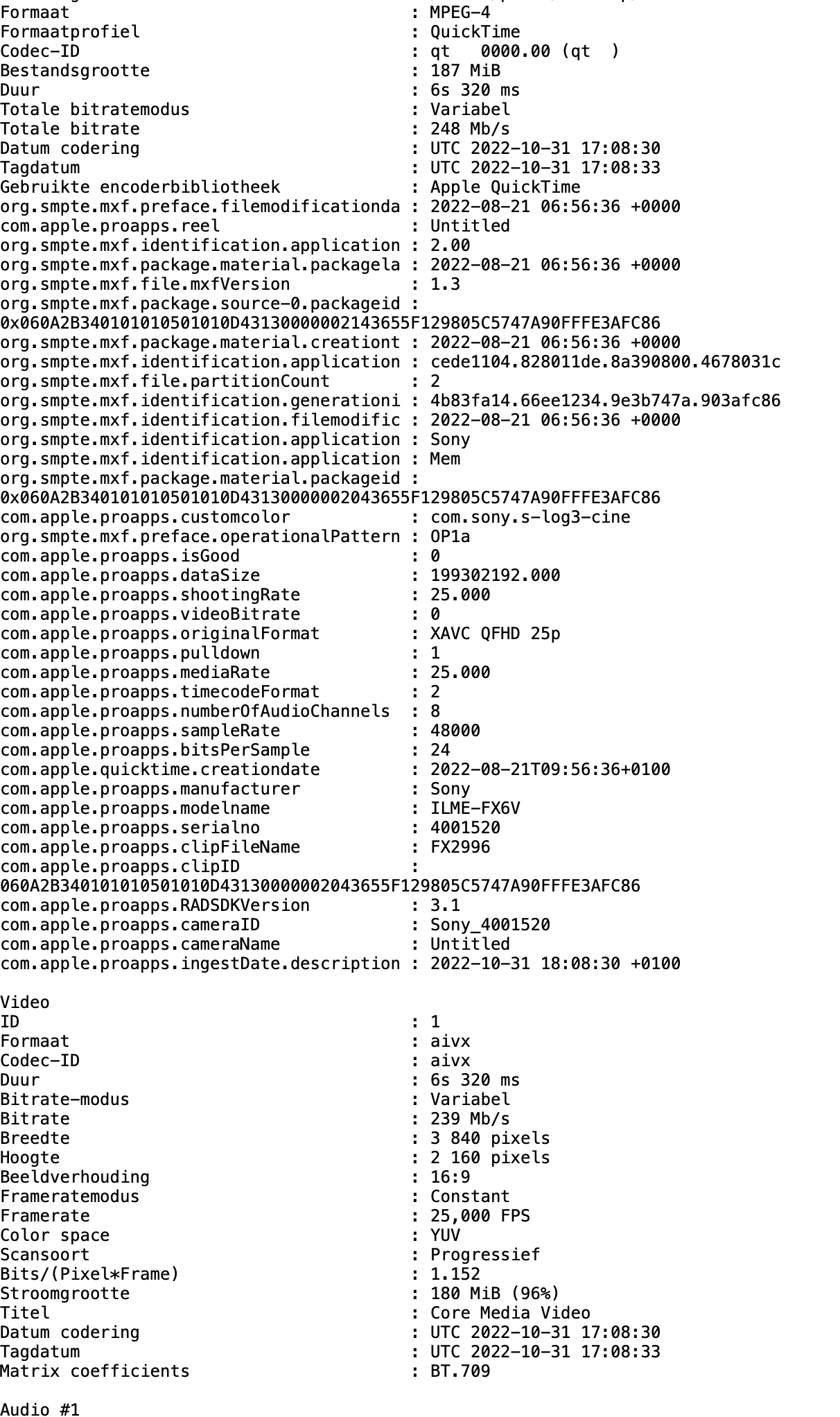
Using Monterey, paid FCP X latest version. I imported the previous clip into FCP. After importing data is as shown again aivx.
Please Log in to join the conversation.
31 Oct 2022 18:17 #122692
by DaveM
By previous clip do you mean "FX2996.MXF"?
Your second screenshot doesn't show the filename or location info. Where did FX2996.MXF get imported to (filename and location)? Is your media set to "leave in place" or to copy to the FCP Library bundle?
Replied by DaveM on topic FCP footage in Premiere
Using Monterey, paid FCP X latest version. I imported the previous clip into FCP. After importing data is as shown again aivx.
By previous clip do you mean "FX2996.MXF"?
Your second screenshot doesn't show the filename or location info. Where did FX2996.MXF get imported to (filename and location)? Is your media set to "leave in place" or to copy to the FCP Library bundle?
Please Log in to join the conversation.
31 Oct 2022 18:39 #122694
by Brinky
Replied by Brinky on topic FCP footage in Premiere
Yes the fx2996. Copy to FCP library. It seems only to happen with FX6 footage. Shots from FS5 and A7 IV are working
Please Log in to join the conversation.
31 Oct 2022 18:51 #122695
by DaveM
Where are you getting the ".mov" version of the fx2996.mxf file?
I'm running macOS 12.6.1 and using FCP 10.6.5. I have some sample FX6 4K (DCI) footage in the MXF file format (it's XAVC-I footage). If I import the MXF file into a new Library and have "leave files in place" set, a link/alias is created in the Library bundle that points to the source media file. If I have "copy to library" set, the MXF file itself is copied into the Library bundle (in lieu of creating an alias). In both cases, the imported file remains an MXF file.
So, how are you getting the MOV file? Where is it located?
And, regardless of that, why can't you import the original MXF file into Premiere (assuming the version of Premiere is fairly recent)?
Replied by DaveM on topic FCP footage in Premiere
Yes the fx2996. Copy to FCP library. It seems only to happen with FX6 footage. Shots from FS5 and A7 IV are working
Where are you getting the ".mov" version of the fx2996.mxf file?
I'm running macOS 12.6.1 and using FCP 10.6.5. I have some sample FX6 4K (DCI) footage in the MXF file format (it's XAVC-I footage). If I import the MXF file into a new Library and have "leave files in place" set, a link/alias is created in the Library bundle that points to the source media file. If I have "copy to library" set, the MXF file itself is copied into the Library bundle (in lieu of creating an alias). In both cases, the imported file remains an MXF file.
So, how are you getting the MOV file? Where is it located?
And, regardless of that, why can't you import the original MXF file into Premiere (assuming the version of Premiere is fairly recent)?
Please Log in to join the conversation.
31 Oct 2022 19:17 - 31 Oct 2022 19:18 #122696
by Brinky
Replied by Brinky on topic FCP footage in Premiere
The file is located in the folder original media of the FCP library.
I shoot XAVC-i on the FX6. Attached a small clip straight out of the cam. Works in premiere. FCP converts it in my case to aivx codec.
I shoot XAVC-i on the FX6. Attached a small clip straight out of the cam. Works in premiere. FCP converts it in my case to aivx codec.
Last edit: 31 Oct 2022 19:18 by Brinky.
Please Log in to join the conversation.
31 Oct 2022 20:25 - 31 Oct 2022 21:10 #122699
by DaveM
Replied by DaveM on topic FCP footage in Premiere
Okay, thanks... now we're getting somewhere...
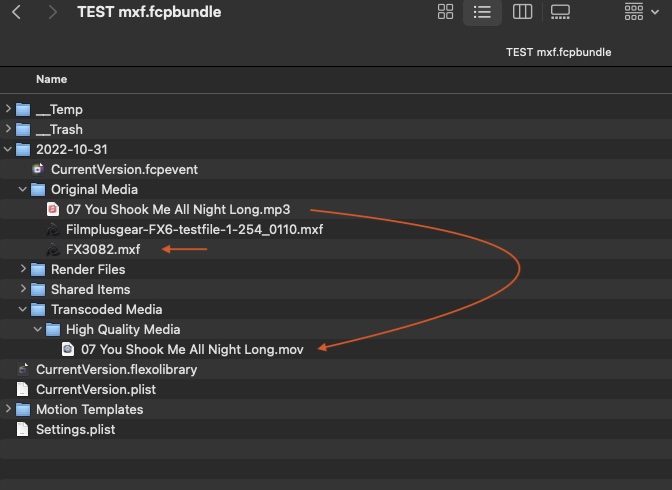
I imported the "FX3082.MXF" clip you provided into FCP with "Copy to library" set. The file was copied into the Library bundle and not changed (it's still an MXF, identical to the source file). Something may be amiss with your FCP setup.
If you have the MXF source media files, you can just use those with Premiere. If alll you have are the files copied into your FCP Library, you'll have to transcode them if they're now using the "avix" codec. Or, you might possibly be able to just change the "avix" tag to "avc" or something else appropriate. Changing the tag may work, but it's going to require the use of ffmpeg in Terminal, most likely, and that's something I couldn't get to work in my brief testing earlier today. If you could change the tag and not have to transcode, that would be the ideal outcome, I'd imagine.
Back to your FCP setup...
When FCP encounters certain foreign files, such as MP3 audio files, it will convert them into MOV files with PCM audio (WAV or AIFF files have PCM audio). It does a similar thing with some video file formats. I believe that the "avix" codec is a result of some issue FCP finds with your source media files (at least some of them, as you have mentioned). I did some searches on the 'net and the only mention of this sort of behavior was from 2014 or 2015, which was before FCP(X) supported MXF files natively.
In this case, I wonder if you have updated the "Pro Video Formats" package of codecs lately. This package contains code that allows FCP (and other applications) to natively work with various file formats. You could try "Final Cut Pro -> Download additional content..." as that menu item sometimes triggers the installation of extra components and content for FCP. Otherwise, you could try to directly install the latest available version:
support.apple.com/kb/DL2050?viewlocale=en_US&locale=en_US
You could launch "System Information" (via option-Apple menu) and look at Installations under the SW section, looking for Pro Video Formats. The current version is 2.2.4, I believe. Reinstalling Pro Video Formats manually via the downloadable installer may be helpful, even if it's already installed.
Other than reinstalling FCP and deleting its preferences, I can't think of anything else that would fix your FCP setup.
If none of these things work, please let us know and maybe someone will have further ideas that could help you.
I imported the "FX3082.MXF" clip you provided into FCP with "Copy to library" set. The file was copied into the Library bundle and not changed (it's still an MXF, identical to the source file). Something may be amiss with your FCP setup.
If you have the MXF source media files, you can just use those with Premiere. If alll you have are the files copied into your FCP Library, you'll have to transcode them if they're now using the "avix" codec. Or, you might possibly be able to just change the "avix" tag to "avc" or something else appropriate. Changing the tag may work, but it's going to require the use of ffmpeg in Terminal, most likely, and that's something I couldn't get to work in my brief testing earlier today. If you could change the tag and not have to transcode, that would be the ideal outcome, I'd imagine.
Back to your FCP setup...
When FCP encounters certain foreign files, such as MP3 audio files, it will convert them into MOV files with PCM audio (WAV or AIFF files have PCM audio). It does a similar thing with some video file formats. I believe that the "avix" codec is a result of some issue FCP finds with your source media files (at least some of them, as you have mentioned). I did some searches on the 'net and the only mention of this sort of behavior was from 2014 or 2015, which was before FCP(X) supported MXF files natively.
In this case, I wonder if you have updated the "Pro Video Formats" package of codecs lately. This package contains code that allows FCP (and other applications) to natively work with various file formats. You could try "Final Cut Pro -> Download additional content..." as that menu item sometimes triggers the installation of extra components and content for FCP. Otherwise, you could try to directly install the latest available version:
support.apple.com/kb/DL2050?viewlocale=en_US&locale=en_US
You could launch "System Information" (via option-Apple menu) and look at Installations under the SW section, looking for Pro Video Formats. The current version is 2.2.4, I believe. Reinstalling Pro Video Formats manually via the downloadable installer may be helpful, even if it's already installed.
Other than reinstalling FCP and deleting its preferences, I can't think of anything else that would fix your FCP setup.
If none of these things work, please let us know and maybe someone will have further ideas that could help you.
Last edit: 31 Oct 2022 21:10 by DaveM.
Please Log in to join the conversation.
01 Nov 2022 09:24 - 01 Nov 2022 10:08 #122707
by Brinky
Replied by Brinky on topic FCP footage in Premiere
Hi, All software is up to date. Just tried it on a macbook 2018 with a clean install of Ventura and fresh FCP and Pro app support. Again imported file shows up as aivx ? When I import and transcode media the transcoded file is changed in ProRes. Strange as you could import the file with no prob.
* Update changed FX6 settings to XAVX-L file now is imported as AVC. So it has to do with the XAVX-i
* Update changed FX6 settings to XAVX-L file now is imported as AVC. So it has to do with the XAVX-i
Last edit: 01 Nov 2022 10:08 by Brinky.
Please Log in to join the conversation.
01 Nov 2022 13:45 #122710
by DaveM
Replied by DaveM on topic FCP footage in Premiere
Are the two systems you've been using both Apple Silicon? I'm using a 2019 Mac Po (Intel). If so, there may be a bug in the Apple Silicon specific code for handling these file types...
Please Log in to join the conversation.
