


- Posts: 61
- Thank you received: 0
3 Post Moderation Rule for New Boarders (25 Jan 2021)
New boarders will have their posts moderated - Don't worry if you cannot see your post immediately.
How to change Multicam Start time to 00:00:00:00 ?
29 Oct 2022 13:41 #122638
by marconoe
How to change Multicam Start time to 00:00:00:00 ? was created by marconoe
Hi all,
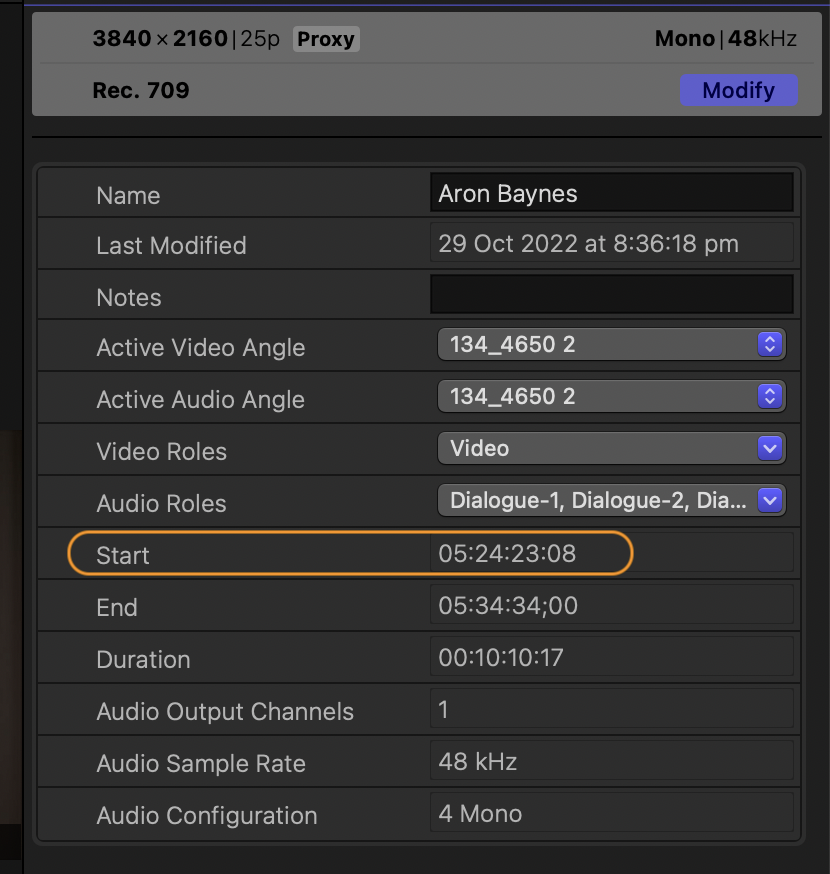
Some of the multicams I'm creating have start times that aren't 00:00:00:00 - where can I edit these please? Or if I can't... why not?
Thank you
Marco
Some of the multicams I'm creating have start times that aren't 00:00:00:00 - where can I edit these please? Or if I can't... why not?
Thank you
Marco
Please Log in to join the conversation.


29 Oct 2022 14:35 - 29 Oct 2022 14:37 #122639
by DaveM
Replied by DaveM on topic How to change Multicam Start time to 00:00:00:00 ?
By default, multicam start timecode comes from the lowest start timecode of the clips included in the multicam. In the dialog window used for creating multicams, you can set the start timecode to any valid custom value.
After the multicam has been created, it doesn't seem like it's something easy to change. One way might be to export an XML file of only the multicam and then edit the start timecode in the resulting file, after which you import the XML and replace the original multicam...
After the multicam has been created, it doesn't seem like it's something easy to change. One way might be to export an XML file of only the multicam and then edit the start timecode in the resulting file, after which you import the XML and replace the original multicam...
Last edit: 29 Oct 2022 14:37 by DaveM.
Please Log in to join the conversation.
