


- Posts: 379
- Thank you received: 6
3 Post Moderation Rule for New Boarders (25 Jan 2021)
New boarders will have their posts moderated - Don't worry if you cannot see your post immediately.
Damaged Library
- Marc Lucas
-
 Topic Author
- Offline
- Platinum Member
-

Less
More
06 Oct 2022 11:56 #122405
by Marc Lucas
Damaged Library was created by Marc Lucas
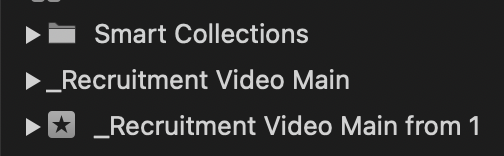
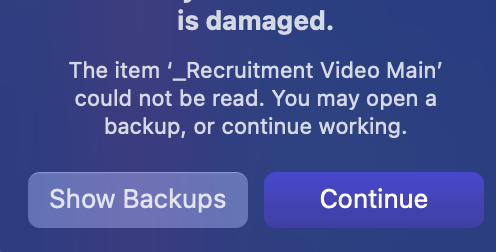
I had the power go out (or M1 mac just cut out leaving a full green screen on my monitor then rebooted) when I tried to open the Library I was working on it come up with a 'damaged' warning. (screen shots attached)
FCP then asked if I wanted to open from a backup which I did and made sure everything was OK and it was.
Although FCP stated there was a problem with the Library there was in fact a problem with the Event that I was working on.
I copied that Event to my original Library and it works OK however I can't delete the damaged Event from the Library whilst inside FCP. I then went into the package contents folder (I know I will get some 'you shouldn't of done that' but I deleted the problem Event inside there hoping it would then disappear inside the FCP Library...it didn't.
When I use the original Library I keep getting the same error message saying the Library is damaged and do I want to carry on using. I guess if the damaged Event were allowed to be deleted then the Library would be OK. Is there a way to force delete the problem/damaged Event?
FCP then asked if I wanted to open from a backup which I did and made sure everything was OK and it was.
Although FCP stated there was a problem with the Library there was in fact a problem with the Event that I was working on.
I copied that Event to my original Library and it works OK however I can't delete the damaged Event from the Library whilst inside FCP. I then went into the package contents folder (I know I will get some 'you shouldn't of done that' but I deleted the problem Event inside there hoping it would then disappear inside the FCP Library...it didn't.
When I use the original Library I keep getting the same error message saying the Library is damaged and do I want to carry on using. I guess if the damaged Event were allowed to be deleted then the Library would be OK. Is there a way to force delete the problem/damaged Event?
Please Log in to join the conversation.


06 Oct 2022 16:26 #122408
by Doug
Replied by Doug on topic Damaged Library
I would recommend not using the damaged Library at all. Create a new library and bring everything over from your backup Library. If it's just the one Event that is damaged and the other Events or elements you need are in the damaged Library, then bring those into the new Library and then delete and be done with the damaged one. You're just opening yourself up to a whole host of potential failure points using a damaged Library, even if it appears as though everything is working ok now.
Please Log in to join the conversation.

08 Oct 2022 03:32 #122418
by dgwvideo
Creating history....one edit at a time !
Replied by dgwvideo on topic Damaged Library
There is a good chance that Digital Rebellion's Pro Maintenance Tools, specifically the Project Repair tool, can fix the event that is damaged. It should be able to fix and update the FCP database that is still reporting the error. Definitely worth a shot.
Creating history....one edit at a time !
Please Log in to join the conversation.
