




- Posts: 8
- Thank you received: 1
3 Post Moderation Rule for New Boarders (25 Jan 2021)
New boarders will have their posts moderated - Don't worry if you cannot see your post immediately.
Trying to make animated split screens on a multicam
20 Sep 2022 00:00 #122213
by David814
Trying to make animated split screens on a multicam was created by David814
What's the best method to using splitscreen inside of a multicam? I think I see one way to do it with duplicating a multicam multiple times in the timeline, then applying a splitscreen template plug in to each multicam line. Is there a better way?
Also, is there a split screen plugin that starts with the original video and then after a certain time animates into split screen?
Like the first 15 seconds here? It's described how to manually do it here But it's pretty time consuming doing it manually all the time and lining up
sets of keyframes each time.
Also, is there a split screen plugin that starts with the original video and then after a certain time animates into split screen?
Like the first 15 seconds here? It's described how to manually do it here But it's pretty time consuming doing it manually all the time and lining up
sets of keyframes each time.
Please Log in to join the conversation.


20 Sep 2022 01:07 - 20 Sep 2022 01:15 #122214
by VTC
Replied by VTC on topic Trying to make animated split screens on a multicam
TwentySix bucks is relatively small change that'll alleviate a lot of heartburn, heartache, key framing, and time spinning your editing wheels. (There are others there if you don't like this one.)
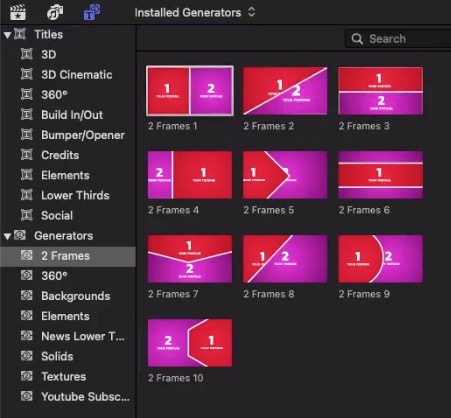
videohive.net/item/multi-screen-frames-p...on-and-fcpx/34150624
videohive.net/item/multi-screen-frames-p...on-and-fcpx/34150624
Last edit: 20 Sep 2022 01:15 by VTC.
Please Log in to join the conversation.
20 Sep 2022 15:18 #122218
by David814
Thank you. The frames look nice but does that use drop zones? I ran into some trouble with another plugin that used drop zones where it was almost impossible to sync up clips because they didn't carry audio. Or at least I didn't know how. I was thinking about getting a plugin like Split Pop where you can drag the template onto each clip lined up on top of each other.
Replied by David814 on topic Trying to make animated split screens on a multicam
TwentySix bucks is relatively small change that'll alleviate a lot of heartburn, heartache, key framing, and time spinning your editing wheels. (There are others there if you don't like this one.)
videohive.net/item/multi-screen-frames-p...on-and-fcpx/34150624
Thank you. The frames look nice but does that use drop zones? I ran into some trouble with another plugin that used drop zones where it was almost impossible to sync up clips because they didn't carry audio. Or at least I didn't know how. I was thinking about getting a plugin like Split Pop where you can drag the template onto each clip lined up on top of each other.
Please Log in to join the conversation.

21 Sep 2022 01:26 #122222
by dgwvideo
Creating history....one edit at a time !
Replied by dgwvideo on topic Trying to make animated split screens on a multicam
I can vouch for "Split Pop". This plugin by Stupid Raisins is excellent, and you can create some amazing split screen configurations. As you said, simply stack them up and choose in the video inspector the clips you want to appear in the specific zones. Audio won't be an issue. I believe there is a trial mode as well.
Creating history....one edit at a time !
Please Log in to join the conversation.
- Stupid Raisins
-

- Offline
- Premium Member
-

23 Sep 2022 01:20 #122240
by Stupid Raisins
Raisins are the worst and I love making fcpx plugins !
Replied by Stupid Raisins on topic Trying to make animated split screens on a multicam
Hi David. Dylan here from Stupid Raisins.
Drop zones suck! Luckily as dgwvideo suggested, Split Pop and Slice Pop have NO drop zone drama because they are effects instead of titles.
That means no out of sync audio or freezing clips!
Let me know if you need any help.
Drop zones suck! Luckily as dgwvideo suggested, Split Pop and Slice Pop have NO drop zone drama because they are effects instead of titles.
That means no out of sync audio or freezing clips!
Let me know if you need any help.
Raisins are the worst and I love making fcpx plugins !
Please Log in to join the conversation.
