


- Posts: 119
- Thank you received: 2
3 Post Moderation Rule for New Boarders (25 Jan 2021)
New boarders will have their posts moderated - Don't worry if you cannot see your post immediately.
Finding Transition from Timeline in Transitions
- Videopixels
-
 Topic Author
- Offline
- Premium Member
-

Less
More
17 Sep 2022 09:53 #122192
by Videopixels
Finding Transition from Timeline in Transitions was created by Videopixels
Hi there.
So it might be a basic thing but I have never found it. Basically like match frame but for transitions already applied in an older edit.
I have a ton of effects and transitions. Opening older projects is a pain to re-locate the transitions used in that edit (they are still installed and online) - is there an easier way with a shortcut key to find transition in installed transition bin at the end of the timeline, at the bottom right of the inspector?
Thanks.
So it might be a basic thing but I have never found it. Basically like match frame but for transitions already applied in an older edit.
I have a ton of effects and transitions. Opening older projects is a pain to re-locate the transitions used in that edit (they are still installed and online) - is there an easier way with a shortcut key to find transition in installed transition bin at the end of the timeline, at the bottom right of the inspector?
Thanks.
Please Log in to join the conversation.

18 Sep 2022 07:04 #122197
by sc_fox
Replied by sc_fox on topic Finding Transition from Timeline in Transitions
At the very bottom of the Effects/Transitions browser is a Search field. Make sure you select All Video & Audio or All for Effects; or All for transitions at the top of the browsers, then enter your search. Usually you only have to type in a few characters to find what you need. Also, you don't have to type from the beginning, just typing zoo is enough to find *all* your zoom transitions, etc...
Please Log in to join the conversation.


19 Sep 2022 15:04 #122210
by VTC
Replied by VTC on topic Finding Transition from Timeline in Transitions
MY read of his situation is not that he's trying to locate a specific transition via the search function of all transitions but just what SPECIFIC transition was used amongst the many so listed.
Expand INDEX. Highlight the transition in the timeline and the name of it will appear. Missing transitions / effects will be duly identified by the dreaded yellow triangle warning also using the INDEX.
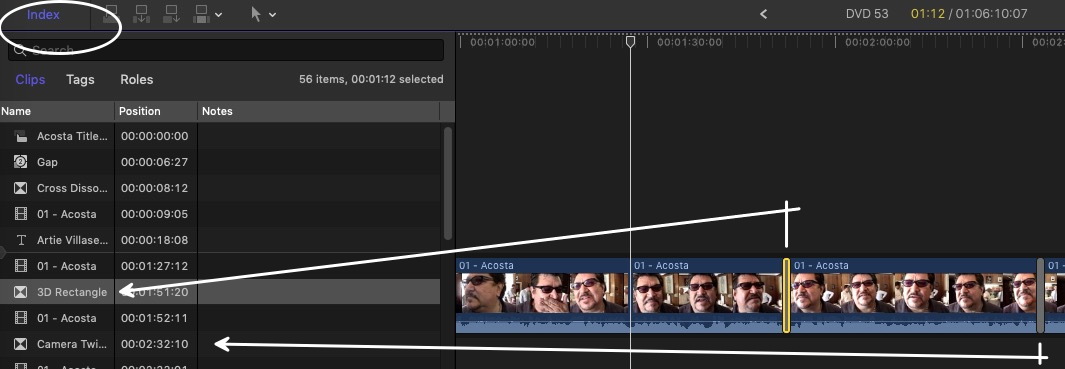
Expand INDEX. Highlight the transition in the timeline and the name of it will appear. Missing transitions / effects will be duly identified by the dreaded yellow triangle warning also using the INDEX.
Please Log in to join the conversation.
- Videopixels
-
Topic Author
- Offline
- Premium Member
-
Less
More
- Posts: 119
- Thank you received: 2
20 Sep 2022 17:45 #122219
by Videopixels
Replied by Videopixels on topic Finding Transition from Timeline in Transitions
Thanks guys. I actually just used Finder in the Motion Effects folder but will try these suggestions next time in FCPX.
Much appreciated
Much appreciated
Please Log in to join the conversation.
