




- Posts: 2
- Thank you received: 0
3 Post Moderation Rule for New Boarders (25 Jan 2021)
New boarders will have their posts moderated - Don't worry if you cannot see your post immediately.
Blu Ray disc not playing in Sony BD Player
05 Sep 2022 17:50 #122113
by johnb4jc1
Blu Ray disc not playing in Sony BD Player was created by johnb4jc1
After upgrading FCP beyond version 10.5.4, Blu-ray discs shared using FCP do not work on any of my Sony players. The disc icon appears with BD-R BDMV and nothing happens when I select it to play. I have used Verbatim BD-R and other brand BD-R discs with no success. My software and firmware are updated on my players.
The Blu-ray discs I make with FCP version 10.5.4 work perfectly, they open to the menu and then I select the video to play. I would love to be able to upgrade my os and fcpx and be able to burn Blu-ray Discs for my business. I should not have to keep using fop 10.5.4.
Mac Mini M1 2020 Big Sur 11.6.8
MacBook Pro M1 Pro 2021 Monterey 12.5
Best Duplicator LG Blu-ray Disc burner
The Blu-ray discs I make with FCP version 10.5.4 work perfectly, they open to the menu and then I select the video to play. I would love to be able to upgrade my os and fcpx and be able to burn Blu-ray Discs for my business. I should not have to keep using fop 10.5.4.
Mac Mini M1 2020 Big Sur 11.6.8
MacBook Pro M1 Pro 2021 Monterey 12.5
Best Duplicator LG Blu-ray Disc burner

Please Log in to join the conversation.


05 Sep 2022 22:23 #122115
by VTC
Replied by VTC on topic Blu Ray disc not playing in Sony BD Player
I don't ever get that (Screen 1) unless I hit the HOME button. Disc immediately presents Screen 2.
However, if you get the This Operation Currently Prohibited for This Disc message (Screen 3) it's because you wisely pressed the PLAY button which, due to SonyThink, doesn't do a thing on Sony players except present the error message. Pressing the CENTER button of the arrow directional compass thinggie gets thing rolling. (I field this concern often when customers call saying the disc doesn't play but only because they're using a Sony device.)
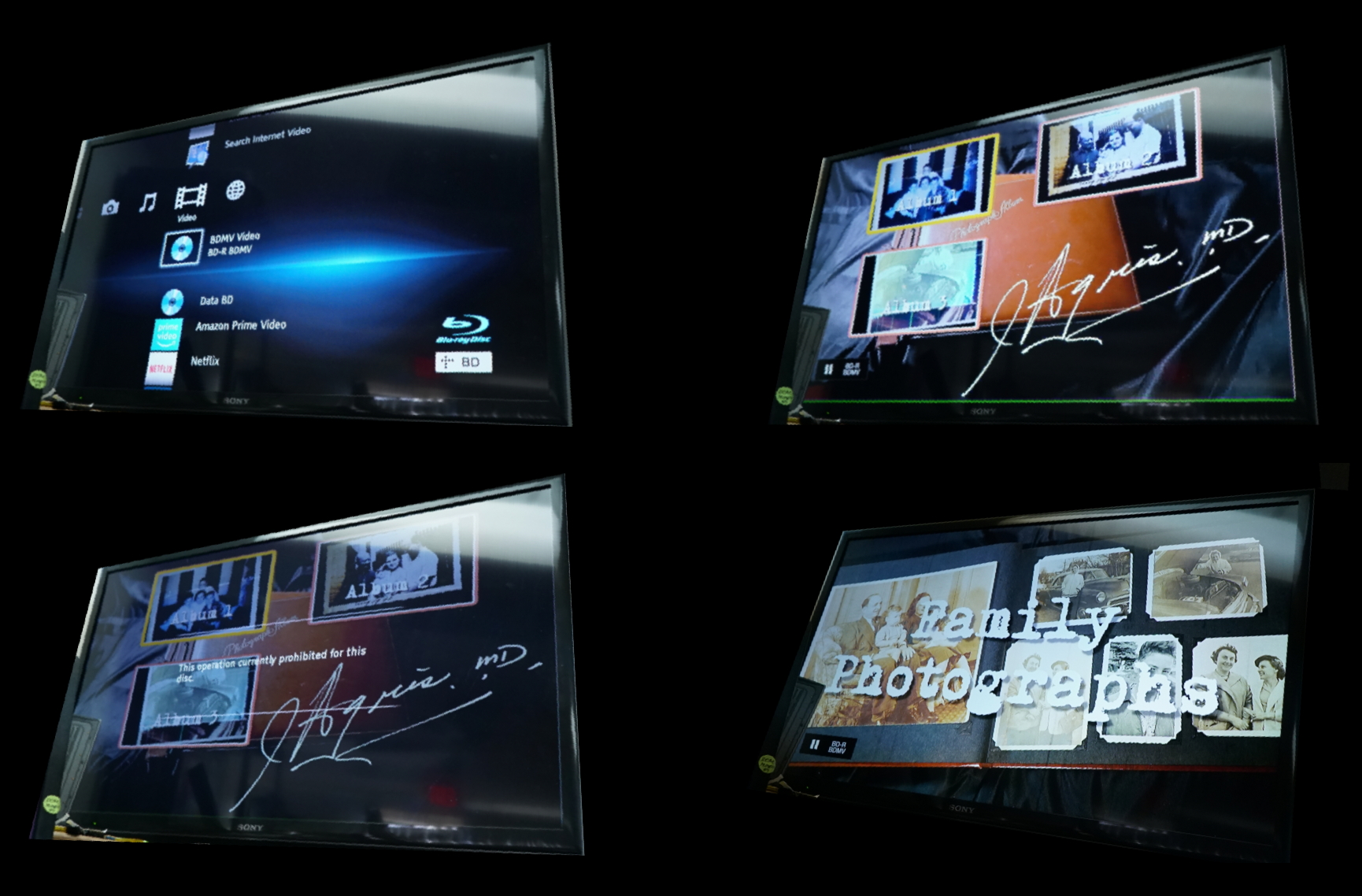
However, if you get the This Operation Currently Prohibited for This Disc message (Screen 3) it's because you wisely pressed the PLAY button which, due to SonyThink, doesn't do a thing on Sony players except present the error message. Pressing the CENTER button of the arrow directional compass thinggie gets thing rolling. (I field this concern often when customers call saying the disc doesn't play but only because they're using a Sony device.)
Please Log in to join the conversation.
05 Sep 2022 22:37 #122116
by johnb4jc1
Replied by johnb4jc1 on topic Blu Ray disc not playing in Sony BD Player
Thanks for the reply and detail! However, I get the same result that you do with my blu-rays from fcp 10.5.4...it goes to your screen 2 from the beginning and selecting the center button gets the video rolling. All the updated versions after fcp 10.5.4 give me the screen I uploaded in the photo. When I press the center button, the screen goes black for a second or two and then back to the same screen. It will not play...same video shared from fcp to blu-ray in two different versions, 10.5.4 works and anything after does not work. I do appreciate you taking the time to try and help.
Please Log in to join the conversation.
