


- Posts: 16
- Thank you received: 0
3 Post Moderation Rule for New Boarders (25 Jan 2021)
New boarders will have their posts moderated - Don't worry if you cannot see your post immediately.
Increase size of waveforms but not video clips ?
- MrJoeCastellon
-
 Topic Author
- Offline
- New Member
-

Less
More
29 Aug 2022 15:08 - 29 Aug 2022 17:55 #122015
by MrJoeCastellon
Increase size of waveforms but not video clips ? was created by MrJoeCastellon
I do most of my editing based on the waveforms. For over a year I've been struggling with how the waveforms look in FCP in that when I increase the size of the waveforms in the timeline, the video clip size increases along with it and takes up vertical space unnecessarily in the timeline.
I have tried detaching audio and setting the options in FCP to show larger waveforms than video clips, but for some reason, the video clip is still larger than the waveform.
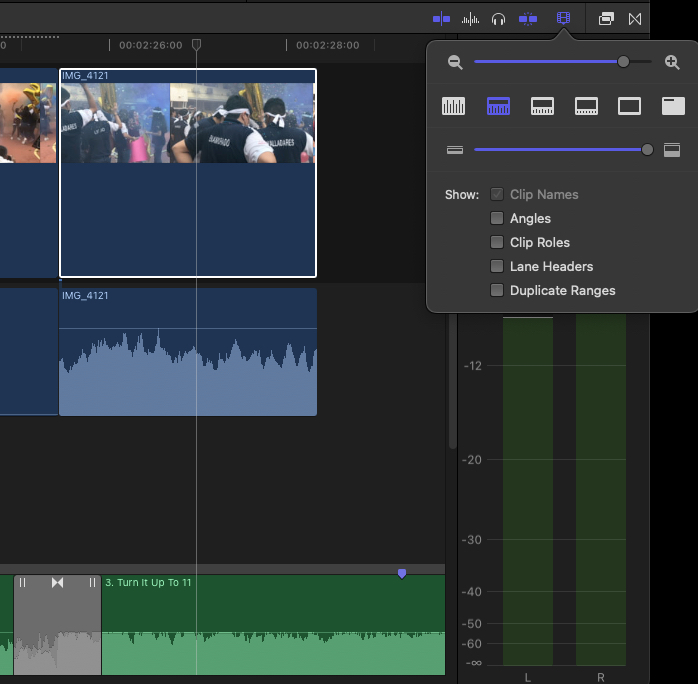
I don't want to set it to only display the waveform because the visual cue of the video clip is useful to me. Ironically, when I did try this option, it just shows a huge blank video clip 🤦🏻♂️
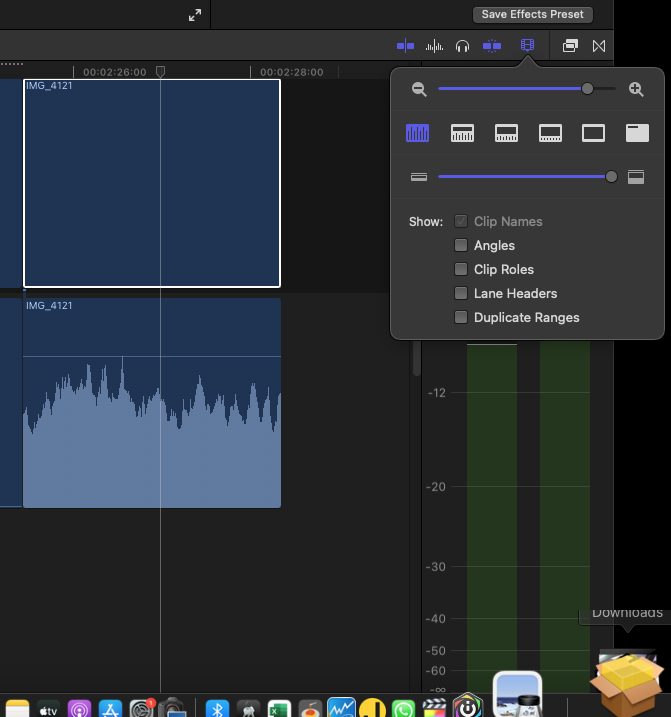
I'm hoping somebody here knows how to minimize the size of the video portion while still having it somewhat visible, and having the waveform actually look bigger than the video portion.
Thanks in advance!
I have tried detaching audio and setting the options in FCP to show larger waveforms than video clips, but for some reason, the video clip is still larger than the waveform.
I don't want to set it to only display the waveform because the visual cue of the video clip is useful to me. Ironically, when I did try this option, it just shows a huge blank video clip 🤦🏻♂️
I'm hoping somebody here knows how to minimize the size of the video portion while still having it somewhat visible, and having the waveform actually look bigger than the video portion.
Thanks in advance!
Last edit: 29 Aug 2022 17:55 by MrJoeCastellon. Reason: uploaded images
Please Log in to join the conversation.
- MrJoeCastellon
-
Topic Author
- Offline
- New Member
-
Less
More
- Posts: 16
- Thank you received: 0
29 Aug 2022 17:56 #122019
by MrJoeCastellon
Replied by MrJoeCastellon on topic Increase size of waveforms but not video clips ?
Thanks. I tried all that but it still doesn't look right. I fixed my OP as I realized the images I had inserted were not showing.
Please Log in to join the conversation.

29 Aug 2022 18:51 - 29 Aug 2022 18:54 #122020
by DaveM
Replied by DaveM on topic Increase size of waveforms but not video clips ?
I'd suggest expanding audio instead of detaching it, unless you have a specific reason for detaching audio. Neither will give you a bigger audio waveform for any given timeline clip appearance setting (as far as I can tell).
What your images in the original post show is expected/normal behavior, though not ideal in many cases (why have wasted vertical space for clips with disabled or no audio?). Definitely quirky UI behavior (seem more like a bug to me)...
For clarity's sake, I get the same behavior on my system...
What your images in the original post show is expected/normal behavior, though not ideal in many cases (why have wasted vertical space for clips with disabled or no audio?). Definitely quirky UI behavior (seem more like a bug to me)...
For clarity's sake, I get the same behavior on my system...
Last edit: 29 Aug 2022 18:54 by DaveM.
Please Log in to join the conversation.
- MrJoeCastellon
-
Topic Author
- Offline
- New Member
-
Less
More
- Posts: 16
- Thank you received: 0
30 Aug 2022 01:54 #122028
by MrJoeCastellon
Replied by MrJoeCastellon on topic Increase size of waveforms but not video clips ?
Sigh. It seems this has been overlooked by Apple's FCP team. I had detached the audio just to see if that would help. Clearly, it made it worse 😂 I even tried deleting the detached audio because I'm doing a music video and I don't need the audio from the video tracks. Still not what I need, visually 😩
Please Log in to join the conversation.


30 Aug 2022 02:38 - 30 Aug 2022 02:38 #122029
by TerryB
Replied by TerryB on topic Increase size of waveforms but not video clips ?
Would using Roles and focusing on an audio Role help?
support.apple.com/guide/final-cut-pro/fo...ole-ver802c55d8a/mac
support.apple.com/guide/final-cut-pro/fo...ole-ver802c55d8a/mac
Last edit: 30 Aug 2022 02:38 by TerryB.
Please Log in to join the conversation.
- MrJoeCastellon
-
Topic Author
- Offline
- New Member
-
Less
More
- Posts: 16
- Thank you received: 0
30 Aug 2022 02:45 #122030
by MrJoeCastellon
That was close! It does look helpful, however it only affects the audio clips and I only have the music track, which is a single lane. If only it made the video clips small, it would be a jackpot.
Replied by MrJoeCastellon on topic Increase size of waveforms but not video clips ?
Would using Roles and focusing on an audio Role help?
support.apple.com/guide/final-cut-pro/fo...ole-ver802c55d8a/mac
That was close! It does look helpful, however it only affects the audio clips and I only have the music track, which is a single lane. If only it made the video clips small, it would be a jackpot.
Please Log in to join the conversation.
- Carsten Orlt
-

- Offline
- Platinum Member
-

Less
More
- Posts: 422
- Thank you received: 82
30 Aug 2022 03:50 #122031
by Carsten Orlt
Replied by Carsten Orlt on topic Increase size of waveforms but not video clips ?
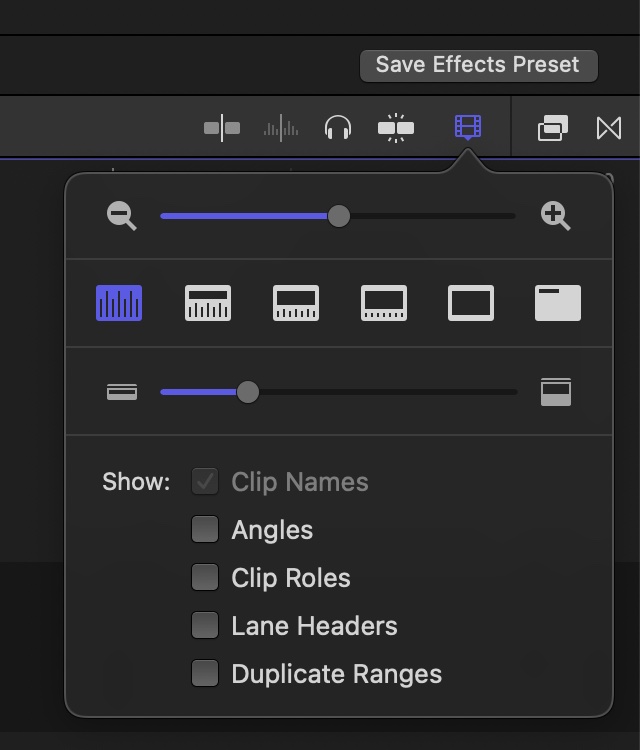
What I do is to switch the timeline to 'waveform only'. most left symbol in the timeline display menu, see screenshot. All clips regardless whether they have video or not are only displaying their waveform.
Please Log in to join the conversation.

30 Aug 2022 11:42 #122036
by joema
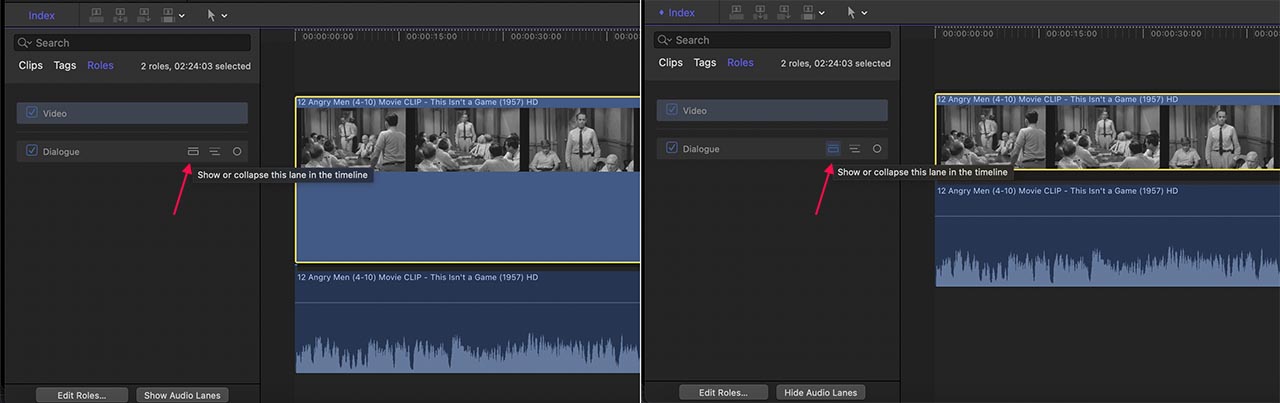
Can you try the left-hand button in the dialog roles pane, the one labeled "Show or collapse this lane in the timeline"? See attached.
Replied by joema on topic Increase size of waveforms but not video clips ?
Would using Roles and focusing on an audio Role help?
support.apple.com/guide/final-cut-pro/fo...ole-ver802c55d8a/mac
That was close! It does look helpful, however it only affects the audio clips and I only have the music track, which is a single lane. If only it made the video clips small, it would be a jackpot.
Can you try the left-hand button in the dialog roles pane, the one labeled "Show or collapse this lane in the timeline"? See attached.
Please Log in to join the conversation.
